



Commandify v1.0.4: Frontend Support, WordPress 6.9 Compatibility & Advanced WooCommerce Actions
- Frontend Command Palette Support (Optional)
- WordPress 6.9 Compatibility (Cmd/Ctrl + K Conflict Prevention)
- Advanced WooCommerce Customer Actions (Pro)
- Unified Post Actions Across Search & Patterns
- Better Elementor & Bricks Frontend Behavior
- UI & Interaction Improvements
- Fixes & Stability Improvements
- Summary
Commandify v1.0.4 is a major quality-of-life release focused on frontend workflows, WordPress 6.9 compatibility, and deeper WooCommerce customer management.
This update removes friction in everyday admin tasks, improves consistency across integrations, and ensures Commandify continues to work smoothly alongside new WordPress core features.
Below is a detailed breakdown of everything new, improved, and fixed in this release and how to use it effectively.
Frontend Command Palette Support (Optional) #
Commandify now supports running the command palette directly on the frontend while you are logged in.
This means you can trigger Cmd/Ctrl + K while viewing a post or page and instantly access relevant actions such as editing content, opening builders, or navigating to related admin screens, without returning to
/wp-admin.
How to enable frontend support
Frontend commands are disabled by default for security and performance reasons.
To enable them:
- Go to WordPress Admin → Commandify → Settings
- Enable Frontend Command Palette
- Save your changes
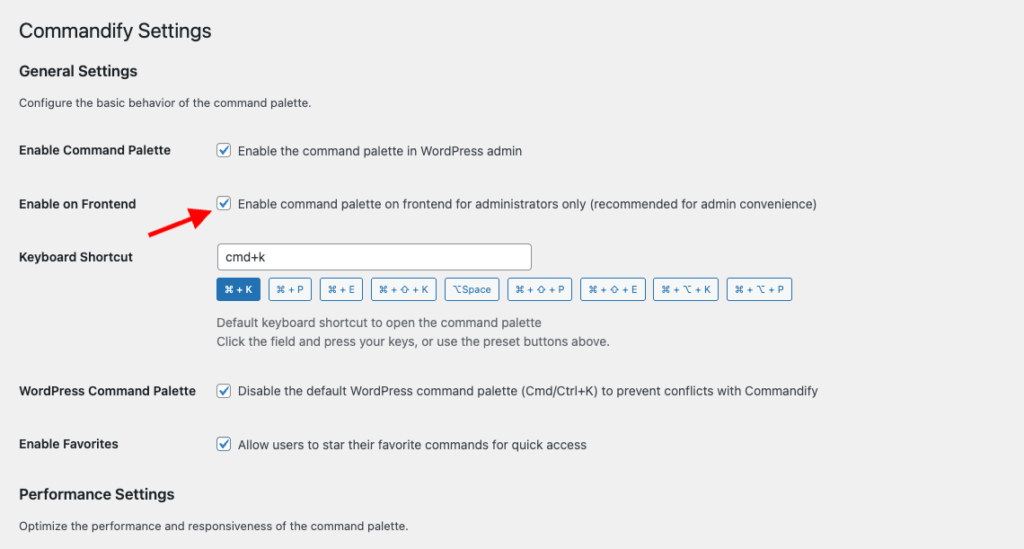
Once enabled, the command palette will be available on frontend pages where you are logged in and have permission to perform actions.
Why this matters
- Faster edit workflows when reviewing live content
- No context switching between frontend and admin
- Ideal for editors, designers, and store managers reviewing changes in real time
WordPress 6.9 Compatibility (Cmd/Ctrl + K Conflict Prevention) #
WordPress 6.9 introduces its own default command palette, which also uses the Cmd/Ctrl + K shortcut.
To prevent shortcut conflicts, Commandify v1.0.4 adds a dedicated compatibility setting.
Disable the default WordPress command palette
If you are running WordPress 6.9 or later:
- Go to Commandify → Settings
- Enable Disable Default WordPress Command Palette
- Save settings
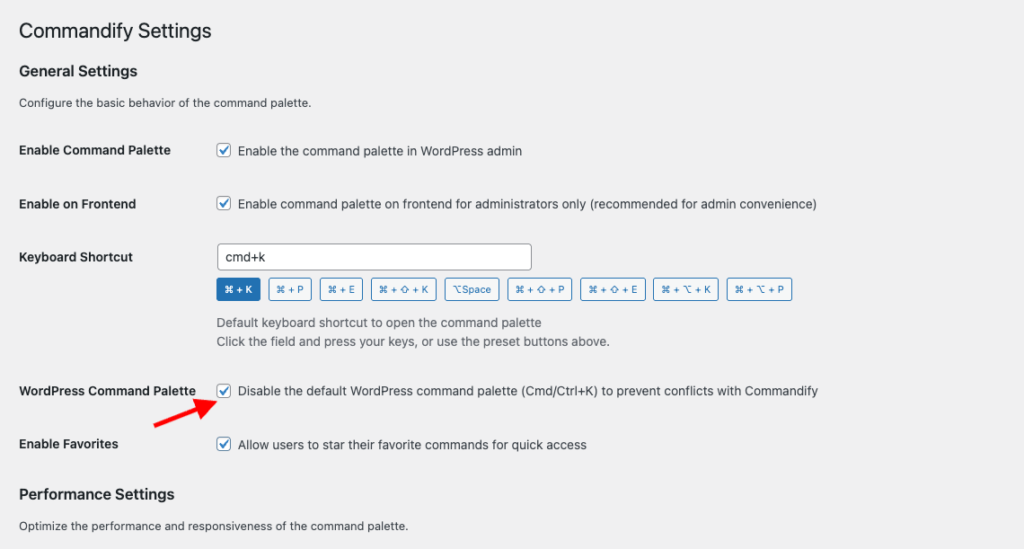
This ensures Commandify remains your primary command system, without interference from WordPress core.
Why this matters
- No shortcut conflicts
- Predictable keyboard behavior
- Cleaner, distraction-free productivity workflow
Advanced WooCommerce Customer Actions (Pro) #
Commandify v1.0.4 significantly expands WooCommerce customer-level actions, making it easier to manage customer data without opening multiple admin screens.
View customer addresses instantly
You can now view a customer’s:
- Billing address
- Shipping address
Addresses open in a clean, read-only modal with proper formatting, making it easy to review customer details during support or order checks.
Update billing and shipping addresses
Commandify now allows you to edit customer addresses directly from the command palette.
Key improvements include:
- Dedicated update forms for billing and shipping addresses
- Searchable country and state dropdowns
- Dynamic state updates based on selected country
- Field order matches WooCommerce’s native layout
This removes the need to open customer profiles or orders just to update address details.
Improved WooCommerce Address Forms
WooCommerce address forms now use dynamic country/state selection with searchable dropdowns.
This improves accuracy, speeds up data entry, and prevents invalid address combinations — especially useful for international stores.
Unified Post Actions Across Search & Patterns #
Post actions are now more consistent across Commandify.
The “Change Status” action now appears:
- In standard search results
- In dynamic pattern lookups (e.g. when using IDs or context-aware commands)
- For all supported post types
This ensures the same actions are always available, regardless of how you access a post.
Better Elementor & Bricks Frontend Behavior #
Elementor improvements

- “Edit with Elementor” now appears on the frontend for all Elementor-supported post types, not just pages built entirely with Elementor
- Keyboard shortcuts now work reliably inside the Elementor editor iframe
- Commandify automatically detects and captures keyboard events inside iframes
Learn more about Elementor support.
Bricks improvements
- Bricks integration now uses centralized post action handling
- More consistent behavior across post types enabled in Bricks settings
Learn more about Bricks Builder support.
These changes make frontend editing with page builders smoother and more predictable.
UI & Interaction Improvements #
Several usability improvements were introduced to polish the overall experience:
- Improved icon alignment in command lists, back buttons, and search icons
- Support for large and extra-large modals (used in address forms)
- Keyboard scrolling inside modals using Arrow Up / Arrow Down
- More consistent visual spacing across backend and frontend palettes
The command palette now feels more refined and easier to use during long sessions.
Fixes & Stability Improvements #
This release also includes important fixes:
- Fixed duplicate post creation when using the duplicate action
- Fixed Contact Form 7 delete action and added confirmation modal
- Fixed escaped quotation marks in copied CF7 shortcodes
- Fixed CF7 search not showing all forms and statuses
- Fixed undefined variable errors in frontend contextual commands
- Fixed Elementor frontend “Edit” action not appearing on post views
Summary #
Commandify v1.0.4 focuses on three major areas:
- Frontend productivity with optional frontend command palette support
- Future-proof compatibility with WordPress 6.9
- Deeper WooCommerce workflows with real customer management actions
As always, frontend features are optional, security-conscious, and fully configurable from the settings panel.
If you rely on keyboard-first workflows, WooCommerce management, or frontend editing, this update brings meaningful improvements to your daily work.


