


Commandify v1.0.6 Brings Dark Mode, A Refined Command Palette, And Smarter Developer Controls

We just released Commandify v1.0.6 with a 100% new UI interface, dark mode, and lots of other new features and improvements.
WordPress gives you freedom but not always speed.
Anyone who spends serious time inside the WordPress admin knows this well: you click menus, hunt through settings, switch tabs, and constantly break your flow just to do simple tasks. This friction multiplies quickly on large sites, WooCommerce stores, and complex client projects.
That’s exactly why we built Commandify to make WordPress feel faster by turning commands into actions and actions into outcomes without unnecessary clicks.
Today, with Commandify v1.0.6, we’ve taken another significant step not by piling on features, but by refining how the command palette works at its core; making it more intuitive, better looking, less distracting, and more powerful over time.
Let’s walk through what’s new and why it matters.
A Command Palette You’ll Want To Use Every Day
When we look at how people actually use Commandify on real sites, one pattern stands out:
It’s not about cool features, it’s about reducing friction.
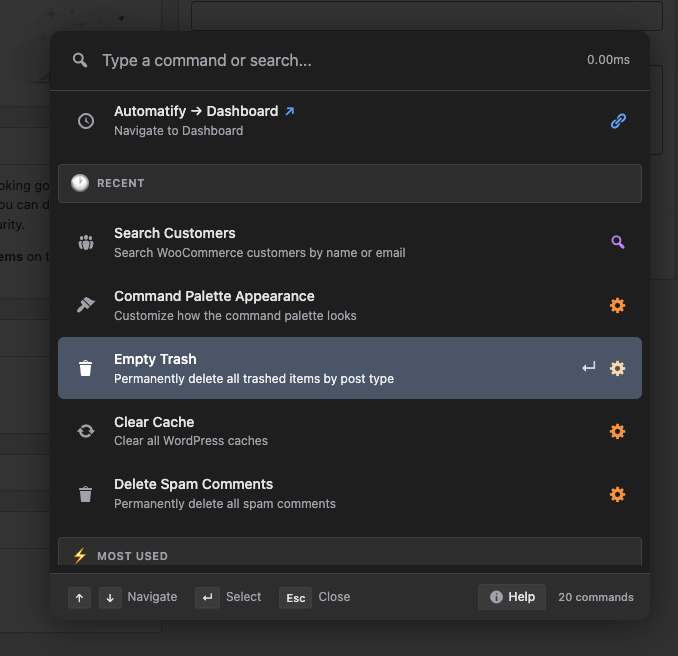
Opening a palette should feel like a breath of fresh air, not another UI challenge. That’s why the most visible change in v1.0.6 is the new palette design.
We didn’t redesign it just to look modern- we redesigned it to feel right. Clearer focus states, better visual indicators, calmer spacing, and improved keyboard navigation all mean you can find what you’re looking for nearly instantly when you open the palette.
Whether you’re toggling settings, jumping to a template, or running maintenance tasks, the interface now feels more predictable and comfortable — especially on complex screens with lots of commands.
In other words: it’s easier to use because it fades into the workflow instead of interrupting it.
Dark Mode That Works With Your Setup (Not Against It)
Dark mode isn’t just a trend. For many developers, night-time editors, and long admin sessions, a palette that respects your visual comfort makes a real difference in productivity.
In Commandify v1.0.6 (Pro), native dark mode support arrives with three flexible options:
- Always Dark
- Always Light
- Follow System preference
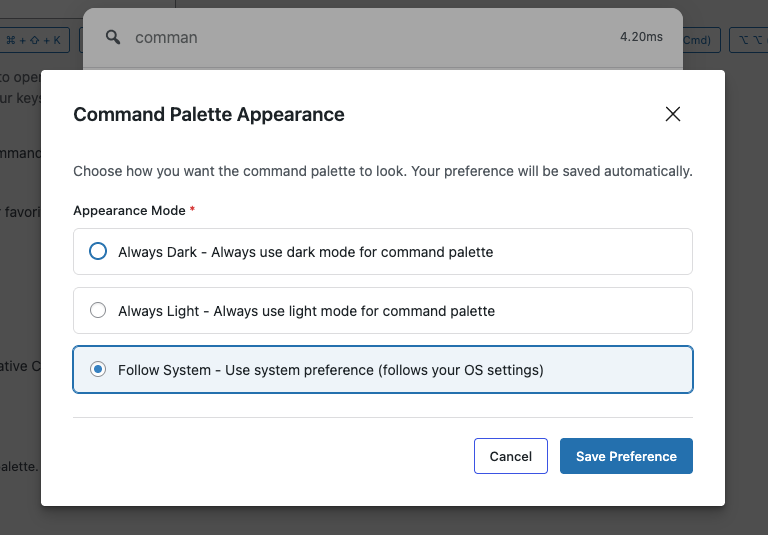
And unlike many plugins that bolt on a theme toggle and call it a day, Commandify’s dark mode was redesigned with performance and stability in mind. It applies theme changes directly in the DOM for instant updates, and avoids clashing with other tools.
Speaking of that- if you already use WP Dark Mode plugin, Commandify detects it automatically and disables its own native dark mode to prevent theme conflicts. That’s not just thoughtful design- it’s practical engineering to reduce headaches on real sites.
This means your palette matches the rest of your admin environment without unexpected theme mismatches or UI flickers.
Customize The Palette Without Breaking Your Flow (Pro)
Most productivity tools make you adjust settings in a separate screen, disrupt your workflow, and then hope you like the change.
We took a different approach.
Commandify now includes a Command Palette Appearance command- a shortcode you can run from inside the palette itself (or from settings) that opens a modal where you tweak theme preferences live. Change the look, see the result immediately, and keep the palette open so you don’t lose focus.
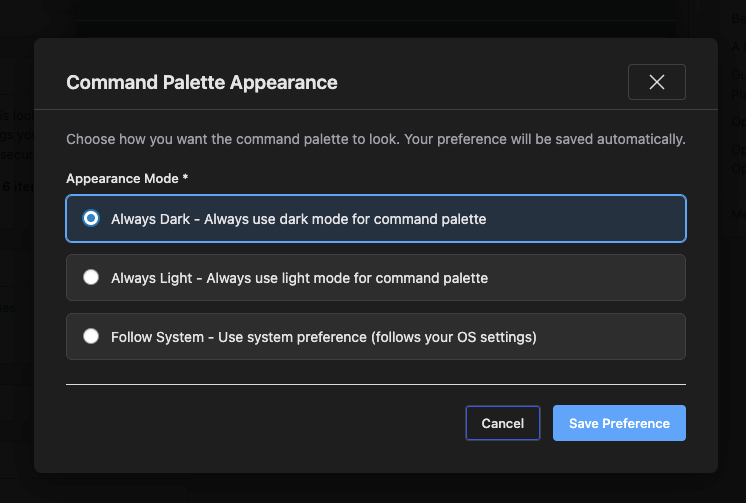
That’s a small detail with big impact, because preferences should adapt to your personal flow, not force you out of it.
It’s also an example of an important shift in how we design Commandify: preferences shouldn’t be a distraction- they should live inside the workflow.
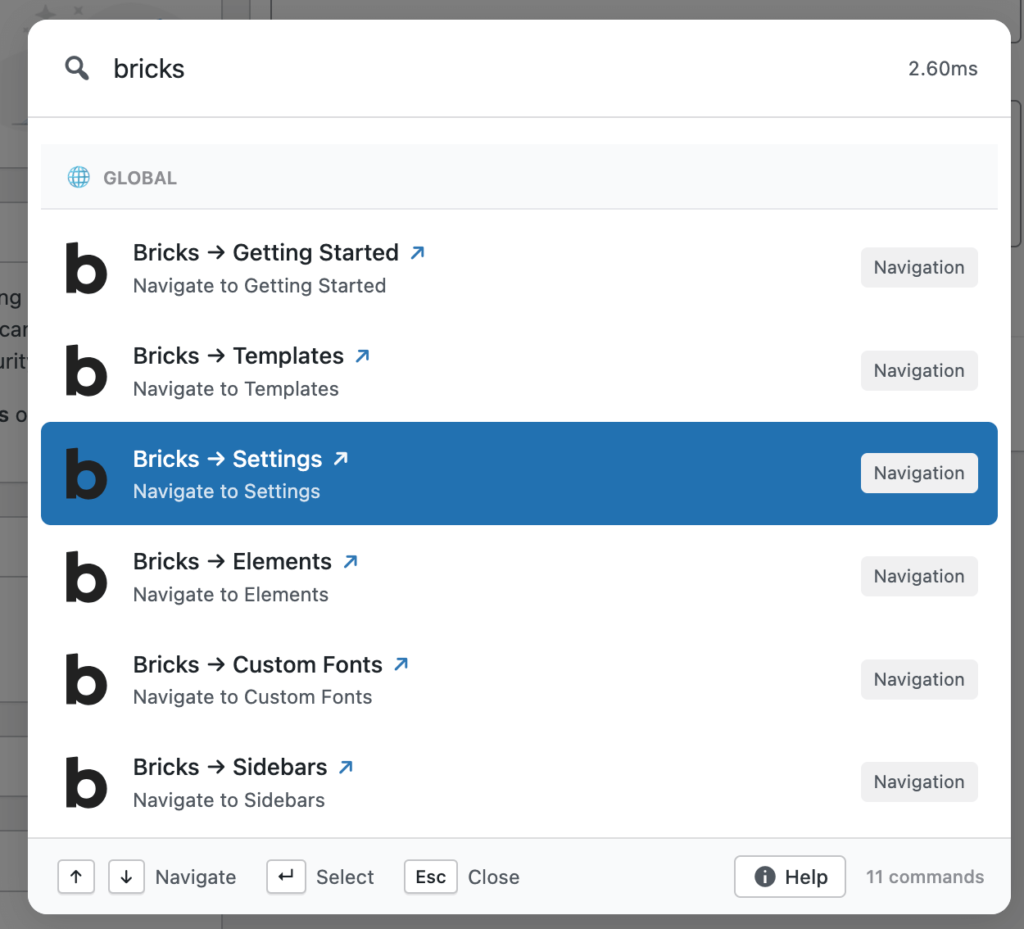
Bricks Builder Gets A Better Code Signature Workflow (Pro)
If you use Bricks Builder and build templates or dynamic layouts, you know that handling executable code safely is critical.
In v1.0.6 Pro, we added the “Bricks: Regenerate Code Signatures” command.
This isn’t a superficial addition — it’s a workflow improvement. Instead of navigating deep into template settings or running manual scripts on your server, you can regenerate code signatures right from the palette. A confirmation modal keeps it safe, and built-in validation prevents accidental overrides.
The benefit here is clear:
- less navigation
- fewer context switches
- more control right where you’re already working
Built For Extensibility: A Global Command Event
One of the most exciting changes in this release is actually under the hood: v1.0.6 introduces a global event system around command execution.
Whenever a command runs, Commandify now fires:
commandify-command-executed
This might sound technical, but it unlocks something huge: the ability for Pro extensions and third-party workflows to react after a command runs.
This means:
- plugins or scripts can integrate with Commandify more deeply
- automation tools can react in real time
- custom workflows can be built without modifying core code
This change lays the foundation for integrations that go far beyond what any command palette has done before.
Commandify v1.0.6: Stability, Performance, And The Details That Save Time
Fixes That Matter When Sites Get Big
A lot of work in Commandify v1.0.6 went into things that don’t look exciting on a feature list, but make a real difference on production sites.
One example is WooCommerce customer lookup. On small stores, everything works fine no matter how you query data. On large stores with thousands of customers, weak queries quickly turn into delays, incomplete results, or outright failures.
In this release, customer search has been tightened up so results load faster and stay accurate even as databases grow. That means fewer retries, fewer manual searches, and less time jumping back to WooCommerce screens just to confirm data.
The same thinking applies to WordPress update checks. If you manage multiple plugins and themes, missing or delayed update detection is more than annoying. It’s a maintenance risk. Commandify v1.0.6 fixes update detection so core, plugin, and theme updates surface correctly inside the palette again, without inconsistencies.
These are the kinds of fixes you only notice when they’re missing, which is exactly the point.
Dark Mode Reliability, Not Just Dark Mode Features
Earlier in the release we talked about dark mode as a feature. But v1.0.6 also fixes several edge cases that affect trust.
Previously, some users experienced small delays when opening the palette, where the theme would briefly load in the wrong mode before correcting itself. Others saw CSS not update immediately after switching appearance.
Those issues are now resolved.
You also getting a perfect compability with WP Dark Mode plugin if you’re already using it. No issue, just choose which one or how you wanna enjoy the dark mode, its your call!
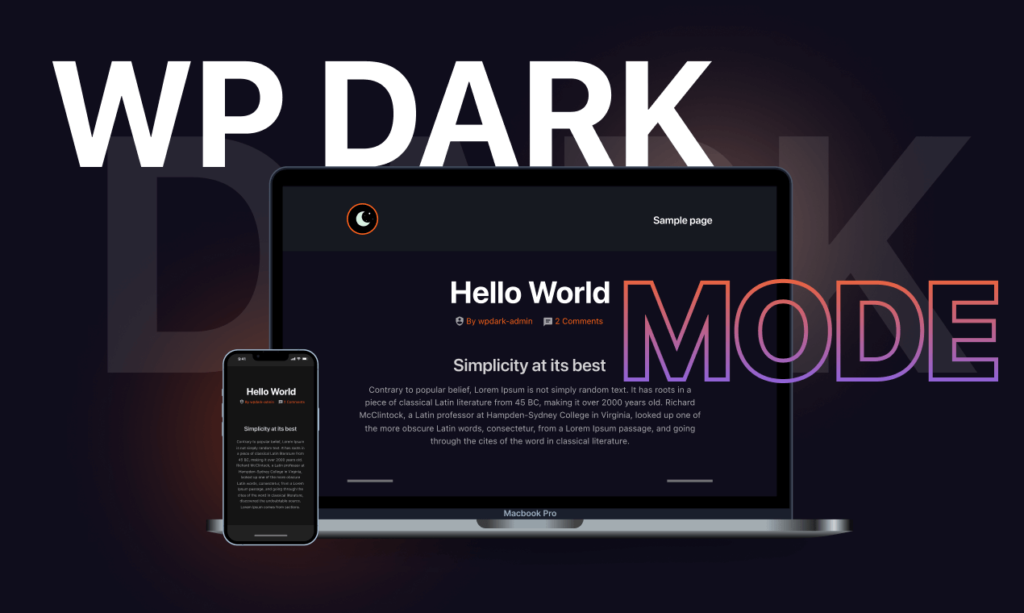
Theme detection reads directly from stored preferences as soon as the palette opens. Overlay attributes update instantly. Reload events fire consistently. The palette opens in the correct theme every single time.
It’s a quiet improvement, but it reinforces something important: Commandify should feel dependable. When you press Cmd/Ctrl + K, you shouldn’t wonder what state the UI will be in.
Why Commandify v1.0.6 Is About Long-Term Productivity
It’s easy to judge releases by how many features they add. But that’s not how productivity tools earn trust over time.
Commandify v1.0.6 is a release about refinement.
- The palette is calmer and easier to scan
- Appearance controls respect existing setups
- Preferences persist correctly without extra steps
- Commands execute within a more extensible architecture
Each of these changes removes a small piece of friction. Combined, they add up to a noticeably smoother daily workflow.
If you use the command palette occasionally, you’ll appreciate the polish.
If you use it constantly, you’ll feel the difference immediately.
Commandify vs CommandUI vs Turbo Admin (A Quick Comparison)
| Capability / Area | Commandify | CommandUI | Turbo Admin |
|---|---|---|---|
| Core Philosophy | Action-first command system (not just search) | Navigation-first | Menu & UI shortcuts |
| True Command Palette (Cmd/Ctrl+K) | ✅ Yes (backend + frontend) | ✅ Yes (admin only) | ❌ No |
| Frontend Command Support | ✅ Yes (logged-in users) | ❌ No | ❌ No |
| WordPress 6.9 Conflict Safe | ✅ Built-in WP palette disable option | ❌ No | ❌ No |
| Action Types Supported | 7+ command types (navigation, action, toggle, pattern, search, submenu, dynamic) | Basic navigation/actions | Click-based shortcuts |
| Context-Aware Commands | ✅ Yes (screen-aware actions) | ⚠️ Limited | ❌ No |
| Dynamic Pattern Recognition | ✅ Yes (#postID, @user, emails, entries, orders) | ❌ No | ❌ No |
| WooCommerce Depth | Full order, product, customer workflows | ❌ No | ⚠️ Limited |
| Form Integrations | CF7 + Flamingo, Fluent Forms (deep actions) | ❌ No | ❌ No |
| Page Builder Integrations | Elementor + Bricks (template management, frontend edit) | ⚠️ Edit-only | ⚠️ Edit-only |
| User Role Switching | ✅ Full workflow (switch, switch back, status) | ❌ No | ❌ No |
| Maintenance Commands | ✅ Clear transients, thumbnails, spam (one-click) | ❌ No | ⚠️ Partial |
| Fuzzy Search Intelligence | ✅ Advanced, context-aware ranking | ⚠️ Basic | ❌ No |
| Help & Command Guide Inside Palette | ✅ Yes (built-in help panel) | ❌ No | ❌ No |
| Built for Agencies & Power Users | Yes – workflows, not shortcuts | Partially | No |
Why this comaprison matters
Most command tools in WordPress stop at navigation.
Commandify goes further by executing real actions, adapting to context, recognizing patterns, and deeply integrating with the tools teams actually use—WooCommerce, forms, page builders, and user management.
That’s why Commandify isn’t just a faster menu. It’s a true command system for WordPress workflows.
Commandify Roadmap: Expanding the Command Palette Ecosystem
Commandify has grown rapidly over the last three months, adding 10+ powerful integrations and significantly expanding its action engine. But we’re just getting started.
Our roadmap is simple and consistent:
Add deeper integrations, increase action density, and turn WordPress into a true command-driven workspace.
Here’s what’s coming next:
More Form & CRM Integrations
We’re expanding beyond Contact Form 7 and Fluent Forms. Upcoming integrations include:
- Gravity Forms
- WPForms
- FluentCRM (Additional Fluent ecosystem products including community and cart)
The goal isn’t just form search- it’s full submission control, entry management, and CRM workflow access directly from the command palette.
LMS & Learning Platforms
Managing courses, lessons, and students should never require endless menu navigation.
Upcoming integrations include:
- LearnDash
- TutorLMS
- BuddyBoss (LMS & community workflows)
We’re building command-based access to course structures, student progress, and administrative actions — ideal for educators and membership site owners.
Membership & Community Access Control
For sites running paid communities or gated content, workflow speed matters.
Planned integrations include:
- MemberPress
- Paid Memberships Pro
- Fluent Community
- BuddyBoss membership workflows
This will allow faster user access control, subscription management, and member administration directly from the command layer.
More Page Builder Support
Elementor and Bricks are already deeply integrated. Next, we’re expanding support for:
- Beaver Builder
- WPBakery
- Additional template systems
- Extended builder-specific actions
The vision is clear: no matter which builder you use, Commandify becomes the fastest way to control it.
A Command Layer That Keeps Growing
In just three months, Commandify has become one of the most feature-rich and integration-heavy command palette tools in the WordPress ecosystem.
It already supports:
- WooCommerce (orders, products, customers)
- Elementor
- Bricks Builder
- Contact Form 7
- Flamingo
- Fluent Forms
- User Switching
- WP Dark Mode
- Maintenance tools
- Frontend command execution
- Dark mode & WordPress 6.9 compatibility
And we’re adding new integrations every single month.
Commandify isn’t evolving slowly, it’s expanding aggressively.
The goal is not to be “another command palette.”
The goal is to become the operational control layer for serious WordPress sites.
Why Commandify Is Becoming A Core Tool For WordPress Users
At a surface level, Commandify looks like a shortcut tool. In practice, it’s something else entirely.
Commandify replaces scattered admin navigation with a single, action-driven interface.
Instead of remembering where things live, you focus on what you want to do. Edit a post. Toggle a setting. Manage a WooCommerce order. Regenerate builder assets. It’s all one search away.
What separates Commandify from other command palettes is depth. It doesn’t stop at navigation. It executes real actions, understands context, and integrates with the tools WordPress users actually rely on.
That’s why updates like v1.0.6 matter. They don’t chase trends. They reinforce the idea that productivity comes from clarity, consistency, and trust in the tool you use every day.
Commandify v1.0.6 moves the plugin closer to that ideal. Fewer distractions. Stronger foundations. Better control.
And most importantly, less time wasted inside wp-admin.
If your WordPress workflow already feels busy, this release makes it feel lighter- which is exactly what a command palette should do.