



CommandUI vs Commandify: Get A More Powerful Alternative to CommandUI to Make Your WordPress Life Easier

If you spend a serious part of your day inside the WordPress admin, you already know the problem.
Too many menus.
Too many screens.
Too many clicks just to get one thing done.
The more plugins you install, the worse it gets.
Developers jump between custom post types, templates, and settings. Agencies switch between multiple client sites all day. WooCommerce store owners dig through orders, products, customers, and reports. Content teams bounce between drafts, pages, media, and plugins.
WordPress is powerful, but it’s not built for speed.
That’s exactly why command palette tools have become one of the most important productivity upgrades for modern WordPress users.
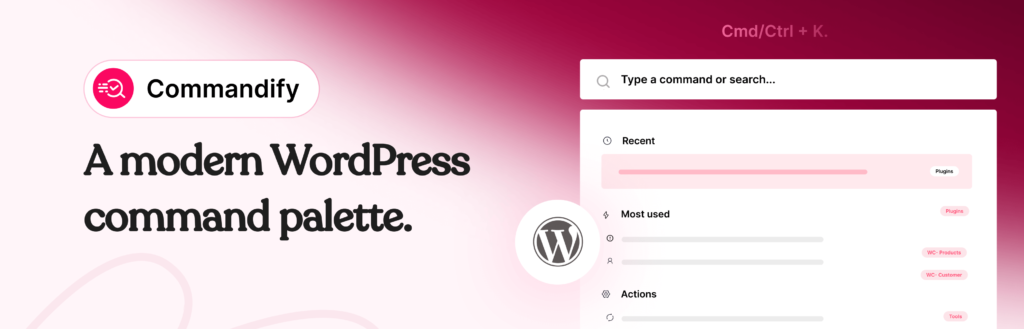
Inspired by macOS Spotlight and VS Code, these tools let you press Cmd/Ctrl + K, type what you want, and jump straight to it. No scrolling. No hunting through menus. No context switching.
This is the space where CommandUI established itself early. And it’s also where Commandify, a newer plugin by wpRigel, is quickly redefining what a command palette can actually do.
This article walks you through a clear, practical comparison:
- Where CommandUI excels
- Where Commandify goes much deeper
- How their philosophies differ
- And why Commandify has become a more powerful alternative, not just a replacement
The goal isn’t to crown a winner.
It’s to help you choose the tool that genuinely fits how you work inside WordPress.
Why WordPress Command Palette Tools Matter Today
WordPress wasn’t designed with large-scale workflows in mind.
As soon as you move beyond a simple blog, the admin becomes menu-heavy and slow:
- WooCommerce adds layers of order and product screens
- Page builders introduce separate template systems
- Form plugins hide entries behind nested dashboards
- Maintenance tasks live in scattered tools and settings
Even experienced users lose time just getting to the right place.
Command palette tools solve this by acting as a single entry point to the entire admin.
Instead of remembering where something lives, you just type what you’re looking for.
Instead of clicking through five screens, you jump directly to the task.
Once you use a good command palette for a few days, going back to menu navigation feels outdated.
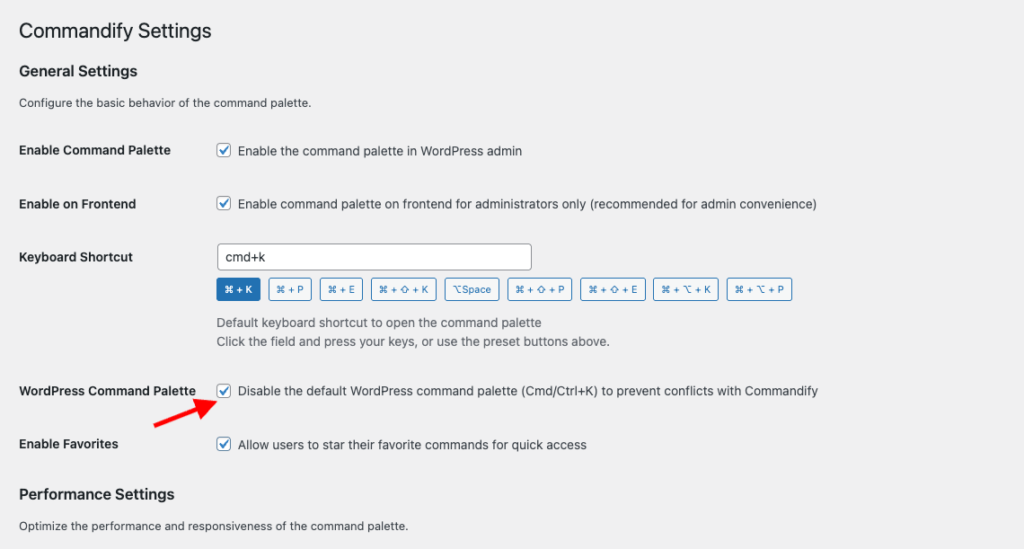
Editor’s note: WordPress itself now includes a built-in command palette, which shows how essential keyboard-first workflows have become. However, the native palette is intentionally basic, limited to simple navigation and a few editor actions. This is where Commandify steps in. You can disable the default WordPress command palette and replace it with Commandify to unlock action-driven commands, context-aware workflows, and deep integrations that go far beyond what core WordPress is designed to handle today.
CommandUI: What It Brings to the Table
CommandUI entered the WordPress ecosystem at the right time.
It delivered something WordPress users didn’t really have before: a fast, polished, keyboard-first command palette that made admin navigation feel modern.
What CommandUI does well:
- Quick global search across posts, pages, plugins, media, and settings
- Fast, predictable navigation
- Ability to open, edit, preview, or manage content directly
- Clean, well-designed command palette UI
- Builder-focused workflows (notably Beaver Builder)
- Helpful shortcuts for everyday admin tasks
For many users, CommandUI is the first plugin that makes WordPress feel fast again.
If your primary need is:
- jumping between content,
- opening admin screens quickly,
- and reducing menu usage,
CommandUI handles that very well.
But as WordPress sites grow (especially with WooCommerce, forms, builders, and client work) navigation alone often isn’t enough.
That’s where Commandify enters the picture.
Commandify: A Newer Alternative Built to Go Much Deeper
Commandify is a WordPress command palette plugin developed by wpRigel, the same team behind Pollify.
What’s interesting is that Commandify wasn’t rushed to market.
It was actually the first plugin wpRigel planned to build, long before Pollify. But once early command palette tools like CommandUI appeared, the team paused and rethought the approach.
Instead of competing on UI polish or basic navigation, they rebuilt Commandify around a bigger idea:
A command palette should not just help you go places. It should help you do real work.
That philosophy shapes everything in Commandify.
Rather than stopping at search and navigation, Commandify was designed as a full WordPress productivity engine, with a strong focus on:
- WooCommerce operations
- Context-aware workflows
- Dynamic pattern recognition (IDs, users, emails)
- Action-driven commands
- Deep plugin integrations
Based on the current product architecture, Commandify includes:
- Global command palette (backend + frontend)
- Deep WooCommerce commands (orders, customers, products, variations)
- Context-aware command packs that adapt to your screen
- Dynamic pattern recognition (
#postID,@user, order IDs, emails) - Smart Default View (favorites, recent, most-used actions)
- Admin actions and toggle commands
- Plugin and theme installation and management
- Maintenance tools (cache, transients, spam, thumbnails)
- Built-in help system and keyboard guidance
- Performance-optimized command loading
In short:
- CommandUI focuses on fast search and navigation
- Commandify focuses on actions, workflows, and admin control
That difference becomes more obvious the more complex your site is.
What Both Tools Do Well (The Shared Baseline)
Before diving deeper, it’s important to be fair.
Both CommandUI and Commandify already cover the essentials that make command palettes valuable in the first place:
- Global command palette (Cmd/Ctrl + K)
- Keyboard-first workflow
- Fast admin navigation
- Clean, distraction-free UI
- Search across posts, pages, media, plugins, and users
- Quick content actions (edit, view, preview, delete)
- Huge time savings for power users
If your only requirement is faster navigation, either tool will feel like a major upgrade over default WordPress.
The real difference shows up once you go beyond the basics.
That’s where the comparison becomes less about features and more about philosophy.
CommandUI vs Commandify: A High-Level Comparison with Quick Overview
This high-level snapshot sets the stage for the deeper breakdown coming later. Check the Commandify vs CommandUI quick comparison table first-
| Feature / Capability | CommandUI | Commandify |
|---|---|---|
| Free version available | ❌ Paid only | ✅ Core features included |
| Global command palette (Cmd/Ctrl + K) | ✅ | ✅ |
| Fast admin navigation | ✅ | ✅ |
| Clean, modern UI | ✅ | ✅ |
| Frontend command palette | ✅ | ✅ Context-aware |
| WooCommerce integration | ❌ | ✅ Orders, products, customers |
| Form integrations | ❌ | ✅ CF7, Flamingo, Fluent Forms |
| Page builder template management | ⚠️ Basic edit access | ✅ Full lifecycle control |
| Action-driven commands | ❌ | ✅ Core architecture |
| Context-aware commands | ❌ | ✅ Screen-aware |
| Dynamic pattern recognition | ❌ | ✅ #ID, @user, emails |
| Smart Default View (favorites, recent) | ❌ | ✅ |
| Maintenance tools | ❌ | ✅ Built-in |
| Pricing flexibility | Limited | ✅ Lower + lifetime option |
Key takeaway:
- CommandUI focuses on search and navigation.
- Commandify adds actions, workflows, and deep integrations on top of that foundation.
This doesn’t mean CommandUI is “bad” or outdated. It simply highlights a shift:
If your workflow involves WooCommerce, form management, admin operations, or client-heavy work, Commandify is solving a broader problem.
Navigation & Content Access: Similar Speed, Different Intelligence
Both tools solve the same core problem first: getting around WordPress faster.
CommandUI does this extremely well. You open the palette, type a page name, plugin, or setting, and jump there instantly. The experience is consistent, predictable, and fast.
Commandify offers the same speed, but additionally adds context awareness.
That means the commands you see are influenced by where you are:
- In the post editor, content-related actions surface first
- On product screens, WooCommerce commands become prominent
- In list tables, bulk or contextual actions appear automatically
Instead of showing the same list everywhere, Commandify adapts to your workflow in real time.
Verdict:
- CommandUI: reliable, static navigation
- Commandify: navigation plus contextual intelligence that scales with complexity
WooCommerce Integration: The Biggest Dividing Line
This is where the comparison becomes very clear.
CommandUI does not include WooCommerce-specific workflows.
You can navigate to WooCommerce screens, but that’s where it stops.
Commandify, on the other hand, is built with WooCommerce as a first-class use case.
From the command palette, you can:
- Search orders and open them instantly
- View orders directly using an order ID (
#order_id) - Manage order status, notes, and related actions
- Search products and variations
- Edit stock, price, SKU, duplicate products
- Search customers and view order history
- Manage customer addresses
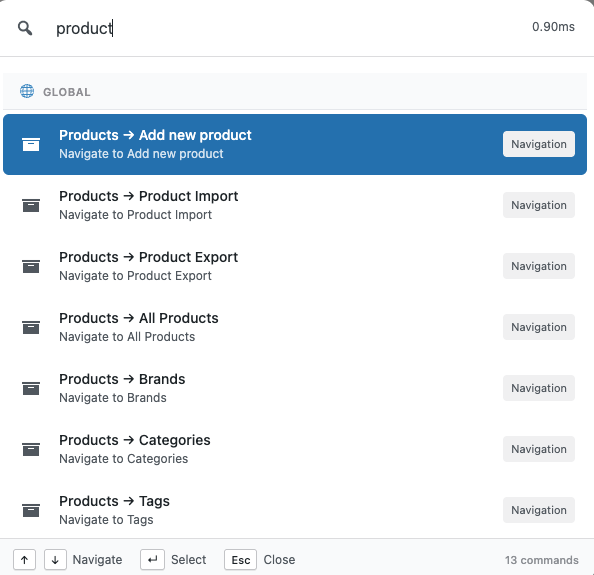
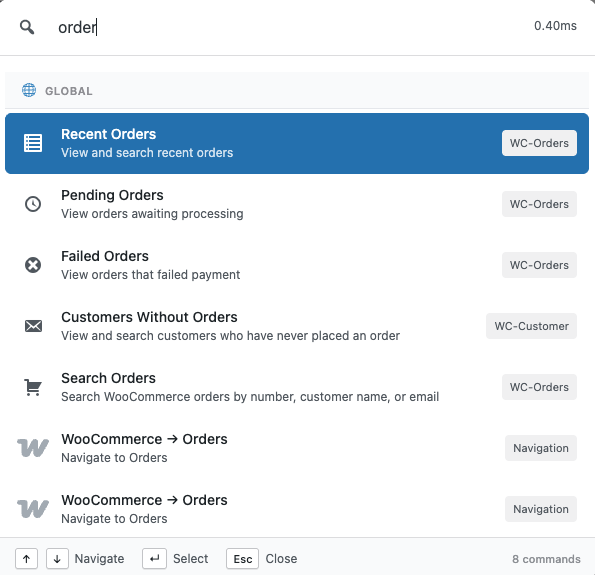
For store owners, this removes multiple layers of admin navigation.
For agencies, it cuts response time on support tickets dramatically.
Verdict:
- CommandUI: No WooCommerce support
- Commandify: full WooCommerce admin control
If your site doesn’t use WooCommerce, this may not matter.
If it does, the difference is night and day.
Action Engine Depth: Search vs Action-Driven Workflows
Both plugins can search content.
Only one is built around executing actions.
CommandUI focuses on:
- Opening pages
- Editing content
- Navigating to admin screens
Commandify goes further by treating actions as first-class commands.
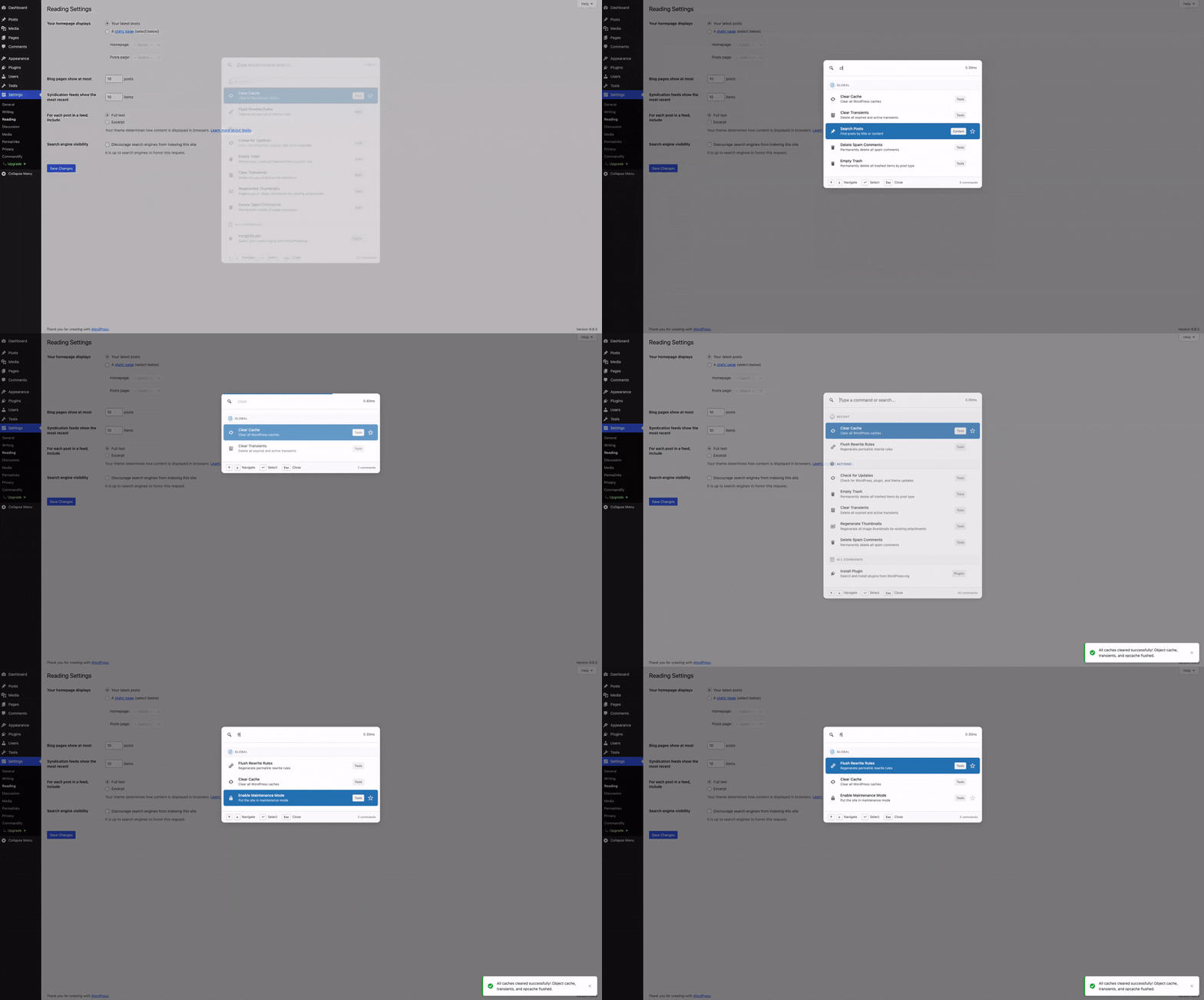
From the palette, you can:
- Toggle WordPress settings
- Install or activate plugins and themes
- Run maintenance tasks
- Manage cache, transients, spam, and rewrites
- Execute admin operations without opening full screens
This turns the command palette into a control panel, not just a shortcut menu.
Verdict:
- CommandUI: search-first palette
- Commandify: action-first productivity system
Dynamic Pattern Recognition: Small Feature, Huge Time Saver
This is a feature CommandUI doesn’t currently offer.
Commandify supports dynamic pattern recognition, meaning it understands structured input like:
#postIDto open posts directly@usernameto jump to user profiles- Order IDs to open WooCommerce orders
- Email addresses to locate customers or form entries
On busy sites, IDs are everywhere — support tickets, Slack messages, internal docs.
Instead of searching manually, you paste the reference and act immediately.
This is especially valuable for:
- Agencies
- Support teams
- Developers
- Store managers
Verdict:
- CommandUI: natural-language search
- Commandify: ID-based, technical, and power-user workflows
Form & Submission Management: Beyond Navigation
CommandUI does not offer form-level integrations.
Commandify includes deep form workflows, including:
- Contact Form 7 integration
- Flamingo submission management
- Fluent Forms support (forms, entries, transactions)
- Pattern-based entry lookup using IDs or emails
This means you can search forms, inspect submissions, manage spam, and jump to related content — all from the palette.
For form-heavy sites, this removes an entire layer of admin UI.
Verdict:
- CommandUI: no form workflows
- Commandify: full form and submission control
Builder & Template Management: Where Commandify Pulls Ahead
CommandUI has early builder support, focused mainly on navigation and edit access.
Commandify expands this significantly:
- Elementor template search and management
- Export, duplicate, rename, and create templates
- Regenerate CSS and clear builder cache
- Full Bricks Builder template workflows
Instead of just opening a template, Commandify lets you manage the entire template lifecycle from one shortcut.
Verdict:
- CommandUI: builder access
- Commandify: builder control
Maintenance & Admin Utilities
This is an area where CommandUI intentionally stays minimal.
Commandify includes a growing set of maintenance tools, such as:
- User switching
- Clearing transients
- Flushing rewrite rules
- Regenerating thumbnails
- Deleting spam comments
For agencies and developers, these tasks come up constantly — and removing menu navigation saves real time.
Verdict:
- CommandUI: minimal admin utilities
- Commandify: practical admin toolkit
Performance & Stability: Different Optimizations, Same Speed
Both plugins are fast.
CommandUI feels extremely lightweight and responsive, especially on simpler sites.
Commandify does more, but is designed to stay performant through:
- Command grouping
- Intelligent loading
- Context checks
- Caching and readiness logic

In real use, performance is not a deciding factor- both deliver a smooth experience.
Verdict:
Tie. Commandify maintains speed even with deeper workflows enabled.
Integration Scope & Ecosystem Direction
CommandUI’s focus remains tight: UI polish and navigation refinement.
Commandify’s roadmap is significantly broader, covering:
- Forms (CF7, Fluent Forms, Gravity Forms, WPForms)
- Builders (Elementor, Bricks, Beaver Builder)
- WooCommerce expansion
- LMS platforms
- Membership plugins
- Custom fields (ACF, Meta Box, JetEngine)
- SEO tools
This matters for users who want one tool that grows with their site instead of stacking multiple plugins.
Verdict:
- CommandUI = focused scope
- Commandify = expanding productivity ecosystem
How to Decide Between CommandUI and Commandify
The simplest way to choose is to look at what slows you down most inside WordPress.
Choose CommandUI If:
- You mainly want faster navigation
- Your workflow is content-focused (posts, pages, settings)
- You don’t rely heavily on WooCommerce
- You prefer a minimal, polished UI with fewer moving parts
- You want a tool that feels familiar and predictable
If most of your time is spent jumping between screens and editing content, CommandUI does its job well. It’s clean, stable, and efficient for navigation-heavy work.
Choose Commandify If:
- You run a WooCommerce store or manage stores for clients
- You want to perform real admin actions from the keyboard
- Your workflow includes orders, products, users, forms, or maintenance
- You rely on IDs, emails, or direct references in daily work
- You want commands that adapt based on context
- You manage multiple sites or complex setups
- You want a tool that keeps expanding, not one that stays narrow
Commandify is not just about getting around WordPress faster.
It’s about reducing entire workflows to a few keystrokes.
If WordPress is more than a blog for you, that difference matters.
How Easy Is It to Switch From CommandUI to Commandify?
Switching doesn’t require a migration or setup process.
These plugins don’t lock you in.
You can:
- Install Commandify
- Use it alongside CommandUI for a few days
- See which one your muscle memory naturally reaches for
Because both use Cmd/Ctrl + K, the palette that returns better results quickly becomes the one you rely on.
Commandify’s Smart Default View (favorites, recent, most-used commands) also means it adapts to how you work, not the other way around.
For most users:
- CommandUI feels familiar immediately
- Commandify feels more powerful after a few days of real use
The Roadmap: Why Commandify Keeps Getting Stronger
One of the biggest reasons users move to Commandify is not just what it does today — but where it’s clearly heading.
According to the product roadmap, Commandify is actively expanding across major WordPress ecosystems:
Forms
- Contact Forms 7 and Flamingo (already available)
- Fluent Forms (already available)
- Gravity Forms
- WPForms
Page Builders
- Elementor (deep template management, already available)
- Bricks Builder (Deep integration, already available)
- Beaver Builder
LMS Platforms
- LearnDash
- Tutor LMS
- LifterLMS
Membership Plugins
- Paid Memberships Pro
- Restrict Content Pro
- Wishlist Member
Developer Tools
- Advanced Custom Fields
- Meta Box
- JetEngine
SEO Plugins
- Rank Math
- Yoast
- AIOSEO
The pattern here is consistent.
Commandify doesn’t add integrations just to tick boxes.
Each one follows the same action-first design:
- searchable
- actionable
- context-aware
This makes Commandify feel less like a plugin and more like a productivity layer that grows with WordPress itself.
Pricing & Long-Term Value
Pricing is often the deciding factor, especially for agencies.
CommandUI uses a premium-only model. It’s fair for what it offers, but fixed.
Commandify takes a different approach:
- Free version available with core functionality
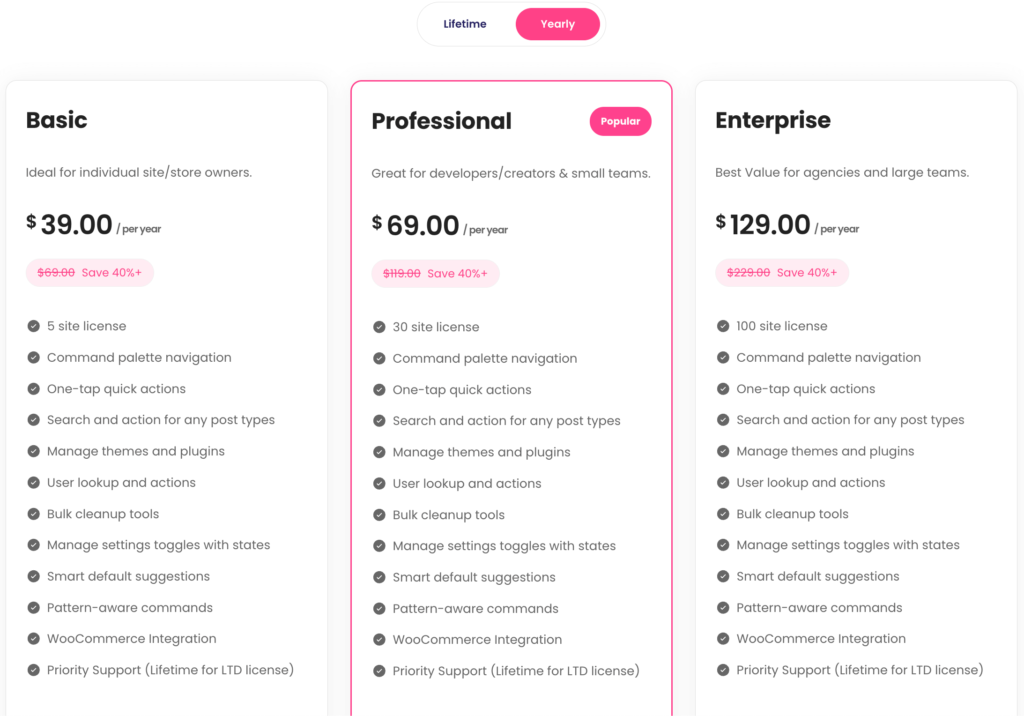
- Affordable yearly plans
- Lifetime licenses for long-term users and agencies
Check Commandify Yearly Pricing
Check Commandify Lifetime Pricing
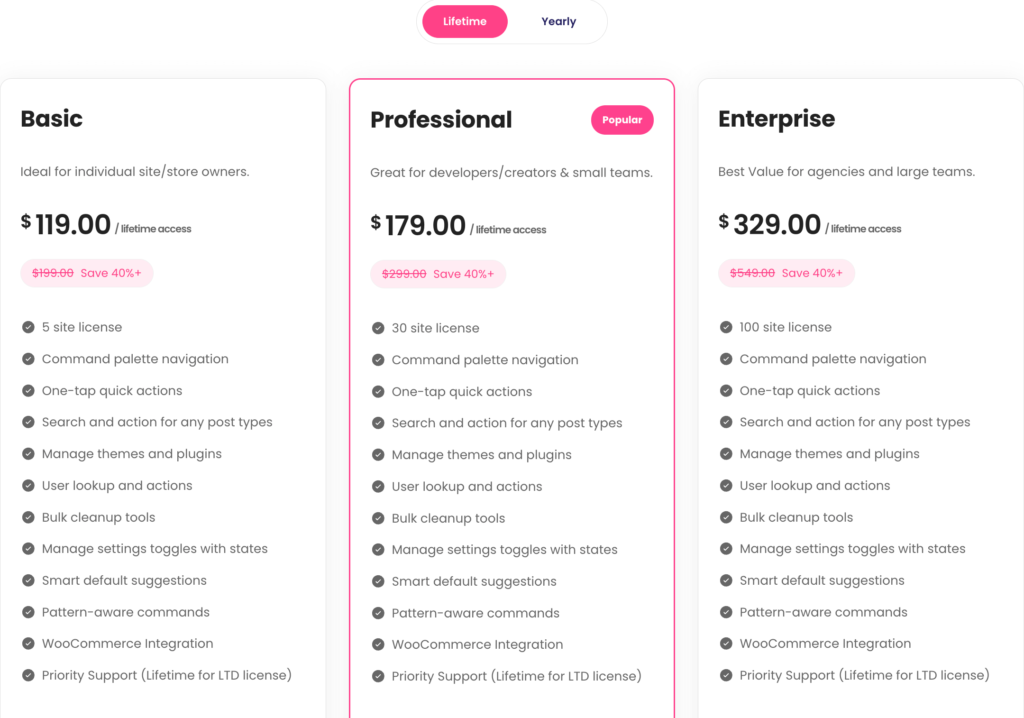
For anyone managing multiple sites, lifetime access alone can justify the switch. You’re effectively locking in future integrations and workflows without recurring costs.
That flexibility is rare in productivity tools and it matters as your stack grows.
Why Commandify Is Different and More Powerful Than Other Command Palette Tools
Most WordPress command palette tools are built around a simple idea: help users search faster and navigate menus quicker.
That’s useful. But it’s also where most of them stop.
Commandify is built on a different foundation. Instead of treating the command palette as a search box, Commandify treats it as a control layer for WordPress.
The difference is subtle at first, but dramatic in daily use.
Action-First, Not Search-First
With traditional command palettes (including CommandUI), the flow usually looks like this:
- Open palette
- Search for something
- Navigate to a screen
- Do the actual work there
Commandify shortens that loop.
In many cases, the flow becomes:
- Open palette
- Type intent or reference
- Complete the action instantly
This is possible because Commandify is designed around action-driven commands, not just navigation shortcuts.
The 7 Action-Driven Command Types That Power Commandify
Commandify supports multiple command types that work together as real workflows.
These aren’t surface-level shortcuts — they are how the plugin is architected.
1. Navigation Commands
The foundation.
Quickly jump to dashboards, settings pages, tools, or custom admin screens.
This is where Commandify overlaps with other tools — and then builds far beyond.
2. Search Commands
Search across posts, pages, custom post types, users, media, products, forms, entries, and templates from one place.
But unlike search-only palettes, search results in Commandify are actionable, not just links.
3. Action Commands
This is the core difference.
Instead of opening a screen, Commandify lets you do the work directly, such as:
- Change post status
- Edit or duplicate content
- Manage WooCommerce orders
- Perform product actions
- Handle form submissions
Actions are first-class citizens, not secondary options.
4. Sub-Action (Nested) Commands
Many WordPress tasks involve follow-up steps.
Commandify supports nested actions like:
- Emptying trash
- Managing templates
- Executing secondary admin tasks
- Running maintenance operations
You don’t leave the palette to finish a workflow.
5. Dynamic Pattern Recognition Commands
This is where Commandify really shines for power users.
It understands structured input like:
#postID@username- Order IDs
- Email addresses
ffentry:IDfor Fluent Forms entries
Paste a reference, and Commandify immediately surfaces the right actions, not just search results.
This is invaluable for agencies, support teams, and store owners dealing with IDs all day.
6. Toggle Commands
Some tasks aren’t about opening or editing — they’re about switching states.
Commandify supports toggle-style commands for things like:
- Maintenance mode
- Settings states
- Feature enable/disable flows
All with immediate feedback.
7. Context-Aware Commands
The same shortcut behaves differently depending on where you are.
- In the editor → content actions
- On WooCommerce screens → order and product workflows
- In list tables → bulk or contextual operations
- On the frontend → editing and admin shortcuts
Commands adapt to context automatically, reducing noise and friction.
Deep Integrations That Go Beyond Search
Another key difference: Commandify’s integrations are action-based, not search-only.
Most command palettes integrate by linking you to another plugin’s screen.
Commandify integrates by bringing that plugin’s workflows into the palette.
Examples of Action-Based Integrations
- WooCommerce
Manage orders, products, variations, customers, addresses, and IDs directly. - Forms (CF7, Flamingo, Fluent Forms)
Search forms, inspect entries, manage submissions, handle spam, and jump to related content. - Page Builders (Elementor, Bricks)
Full template lifecycle management: create, duplicate, rename, export, regenerate CSS, clear cache. - User Switching & Maintenance Tools
Switch users, clear transients, regenerate thumbnails, delete spam, flush rewrites. - Upcoming Ecosystems
LMS, membership plugins, custom fields, and SEO tools — all planned with the same action-first model.
This is why Commandify doesn’t replace one plugin. It replaces dozens of small admin interactions with one shortcut.
Why This Makes Commandify Ideal for Advanced WordPress Workflows
This architecture makes Commandify especially effective for:
- Agencies managing multiple client sites
- WooCommerce store owners handling orders and customers daily
- Support teams working with IDs, emails, and form submissions
- Developers and power users who prefer keyboard-first control
Commandify isn’t just faster navigation.
It’s operational leverage inside WordPress.
Quick FAQs: Commandify vs CommandUI
Is Commandify just another command palette plugin?
No. While it includes fast navigation and search, Commandify is built around action-driven workflows, contextual commands, and deep integrations that go far beyond navigation.
Can I use Commandify if I don’t run WooCommerce?
Yes. WooCommerce is a major strength, but Commandify is equally useful for content management, builders, forms, maintenance, and admin workflows.
Does Commandify replace CommandUI completely?
Not necessarily. CommandUI is excellent for clean, search-first navigation. Commandify is better suited for users who want to execute actions, manage data, and reduce admin workflows.
Is Commandify suitable for agencies and teams?
Yes. Features like pattern recognition, contextual commands, user switching, and maintenance tools are specifically valuable for agency and support workflows.
Does using all these features slow WordPress down?
No. Commandify is designed with optimized loading, caching, and readiness checks so performance remains stable even with complex integrations.
CommandUI vs Commandify: Detailed Comparison with Full Breakdown
Now explore the detailed head to head comparison on CommandUi vs Commandify. Find out a more powerful alternative to CommandUI with lower price.
General & Navigation
| Feature | CommandUI | Commandify Free | Commandify Pro |
|---|---|---|---|
| Free version | No | Yes | Yes |
| Global command palette | Yes | Yes | Yes |
| Custom keyboard shortcuts | Yes | Yes | Yes |
| Admin menu navigation | Yes | Yes | Yes |
| Search posts & pages | Yes | Yes | Yes |
| Custom post type support | Yes | Yes (auto-detected) | Yes |
| Search media library | Yes | Yes | Yes |
| Search users | Yes (limited actions) | Yes | Yes |
| Edit / view / preview content | Yes | Yes | Yes |
| Trash / delete content | Yes | Yes | Yes |
| Toast notifications & loading state | Yes | Yes | Yes |
Action System & Productivity
| Feature | CommandUI | Commandify Free | Commandify Pro |
|---|---|---|---|
| Action-driven command architecture | No | No | Yes |
| Smart Default View (favorites, recent) | No | No | Yes |
| Context-aware commands | Limited | No | Yes |
| Dynamic pattern recognition | No | No | Yes |
| Toggle commands (maintenance mode, etc.) | No | No | Yes |
| Advanced admin operations | No | No | Yes |
Plugin & Theme Management
| Feature | CommandUI | Commandify Free | Commandify Pro |
|---|---|---|---|
| Search WordPress.org plugins | Limited | Yes | Yes |
| Install plugins | Limited | Yes | Yes |
| Search & install themes | Limited | Yes | Yes |
| Switch themes | Yes | Yes | Yes |
WooCommerce Integration
| Feature | CommandUI | Commandify Free | Commandify Pro |
|---|---|---|---|
| Search orders | No | No | Yes |
| Instant order view by ID | No | No | Yes |
| Order actions (status, notes, manage) | No | No | Yes |
| Search products & variations | No | No | Yes |
| Product actions (stock, price, duplicate) | No | No | Yes |
| Search customers | Limited | No | Yes |
| Customer order history | No | No | Yes |
| Customer address management | No | No | Yes |
Page Builder Integrations
Elementor
| Feature | CommandUI | Commandify Pro |
|---|---|---|
| Search templates | Yes | Yes |
| Edit templates | Yes | Yes |
| Export templates | No | Yes |
| Duplicate templates | No | Yes |
| Rename templates | No | Yes |
| Create templates (all types) | No | Yes |
| Regenerate CSS | No | Yes |
| Clear Elementor cache | No | Yes |
Bricks Builder
| Feature | CommandUI | Commandify Pro |
|---|---|---|
| Search templates | Yes | Yes |
| Edit with Bricks | Yes | Yes |
| Respect Bricks post type rules | Unknown | Yes |
| Export templates | No | Yes |
| Duplicate / rename templates | No | Yes |
| Create templates | No | Yes |
| Regenerate CSS & cache | No | Yes |
Forms & Submissions
| Feature | CommandUI | Commandify Pro |
|---|---|---|
| Contact Form 7 integration | No | Yes |
| Search CF7 forms | No | Yes |
| Detect CF7 shortcodes | No | Yes |
| Flamingo submission search | No | Yes |
| Manage submissions (spam / trash) | No | Yes |
| Fluent Forms integration | No | Yes |
| Search forms, entries, transactions | No | Yes |
| Pattern-based entry lookup | No | Yes |
Maintenance & Utilities
| Feature | CommandUI | Commandify Pro |
|---|---|---|
| User switching integration | No | Yes |
| Clear transients | No | Yes |
| Flush rewrite rules | No | Yes |
| Regenerate thumbnails | No | Yes |
| Delete spam comments | No | Yes |
UX & Compatibility
| Feature | CommandUI | Commandify |
|---|---|---|
| Frontend command palette | Yes | Yes (context-aware) |
| RTL support | No | Yes |
| WordPress 6.9 compatibility | No | Yes |
Pricing & Licensing
| Feature | CommandUI | Commandify |
|---|---|---|
| Free version | No | Yes |
| Yearly pricing | Higher | Lower |
| Lifetime license | No | Yes |
| Agency-friendly value | Moderate | High |
Final Thoughts on CommandUI vs Commandify: Which One Actually Makes WordPress Easier?
CommandUI deserves credit. It helped bring keyboard-driven navigation to WordPress and set expectations for what a modern admin experience can feel like.
For many users, it’s still a solid choice.
But Commandify enters the space with a broader vision.
It doesn’t just help you navigate WordPress. It helps you run WordPress.
More actions.
More integrations.
More control.
More room to grow.
If you want a clean, fast navigation palette, CommandUI works.
If you want a more powerful alternative that turns WordPress into a command-driven workspace (especially for WooCommerce, agencies, and advanced sites) Commandify is the stronger long-term fit.
Both tools improve WordPress. Only one is built to scale with everything WordPress is becoming.