


How to Manage WooCommerce Orders, Products, and Customers Faster Using Commandify Plugin

If you run a WooCommerce store long enough, this feeling becomes unavoidable.
Orders keep coming in. Support tickets start stacking up. Products need updates. Customers email with order numbers you don’t recognize immediately. Your day slowly turns into a cycle of opening admin pages, waiting for screens to load, searching again, and repeating the same steps over and over.
For agencies, this problem multiplies. One moment you’re checking an order issue on a client store. The next moment you’re updating product details on another. Each task is small on its own, but the constant context switching drains time and focus.
Most store owners don’t struggle because WooCommerce is difficult to use. They struggle because WooCommerce admin workflows weren’t designed for speed once a store grows.
Before we go further, let’s quickly align on what WooCommerce is and why this problem exists.
What is WooCommerce?
WooCommerce is the most widely used eCommerce plugin for WordPress. It gives you complete control over products, orders, customers, payments, and store settings.
It’s extremely flexible and powerful. But that flexibility comes with a tradeoff.
As soon as your store moves beyond a small catalog or a few weekly orders, managing WooCommerce from the WordPress admin becomes slower and more click-heavy than it should be.
In this article, we’ll focus on the practical side of running a WooCommerce store and show how Commandify helps store owners and agencies deal with these daily admin challenges faster and with less friction.
Why Managing WooCommerce Orders Feels Slow in Real Life
Orders are where WooCommerce admin friction becomes obvious first.

On the surface, order management seems simple. You open the orders screen, find the order, and take action. But when you’re doing this dozens of times a day, the inefficiencies start to hurt.
Each order interaction usually involves:
- Loading the orders list
- Searching or filtering
- Opening an order
- Going back to the list
- Repeating the same steps again
For busy stores, this process adds up quickly. That’s why store owners often search for things like how to manage WooCommerce orders efficiently or WooCommerce order management tips. They’re not looking for new features- they’re trying to reduce wasted time.
The problem isn’t that WooCommerce lacks order tools.
It’s that every action requires a full screen change, even when the task itself is small.
Why Order IDs Slow Down Support Workflows
In real support conversations, customers rarely describe their order in detail. They reference numbers.
A typical message looks like this:
“Order #4921 hasn’t shipped yet.”
From a support perspective, this is clear. From a WooCommerce admin perspective, it still means multiple steps.
You have to:
- Copy the order ID
- Open the orders screen
- Paste the ID into the search
- Wait for results
- Open the order
- Go back again
When this happens occasionally, it’s fine. When it happens all day, it becomes exhausting. This is especially painful for agencies and stores with dedicated support teams, where order IDs are constantly passed through emails, chats, or ticket systems.
WooCommerce doesn’t treat ID-based workflows as a first-class experience, even though that’s how real teams work.
Product Management Becomes Frustrating as the Catalog Grows
Product management is the next major slowdown point.
As long as you have a small catalog, WooCommerce product screens feel manageable. But once products grow into the hundreds — with variations, pricing updates, stock changes, and marketing tweaks — the admin experience starts to feel heavy.
Common frustrations include:
- Searching for the right product repeatedly
- Opening products just to change one small value
- Managing variations buried inside product edit screens
This is why store owners ask how to manage WooCommerce products faster or is there a quicker way to update WooCommerce products.
The core issue is not missing features.
It’s that even simple product actions require full editor screens, which slows down everyday operations.
Why Managing WooCommerce Customers Breaks Focus
Customer management is often overlooked, but it quietly consumes a lot of time.
In WooCommerce, customers and orders are closely related, but the admin interface separates them across different screens. This makes sense structurally, but it creates friction during real support or operations work.
Typical scenarios include:
- Checking a customer’s order history
- Verifying billing or shipping details
- Confirming who placed a specific order
Each of these actions involves switching screens, scrolling, and navigating back and forth. For support teams, this constant movement interrupts focus and slows down response time.
That’s why queries like manage WooCommerce customers easily keep appearing. Store owners aren’t asking for new customer features — they want faster access to existing information.
How Commandify Solves Real WooCommerce Admin Challenges

Most WooCommerce admin pain doesn’t come from missing features. It comes from how long it takes to reach the feature you already need.
WooCommerce gives you everything required to run a store, but it expects you to navigate through multiple screens, lists, and editors for even the smallest task. That approach works for occasional updates, but it breaks down when WooCommerce becomes part of daily operations.
This is where Commandify fits naturally into WooCommerce workflows.
Commandify doesn’t replace WooCommerce. It doesn’t change how orders, products, or customers work. Instead, it adds a faster interaction layer on top of WooCommerce so you can search less, click less, and act faster.
Managing WooCommerce Orders Directly From One Command
Order management is the first place most users notice the difference.
With Commandify, orders are no longer something you have to navigate to. They become something you can access directly.
Instead of opening the WooCommerce orders screen every time, you can:
- Search orders instantly
- Open orders using order IDs
- Jump into order actions without browsing long lists
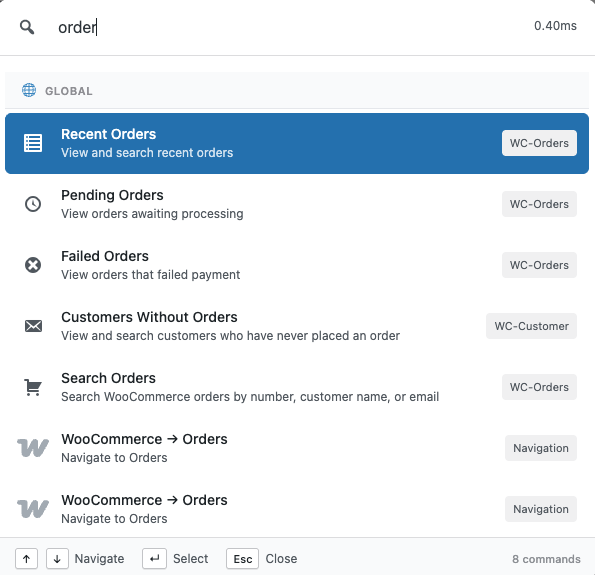
This is especially useful for support teams and store owners handling live issues. When someone sends you an order number, you don’t need to mentally switch into “admin navigation mode.” You simply act on the order.
For anyone trying to manage WooCommerce orders efficiently, this removes the biggest source of admin friction: unnecessary page loads.
Faster WooCommerce Product and Variation Management
Product management becomes repetitive very quickly on active stores.
Price changes, stock updates, variation fixes, and quick edits all require opening product editors in default WooCommerce workflows. While that’s fine occasionally, it slows things down when these tasks happen every day.
Commandify improves WooCommerce product management by:
- Making products searchable from one place
- Letting you jump straight into relevant product actions
- Reducing the need to load full product editors for small updates


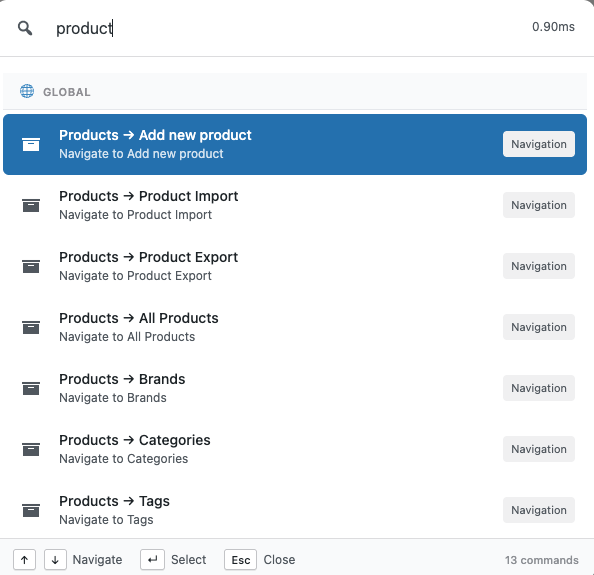
For stores with large catalogs or frequent product changes, this directly helps manage WooCommerce products faster without introducing risky bulk operations or complex automation.
Variations benefit even more from this approach. Instead of scrolling through long variation panels, you spend more time acting and less time searching.
Managing WooCommerce Customers Without Jumping Between Screens
Customer-related tasks often interrupt support workflows.
You might start with an order, then need to:
- Check customer details
- Review past orders
- Confirm billing or shipping information


Default WooCommerce admin flows separate these steps across multiple screens, which breaks focus and slows down responses.
Commandify makes customer access more direct by allowing you to:
- Search customers quickly
- Move between customer and order context without manual navigation
- Spend less time clicking and more time resolving issues
This is particularly valuable for stores offering live support or agencies handling WooCommerce support for multiple clients. It’s a practical improvement for anyone trying to manage WooCommerce customers easily without adding more tools.
Why This Approach Works Better Than Traditional WooCommerce “Optimizations”
Many WooCommerce productivity tips focus on surface-level improvements:
- Better filters
- Saved views
- Browser bookmarks
- Extra admin plugins
While these help slightly, they don’t change the underlying workflow. You still have to navigate to the same screens and wait for the same pages to load.
Commandify works differently.
Instead of optimizing individual screens, it reduces how often you need to open those screens at all. That’s why it feels faster even though WooCommerce itself hasn’t changed.
This is also why Commandify works well for:
- Growing stores
- High-order-volume sites
- Agencies managing multiple WooCommerce installs
It improves speed without increasing complexity.
When Commandify Makes the Biggest Difference for WooCommerce
Commandify is useful on any WooCommerce site, but its impact is strongest when:
- Orders are handled daily, not weekly
- Support tickets reference order IDs frequently
- Products require frequent updates
- Multiple people work inside the WooCommerce admin
- Agencies manage WooCommerce for clients
If you’ve ever felt that WooCommerce admin slows you down more as your store grows, this is exactly the scenario Commandify is designed for.
Why Small Admin Tweaks Don’t Fix the Real Problem
Many store owners try to work around these issues by using filters, browser bookmarks, or opening multiple tabs. While these tricks help slightly, they don’t address the real bottleneck.
The real slowdown comes from how you access and act on WooCommerce data, not from missing features or poor organization.
What’s needed isn’t another dashboard or settings screen.
It’s a faster way to interact with WooCommerce itself.
This is where Commandify changes the experience- not by replacing WooCommerce, but by giving you a smarter, faster layer on top of it.
Faster WooCommerce Order Management Without Constant Screen Switching
Once a store reaches a certain volume, the biggest time drain is no longer order fulfillment itself. It’s finding and opening orders repeatedly.
Most WooCommerce store owners and support teams don’t process orders in batches. They react to issues as they come in. A delayed shipment. A missing address. A refund request. Each request usually references an order number, not a product name or customer name.
This is why people search for how to manage WooCommerce orders efficiently rather than “how to create orders.” Creation isn’t the problem. Access speed is.
With default WooCommerce admin workflows, every order-related task forces you through the same steps:
- Load the orders table
- Search or filter
- Open the order
- Navigate back again
That repetition becomes a bottleneck when you’re handling support, logistics, or agency work.
Using Commandify, order management becomes more direct. Instead of navigating to the orders screen first, you can search and open orders immediately, using natural input or order IDs. This approach removes several unnecessary page loads and lets you focus on resolving the issue instead of navigating the admin.
For busy stores, this alone significantly improves WooCommerce order management efficiency.
Working With Order IDs the Way Support Teams Actually Do
Order IDs are how real teams communicate.
Support agents paste order numbers into chat tools. Agencies receive order references via tickets. Store owners scan order IDs from emails or invoices. But WooCommerce treats order IDs as a secondary lookup method rather than a primary workflow.
That mismatch creates friction.
Commandify closes this gap by letting you work ID-first, which is how support teams naturally operate. When you paste or type an order ID, the system understands your intent and surfaces the relevant order actions instantly.
This matters because:
- You don’t need to remember where the order lives
- You don’t need to load the full orders list
- You don’t lose focus switching screens
For anyone looking to manage WooCommerce orders efficiently, this change alone saves a noticeable amount of time every day.
Managing WooCommerce Products Faster Without Opening the Editor Repeatedly
Products are the second major source of admin slowdown.
As your catalog grows, product management shifts from occasional updates to frequent, small changes. Adjusting prices. Updating stock. Checking variations. Responding to marketing or support requests.
Store owners often search how to manage WooCommerce products faster because the default workflow is heavy for these quick tasks.
Each product update usually requires:
- Opening the products list
- Searching by name
- Loading the product editor
- Waiting for variations to load
- Making one small change
- Updating and closing
This workflow isn’t inefficient because WooCommerce lacks features.
It’s inefficient because every small task requires a full editor load.
Commandify improves this by making products searchable and actionable without forcing you through the entire product editor every time. You can locate products instantly, jump to relevant actions, and handle repetitive product tasks with fewer interruptions.
For stores with frequent price or stock changes, this dramatically speeds up WooCommerce product management.
Handling Variations Without Losing Time and Context
Product variations are where WooCommerce admin friction becomes even more obvious.
Managing variations often means:
- Scrolling through long product pages
- Waiting for variation panels to expand
- Searching manually for the correct option
This process is slow, especially when you’re making quick fixes rather than bulk updates.
Commandify reduces this friction by keeping variation-related actions closer to search and context. Instead of digging through nested panels, you can move directly to what you need, making variation management faster and less mentally taxing.
This approach is particularly valuable for:
- Apparel stores
- Subscription products
- Stores with complex option sets
It’s a practical improvement for anyone trying to speed up WooCommerce admin workflows.
Managing WooCommerce Customers Without Breaking Focus
Customer-related tasks are often scattered across different parts of the WooCommerce admin.
In real workflows, you might need to:
- Check a customer’s past orders
- Verify billing or shipping details
- Confirm account information during support calls
Default WooCommerce workflows require you to jump between order screens and customer profiles repeatedly. This constant switching slows down response time and increases the chance of mistakes.
That’s why queries like manage WooCommerce customers easily are common.
Commandify makes customer lookups more direct. Instead of navigating through multiple admin pages, you can search customers quickly and move between related data without losing context. This is especially useful for support teams who need fast answers rather than deep reports.
The result is smoother customer handling and faster issue resolution.
Daily WooCommerce Tasks That Become Noticeably Faster
When you step back, the real benefit of better WooCommerce admin workflows isn’t one single feature. It’s the cumulative time saved across dozens of small tasks.
With a faster workflow, tasks like these take less effort:
- Checking order status during support conversations
- Opening orders by ID from tickets or emails
- Locating products to make quick updates
- Reviewing customer details without navigating away
- Switching between multiple WooCommerce stores (for agencies)
These improvements don’t change how WooCommerce works. They change how quickly you can work with it.
For anyone searching for WooCommerce admin workflow optimization, this is the level where productivity gains become real and measurable.
Why This Matters More for Agencies and Growing Stores
Small stores can tolerate slower admin workflows. Growing stores can’t.
As soon as you introduce:
- Dedicated support roles
- Multiple admins
- Agency-managed stores
- High order volume
Admin speed becomes part of your operational cost.
Agencies, in particular, benefit from workflows that reduce friction. When you manage several WooCommerce sites, even small inefficiencies multiply quickly.
That’s why tools that help speed up WooCommerce admin without changing store logic are especially valuable at scale.
FAQs on WooCommerce and Commandify
Is Commandify a replacement for WooCommerce?
No. WooCommerce remains your eCommerce engine. Commandify simply gives you a faster way to interact with WooCommerce data and actions from the WordPress admin.
Can Commandify help manage WooCommerce orders faster?
Yes. Commandify allows faster access to orders, including opening orders directly by ID and reducing the need to browse order lists repeatedly.
Does Commandify change how WooCommerce data is stored?
No. All orders, products, and customers remain managed by WooCommerce exactly as before. Commandify only improves access and workflow.
Is Commandify useful for small WooCommerce stores?
It can be, but the biggest gains appear as stores grow. If you handle orders and products occasionally, the difference is smaller. If WooCommerce is part of daily operations, the improvement is noticeable.
Can agencies use Commandify across multiple WooCommerce sites?
Yes. Agencies benefit significantly because small time savings multiply across client sites, especially when handling support or product updates.
Does using Commandify slow down WooCommerce admin?
No. Commandify is designed to be lightweight and focuses on reducing admin interactions rather than adding heavy dashboards.
Final Takeaway on How to Manage WooCommerce Orders Easily with Commandify
WooCommerce isn’t slow because it’s poorly built. It’s slow because it was designed for capability first, not speed at scale.
As your store grows, managing orders, products, and customers becomes an operational task, not an occasional admin chore. That’s when workflow efficiency starts to matter more than new features.
Commandify doesn’t add complexity to WooCommerce. It removes friction from how you work with it.
If your goal is to manage WooCommerce orders efficiently, manage WooCommerce products faster, and handle customers without constant screen switching, improving your workflow is the most effective place to start.