
Not Just Search. Get Work Done.
An Action-first Command Palette
for Modern WordPress Sites
Commandify is an action-driven command palette tool for WordPress that lets you search, navigate, and perform real tasks
using your keyboard. Execute real workflows with one click. Manage content, WooCommerce, page builders, forms,
and users- directly from your keyboard, without switching screens or losing focus.
Work faster. Stay organized. Do more with the power of search!
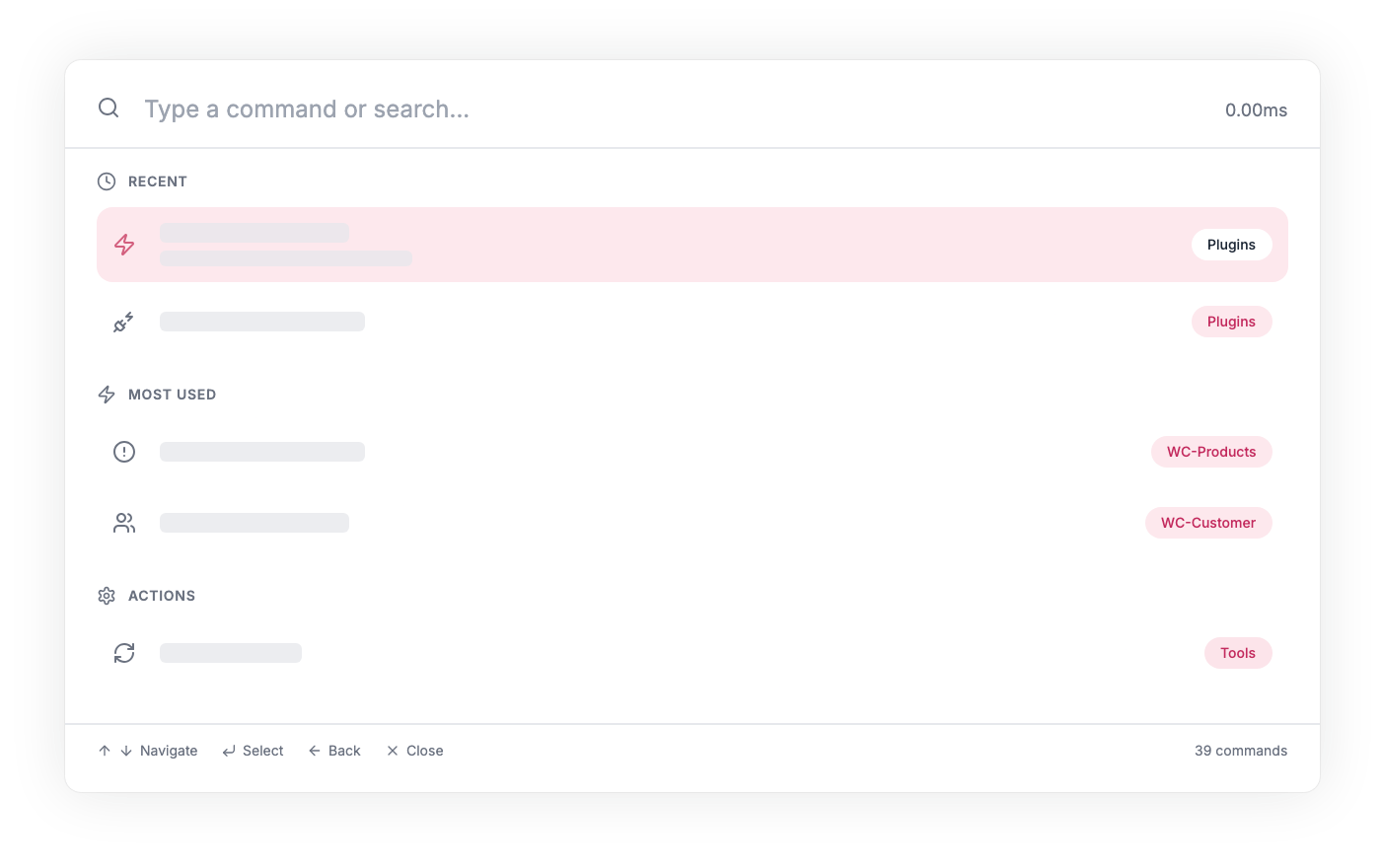
Why Need Commandify?
As your WordPress site or WooCommerce store grows, your dashboard becomes harder to navigate.
Commandify keeps everything within reach through one simple command palette. It’s an essential tool for
developers, creators, store owners, and busy site managers who want to work smarter- not slower

Work Faster, Not Harder
Stop digging through menus. Commandify’s fuzzy search helps you open pages and run actions quickly so you stay in your flow.

Reduce Mental Load, Focus on Growth
With one consistent interface for everything, you switch context less and stay focused on what you’re building.

Empower Your Workflow
Turn multi-step actions into single commands. Edit content, manage settings, or install tools without losing momentum.
Keyboard-First Navigation
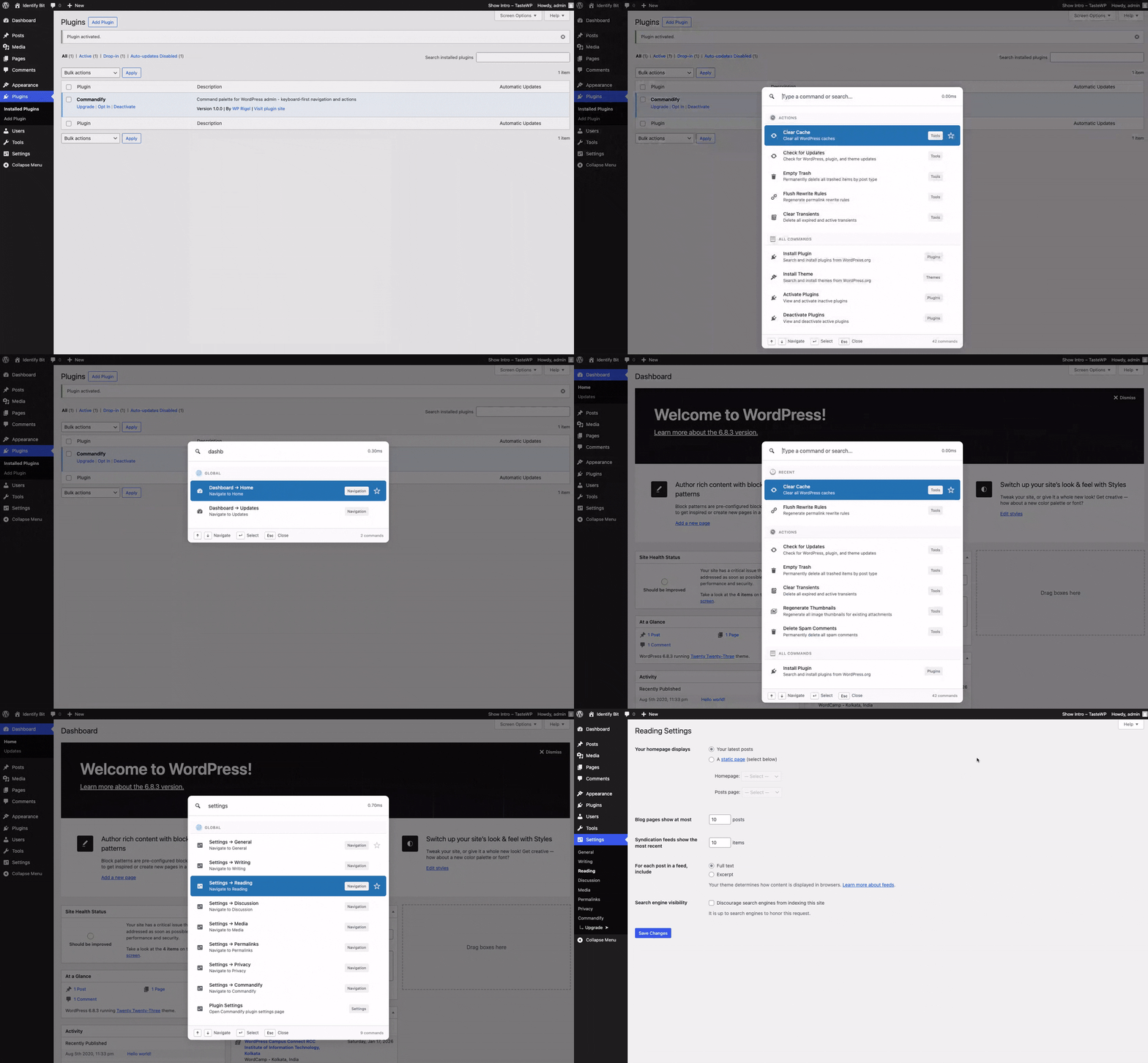
Open any WordPress admin page by typing its name. Move around your dashboard efficiently and stay focused without reaching for the mouse.
One-Command Actions
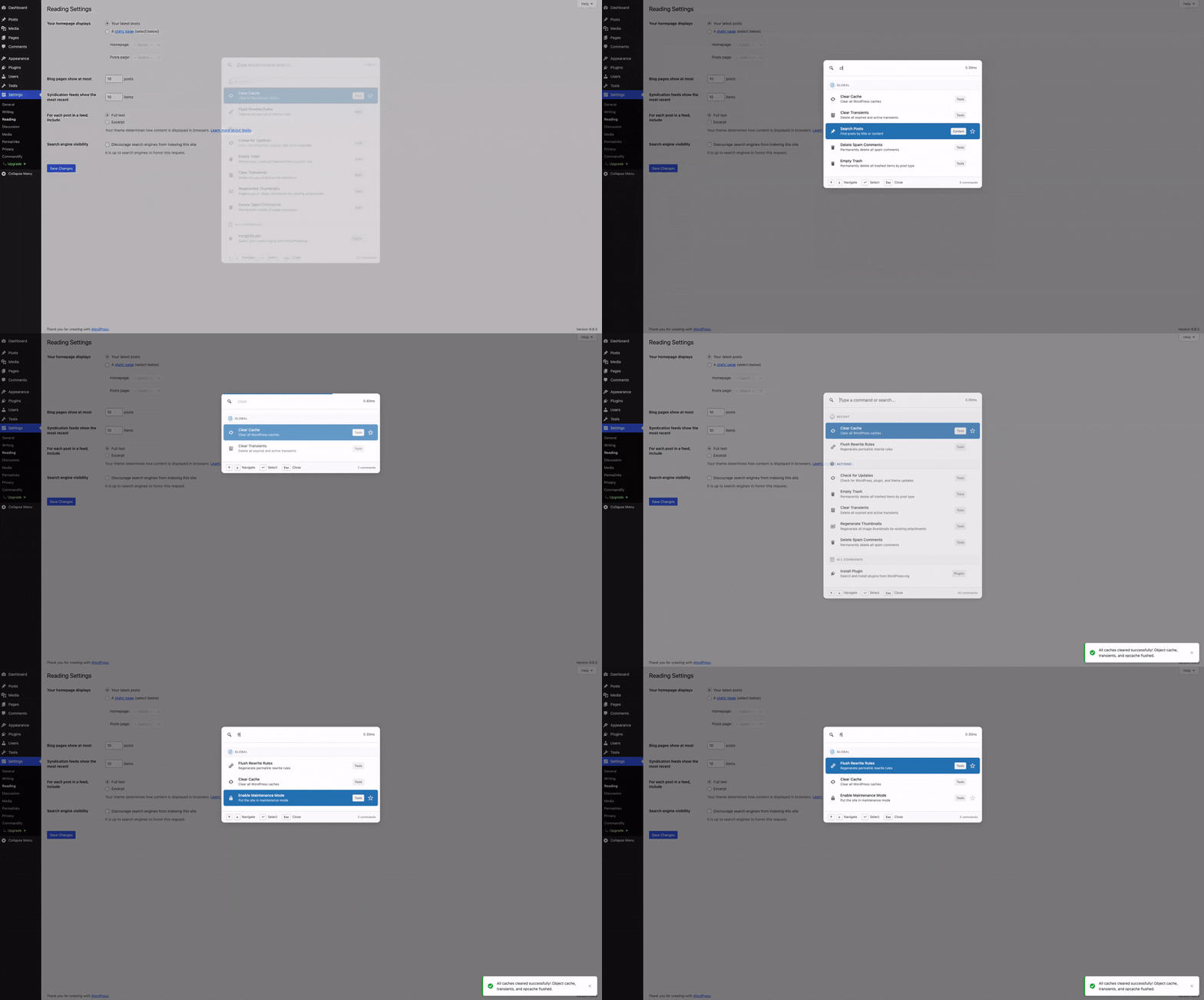
Run essential tasks like clear cache, check updates, empty trash, and more, with a single command.
Install Without Navigation
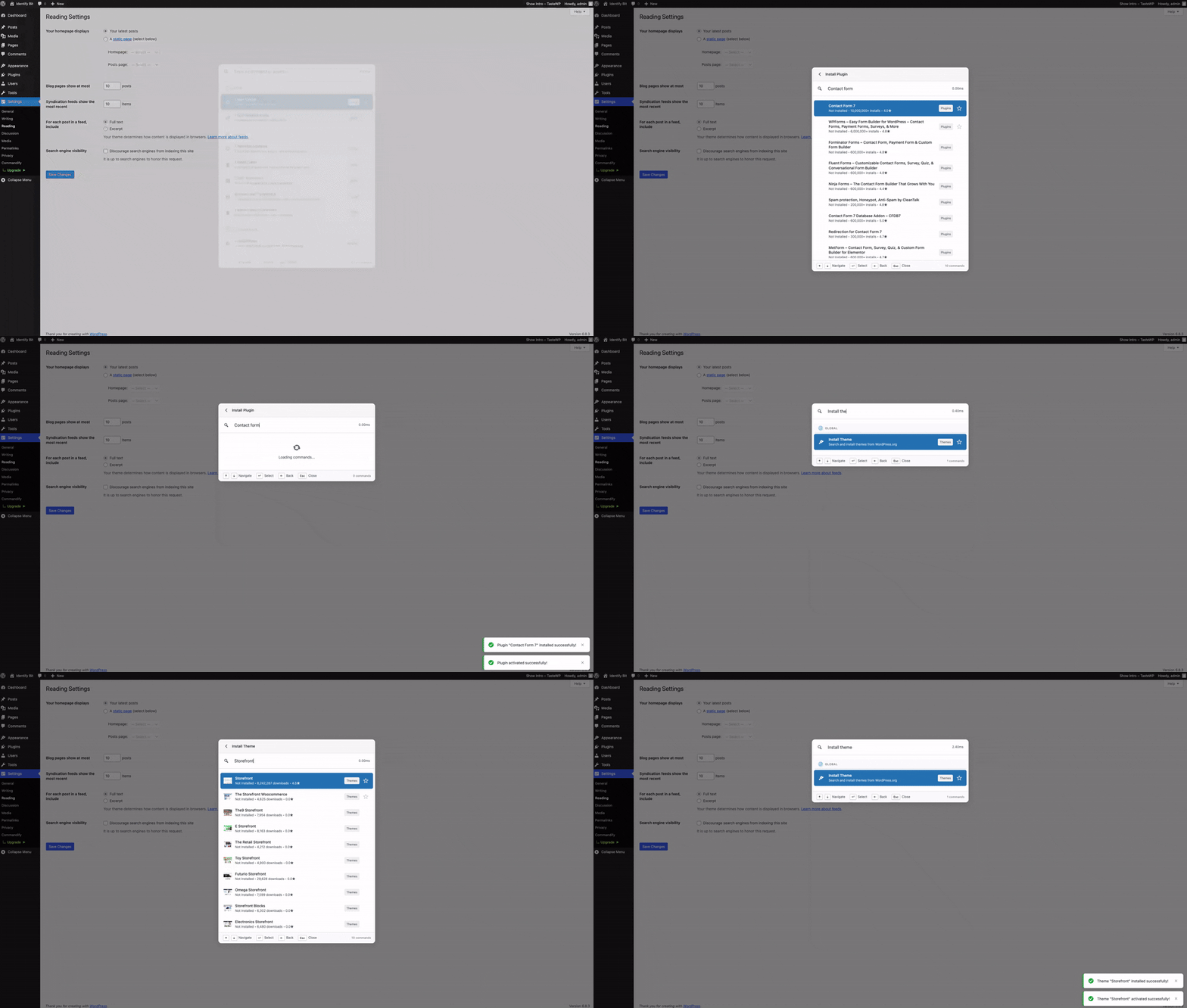
Search, install, and activate plugins or themes directly from the palette without leaving your current screen.
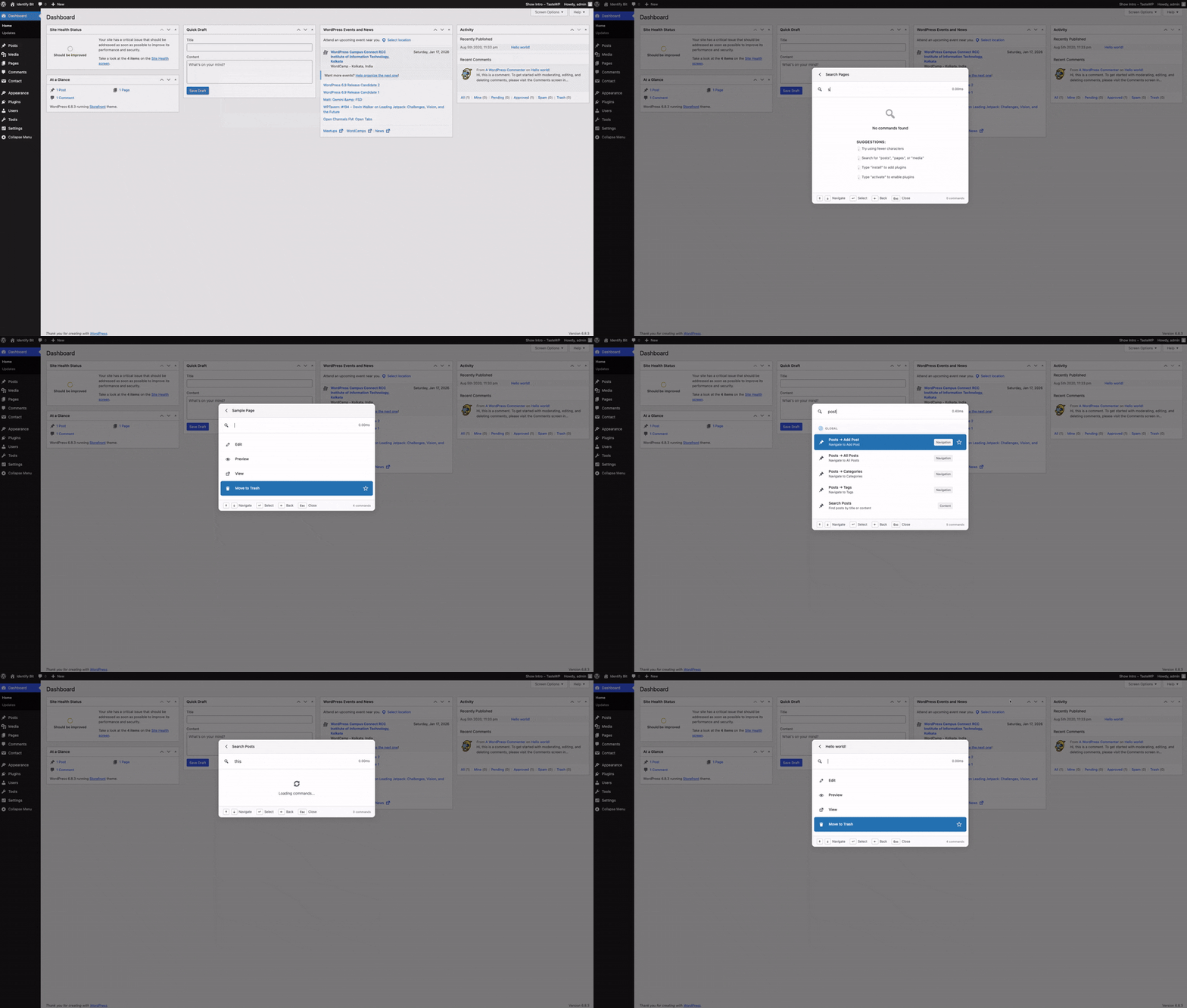
Universal Content Search
Search through posts, pages, products, and any custom post type from one unified search bar.
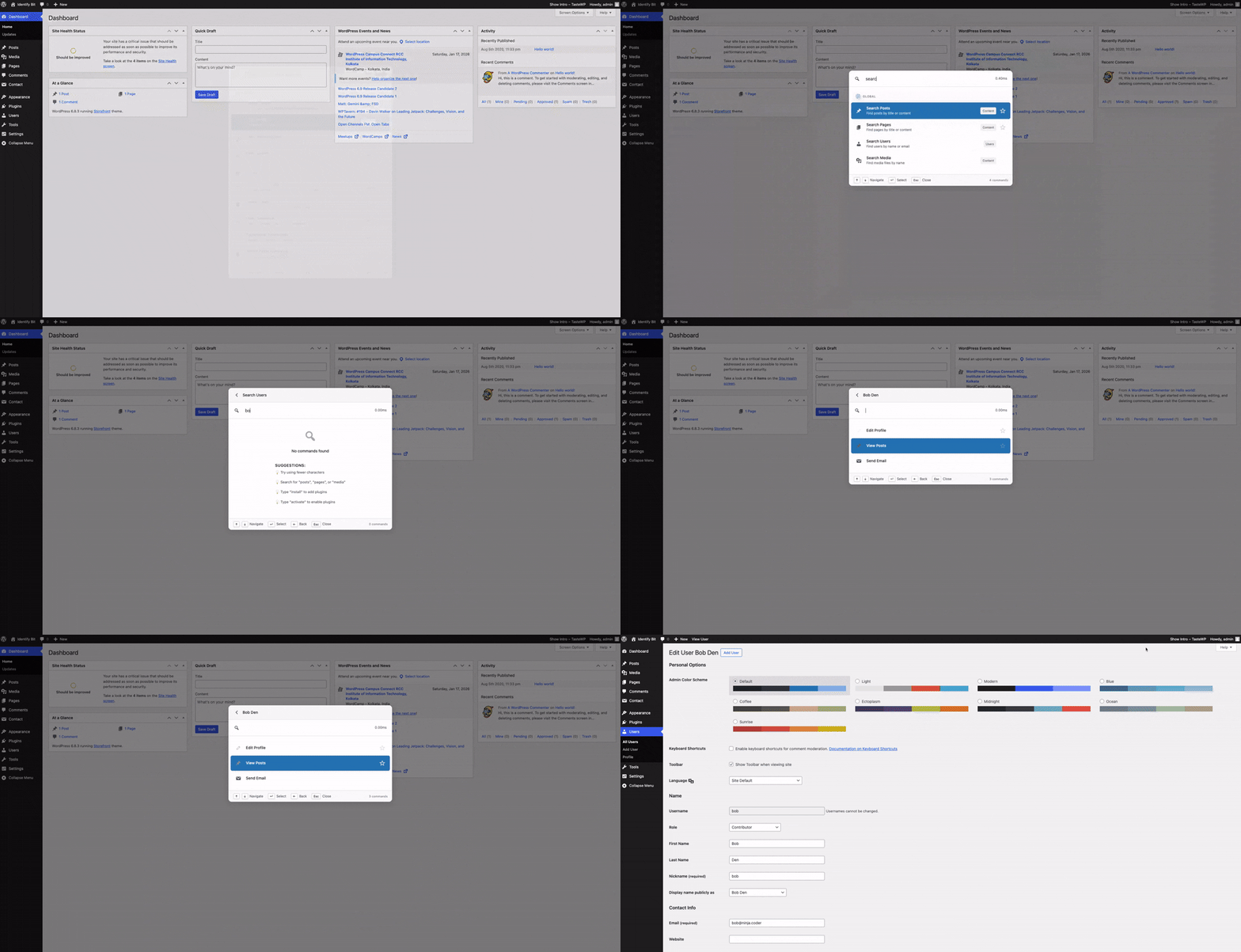
Instant User Search
Look up users by name, email, or role and jump straight into their profiles or related actions.
And more exciting features like these…
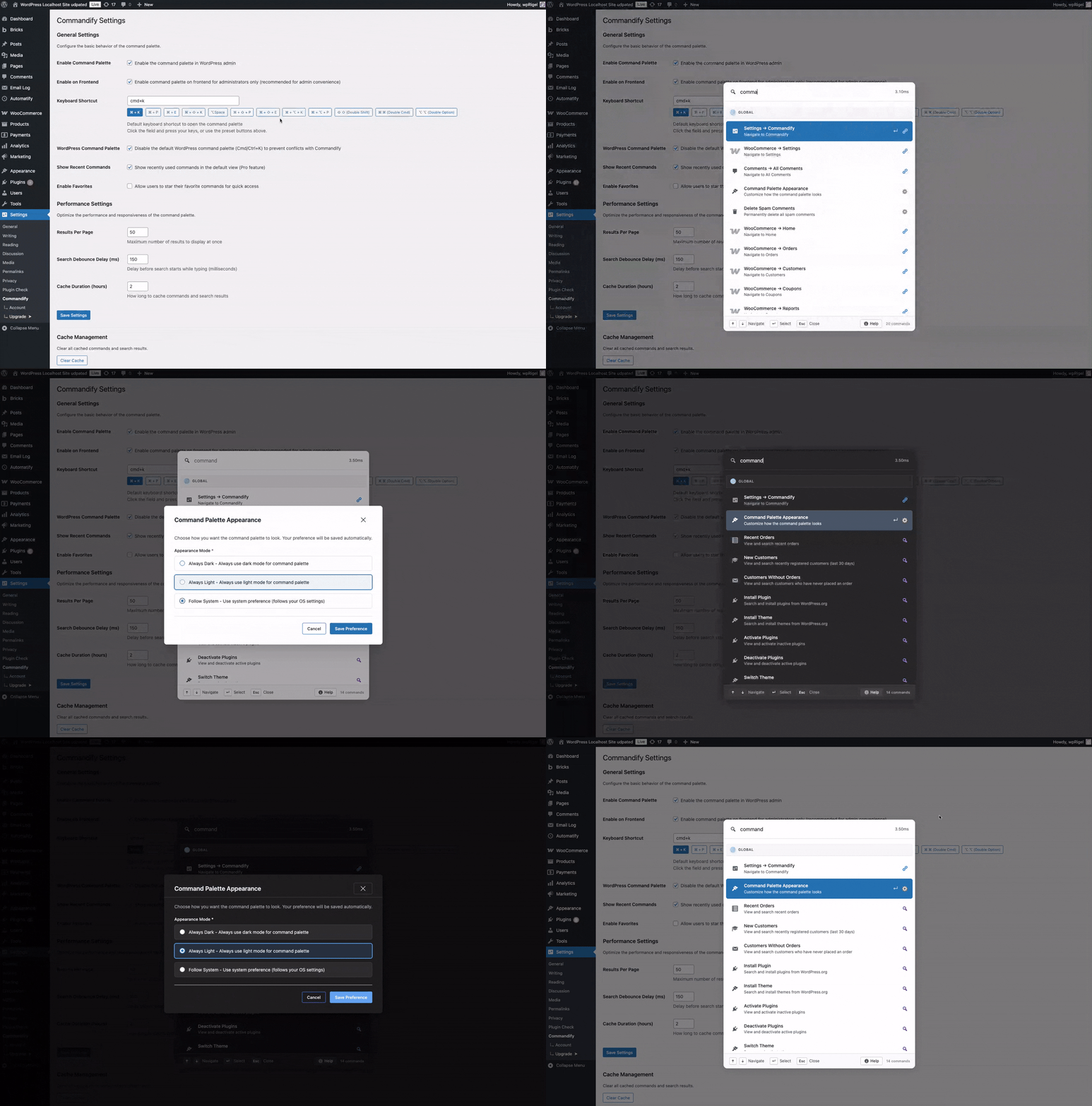
Dark Mode
A simple settings for instantly switching dark or light or system preference mode using command palette.
Productivity Wins from Real WordPress Users
Ready to Join Them?

Istiak Rayhan
Founder & CEO at Ultimate Blocks
Commandify is one of the most interesting productivity tools I’ve seen for WordPress in a long time. The command-palette approach feels modern and intuitive, and the ability to run AI-powered commands right inside the editor is genuinely impressive.

Abu Hayat Polash
Founder & CEO at bPlugins
I’ve used every command palette tool out there- Commandify is the first one built for real work, not just navigation. The action-focused approach, along with deep integrations for Elementor, Bricks, CF7, and WooCommerce, makes it incredibly valuable for agencies and teams managing complex sites.

Adrita Chakraborty
CEO & Co-founder at Miraiyo
Commandify feels like the missing shortcut WordPress should have had. From editing Elementor or Bricks templates to managing WooCommerce orders and even CF7 forms, everything becomes one keystroke away. It’s a huge win for anyone running multiple sites or handling large workflows.
Enjoy Powerful Features, Free Forever
Commandify includes a powerful set of tools to make your WordPress dashboard more efficient,
right from the first install. Enjoy exciting commands in lite version, free forever!

Instant Palette Launcher
Use Cmd/Ctrl + K to open a clean, Spotlight-style palette anywhere in the admin, ready for your next action.

Menu-Driven Navigation
Mirrors the entire admin menu structure so you can jump to deep settings and tools without hunting through submenus.

Content Search & Actions
Posts, pages, and media show with status/date context plus quick actions (edit, view, trash) in a single keystroke.

Plugin & Theme Control
Search, install, activate, or deactivate plugins/themes straight from the palette using WordPress.org data.

Maintenance Shortcuts
Clear caches, empty trash, and run update checks with built-in confirmation to keep your workflow safe.

User & Media Lookup
Find users, authors, editors or media items fast, with direct actions for editing, viewing, or initiating quick collaboration.

Custom Preferences
Per-user settings for shortcut key, search size, debounce timing, and command visibility.

Keyboard-First UX
Focus management, toast notifications, and instant copy actions keep you moving without mouse clicks.

Progress Feedback
A smart progress bar appears only for longer REST operations, staying out of the way for your instant JS actions.
Ready to Boost Your Productivity?
Get started with the powerful free version of Commandify and experience
a smarter WordPress workflow. Soon it will be live on WordPress.org.
PRO
Go Pro and Unlock Your Potential
Commandify Pro gives you deeper control, smarter workflows, and powerful tools designed for
professionals who manage growing WordPress and WooCommerce sites.

Smart Default View
Start with curated groups of commands like Favorites, Recent, and Most Used, act immediately without typing.

Contextual Command Packs
Commandify recognizes the screen you’re on & suggests relevant actions- Publish, Preview, Filter, or Empty Trash.

Advanced Settings Forms
Edit WordPress settings like site title, timezone, and discussion options through clean, validated Commandify forms that show live values.

Toggle & State Commands
Turn features on or off (like maintenance mode) with accurate true/false states loaded through REST.

Dynamic Pattern Recognition
Paste an email, #postID, or @userID and Commandify instantly suggests actions related to that specific entity.

WooCommerce Orders Control
Search orders and update them using structured actions: change status, add notes, apply coupons, recalc totals, and more- complete with modal confirmation.

WooCommerce Products & Variations
Each product and variation appears as its own entry with tools to edit, view, delete, or update stock, pricing, and SKUs.

WooCommerce Customer Tools
Find customers by email or name, open their profiles, view recent orders, or email them directly.

Usage Analytics & Enhancements
Refined Pro styling, per-user usage insights, and beacon endpoints keep your command history and palette state consistent across navigations.
Integration
Commandify Integrations That Replace Dozens of Clicks With One Shortcut
Commandify Pro gives you deeper control, smarter workflows, and powerful tools designed for
professionals who manage growing WordPress and WooCommerce sites.

WooCommerce
Manage orders, products, and customers directly from the command palette with instant search and actions.

Contact Form 7 with Flamingo
Search forms, manage submissions, and handle Flamingo entries without leaving your keyboard.

Elementor
Export, duplicate, rename, and create templates with full template library management from the palette.

Bricks Builder
Complete template management with intelligent post type detection and builder access from anywhere.

User Switching
Instantly switch between user accounts for testing and support workflows with one command.

Fluent Forms
Search forms, entries, and transactions with instant actions, including pattern-based entry lookup and submission management.

Fuzzy Search
Find commands faster with intelligent, context-aware search that understands intent, synonyms, and partial inputs.

WP Dark Mode
Instantly swtich dark and light mode based on plugin settings through command palette.

Beaver Builder (Upcoming)
Template search, builder access, and page management directly from the command palette interface.

Gravity Forms (Upcoming)
Search forms, view entries, and manage submissions with quick actions for form management.

WPForms (Upcoming)
Quick form access, entry management, and submission handling through keyboard commands.

LearnDash (Upcoming)
Manage courses, lessons, and student progress with instant search and quick navigation.

Advanced Custom Fields (Upcoming)
Search field groups, manage custom fields, and access ACF settings without menu navigation.

Yoast SEO (Upcoming)
Quick access to SEO settings, focus keywords, and content analysis from the command palette.

Rank Math (Upcoming)
Access SEO tools, schema settings, and content optimization features through quick commands.
Commandify Pricing, Affordable for All
Basic
Ideal for individual site/store owners.
- 5 site license
- Command palette navigation
- One-tap quick actions
- Search and action for any post types
- Manage themes and plugins
- User lookup and actions
- Bulk cleanup tools
- Manage settings toggles with states
- Smart default suggestions
- Pattern-aware commands
- WooCommerce Integration
- Priority Support (Lifetime for LTD license)
Professional
PopularGreat for developers/creators & small teams.
- 30 site license
- Command palette navigation
- One-tap quick actions
- Search and action for any post types
- Manage themes and plugins
- User lookup and actions
- Bulk cleanup tools
- Manage settings toggles with states
- Smart default suggestions
- Pattern-aware commands
- WooCommerce Integration
- Priority Support (Lifetime for LTD license)
Enterprise
Best Value for agencies and large teams.
- 100 site license
- Command palette navigation
- One-tap quick actions
- Search and action for any post types
- Manage themes and plugins
- User lookup and actions
- Bulk cleanup tools
- Manage settings toggles with states
- Smart default suggestions
- Pattern-aware commands
- WooCommerce Integration
- Priority Support (Lifetime for LTD license)
*Prices exclude VAT/taxes. Includes a 14-day money-back guarantee. Priority Support matches plan duration- 1 year for annual license and lifetime for LTD license.
Want to try for free?

14-day Money Back Guarantee
You’re fully protected by our 100% No-Questions-Asked Money-Back Guarantee. If for any reason you’re not satisfied with the plugin within the next 14 days, simply let us know and we’ll issue a full refund- no hassle, no explanations required. Check our Refund Policy
Frequently Ask Questions
Learn all about Commandify- the best productivity tool fo WordPress by wpRigel. Use for free to simplify your
WordPress Workflow. Get the easiest and powerful command palette WordPress ever have.
What exactly does Commandify do?
Commandify adds a command palette to your WordPress dashboard. Press Cmd+K (on Mac) or Ctrl+K (on Windows) to search, navigate, and perform actions, without digging through menus or switching between screens. It’s a flagship product by wpRigel- https://wprigel.com/
Is Commandify safe to use on client sites?
Yes. Commands respect WordPress capabilities, meaning users can only run actions they already have permission for. This makes Commandify suitable for personal sites, client projects, and agency workflows.
Does Commandify work with custom post types?
Absolutely. Any custom post type registered by your theme or plugins automatically appears in Commandify’s search and navigation commands.
Does Commandify support WooCommerce?
Yes. Commandify Pro includes deep WooCommerce support (orders, products, variations, and customers) so store owners and support teams can work faster.
What integrations are coming next?
We already have 5+ integrations like WooCommerce, Elementor, Contact Form 7, Bricks Builder, User Switching, Flamingo, etc. and actively expanding Commandify with deeper, action-focused integrations.
Scheduled for upcoming releases:
Page Builders
- Beaver Builder
Form Builders
-
Fluent Forms
-
Gravity Forms
-
WPForms
LMS Platforms
-
LearnDash
-
TutorLMS
Membership Plugins
-
MemberPress
-
PaidMembershipsPro
Custom Fields
-
ACF (Advanced Custom Fields)
-
Meta Box
-
JetEngine
Workflow & Automation
-
Bulk actions
-
Saved workflows
-
Keyboard macros
Does Commandify slow down my WordPress admin?
No. Commandify runs lightweight scripts and uses client-side filtering. Most commands open instantly, and longer operations show a progress bar so you know what’s happening.
How is Commandify different from CommandUI?
CommandUI is primarily a fast navigation and search tool.
Commandify goes far beyond that.
Commandify is built around actions, not just search — giving you the ability to perform real admin, content, store, and workflow tasks from any screen.
Here’s what sets Commandify apart:
✔️ Context-aware commands that adapt to each screen (editor, list tables, WooCommerce pages, etc.)
✔️ Deep WooCommerce controls — orders, products, variations, customers, pricing, stock & more
✔️ Pattern recognition for @users, #postIDs, emails, order numbers
✔️ Six major Pro-level integrations:
-
Page Builders: Elementor, Bricks
-
Form Plugins: Contact Form 7, (and soon Fluent Forms, Gravity Forms, WPForms)
-
User Switching: full switch, switch-back, session status
-
Smart Default Command View (Favorites, Recent, Most Used)
-
Action-based workflows for managing content, settings, forms, templates, and user roles
-
One-click maintenance tools (Clear Transients, Regenerate Thumbnails, Delete Spam Comments)
In short:
CommandUI helps you find things.
Commandify helps you do things.
It’s designed to function as a full productivity layer for WordPress, not just a command palette for navigation.
Do I need coding skills to use it?
Not at all. Everything works through search and simple actions. Developers can register custom commands, but it’s optional.
Can I open the Commandify palette from the front-end while logged in as admin?
Not yet and this is intentional.
Commandify currently works only inside wp-admin because it runs powerful admin-level actions.
Allowing these commands on the front-end (even when the admin bar is visible) introduces avoidable security risks.
Keeping it admin-only ensures:
✔️ Maximum security
✔️ Full compatibility with sensitive plugins
✔️ Stable, predictable behavior
But yes, front-end activation is planned.
We’re working on a secure approach and will release it once we’re confident it can’t expose admin capabilities to front-end scripts.
For now: wp-admin only, for safety.
What integrations does Commandify support now, and what’s coming next?
Commandify already includes several deep, action-focused integrations:
Available Now
-
Elementor (both in Free and Pro versions):
-
Bricks Builder
-
WooCommerce
-
Contact Form 7
-
Flamingo for Contact Form 7
-
User Role Switching
Coming Next
We’re actively building action-based integrations for:
-
Fluent Forms
-
Gravity Forms
-
WPForms
-
LearnDash
-
TutorLMS
-
MemberPress
-
PaidMembershipsPro and more
Each new integration will include the same Commandify approach: search and direct actions, so you can manage forms, submissions, courses, lessons, memberships, and more- all from one shortcut.
