



Best WooCommerce Admin Tools and Plugins for Store Managers in 2026

Most “best WooCommerce plugins” lists are really product catalogues. They cover SEO plugins, payment gateways, and subscription extensions.
They are written for people setting up a new store, not for people who already have a store running and spend hours inside the WooCommerce admin every single day.
This guide is different. Every plugin here is evaluated through one specific lens: does it reduce the time and effort required to manage an active WooCommerce store? Not what it adds to the frontend. Not what it enables for customers. What it saves for the person managing the site from the inside.
If you are a store manager handling daily orders, a developer maintaining WooCommerce sites for clients, or a business owner who does their own admin work, this list is built around your actual workflow.
One note upfront: if your WooCommerce admin is currently slow, the WooCommerce admin speed guide covers technical and workflow fixes in detail. Getting the admin running well before adding more tools is always the right sequence.
Category 1: Navigation and Daily Admin Speed
Commandify Pro: Best WooCommerce Command Palette
Free version on WordPress.org. Pro from $47/year.
If there is one plugin that changes how WooCommerce admin feels to work in, it is this one. Commandify adds a command palette triggered by Cmd/Ctrl + K. Type what you need and act on it instantly, without touching the WooCommerce menu structure at all.
The free version already covers full admin navigation, content search across all post types, plugin management, and maintenance commands. For WooCommerce store management specifically, the Pro version’s WooCommerce command suite is what makes it essential.
Here is what it replaces in practice. Looking up an order currently means: WooCommerce menu, Orders, page loads, search for customer or order number, click the order. Five to seven steps. With Commandify Pro, you press Cmd/Ctrl + K, type the order number, and it is there.
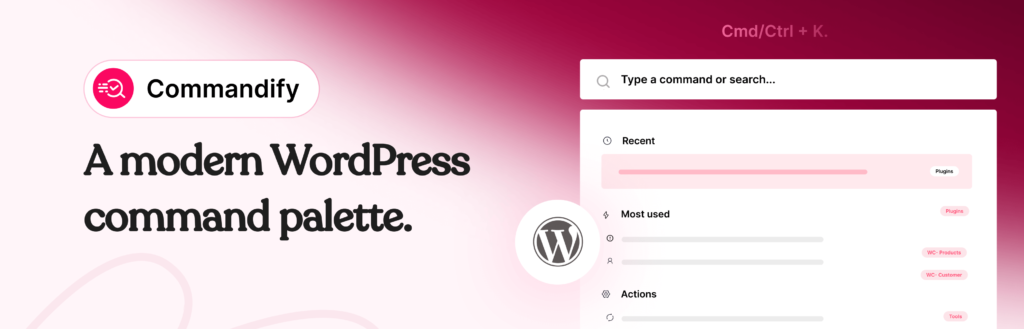
Type a customer email and it recognises the pattern and opens the customer profile. Type a product SKU and it opens the product. Change order status and add notes directly from the palette without visiting the order screen at all.
For store managers handling support queries through a helpdesk or email, this is the tool that removes the daily bottleneck. You stop switching between your support tool and WooCommerce admin screens for every individual lookup. You paste, the palette recognises the pattern, you act, and you move on.
You can read a detailed workflow walkthrough in the guide on managing WooCommerce orders, products and customers faster with Commandify.
Best for: Any store manager or admin who performs daily WooCommerce lookups. The free version is worth installing on every WordPress site. Pro pays for itself in recovered time within the first week for active WooCommerce stores.
Pricing: Free on WordPress.org. Pro Basic $47/year (5 sites) or $135 lifetime. Pro Professional $79/year (30 sites) or $215 lifetime. Full pricing here.
Category 2: Bulk Operations and Product Management
Smart Manager: Best for Spreadsheet-Style Bulk Editing
Free version available. Pro from $149/year.
WooCommerce’s built-in bulk editor is genuinely limited. You can change status and a handful of fields across selected products, but you cannot edit pricing, stock, SKUs, and custom fields across a filtered set of products from a single screen with formulas and conditional logic.
Smart Manager fixes this with a spreadsheet-style interface that loads directly inside wp-admin. Every product, variation, order, coupon, or custom post type appears in a grid you can filter, sort, and edit inline.
You change prices using formulas: increase all products in Category X by 15%, set all products with stock below 10 to a specific price, update all variations of a product simultaneously.
For stores that run regular promotions, deal with seasonal pricing changes, or need to update supplier pricing across a large catalogue, the time difference between Smart Manager and doing this manually through individual product screens is extreme. What takes hours of clicking through individual product pages becomes a filtered grid edit completed in minutes.
The Pro version adds bulk editing for WooCommerce subscriptions, bookings, and course post types if you use those extensions. It also includes an audit log that tracks who changed what and when, which is useful for teams where multiple people manage the catalogue.
Best for: Stores with 100+ products that need regular bulk updates, seasonal pricing changes, or inventory adjustments across variable products.
WooCommerce Product Import Export (WebToffee): Best for CSV-Based Catalogue Updates
Free version on WordPress.org. Pro from $69/year.
When your product updates come from supplier CSV files, when you need to migrate a catalogue from another platform, or when you want to maintain your product data in a spreadsheet and push changes in bulk, a dedicated import/export plugin is essential.
WooCommerce has a built-in importer, but it handles basic fields only. The WebToffee plugin supports all product types including variable products and variations, custom fields and meta, product categories and attributes, upsell and cross-sell relationships, and custom taxonomy fields. The Pro version adds scheduled automatic imports from an FTP or URL source, which means your catalogue can stay synchronised with a supplier feed without manual intervention.
The filtering options during export are also worth noting. You can export products by category, status, date range, or custom field value. This makes generating inventory reports and syncing specific product subsets much cleaner than the native WooCommerce export.
Best for: Stores that receive supplier data in CSV format, run multiple sourcing channels, or need scheduled automatic catalogue updates.
Category 3: Order and Customer Management
WooCommerce Order Export (WebToffee): Best for Order Data Extraction
Free version available. Pro from $69/year.
WooCommerce’s native order export is rudimentary. It exports a basic CSV with limited field selection and no filtering by custom criteria. For accounting, for fulfilment handoffs, for generating reports for external platforms, this is not enough.
The WebToffee Order Export plugin lets you export orders filtered by date range, status, shipping method, payment method, or any custom field. You choose exactly which fields appear in the export and in what order. The Pro version adds scheduled automatic exports to email, FTP, or URL endpoints, which is useful for teams using external fulfilment or accounting software that needs regular order data feeds.
Best for: Stores that hand off order data to external fulfilment providers, accountants, or reporting tools on a regular basis.
Fluent CRM: Best Self-Hosted WooCommerce CRM
Free version available. Pro from $129/year.
WooCommerce has a Customers section, but it is not a CRM. You can view a customer’s orders and basic information, but you cannot segment them, tag them based on purchase history, set up post-purchase sequences, or track their lifetime value against campaigns.
Fluent CRM is a full self-hosted CRM that lives inside WordPress and syncs with WooCommerce data automatically. Every customer is imported with their order history, spend data, and product purchase records. You can segment customers by total spend, number of orders, specific products purchased, or any combination of factors. Automation sequences trigger based on WooCommerce events: abandoned cart, first purchase, repeat purchase threshold, product category purchases.
The self-hosted model is the key differentiator from external CRM tools. Your customer data stays inside WordPress, on your server, under your control. No per-contact pricing. No external platform subscription that scales up with your list size. You pay for the plugin once per year and the data is yours.
For stores that want customer segmentation and post-purchase email automation without the cost and data complexity of Klaviyo, ActiveCampaign, or similar external platforms, Fluent CRM is the clearest choice.
Best for: Stores that want customer segmentation, post-purchase automation, and email marketing without paying per-contact pricing to an external platform.
Category 4: Reporting and Analytics
WooCommerce Admin Dashboard (Built-In): Start Here Before Adding Anything
Free, included with WooCommerce.
Before installing a third-party analytics plugin, spend an hour exploring WooCommerce’s native reporting. It is significantly more capable than most store owners realise.
The WooCommerce Admin dashboard provides real-time sales figures, filterable reports for revenue, orders, products, categories, coupons, and customers. Reports are filterable by date range, product, category, and order status. The Performance Indicators section gives a configurable overview of your chosen metrics on the main dashboard.
In 2026, the native analytics also includes customer lifetime value summaries, average order value trends, and product performance breakdowns. For a significant percentage of stores, the built-in reporting answers all the daily operational questions without any additional plugin.
Install something additional only when you identify a specific reporting need that the native dashboard cannot answer.
Metorik: Best for Advanced WooCommerce Reporting
Paid, from $50/month. 30-day free trial available.
When native WooCommerce analytics are genuinely not enough, Metorik is the benchmark external reporting tool for WooCommerce specifically. Not Google Analytics, not MonsterInsights. Metorik is built around WooCommerce data structures and understands them natively.
It provides cohort analysis showing how customer purchase behaviour changes over time. Customer lifetime value projections based on actual purchase patterns. Subscription metrics if you use WooCommerce Subscriptions. Automated email digests sent to your team at intervals you define. Segmented customer exports for re-engagement campaigns.
The pricing reflects that it is a specialist tool for stores where data-driven decisions have a measurable revenue impact. At $50/month, it is appropriate for stores doing meaningful monthly revenue where understanding customer cohort behaviour affects what you stock, how you price, and who you target with promotions.
Best for: Growing stores where customer lifetime value, cohort retention, and subscription analytics directly inform business decisions.
Category 5: Site Maintenance and Admin Health
WP-Optimize: Best for Database Maintenance
Free version available. Pro from $49/year.
WooCommerce databases accumulate overhead over time. Expired transients, post revisions from product edits, orphaned order metadata, customer session data that was never cleared, and tables left behind by deleted plugins. On a store that has been running for a year or more, this accumulated overhead adds measurable query time to admin page loads.
WP-Optimize handles cleanup through a checkbox interface that previews what will be removed before anything is deleted. It goes beyond what most caching plugins offer for database cleanup: it identifies and removes tables from plugins you have already deleted that remain in the database as orphaned remnants. It also integrates with UpdraftPlus for taking a database backup before any cleanup operation, which is good practice to have as a built-in step.
Best for: Any store more than 12 months old, especially stores that have gone through periods of testing and removing plugins.
Query Monitor: Best for Diagnosing Performance Problems
Free.
Not a permanent install. A diagnostic tool you use when something is slow and you need to know why. Query Monitor attributes every database query on any admin page to the specific plugin or theme that generated it. It also surfaces PHP errors, slow queries, uncached queries, and HTTP requests made during page load.
Install it, visit the slow page, check Queries by Component. If a single plugin is responsible for the majority of your page’s query load, that is your answer. Remove Query Monitor after your diagnostic session is complete.
Best for: Any situation where an admin page is noticeably slow and the cause is unclear.
The Store Manager’s Recommended Stack

Not every store needs every plugin on this list. The right set depends on your catalogue size, order volume, and team structure. Here is how to think about building your stack.
For Any Store, Start With These Two
Commandify free is worth installing on every WooCommerce site regardless of size. The admin navigation improvement and maintenance commands alone justify the install. Upgrade to Commandify Pro when WooCommerce order and product management become a daily workflow.
WP-Optimize is worth running quarterly on any store. Database cleanup is one of those maintenance habits that prevents slowness rather than fixing it after the fact.
For Stores With Growing Catalogues
Add Smart Manager when individual product edits become a time drain. The transition point is usually when you have 100+ products and find yourself making the same change across many products one at a time. That is exactly the use case Smart Manager solves.
Add WooCommerce Product Import Export when your product data comes from external sources. If you receive supplier CSV files, import product data from another platform, or manage product content in a spreadsheet, this plugin turns that process from manual to automated.
For Stores Focused on Customer Retention
Fluent CRM becomes relevant when your marketing strategy moves beyond one-off campaigns to customer segmentation and lifecycle automation. It is also relevant when the per-contact pricing of external CRM tools starts to become significant relative to your list size.
For Stores Where Data Drives Decisions
Check whether the native WooCommerce Admin reporting answers your questions first. It is underused. If you genuinely need cohort analysis, subscription retention metrics, or customer lifetime projections, then Metorik earns its place.
At $50/month it is not a casual addition, but for stores where those insights inform stocking and pricing decisions, the ROI is real.
The fastest improvement you can make to your WooCommerce admin workflow today requires no technical knowledge and takes two minutes. Install Commandify free from WordPress.org, press Cmd/Ctrl + K, and type the name of any WooCommerce screen or order.
Ready for the full WooCommerce command suite? Commandify Pro starts at $47/year with a 14-day money-back guarantee.
Frequently Asked Questions on WooCommerce Admin Tools
What is the difference between WooCommerce admin tools and WooCommerce store plugins?
WooCommerce store plugins extend what your store can do for customers: payment gateways, subscription billing, product types, shipping options.
WooCommerce admin tools improve how efficiently you manage the store from the inside: faster navigation, bulk editing, reporting, and customer management workflows. They solve different problems. Store plugins add capabilities. Admin tools save the time of the people running the store daily.
Does Commandify work with all WooCommerce product types?
Yes. Commandify Pro’s WooCommerce command suite supports simple products, variable products, and individual product variations. Each variation is accessible as its own searchable palette entry. It also works with custom post types registered by WooCommerce extensions.
The full walkthrough is in the WooCommerce management guide.
Is Smart Manager compatible with WooCommerce HPOS?
Yes. Smart Manager has been updated for WooCommerce HPOS compatibility. If you have enabled High-Performance Order Storage, Smart Manager’s order management grid and bulk editing features work correctly with the new storage engine.
Do I need Metorik if I already have Google Analytics on my WooCommerce store?
They serve different purposes. Google Analytics tracks traffic, acquisition channels, and user behaviour across your site. Metorik tracks customer purchase patterns, order value trends, cohort retention, and subscription metrics using your WooCommerce order data directly.
If your decisions are primarily about where traffic comes from and how users navigate the site, Google Analytics is the right tool. If your decisions are about customer lifetime value, which products drive repeat purchases, and how subscription cohorts retain over time, Metorik provides data Google Analytics cannot.
How many admin tools is too many for a WooCommerce store?
The right number is however many solve specific, real problems in your current workflow without duplicating each other. Installing tools speculatively, because they look useful or because a guide recommended them, adds plugin overhead without benefit.
The test for each plugin should be: does this remove a friction point I experience daily? If yes, install it. If you are not sure, wait until the friction point becomes obvious enough to identify.