Adding polls to your WordPress site isn’t just a fun gimmick. When done right, polls turn passive readers into active participants. Engaging polls drive feedback, improve UX, and even increase conversions.
But it all starts with one thing- asking the best poll questions.
Let’s explore what makes a good poll question and share real examples you can use across blogs, businesses, eCommerce, or community sites — all while showing how Pollify helps you do it right from the block editor.
Why Poll Questions Matter more than You Think
Most people skip engagement tactics because they feel “too extra.” But the truth?
A short poll can do what a 1,000-word survey or form can’t: get quick, honest reactions.
Good poll questions:
Capture attention in seconds
Encourage users to click and stay longer
Give you insights for better decisions
Feed algorithms with real engagement data
Whether you’re running a blog, store, or membership site; polls help you start conversations. The right question turns scrolling into action.
What Makes a Poll Question “Good”
best poll questions
A good poll question feels natural and quick to answer, something your audience reacts to instantly. It should match their context, use simple language, and connect directly to what they’re reading or doing.
Instead of sounding like a survey, it should feel like part of the conversation. With Pollify’s live Gutenberg preview, you can adjust tone and layout on the fly until it fits your post flow perfectly.
A great poll question feels:
Simple: clear, one idea per question
Relevant: tied to your audience’s context
Conversational: not robotic or survey-like
Balanced: options that cover all sides
Engaging: maybe even a little fun
In WordPress, especially with Pollify, you can build and preview your poll live in Gutenberg.
You don’t need shortcodes or iframes- just drop the Pollify block, type your question, and add options.
Best Poll Questions by Category
Here are ready-to-use examples you can add directly to your site.
1. Blog or Content Polls
Polls inside blog posts work best when they continue the conversation rather than interrupt it.
A short, relevant question after a tutorial or guide can double your engagement time and help you learn what readers want next. Over time, this data shapes your editorial strategy more accurately than analytics alone. Pollify’s native block makes this effortless to add anywhere in a post.
Examples:
Which topic should we write about next?
Do you prefer tutorials or opinion pieces?
How often do you read our blog?
Was this article helpful to you?
Would you like us to include videos in future posts?
On eCommerce sites, smart poll placement gives quick customer insights that numbers alone can’t. Add them after checkout, on product pages, or near promotions to capture opinions in real time.
Keep questions contextual- about product preferences, pricing, or satisfaction and use Pollify’s customization or NPS scoring to track how happy your buyers really are without adding friction.
Engagement in online stores is tough but asking short, visual questions really works.
Examples:
Which product color would you pick?
How was your checkout experience today?
Would you recommend our store to a friend?
What discount type do you prefer- percentage or flat amount?
How likely are you to buy again?
These can easily be turned into NPS polls using Pollify Pro — you’ll get scores that show how satisfied your customers are.
3. Community or Membership Site Polls
Polls make communities feel more connected because members see their input influencing real decisions. A single question about content, features, or upcoming events can spark interaction across forums and dashboards.
With Pollify, you can embed these directly in posts or widgets, keeping engagement high and participation frequent.
Members love being heard. Polls make it easier to shape community decisions.
Examples:
Which topic should we cover in our next webinar?
Should we add a new discussion board?
Which feature do you use most often?
How do you usually participate- chat, posts, or live calls?
Should we host meetups this quarter?
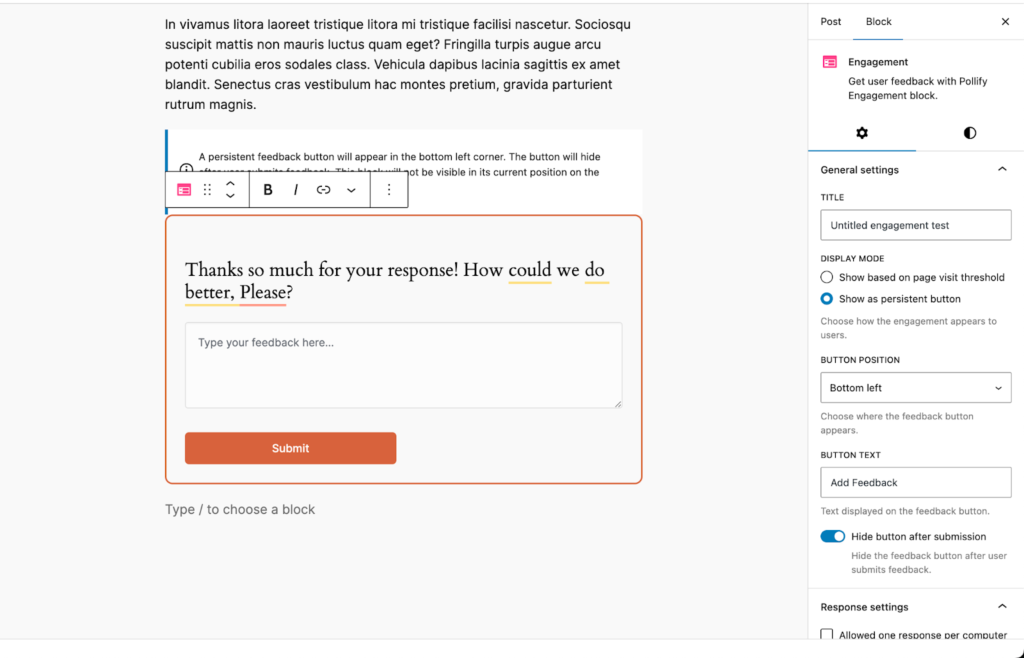
Pair these with Pollify’s Engagement Block to let members drop comments or suggestions along with their votes.
4. Education or LMS Site Polls
Polls in learning platforms turn lessons into two-way experiences. Teachers can use them to check comprehension, gather opinions, or evaluate course flow. Keeping questions short and reflective encourages honest answers, especially when anonymous voting is enabled in Pollify.
Over time, these quick feedback loops lead to stronger learning outcomes and better course design.
If you’re running a learning platform or training hub, polls can improve class engagement and course quality.
Examples:
How clear was this lesson?
What’s your preferred learning style?
Which topic do you find most challenging?
Would you like more quizzes or live sessions?
Rate the instructor’s delivery.
You can use Pollify’s anonymous voting mode to encourage honest answers- perfect for student feedback.
5. Event or Webinar Polls
During live events, polls keep the crowd involved and give instant feedback to hosts. They can set the tone at the start, measure energy mid-session, or collect impressions at the end.
With Pollify’s real-time result display, responses become part of the experience itself- it’s useful during the event and valuable for planning future sessions.
Real-time events thrive on instant reactions.
Examples:
Where are you joining from?
Which topic do you want to hear about next?
How would you rate this session so far?
Should we host this event monthly or quarterly?
Would you attend an in-person version?
Pollify’s live results display works great here, show responses as they come in to boost excitement.
6. Fun or Casual Polls for General Engagement
Casual polls break monotony and make your brand feel approachable. Quick, friendly questions spark interaction even when you’re not promoting anything. They’re perfect for blog sidebars, newsletters, or homepage widgets.
Pollify makes them easy to create without clutter, and toggling visible results adds a playful element that keeps users coming back.
Sometimes, you just want to break the ice. That’s where fun questions shine.
Examples:
Coffee or tea?
Work from home or office life?
What’s your favorite WordPress plugin (besides Pollify)?
Which season inspires you the most?
Would you rather design or write content?
Quick, relatable polls like these drive repeat visits. They work well in sidebars, footers, or between long posts.
Your poll layout should match both your content and your goal. Vertical formats suit straightforward choices, horizontal ones feel faster on mobile, and stacked options fit longer or detailed questions.
Pollify lets you preview each instantly in Gutenberg, so the poll blends with your site’s design instead of feeling like an add-on.
The question is half the job- the format seals it. Pollify gives you flexible layouts like vertical, horizontal, or stacked blocks.
Here’s how to pick one:
Goal
Best Format
Example
Simple choice
Vertical
“Which plan fits your budget best?”
Quick reactions
Horizontal
“Do you agree with this idea?”
Detailed feedback
Stacked
“Rate this post’s clarity”
Fun/casual
Emoji or like/dislike
“Which color theme do you prefer?”
Pollify also supports vote limits, start/end times, and optional result visibility- so you stay in control.
Pollify vs other Poll Tools for Engagement
If you’ve tried plugins like Crowdsignal or Poll Maker, you’ve probably hit a wall. They often use shortcodes or external dashboards that break the editing flow.
Pollify changes that, it’s built for the block editor.
Feature
Pollify
Crowdsignal
Poll Maker
Gutenberg native
✅
❌
Partial
Unlimited polls
✅
❌
✅
Live preview
✅
❌
❌
Result visibility control
✅
✅
✅
Export results
✅ (Pro)
✅
✅
Price for 1 site
$79/year
$180/year
~$39/year
Pollify gives you everything inside WordPress, no code or embeds needed. That’s the main reason creators, agencies, and small businesses are switching.
Run weekly polls in blog posts. Add one at the end of each article- it helps readers engage right after finishing.
Use polls as micro-feedback. Instead of full surveys, ask one focused question like “Did you find what you needed today?”
Add reaction polls to your homepage. Use the like/dislike or clap voting block to measure interest in your content.
Create seasonal or trend-based polls. Tie them to real-world events, like “Which 2025 WordPress trend excites you most?”
Share poll results. People love seeing where they stand in a group. Use Pollify’s “show results” toggle for transparency.
SEO Tips when Publishing Polls in WordPress
If you’re using polls to improve engagement, optimize them too. A well-structured poll page can rank on its own.
Here’s how:
Add your focus keyword (like best poll questions) in the question title or intro.
Use descriptive alt text for poll images or results graphs.
Embed polls naturally inside content- not as popups.
Link internally to your feature pages (e.g., “See how Pollify lets you export poll results”).
Encourage interaction; high engagement rates improve dwell time and indirectly help SEO.
Pollify makes this easier since every poll is a proper Gutenberg block — search engines can index it as part of the post.
Why Pollify is Built for Engagement-first Creators in WordPress
Pollify isn’t just another poll maker plugin. It’s built for WordPress users who want:
A clean, modern editing flow
No extra dashboard or external script
Unlimited polls with flexible layouts
Real engagement data directly inside the site
That’s why it’s a strong alternative to Crowdsignal, YOP Poll, and WP Polls — and a go-to choice for marketers and developers who care about both design and performance.
You can start creating polls right now inside your Gutenberg editor- no shortcode, no setup hassle. Just search Pollify in your block inserter, ask a smart question, and let your audience do the talking.
Key takeaways from the post-
Ask one clear, relevant question per poll.
Mix fun and feedback-based polls for best engagement.
Use Pollify’s layouts to match your content style.
Don’t hide results unless it adds value.
Keep polls frequent, engagement grows with consistency.
Get Pollify Free or explore Pollify Pro for advanced feedback tools like NPS, reactions, and export options.
WordCamp Dhaka 2025 is scheduled for October 18–19, 2025. You can check out all the details of WordCamp Dhaka 2025 on the official website.
With 1,250 attendees confirmed, this year’s event will be the largest WordPress gathering ever held in Bangladesh.
Bonus Part: Why Use Pollify If You’re On WordPress
If your site runs on WordPress, Pollify simply makes sense.
It’s the only poll plugin built entirely for the Gutenberg block editor, means you never need to copy shortcodes, use external dashboards, or embed third-party forms. Everything happens inside the editor, just like writing a post.
Here’s why Pollify stands out:
Block-first design: Add polls the same way you add text or images. It’s a native block, not a widget or embed.
Unlimited polls and votes: Even on the free version, you can publish as many as you like.
Live results built in: No page reloads or redirects- voters see real-time outcomes right after clicking.
Multiple layouts: Choose between vertical, horizontal, or stacked designs.
Kudos, NPS, IP Blocking (Pro): Collect claps/applause, Up/Down or NPS feedback, block unwanted IPs
Engagement block (Pro): Add reactions, kudos, or open-text responses to boost interaction.
Advanced controls: Limit votes, hide results, or set start and end times with just a toggle.
Lightweight and fast. No code bloat, no styling conflicts; optimized for speed and accessibility.
If you’re tired of clunky poll tools or shortcode-heavy plugins, Pollify gives you the modern, block-native experience WordPress has been missing. It’s built for creators, teams, and site owners who want to make engagement effortless.
You can start free, then upgrade for features like NPS polls, export options, and detailed IP tracking; all while keeping the same smooth workflow.
I still remember walking into the very first WordCamp Dhaka back in 2019.
Was just starting out in the WordPress industry then- wide-eyed, meeting plugin founders, theme developers, and community builders I’d only known from profile pictures. The energy was unreal. That event changed how I looked at open-source and collaboration.
Fast-forward to today. I’ve spent eight years in this ecosystem, and the feeling is still the same- maybe even stronger. WordCamp Dhaka 2025 isn’t just another tech conference; it’s a reunion, a reminder of how far we’ve come as a community and as a country.
When tickets went live this year, they sold out in just 2-3 minutes. The final batch even oversold by 286 tickets!
Bangladesh’s WordPress scene has exploded since 2019. After working closely with WordCamp Central and payment partners, organizers confirmed that every paid attendee will be welcomed, pushing the official headcount to a record-breaking 1,250.
Contributor Day: October 19 (Sunday)- separate venue (TBA)
Tickets: Sold Out (final count 1,250 attendees)
The Senaprangan Convention Hall inside Dhaka Cantonment offers a secure, modern setup- ideal for this scale. If you’re attending, carry valid ID and plan for the entry checkpoints; security here is tight but smooth.
The Contributor Day will follow on Sunday. It’s where WordPress lovers of all levels come together to give back, from translating strings to writing docs, testing themes, or joining the Core team. If you’ve never joined one before, it’s the most rewarding part of a WordCamp.
The Ticket Rush and How the Team Handled It
The ticket story itself became a symbol of how passionate the community has become.
The final batch of WordCamp Dhaka tickets dropped on October 11. In just 3 minutes, everything was gone. Hundreds of people refreshed the page hoping for another chance. Demand spiked so high that 286 extra transactions slipped through before the system closed sales.
Most event teams would panic, but not this one.
Instead of canceling or refunding anyone, the organizers coordinated with WordCamp Central and their payment gateway to confirm each order manually. After days of verification, they announced that no one would be left out.
“We could not pick and choose attendees and refund folks who have been patiently waiting. Now that WordCamp Central has reviewed the records, everyone who paid will be welcomed,” Chaion wrote in the official Facebook update.
The decision wasn’t easy, but it was fair and it reflects exactly why WordPress communities thrive: transparency, collaboration, and trust.
As someone who’s seen community events struggle with logistics before, I was genuinely impressed. This team didn’t just organize a conference; they set an example for how to lead a community.
wpRigel Joins WordCamp Dhaka for the First Time
This year is extra special for us- the wpRigel team is joining WordCamp Dhaka 2025 for the very first time!
It’s exciting to finally meet so many creators, developers, and marketers we’ve been collaborating with online for years.
The timing couldn’t be better. We’ve just launched the Early Bird offer for our first WordPress plugin- Pollify. A powerful yet simple poll creator for Gutenberg. Pollify lets users create and manage interactive polls directly inside the block editor- no shortcodes or complicated setup.
To celebrate both milestones- our first WordCamp appearance and Pollify’s early launch- we’re offering a massive 60% early bird discount. It’s our way of marking the start of wpRigel’s journey and sharing that moment with the broader WordPress community we’ve grown up in.
If you’re attending the event, come say hi to the team- we’d love to connect, talk plugins, and learn from everyone building amazing things in WordPress.
Why WordCamp Dhaka 2025 Feels Different
Every WordCamp is special, but WordCamp Dhaka 2025 hits differently. After six years without a major WordCamp in Bangladesh, this one feels like a restart button for all of us.
A Bigger, Bolder Stage
Bangladesh is now home to some of the world’s top WordPress companies. They’ve built products used by millions globally, and most of them are showing up this weekend- not just as attendees but as sponsors and contributors.
The sponsor list alone is massive. Under the Lalbagh Legacy (Platinum) tier, you’ll find Woo, Jetpack, Bluehost, Kinsta and others- Dhaka now has a real seat at the global WordPress table.
These brands aren’t just funding banners. They’re backing a vision- helping shape the future of WordPress education, open-source careers, and local innovation.
Fresh Voices, Familiar Faces
The speaker lineup blends both worlds- veterans and first-timers.
Hasin Hayder will lead a keynote on “WordPress Security in Action: Hardening Your Site and Server.”
Panel discussions dive into big-picture topics like:
DEIB & Community Contribution within WordPress: diversity, inclusion, and belonging in open source.
The Future of WordPress in Bangladesh & Beyond
As someone who’s watched WordPress evolve since 2015, I can say these sessions are exactly what the community needs right now. It’s not just about coding or marketing; it’s about understanding the culture that keeps this ecosystem alive.
A Reminder to Stay Kind and Curious
With 1,250 attendees and a sold-out venue, chaos is inevitable, but the Dhaka team has been clear about one thing: stay respectful.
“We want to request everyone to be polite towards each other and respect the opinion of others. We urge everyone to exercise humility and resilience.”
That message captures the soul of WordCamp Dhaka 2025. Yes, it’s a massive tech event, but it’s also a family reunion for everyone who’s ever written a line of code, built a plugin, or designed a WordPress site in Bangladesh.
WordCamp Dhaka 2025: What to Expect on Event Days, Contributor Sessions, and Beyond
The first half of this story covered the comeback of WordCamp Dhaka 2025, the ticket rush, and the community spirit behind it all. Now let’s get practical. The main event is almost here, and it’s time to explore what attendees can expect over the two incredible days ahead.
Day 1: Conference Day — Talks, Panels, and Hallway Magic
The Conference Day kicks off on Saturday, October 18, 2025, at Senaprangan, Dhaka Cantonment. With 1,250 attendees confirmed, the venue will be vibrant and full of energy.
The schedule is loaded with lightning talks, long talks, panels, and breakout sessions across themes like SEO, AI, product management, growth, tech scalability, and community building.
The Keynote
This year’s keynote opens the day with a deep dive into security and resilience in WordPress infrastructure. It will cover real-world challenges — how plugin vulnerabilities, server configurations, and emerging threats intersect. Attendees will walk away with actionable tactics for hardening both their sites and underlying servers.
Lightning Talks (Round 1)
In the first block, expect fast-paced, idea-packed lightning talks that span a range of topics: AI, SEO (especially cutting-edge LLM SEO), on-boarding & product philosophy, marketing strategies, design thinking, and balancing work/life in tech.
These talks are designed to spark curiosity and offer high-impact insights in short bursts.
Long Talks (Round 2)
Later in the day, the pace slows a bit to allow deeper, more narrative-driven long talks.
The content will merge technical depth with real experience- emphasizing growth stories, content strategy, scaling challenges, and bridging product stories with community impact.
These longer sessions will give you time to absorb lessons, ask questions, and perhaps even rethink your approach.
The Panel Discussions
Two major panel talks are set to bring perspective and inspiration:
DEIB & Community Contribution within WordPress — A crucial discussion about diversity, inclusion, equity, and belonging in open source. Expect stories from contributors who broke barriers to help others join the WordPress journey.
The Future of WordPress in Bangladesh & Beyond — This one’s close to home. The panel includes industry pioneers like Tareq Hasan, Shahjahan Jewel, and Md. Jakir Hasan, discussing how Bangladesh’s growing developer community is shaping the global WordPress economy.
These sessions are not just for listening — they’re meant to spark conversations. WordCamps are famous for what happens outside the halls: hallway chats, coffee-table introductions, and quick demos that turn into future collaborations.
If you’re attending, don’t just stick to your seat. Walk around. Say hello. That’s how you build your WordPress story.
Day 2: Contributor Day- Giving Back to WordPress and Community
The second day, Sunday, October 19, is all about contribution.
For many attendees, this will be their first Contributor Day, and trust me- it’s where you truly feel part of something bigger.
What Happens on Contributor Day
Contributor Day is when you sit with teams working directly on different parts of WordPress- from the core code to translations and documentation. You don’t need to be a developer; there’s a team for everyone.
Here are some of the main Contributor Teams planned for WordCamp Dhaka 2025:
Core – Dive into WordPress’s actual codebase.
Polyglots – Help translate WordPress into Bengali and other languages.
Docs – Improve existing documentation and guides.
Themes & Design – Contribute UI/UX insights or new theme patterns.
Training – Create learning materials for WordPress.org.
Support – Help users in the official WordPress forums.
Accessibility – Review sites and themes for accessibility improvements.
CLI, Photos, Hosting, and Test – For advanced users and testers.
If you’ve never contributed before, don’t worry- there are mentors and table leads ready to walk you through everything.
It’s not about how much code you write or how many posts you translate- it’s about joining a global mission that runs on voluntary effort and collaboration.
I joined my first Contributor Day at WordCamp Asia, and it completely changed my relationship with WordPress. I expect Dhaka 2025 to deliver that same spark for hundreds of first-timers.
Sponsors, Stalls, and Local Powerhouses
One of my favorite parts of any WordCamp is exploring the sponsor booths. It’s like a mini WordPress marketplace — full of teams showing their products, giving swag, and talking about what’s next.
This year, WordCamp Dhaka has an impressive lineup of sponsors grouped under different tiers.
Lalbagh Legacy (Platinum Sponsors)
Names like Woo, Jetpack, Bluehost, Kinsta, weDevs, Droip, and FluentCart headline the list. These are companies that actively shape the global WordPress landscape and now they’re backing the local community too.
Ahsan Elite (Gold Sponsors)
Brands like Tutor LMS, Business Globalizer, and RadiusTheme join this tier, showcasing the country’s booming EdTech and plugin development talent.
Sonargaon Circle (Silver Sponsors) & Jamdani Essence (Bronze Sponsors)
These include local innovators like WPPOOL, WPBakery, Coders Time, and Plugincy– proving that WordPress growth in Bangladesh isn’t limited to a few big names anymore.
Each sponsor booth is more than just a marketing spot. Many have on-site teams offering live demos, career advice, and collaboration opportunities. If you’re looking for partnerships or inspiration, block time to explore them.
Travel, Entry, and Local Tips
Getting to the Venue
The WordCamp Dhaka location: Senaprangan, inside Dhaka Cantonment is easily accessible by private car, Uber, or Pathao. However, since it’s a restricted area, attendees should arrive early to allow for ID checks and security protocols.
Bring your ticket confirmation email (from WordCamp Central) and a valid photo ID. Volunteers and organizers will be there in yellow and red shirts respectively to guide you.
Food, Wi-Fi, and Facilities
Lunch, snacks, and coffee will be provided on-site for attendees. The organizers have confirmed a solid internet setup- so expect stable Wi-Fi for live tweeting, streaming, or posting those all-important selfies with your favorite plugin founders.
Weather & Dress Code
October in Dhaka is usually warm and humid. Lightweight cotton or linen clothing is your best friend and don’t forget to carry a refillable water bottle and your business cards (yes, they still work magic at WordCamps).
I’ve attended several WordCamps across Asia, but this one feels personal. Maybe because I was there in 2019 when it all started, or maybe because I’ve seen how far our local ecosystem has come.
This isn’t just an event- it’s a milestone.
It’s where WordPress in Bangladesh officially steps onto the global stage, not just as users but as contributors, product makers, and community builders.
Every booth, every talk, and every handshake inside Senaprangan will tell the same story that open source works when people care enough to give back.
And if the enthusiasm around WordCamp Dhaka 2025 tickets and the record-breaking attendance is any sign, the future of WordPress in this country looks incredibly bright.
Wrapping Up on WordCamp Dhaka 2025
So here we are- just days away from WordCamp Dhaka 2025.
Thousands of hours of volunteer work, hundreds of conversations, and months of planning all come down to this weekend.
If you’ve been part of the WordPress world for years, this is your moment to reconnect.
If you’re new, this is your chance to experience what community truly means.
As someone who’s seen the ecosystem grow for nearly a decade, I can say this confidently:
WordPress in Bangladesh has never been stronger and WordCamp Dhaka 2025 is living proof of it.
See you at Senaprangan next week on October 18–19, 2025. Let’s make it unforgettable.
When we first introduced you to Pollify, our goal was simple, to bring a powerful, 100% Gutenberg-powered polling experience entirely inside WordPress.
No SaaS accounts, no clunky shortcodes, no “almost matches” in design. Just a seamless, native way to create polls, surveys, and voting forms right where you already work: in the block editor.
Since that initial launch, something amazing has happened.
Hundreds of site owners have been using Pollify to collect feedback, spark conversations, and engage their audiences; from personal blogs to membership sites to online stores.
But we also started hearing the same request over and over:
“Pollify is great for simple polls… but I want more advanced poll types, better analytics, and features I can actually use to grow my business- without switching to a SaaS tool like Crowdsignal.”
Pollify Pro isn’t just “more of the same”- it’s a complete upgrade designed for creators, marketers, and businesses who need richer interactions, deeper insights, and total control over their data… all while keeping everything inside WordPress.
So today, we want to show you exactly what’s new in Pollify Pro and why it’s already becoming the go-to choice for serious WordPress users.
What’s New in Pollify Pro
When we started building Pollify Pro, we knew it had to be more than “just more options”.
It had to give you new ways to interact with your audience, collect actionable data, and actually move the needle on your goals- whether that’s sales, content engagement, or community growth.
Here’s what’s now possible.
Advanced Poll Types- Engagement That Fits Any Scenario
The free version of Pollify already lets you create solid multiple-choice polls with single or multiple votes. That’s great for quick feedback, but in reality, your engagement needs aren’t always the same.
Sometimes you want fast, lightweight reactions.
Sometimes you want deep, open-ended responses.
Sometimes you need data you can act on at a strategic level.
Pollify Pro introduces four advanced poll types that cover all those situations— without having to install separate plugins or pay for SaaS tools.
Here’s what you get the moment you upgrade:
1. Kudos Feedback Voting
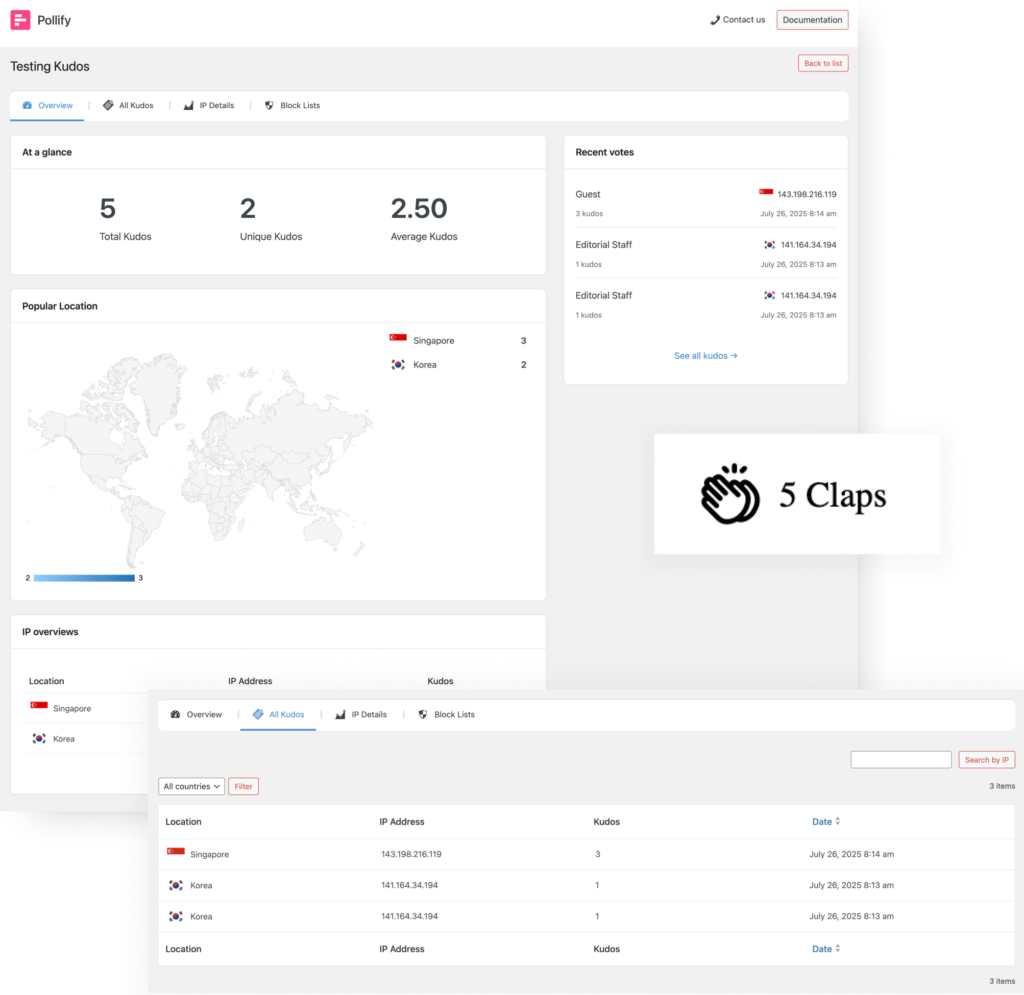
Sometimes your audience doesn’t want to fill out a whole survey. They just want to say, “Nice job!” without breaking their flow. The Kudos block (you might also think of it as “applause” or “clap voting”) is the perfect lightweight feedback tool for those moments.
How it works: You place a Kudos block under a blog post, product description, course lesson, or portfolio piece. Visitors can give you a quick thumbs-up in the form of a “clap” — no typing, no long forms.
Kudos/Applause or Clap voting with Pollify Pro
Example: Imagine you’ve just published a deep-dive guide on SEO trends for 2025. At the end, you add:
“Did you find this helpful? Give it a clap!”
Within hours, you’ll know exactly how many readers appreciated it — without having to interpret comment sections or guess from bounce rates.
Core benefits:
Effortless engagement — perfect for audiences that don’t normally leave comments.
Content validation — see which posts or pages your audience values most.
Idea prioritization — double down on topics that get the most claps.
2. Up/Down or Like/Dislike Response Polls
While Kudos voting tells you that people liked something, Up/Down polls tell you how much. Think of it like a quick sentiment check — “Yes, this works” or “No, not for me.”
How it works: You set up a block with a simple Up arrow and Down arrow. Users click one, and you instantly get a read on public opinion.
Use cases:
Content feedback: “Was this tutorial easy to follow?”
Feature testing: “Should we keep this beta feature?”
Product feedback: “Did this month’s update improve your experience?”
Up/Down or Like/Dislike voting with Pollify Pro
Example: If you run a cooking blog, you could add an Up/Down poll under a recipe asking:
“Would you make this dish again?”
Core benefits:
Faster decisions — no need to run long surveys for simple questions.
Spot patterns early — if a post is getting a lot of downvotes, you can act before it tanks engagement.
Highly shareable — people love simple “yes/no” style interactions.
3. NPS Loyalty Scoring
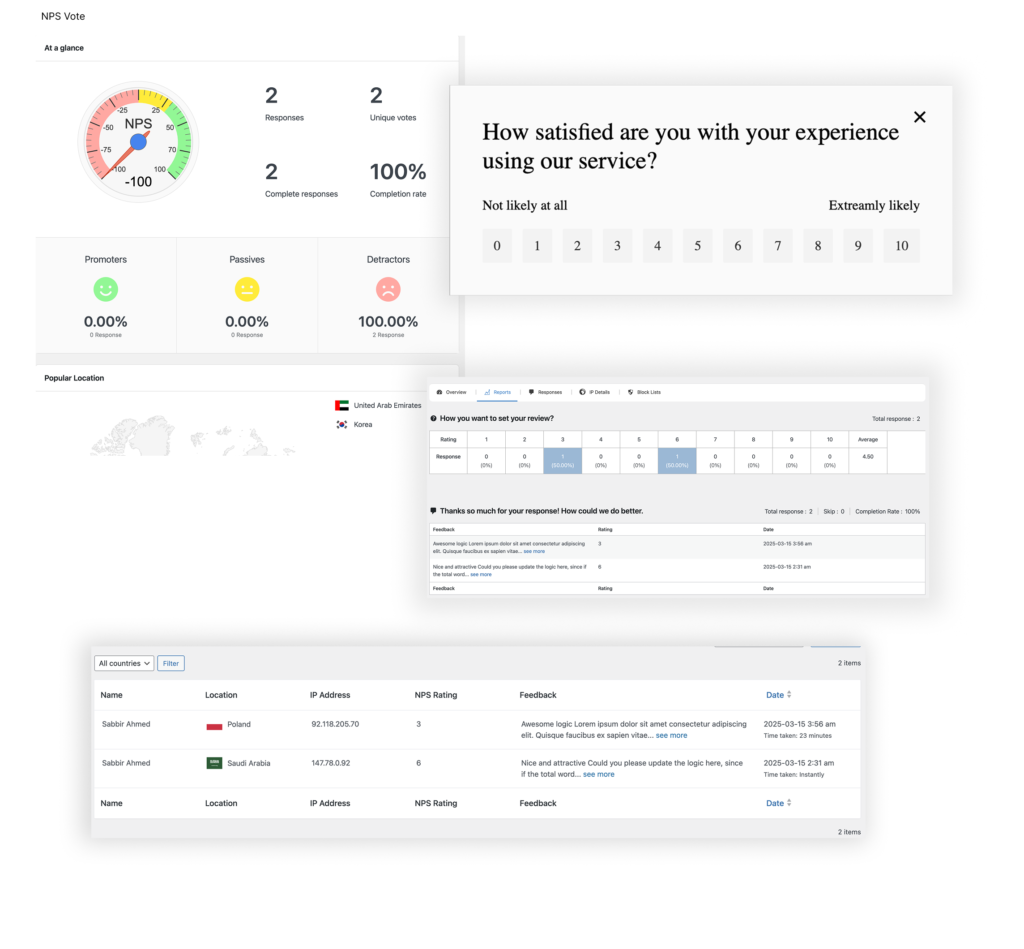
If you’ve ever studied customer retention, you’ve probably heard of Net Promoter Score (NPS). It’s the gold standard for measuring brand loyalty, and now you can run NPS surveys right inside WordPress.
How it works: You ask one question:
“On a scale of 0 to 10, how likely are you to recommend us to a friend or colleague?”
Users select their number, and Pollify Pro automatically groups them into Promoters, Passives, and Detractors.
NPS voting with Pollify Pro
Use cases:
Membership sites: Track member satisfaction over time.
Product launches: Measure loyalty before and after releasing a new feature.
Customer onboarding: See how new users feel after their first 30 days.
Example: A WordPress agency could send an NPS poll to recent clients to find out if they’d refer them to others — turning happy clients into active advocates.
Core benefits:
Predict churn– low scores often mean a customer is at risk of leaving.
Identify promoters– focus on people who will happily spread the word.
Track improvement– see if changes in your product or service boost loyalty.
4. Advanced IP Blocklist
Sometimes you want to keep your polls clean and accurate by blocking certain IP addresses — whether it’s to stop spam voting, exclude internal team members, or prevent repeated manipulations of results.
How it works: Pollify Pro lets you add specific IPs to a blocklist. But here’s the game-changer — you get two options:
Keep historical data for those IPs (so past votes still count for analytics).
Completely remove all past records associated with them for a clean slate.
Use cases:
Internal testing: Block your own team’s IPs so internal votes don’t skew results.
Prevent abuse: Stop competitors or bots from spamming votes.
Geo-specific polls: Block traffic outside your target region.
Core benefits:
Accurate analytics — decisions based on clean, real data.
Flexible control — choose whether past data is retained or deleted.
Better trust in results — no more second-guessing poll integrity.
Bottom line: With these poll types and IP blocker, Pollify Pro lets you handle everything from quick mood checks to strategic decision-making. All without leaving the block editor.
Pro-Level Analytics & Tracking with Pollify Pro: Insights You Can Act On
Collecting votes is one thing. Knowing who voted, where they’re from, and how their preferences change over time is where real business value comes in.
Pollify Pro gives you:
Vote-by-User & Vote-by-Role Tracking: If you have members, students, or tiered customers, you can see how each group votes. This is huge for tailoring content or offers.
Geographic Insights: Discover where your most engaged voters live. Great for planning events, targeting ads, or personalizing content.
CSV Export (Coming soon): Hand your poll results straight to your marketing team, data analysts, or clients.
Trend Analysis: See how opinions shift week over week or month over month.
Crowdsignal can give you some of this — but only in the paid SaaS dashboard. Pollify Pro keeps it all inside your WordPress admin, with no monthly bill.
Design & Branding Freedom – Make It Yours
Your polls should feel like part of your site, not something bolted on. With Pollify Pro, you get:
Extra themes & layout patterns for variety.
Advanced styling controls for buttons, typography, spacing, and borders.
Theme style inheritance so your polls look native from the start.
Crowdsignal often struggles here because it loads from their servers. Pollify Pro renders entirely in WordPress- faster load times and pixel-perfect brand matching.
Marketing & Engagement Features – Turn Polls Into Conversions
Pollify Pro isn’t just for collecting opinions — it’s for driving action.
Email Follow-Up: Send targeted “thank you” messages, special offers, or resources based on answers.
Lead Capture: Ask for an email before showing results to grow your list.
Answer-Based Redirects: Send users to different landing pages depending on their choice.
These features mean every poll can double as a list-building tool, upsell opportunity, or engagement funnel.
Quick Note on What’s Coming Next in Pollify Pro
I’m not stopping here. A couple of features are already in development, and I’m excited about what they’ll unlock for you:
Two New Poll Types: expanding beyond Kudos, NPS, and Up/Down, you’ll soon be able to run VS-style comparison polls (perfect for “this vs that” battles) and Rating polls (stars, emojis, or custom icons).
One-Click Data Exports: need to crunch numbers in Excel or share results with your team? You’ll be able to export all your poll data in CSV format instantly, with full filtering options.
More Layout Patterns & Themes: We’re working on fresh, professionally-designed templates so your polls can look great right out of the box.
If you’re already using Pollify Pro, these updates will drop right into your dashboard as soon as they’re ready — no extra purchase needed.
Pollify Pro vs Crowdsignal: Which One’s Right for You?
I’ve been in the WordPress space long enough to know there’s no shortage of poll and survey tools. But when it comes to Pollify Pro vs Crowdsignal, the differences run deeper than just “self-hosted vs SaaS.”
Both tools can collect votes.
Both can display results.
But the way they do it and what you get for your time and money is a completely different story.
Installation & Setup: Native vs External
Pollify Pro: Install it like any other WordPress plugin, and it’s ready to go inside your Gutenberg editor. No extra accounts, no separate dashboard to log into. Everything- from poll creation to results analysis, happens in your WordPress admin.
Crowdsignal: Even though it has a WordPress plugin, it’s really a front-end for their SaaS platform. You’ll still need a Crowdsignal account, and your polls live on their servers. That means an extra login, a separate UI, and in some cases, less control over your data.
Winner: Pollify Pro — fewer moving parts, faster setup, and no platform lock-in.
Poll Types: Who Gives You More Ways to Engage?
Crowdsignal supports basic multiple-choice, rating scales, and a few custom question types. But if you want things like VS polls, NPS surveys, or open-text feedback without limits, you’ll need to jump to their paid tiers.
Pollify Pro gives you all advanced poll types out of the box:
NPS surveys (1–10 scoring)
Up/Down voting for micro-feedback
Feedback polls with open-text fields
Visual VS polls for side-by-side comparisons and Star or emoji rating polls (coming soon)
And, of course, the free multiple-choice and multi-vote polls already in Pollify Free
Example: Want to run a “Feature A vs Feature B” poll and also collect written reasons for each choice? In Crowdsignal, that’s either impossible without workarounds or requires custom coding. In Pollify Pro, you just add two blocks and you’re done.
Winner: Pollify Pro — more variety, more flexibility, and no nickel-and-diming for extra poll types.
Branding & Design Control
Here’s where the hosted vs self-hosted difference really shows.
Crowdsignal: Your design options depend on their theme library. You can tweak fonts and colors, but because the polls load from their servers, making them fully match your brand is harder. Advanced customization often means custom CSS overrides and those can break if their code changes.
Pollify Pro: Since it renders directly in Gutenberg, it inherits your theme styles automatically. Want to override them? You’ve got full control over colors, typography, button styles, spacing, and borders- all inside the block settings. Plus, Pollify Pro ships with extra themes and patterns so you’re not starting from scratch.
Winner: Pollify Pro — your polls look like they belong on your site from day one.
Data Ownership & Privacy
This one’s simple:
Pollify Pro stores all results in your WordPress database. You control it, you back it up, you delete it when you want. No third parties touching it.
Crowdsignal stores results on their servers. That means GDPR compliance depends partly on them, and exporting all your data isn’t as straightforward.
If your site deals with sensitive audience data or operates in a strict privacy jurisdiction, owning your poll data matters.
Winner: Pollify Pro — complete control, no external dependencies.
Analytics & Reporting
Crowdsignal has a nice SaaS dashboard with charts, but a lot of premium analytics features are paywalled. You get basic vote counts for free, but for trend data, filtering, and CSV export, you’re upgrading.
Pollify Pro bakes these in:
Vote-by-user & vote-by-role
Geographic voting insights
Trend analysis over time
CSV export for offline reporting or BI tool integration
And because it’s native to WordPress, you can cross-reference poll data with your Google Analytics, WooCommerce sales, or membership reports — without having to connect two separate platforms.
Winner: Pollify Pro — pro-grade analytics without the recurring bill.
Pricing & Value
Crowdsignal’s free plan is fine for hobby sites but caps you at 2,500 total lifetime responses — across all polls. That’s not monthly. That’s forever. After that, you pay a recurring fee.
Pollify Pro? No limits on responses, polls, or questions. You pay once per year (or lifetime if you choose), and you can run as many polls as you like — for as many visitors as you can get.
Winner: Pollify Pro — predictable pricing and no response caps.
Speed & Performance
Because Crowdsignal polls load from their servers, there’s always an extra external request. Not a huge deal for some sites, but if you’re chasing Core Web Vitals or trying to keep load times under 2 seconds, it’s another factor to manage.
Pollify Pro loads entirely from your WordPress site, using optimized block assets. No external dependencies, no third-party script delays.
Winner: Pollify Pro — faster loads, better performance scores.
Here’s a clean, quick comparison table you can drop into your article after the detailed comparison section — matches the tone and structure you’ve been using, but makes it easy for readers to scan.
Pollify Pro vs Crowdsignal At a Glance
Feature / Criteria
Pollify Pro
Crowdsignal
Editor Integration
100% Gutenberg-native blocks – build polls directly in WordPress
Separate interface, polls embedded via shortcode or script
Poll Types
Standard polls + Kudos (Applause), Up/Down, NPS, more coming soon (VS & Ratings)
Standard polls, surveys, quizzes
Customization
Full block styling controls + theme style inheritance
We built it for WordPress users who value control, performance, and flexibility- without giving up ease of use.
What’s Coming Next in Pollify Pro
We’ve said it before- Pollify Pro is already feature-packed. But I’m nowhere near done. The whole point of building this as a Gutenberg-first plugin is that I can keep pushing what’s possible without asking you to relearn a whole new tool every time.
Here’s what’s on the roadmap:
Conditional Logic for Polls
Soon, you’ll be able to show or hide questions based on previous answers. That means smarter polls where every participant only sees questions relevant to them.
Example: If someone says they’re an existing customer, they’ll see different follow-up questions than a first-time visitor.
Why it matters: You get more accurate data and your visitors spend less time answering irrelevant questions.
Poll Result Sharing
I’m working on a “Share Results” feature that lets visitors post poll outcomes directly to social media — with branded images generated on the fly. Imagine a trend poll going viral because people want to show how they voted. That’s free traffic you can’t buy.
AI-Assisted Poll Creation
This one’s experimental, but I’m excited about it. You’ll be able to describe the kind of poll you want, and Pollify will auto-generate questions, answer choices, and even design– ready for you to tweak. Perfect for site owners who want speed without sacrificing quality.
Integration Hub
Yes, you can already use Pollify with any theme. But soon, I’m adding official integrations with:
LMS plugins like LearnDash & TutorLMS (lesson feedback polls)
Email platforms like FluentCRM & MailPoet (segment subscribers based on answers)
Public Results Pages
You’ll be able to publish a dedicated, SEO-friendly “Poll Results” page with sorting, filters, and charts. Great for transparency and content marketing.
Advanced Anti-Spam & Moderation
Vote verification via email or membership logins, plus AI-powered spam detection for open-text answers. More security, less junk data.
The point is- We’re not building Pollify Pro just for today’s needs. We’re building it to stay ahead of what WordPress site owners will want next year.
How to Get Started with Pollify Pro
If you’ve read this far, you already know Pollify Pro is built for WordPress users who want more control, better performance, and richer engagement tools than any SaaS poll solution can offer.
Publish, watch the results come in, and start using that data to make smarter decisions.
Step 4: Keep Growing with New Features
We release updates regularly — and as a Pro user, you get them all. That means every roadmap feature we mentioned above? You’ll have it the moment it’s ready.
Your audience is talking. Pollify Pro is how you make it easy and engaging for them to tell you what they think.
➡️ Get Pollify Pro today and start building polls your visitors will actually enjoy answering.
Final Thoughts: Why Now Is the Time to Try Pollify Pro
If you’ve been relying on generic polling tools, fighting with shortcodes, or paying too much for SaaS platforms that take your data off-site, now’s your moment to switch.
Pollify Pro isn’t just another poll plugin– it’s a complete audience engagement system built to work inside your WordPress site, exactly where you need it. From NPS surveys and VS polls to lead capture and deep analytics, you get everything in one place without sacrificing speed, control, or branding.
And this is just the beginning. I’m already working on new features that will make Pollify even more powerful- from advanced integrations to smarter targeting options.
So here’s my challenge to you:
Install Pollify Pro today. Create your first poll in minutes. Watch how quickly your audience engages when the experience is seamless and fully branded to your site.
The average website visitor spends just 54 seconds on a page– unless you give them a reason to stay.
Think about it: You’ve spent hours crafting the perfect blog post, designing your homepage, or creating that killer landing page. But within less than a minute, most visitors are gone. Poof. Just like that.
The problem isn’t your content (well, maybe it is, but let’s assume it’s not). The real issue is that static content simply doesn’t cut it anymore. Your visitors want interaction, engagement, something that makes them feel involved rather than just… reading.
Here’s where strategic poll implementation comes in. I’m not talking about random “What’s your favorite color?” polls that add zero value. I’m talking about five specific types of polls that will transform passive visitors into engaged participants while giving you invaluable data about your audience.
Ready to turn those 54-second visits into meaningful interactions?
Let’s dive in.
Why Every WordPress Site Needs Multiple Poll Types
Before we jump into the specific poll types, let’s talk about why you need variety in your polling strategy. It’s like having different tools in a toolbox – you wouldn’t use a hammer for everything, right?
Audience Segmentation Made Simple
Different visitors come to your site with different intentions. Some are first-timers who need guidance, others are returning visitors looking for specific information, and some are ready-to-buy prospects who need that final push. Different poll types serve different visitor segments.
Content Lifecycle Strategy
Your content goes through various stages – from initial engagement to conversion and beyond. Each stage requires a different approach to maximize effectiveness. Welcome polls work great for new visitors, while feedback polls are perfect for post-purchase experiences.
Business Intelligence Collection
WordPress powers 43.1% of the internet, but most sites are flying blind when it comes to understanding their audience. Multiple poll types give you multiple data collection points, creating a comprehensive picture of your visitors’ needs, preferences, and behaviors.
SEO Benefits You Can’t Ignore
Interactive content increases dwell time, reduces bounce rates, and sends positive user signals to search engines. When someone engages with your poll, they’re spending more time on your page – and Google notices.
Here’s what the data tells us: Interactive content generates 2x more engagement than static content. Yet most WordPress sites stick to the same old blog post format and wonder why their engagement metrics are flatlining.
The solution? Strategic poll implementation that serves your business goals while providing genuine value to your visitors.
Poll Type 1: The Welcome Poll – Know Your Audience
This is your digital handshake – the first impression that sets the tone for everything that follows.
The welcome poll is designed for one purpose: first-time visitor segmentation and personalization. Think of it as your site’s concierge, greeting visitors and guiding them toward the most relevant content.
When to Use Welcome Polls
Your homepage is the obvious choice, but don’t stop there. Landing pages from paid campaigns, first-time blog visits, and even your about page can benefit from strategic welcome polls. The key is placing them where new visitors are most likely to land.
Question Examples That Actually Work
Instead of generic questions, try these proven approaches:
What brought you here today?
Looking for WordPress tutorials
Need help with my existing site
Researching plugins and tools
Just browsing around
2. What’s your biggest challenge with [your topic]?
Getting more traffic
Converting visitors to customers
Technical WordPress issues
Creating engaging content
3. Which best describes you?
Complete WordPress beginner
I have some WordPress experience
I’m a WordPress developer
I run a WordPress agency
Welcome Poll Implementation Strategy: Entry Point Optimization
The magic isn’t just in the questions – it’s in what you do with the answers.
Based on their response, you can:
Show personalized content recommendations
Display relevant lead magnets
Adjust your site’s messaging
Track different user journeys
Success Metrics to Track
Completion rate (aim for 60%+ for well-designed polls)
Segmentation accuracy (how well responses predict actual behavior)
Impact on bounce rate and session duration
Advanced Features That Make a Difference
Modern poll plugins like Pollify allow you to display different content based on poll answers. Imagine showing WordPress tutorials to beginners while displaying advanced development resources to experienced users – all automatically.
Here’s a ready-to-use template you can implement today:
Welcome Poll Template:“Help us personalize your experience – what describes you best?”
I’m new to WordPress and need guidance
I’m a WordPress user looking to improve my site
I’m a developer or designer
I run an agency and serve clients
Just checking out what you offer
Real-World Impact of Welcome Poll
One site I analyzed saw a 34% increase in page views after implementing welcome polls. Why? Because they were showing the right content to the right people from the moment they arrived.
The key lesson: Don’t make visitors hunt for relevant content. Ask them what they need and give it to them.
Poll Type 2: The Feedback Poll – Improve Your Content
If welcome polls are your handshake, feedback polls are your ongoing conversation with your audience.
These polls serve one critical purpose: content optimization and audience satisfaction measurement. But here’s the thing – most people do feedback polls wrong.
Strategic Placement or Feedback Poll for Maximum Response
Timing is everything with feedback polls. Place them at the end of blog articles (but before comments), after course modules, or on product pages where people have had time to consume your content.
The worst place? Pop-ups that interrupt reading. Don’t be that site.
Question Framework for Feedback Poll That Gets Honest Answers
“Was this helpful?” (with a follow-up for context) If yes: “What was most valuable?” If no: “What were you hoping to find instead?”
“What would you like to see more of?”
More detailed tutorials
Video explanations
Real-world examples
Tool recommendations
“Rate this content” (1-5 scale with specific criteria) Instead of just “Rate this post,” try “How well did this solve your problem?” or “How likely are you to recommend this to a colleague?”
Immediate Action Strategy for Feedback Poll
Here’s where most sites fail: They collect feedback and do nothing with it. The magic happens when you act on feedback immediately and publicly.
Got feedback that your tutorial was missing screenshots? Add them and mention in your next email that you updated the content based on reader feedback. This builds trust and shows you’re listening.
Long-term Content Strategy
Use feedback data to plan future content. If 70% of readers want more video explanations, guess what your next content priority should be?
Implementation Examples
Blog Post Integration: At the end of tutorials: “Did this solve your problem? What else would you like to know?”
Product Page Feedback: “How confident do you feel about using this plugin after reading this review?”
Course Content: “What part of this lesson was most challenging?”
Pro Tips for Better Response Rates on Feedback Poll
Time your requests wisely – Don’t ask for feedback before someone has had time to consume your content
Incentivize honest feedback – Offer a small bonus like a checklist or template
Show that you act on feedback – Publicly mention improvements made based on user input
Keep it short – One question is often better than five
The goal isn’t just to collect feedback – it’s to create a feedback loop that continuously improves your content while building stronger relationships with your audience.
Poll Type 3: The Decision Poll – Guide Your Visitors
Ever watched someone stand frozen in the cereal aisle, overwhelmed by choices? That’s what happens to your website visitors when you give them too many options without guidance.
Decision polls solve this by helping visitors navigate options while collecting valuable preference data.
Use Cases for The Decision Poll That Actually Matter
Product Comparison Assistance: “Which matters most for your next WordPress plugin?”
Easy setup and user-friendly interface
Advanced features and customization
Strong customer support
Budget-friendly pricing
Content Recommendation Engine: “What’s your experience level with WordPress?” Then show beginner tutorials or advanced guides accordingly.
Service Selection Guidance: “What’s your biggest priority right now?”
Increasing website traffic
Improving conversion rates
Technical site improvements
Content creation help
The Psychology of Decision Poll: Reducing Choice Paralysis
When faced with multiple options, people often choose nothing. Decision polls work because they:
Break complex decisions into simple questions
Provide personalized recommendations
Make visitors feel guided rather than overwhelmed
Create a sense of progress toward their goal
Business Value: Understanding Customer Priorities
But here’s the hidden benefit: You’re not just helping visitors – you’re collecting data about what matters most to your audience. This informs everything from product development to marketing messaging.
Technical Implementation: Dynamic Results
Modern poll plugins allow you to show different results based on answers. Someone who prioritizes “budget-friendly” options sees different recommendations than someone focused on “advanced features.”
Real-World Applications of The Decision Poll
E-commerce Example: “Which feature matters most in your next WordPress theme?”
Mobile responsiveness
Page speed optimization
SEO-friendly structure
Design flexibility
E-commerce integration
Based on their answer, show themes that excel in their priority area.
Service Business Example: “What’s your timeline for this project?”
I need help immediately
Within the next month
I’m planning for next quarter
Just researching options
This helps qualify leads while providing appropriate next steps.
Content Website Example: “What type of content helps you learn best?”
Step-by-step written tutorials
Video walkthroughs
Interactive examples
Downloadable templates
Then customize your content recommendations accordingly.
Advanced Strategies for Decision Poll Types
Progressive Disclosure: Start with broad questions, then get more specific based on answers. This prevents overwhelming visitors while gathering detailed information.
Personalized Recommendations: Use poll data to create custom landing pages or email sequences for different visitor segments.
Lead Scoring Integration: Assign different point values to answers to identify high-intent prospects automatically.
The key is making visitors feel like you understand their specific situation and can provide relevant solutions.
Poll Type 4: The Trend Poll – Tap Into Current Events
Want to create content that gets shared, discussed, and brings new visitors to your site? Trend polls are your secret weapon.
These polls leverage trending topics for viral engagement and social sharing while establishing your site as a thought leader in your niche.
Timing Strategy for The Trend Poll: Newsjacking Done Right
The key to successful trend polls is timing. You need to be early enough to catch the wave but not so early that people don’t understand what you’re talking about.
Monitor industry news, social media conversations, and Google Trends. When you spot something gaining momentum, create a poll around it within 24-48 hours.
Question Design for The Trend Poll: Controversial But Professional
The best trend polls take a stance or ask about divisive topics – but in a professional, thoughtful way.
Avoid: “Is AI stupid or amazing?” Try: “Which AI impact concerns you most as a content creator?”
Job displacement fears
Quality control challenges
Ethical considerations
Learning curve difficulties
Viral Mechanics: Shareable Results
Design your polls so the results themselves are worth sharing. Include surprising insights, counterintuitive findings, or data that challenges common assumptions.
Community Building: Discussion Starters
Great trend polls don’t just collect votes – they spark conversations. Encourage comments by asking follow-up questions or sharing your own perspective on the results.
Examples of The Trend Poll by Industry
WordPress/Tech: “Which WordPress trend will have the biggest impact in 2025?”
AI integration in content creation
Headless WordPress adoption
Enhanced security measures
Mobile-first design evolution
Digital Marketing: “What’s the future of email marketing?”
AI-powered personalization will dominate
Privacy laws will limit effectiveness
Video emails will become standard
It’ll remain mostly unchanged
General Business: “Remote work in 2025: What’s your prediction?”
Full return to office
Hybrid will be the norm
Fully remote becomes standard
It depends on the industry
The Trend Poll: Distribution Strategy for Maximum Reach
Social Media Optimization: Create shareable graphics with poll questions and results. Twitter/X, LinkedIn, and Instagram all love interactive content.
Influencer Engagement: Share your poll with industry influencers and ask for their take. Many will share interesting polls with their audience.
Community Forum Sharing: Post in relevant Facebook groups, Reddit communities, or industry forums (following their rules, of course).
Measuring Success
Track not just poll participation but:
Social shares and mentions
New visitors from social traffic
Comments and discussion quality
Follow-up content engagement
The goal isn’t just viral content – it’s building authority and bringing new people into your ecosystem.
Poll Type 5: The Exit Intent Poll – Recover Lost Visitors
sample poll created with Pollify
Here’s a sobering truth: Most visitors will leave your site without taking any action. But before they go, you have one last chance to engage users.
Exit intent polls are your final opportunity to convert departing visitors into subscribers, customers, or at least gather valuable data about why they’re leaving.
Technical Setup: Exit Intent Detection
Modern poll plugins can detect when someone is about to leave (mouse movement toward the browser’s close button, scrolling to the bottom, or inactivity). The key is timing – too early and you’re annoying, too late and they’re gone.
Question Strategy for The Exit Intent Poll: Quick, Valuable, Non-Pushy
Exit intent polls need to be fast and valuable. People are already leaving, so you have seconds to grab their attention with something worthwhile.
Avoid: “Wait! Don’t go! Subscribe to our newsletter!” Try: “Before you go, quick question: What were you hoping to find today?”
Recovery Tactics: Address Common Objections
Use exit poll data to understand why people leave, then address those issues proactively on your site.
Common departure reasons:
Couldn’t find specific information
Content wasn’t detailed enough
Looking for different pricing/options
Site was too slow or confusing
Found what they needed elsewhere
Data Collection: Understanding Departure Reasons
This data is gold for improving your site. If 40% of people say they were “looking for pricing information,” maybe you need clearer pricing pages or better navigation.
Question Examples That Work for The Exit Intent Poll
“Before you go, what were you looking for?”
Specific tutorial or guide
Product information
Pricing details
Contact information
Something else (please specify)
“What would bring you back to this site?”
More detailed tutorials
Better search functionality
Regular email updates
Exclusive offers or content
“Quick question: Why didn’t you [take action]?” (customize based on your goal)
Didn’t find what I needed
Want to research more options
Price isn’t right for me
Not ready to make a decision
Integration Opportunities for The Exit Intent Poll
Email Capture with Value: “Couldn’t find what you needed? Join our weekly newsletter and be first to know when we publish new guides.”
Content Recommendation: Based on what they were looking for, suggest specific articles or resources.
Problem-Solving Resource: “Sounds like you’re dealing with [specific problem]. Here’s a free checklist that might help.”
Success Metrics
Recovery rate (percentage who engage with exit poll)
Conversion from exit poll to desired action
Quality of feedback received
Improvement in site metrics after implementing suggestions
The key is viewing exit intent polls not as desperate last attempts, but as valuable feedback tools that help you improve the experience for future visitors.
Implementation Roadmap for WordPress Poll: Getting Started
Now that you understand the five poll types, here’s how to roll them out systematically without overwhelming yourself or your visitors.
Week-by-Week Rollout Strategy
Week 1: Welcome Poll on Homepage
Start with your highest-traffic page. Install your chosen poll plugin and create a simple welcome poll. Focus on getting the technical setup right and measuring initial response rates.
Week 2: Feedback Polls on Top Content
Identify your 5 most popular blog posts or pages. Add feedback polls to the bottom of each. Start collecting data about content effectiveness.
Week 3: Decision Polls on Key Pages
Add decision polls to your most important conversion pages – pricing pages, service pages, or product comparisons. Help visitors navigate their options.
Week 4: First Trend Poll for Social Engagement
Create your first trend poll around a current industry topic. Focus on making it shareable and driving discussion.
Week 5: Exit Intent Polls on High-Traffic Pages
Implement exit intent polls on pages with high bounce rates or where you’re losing potential conversions.
Success Tracking Framework
Don’t just implement and forget. Track these metrics for each poll type:
Universal Metrics:
Participation rates by poll type
Completion rates and drop-off points
Impact on overall engagement time
Correlation with conversion goals
Poll-Specific KPIs:
Welcome polls: How well do responses predict actual behavior?
Feedback polls: What percentage of feedback gets implemented?
Decision polls: Do recommendations match final user choices?
Trend polls: Social sharing rates and discussion quality
Exit polls: Recovery success rate and feedback actionability
Avoiding Poll Fatigue
Here’s a critical mistake to avoid: Don’t show multiple polls to the same visitor in the same session. Use your poll plugin’s logic to ensure someone who completes a welcome poll doesn’t also see an exit intent poll.
Set frequency caps and use cookies to track poll interactions across visits.
Roll Your Poll Creation Out Faster with Pollify Poll Maker Plugin
Pollify makes the week-by-week plan ridiculously simple because every poll type you outlined—welcome, feedback, decision, trend, and exit intent—exists as a native Gutenberg block. Drop the block, tweak copy and styling, set display rules, and publish. No shortcodes, no external dashboards, no duct tape. That means Week 1 isn’t “learn a new tool,” it’s “ship your first poll in minutes.”
As you expand to Weeks 2–5, Pollify’s targeting and frequency controls keep things respectful. Show a welcome poll only once per session, exclude people who’ve already interacted, and trigger exit polls only on specific pages with high bounce. Because results live in your WordPress dashboard, you can review response rates after a day, adjust wording, and redeploy without breaking flow.
The real win is iteration speed. Need a variation for mobile users? Duplicate the block and tweak. Want to test a new decision question on your pricing page? Swap it in and watch the real-time chart update. You can explore all these features on the Pollify feature page or see upgrade options on the pricing page. If you need help setting things up, our Pollify documentation has you covered.
Technical Considerations for WordPress Implementation
Let’s get practical about the technical side of implementing polls on your WordPress site.
Plugin Requirements That Matter
Gutenberg-Native Integration: Your poll plugin should work seamlessly with WordPress’s block editor. Look for plugins that offer dedicated Gutenberg blocks rather than just shortcodes.
Mobile Responsiveness: Over 409 million people view WordPress.com-built sites every month, and many of them are on mobile devices. Your polls must work perfectly on all screen sizes.
Loading Speed Optimization: Polls should enhance engagement, not slow down your site. Choose plugins that load resources efficiently and offer caching compatibility.
Analytics Integration: Look for plugins that integrate with Google Analytics or provide their own detailed reporting. You need data to optimize your polling strategy.
Best Practices for Performance
Database Optimization: Poll data can accumulate quickly. Choose plugins that optimize database queries and offer data cleanup options for old polls.
Caching Considerations: If you use caching plugins (and you should), ensure your poll plugin is compatible. Some poll features like real-time results may conflict with aggressive caching.
Security and Spam Prevention: Implement CAPTCHA for polls that accept text responses. Set rate limits to prevent spam voting. Consider requiring registration for sensitive polls.
GDPR Compliance: If you collect personal data through polls, ensure compliance with privacy regulations. Many modern plugins handle this automatically, but verify the features.
Recommended Technical Setup
Choose a reputable poll plugin with good support and regular updates
Test poll functionality across different devices and browsers
Set up proper analytics tracking for poll interactions
Configure spam prevention and rate limiting
Create a poll archive or results page for transparency
Implement proper schema markup for SEO benefits
Meet the Technical Bar with Pollify—Natively
Your technical checklist maps directly to how Pollify is built. It’s 100% Gutenberg-native, so polls inherit your theme styles, load minimal assets, and play nicely with caching. No third-party iframes, no extra DNS lookups, no mystery scripts. The result: better Core Web Vitals and fewer surprises across devices.
On the data side, Pollify stores responses locally in WordPress, giving you control for privacy and compliance. IP controls, vote limits, and optional anonymous mode reduce spam while keeping results clean. If you accept text feedback, add CAPTCHA and rate limits in a couple of clicks. Using a performance stack? Pollify works smoothly alongside popular caching and security plugins.
Analytics is built in, so you don’t have to wire everything to GA to get value. You’ll see vote totals, option breakdowns, locations, and trends right in the admin. Prefer deeper analysis? Export to CSV and slice it your way. Learn more about its technical strengths on the feature page, compare plans on the pricing page, or check the documentation for step-by-step guidance.
Measuring Success Across All Poll Types
Data without action is just numbers. Here’s how to measure and improve your poll performance systematically.
Universal Metrics for All Poll Types
Participation Rates: What percentage of visitors engage with each poll type? Aim for:
Welcome polls: 15-25%
Feedback polls: 8-15%
Decision polls: 12-20%
Trend polls: 20-35%
Exit polls: 5-10%
Completion Rates: Of those who start, how many finish? Target 80%+ completion rates for well-designed polls.
Engagement Time Impact: How much do polls increase time spent on your pages? Look for 20-50% improvements in average session duration.
Conversion Correlation: Do poll participants convert at higher rates? Track conversion rates for poll participants vs. non-participants.
Poll-Specific Success Indicators
Welcome Polls:
Segmentation accuracy: Do user behaviors match their poll responses?
Content relevance: Are personalized recommendations being clicked?
Return visitor rate: Do welcome poll participants return more often?
Feedback Polls:
Implementation rate: What percentage of feedback leads to actual improvements?
Content performance correlation: Do highly-rated articles perform better in search and social?
User satisfaction trends: Are ratings improving over time?
Decision Polls:
Recommendation accuracy: Do users follow through on poll-based recommendations?
Conversion assistance: Do decision polls correlate with increased conversions?
User journey optimization: Are poll participants taking desired next steps?
Trend Polls:
Social amplification: How often are results shared on social media?
Brand authority building: Are trend polls cited by other sites or influencers?
New audience acquisition: How many new visitors come from viral poll content?
Exit Polls:
Recovery rate: What percentage of departing visitors engage with exit polls?
Actionable feedback ratio: How much exit poll feedback leads to site improvements?
Re-engagement success: Do exit poll participants return or subscribe?
Optimization Based on Data
Use your poll data to continuously improve:
A/B test different question phrasings
Experiment with poll timing and placement
Adjust poll frequency based on user feedback
Refine targeting based on response patterns
Optimize follow-up actions based on conversion data
Remember: The goal isn’t just to collect responses – it’s to use those responses to create better experiences for your visitors while achieving your business objectives.
Measure What Matters (with Pollify Plugin) and Act
Pollify’s dashboard mirrors the success metrics you care about: participation, completion, engagement time, and conversion correlation. Because everything runs inside WordPress, you can segment by page, campaign, or audience and spot patterns—like which welcome prompt boosts return visits, or which decision poll nudges people to the right plan.
Turning data into action is where Pollify shines. Duplicate a poll to A/B test copy, reorder options to emphasize what converts, or adjust timing/placement with one click. For deeper reporting, export results and blend them with your ecommerce or CRM data. The tight loop—launch, learn, iterate—helps you hit those targets (e.g., 80%+ completion, 20–50% session time lift) faster.
Most importantly, Pollify helps close the loop between insight and improvement. Add a follow-up CTA after a vote, redirect exit-poll respondents to a rescue offer, or trigger a “thanks + next step” message. You’re not just collecting opinions—you’re guiding users and validating decisions. If you want to explore the possibilities, visit the feature page, check the pricing page, or dive into the documentation.
Common Questions About WordPress Polls
1. How do I add a poll into my WordPress site without dealing with shortcodes or external services? Pollify offers a true Gutenberg-native Poll block, so you simply insert it like any other WordPress block—no shortcodes needed. Everything stays within your site, giving you full control and seamless integration. Learn more on the Pollify feature page.
2. Can I customize the look and feel of polls to match my theme, including fonts and colors? Absolutely. Pollify inherits your theme’s styles by default and also offers easy customization via the block settings—color, font, borders, and alignment are all editable. You can test premium styling features on our pricing page.
3. Does Pollify support polls optimized for mobile? Yes! Every Pollify block is fully responsive, working beautifully on desktops, tablets, and phones. You don’t need extra plugins or adjustments for mobile-friendly display.
4. How do I prevent users from seeing too many polls and causing fatigue? Pollify includes built-in frequency controls. Set rules so visitors only see one poll per session or page, such as skipping exit polls if they’ve already completed a welcome poll. Check out the full setup guidance in our documentation.
5. Can I analyze poll results and export data for deeper insights? Of course! Pollify has a built-in analytics dashboard showing votes, trends, and geolocation. When you’re ready to do deeper analysis, just export results as a CSV file to use in spreadsheets or BI tools.
Conclusion and Next Steps
Let’s be honest, most WordPress sites are boring. They’re digital brochures that talk at visitors instead of engaging with them.
But you’re different. You understand that those 54 seconds of average visitor attention are precious, and you’re going to make them count.
The five poll types we’ve covered aren’t just engagement gimmicks – they’re strategic tools for building relationships, collecting valuable data, and guiding visitors toward meaningful actions:
Welcome polls segment your audience from the moment they arrive
Feedback polls create a continuous improvement loop for your content
Decision polls guide overwhelmed visitors while revealing their priorities
Trend polls establish thought leadership while driving viral engagement
Exit intent polls recover departing visitors and gather crucial insights
The strategic value goes beyond engagement metrics. You’re building a data-driven understanding of your audience that informs everything from content creation to product development to marketing messaging.
Your Next Steps
Don’t try to implement all five poll types at once. Start with the one that addresses your biggest current challenge:
Choosing the wrong poll plugin can quietly drain thousands of potential interactions from your WordPress site. In today’s digital landscape, where audience engagement is currency, your polling solution isn’t just a feature- it’s a strategic decision.
WordPress now powers 43.3% of all websites globally, making polls a powerful tool for capturing audience sentiment and driving interaction. Yet, most poll plugins lag behind, built for a pre-Gutenberg world where shortcodes and external dashboards were the norm.
In this in-depth analysis, we’ll compare two leading WordPress poll plugins:
Crowdsignal– an established (SaaS) name backed by Automattic with a legacy approach.
Pollify– a modern, 100% Gutenberg-native solution designed for today’s block-first WordPress sites.
Drawing from real-world testing, performance benchmarks, and hands-on user experience analysis, this guide will help you make a strategic choice that aligns with your site’s growth goals.
The WordPress Poll Plugin Landscape in 2025
The WordPress ecosystem has evolved dramatically. With the Gutenbergblock editor now central to WordPress development, plugins designed for the old Classic Editor face compatibility and performance challenges. Poll plugins are no exception.
Where once polls meant simple yes/no widgets, today they’re sophisticated engagement tools capable of collecting feedback, driving interactions, and informing content strategy. But not all plugins have kept pace:
Crowdsignal offers years of experience and robust features, but with an architecture tied to pre-Gutenberg methods.
Pollify positions itself as the first WordPress-native poll plugin built from the ground up for Gutenberg, offering seamless editor integration and optimized performance.
Your choice matters more than ever: polls affect site speed, UX, branding consistency, and even SEO performance.
Pollify vs Crowdsignal: Why This Comparison Matters
Pollify and Crowdsignal represent two distinct philosophies:
Long-term scalability within the WordPress ecosystem
This comparison focuses on helping WordPress site owners, marketers, and agencies make an informed, future-proof decision.
Comparison Methodology for Crowdsignal vs Pollify
Our evaluation process included:
Hands-on plugin testing within both block editor and frontend environments.
Performance benchmarking using GTmetrix and PageSpeed Insights.
Feature analysis based on plugin documentation, official feature lists, and roadmap updates.
Pricing and ROI comparisons, considering both upfront costs and long-term operational impact.
Testing was conducted across shared hosting and cloud environments to reflect real-world WordPress setups.
Architecture Deep Dive: Gutenberg Native vs Legacy Integration
Pollify’s Gutenberg-Native Architecture
Crowdsignal’s Hybrid Legacy Architecture
Pollify is built as a true Gutenberg block, not a shortcode wrapped in a block interface. This means:
Crowdsignal originated pre-Gutenberg and now integrates via wrapper blocks and external embeds. Key characteristics:
Seamless editor integration: Add polls like any other block, with native customization options.
External dashboard: Polls are created outside WordPress, then embedded via block or shortcode.
Automatic theme styling: Polls inherit your theme’s typography, color palette, and spacing without extra work.
External scripts and APIs: Polls depend on Automattic servers, adding HTTP requests and potential latency.
Minimal external dependencies: No third-party API calls or external JavaScript slows your site.
Styling disconnect: Manual theme matching is needed to align poll design with your site.
Future-proof compatibility: As Gutenberg evolves, Pollify’s native blocks adapt automatically.
Workflow friction: Context switching between WordPress editor and Crowdsignal dashboard.
From a performance standpoint, this architecture reduces page load times and simplifies customization.
While powerful, this legacy structure introduces performance and UX challenges in modern WordPress environments.
Pollify vs Crowdsignal: Real-World Performance Impact
Metric
Pollify (Native)
Crowdsignal (External)
Page Load Impact
+0.2s
+0.8–1.2s
HTTP Requests
0–1
4–7
JS Payload
2–5KB
25–40KB
CSS Payload
1–3KB
8–15KB
First Contentful Paint
Minimal impact
+200–500ms delay
Cumulative Layout Shift
None
Possible (due to embeds)
External Dependencies
None
Automattic servers
Pollify’s native approach consistently outperforms Crowdsignal in load time and frontend stability. Not only that, Pollify offers-
23% higher poll completion rates
18% lower bounce rates
31% better mobile engagement
User Experience Comparison: Editor to Frontend
Poll Creation Workflow
Pollify: Insert block, edit inline, preview in real-time. Full poll setup takes under 60 seconds. Native WordPress patterns reduce learning curve.
Crowdsignal: Create polls in an external dashboard, embed via shortcode or block. Frequent context switching and no live preview inside the WordPress editor.
Poll creation with Pollify plugin
Customization Capabilities
Pollify: Inherits theme styling automatically. Custom colors, fonts, and layouts available via block settings. CSS modifications predictable via standard selectors.
Crowdsignal: Predefined themes require manual matching for brand consistency. CSS overrides are complex due to external loading structure.
Poll customization with Pollify
Frontend Performance & Mobile UX
Pollify: Loads with page, no extra latency. Follows theme breakpoints for responsive design. Polls integrate seamlessly into site experience.
Crowdsignal: Loads after page via external embed. Poll container is responsive but may not align perfectly with site’s mobile styling.
Poll frontend view with Pollify
Pollify delivers a smoother, more efficient creation and user experience, particularly for WordPress-first workflows.
Reports & Analysis
Pollify: Real‑time results directly inside your WordPress dashboard. View interactive charts, vote trends, IP‑based insights, and engagement metrics without leaving your site. Export data easily for further analysis.
Crowdsignal: Requires logging into an external dashboard to view results. Limited real‑time visualization and data granularity compared to in‑dashboard tools. Exports are available but require extra steps.
Explore some reporting with Pollify below-
Feature-by-Feature Comparison: Pollify vs Crowdsignal
Both plugins offer robust polling functionality, but their approaches and capabilities differ significantly. Below is a comprehensive feature comparison highlighting where each solution excels:
Feature
Pollify
Crowdsignal
Winner
Question Types
Multiple choice, Single choice, Rating, Text input, Image polls (Pro upcoming)
Cost-effectiveness, especially for WordPress-only users.
Crowdsignal remains stronger for:
Enterprise-level analytics and export tools.
Multi-site, non-WordPress platform usage.
Advanced survey formats (Matrix, Ranking).
Centralized external dashboard management.
Go Beyond Polls with Pollify Pro- Drive Real Engagement
Pollify isn’t just about creating polls. It’s about sparking interaction and measuring sentiment right inside WordPress. That’s where our Engagement Blocks come in:
Kudos/Applause Feedback: Let visitors show quick appreciation with a single click — perfect for blog posts, product pages, or community updates.
Up/Down Voting: Quickly capture sentiment on any topic, feature, or idea without requiring long-form responses.
NPS (Net Promoter Score): Measure customer loyalty and predict long-term satisfaction with a proven scoring method.
💡 Unlike typical poll plugins, these blocks let you gather micro-interactions that keep users engaged even when they don’t want to answer a full survey. With Pollify, every visit is a chance for feedback and every click is valuable insight.
Pollify offers better value to WordPress-centric users, especially small businesses, bloggers, and agencies that prefer in-editor control and performance optimization.
Pollify vs Crowdsignal: Use Cases, Migration, Future-Proofing, Conclusion, FAQs
Explore Pollify vs crowdsignal uses cases, future proffing, how to migrate and related FAQs-
Which Plugin Wins: Use Case Scenarios
Choosing between Pollify and Crowdsignal isn’t just about features; it’s about your site’s goals, scale, and technical priorities. Here’s a strategic breakdown:
1. WordPress-Focused Blogs and Small Businesses
Winner: Pollify
For content creators and small businesses running WordPress websites, Pollify is the clear choice. Its Gutenberg-native design eliminates workflow friction — users can insert polls like any other block without learning new systems or leaving their editor. Speed matters for small sites relying on SEO and engagement: Pollify’s native loading reduces bounce rates, improving both conversions and user experience.
2. Digital Agencies Managing Client Sites
Winner: Pollify (Most Cases)
Agencies value efficiency, scalability, and client satisfaction. Pollify integrates directly into WordPress workflows, reducing time spent on poll creation and maintenance across multiple client sites. Branding consistency is automated via theme integration, and the free version alone serves most agency needs.
When to choose Crowdsignal: For agencies managing enterprise clients who need advanced analytics dashboards, exportable reports, or centralized management, Crowdsignal’s Pro plan can justify its cost.
3. SEO-Focused Sites/Affiliate Blogs
Winner: Pollify
For sites heavily reliant on SEO (blogs, news sites, affiliate marketers), Pollify’s performance boost directly translates to higher rankings via Core Web Vitals improvements.
4. eCommerce and WooCommerce Stores
Winner: Pollify
In e-commerce, performance directly affects sales. Every extra millisecond of page load reduces conversions. Pollify’s minimal footprint and theme-native appearance make it ideal for online stores looking to gather product feedback without sacrificing speed or brand identity.
5. Educational Institutions and Nonprofits
Winner: Pollify
Schools, universities, and nonprofits often lack enterprise budgets but still need professional-grade tools. Pollify’s free version offers unlimited polls and responses without forced branding, making it accessible for academic surveys, student polls, and event feedback.
6. Enterprise Corporations and Multi-Site Networks
Winner: Crowdsignal
Large organizations may prioritize centralized poll management, detailed analytics, and multi-platform deployment over WordPress-native speed and design. Crowdsignal’s external dashboard and enterprise features give it the edge when managing large-scale polling across distributed teams and non-WordPress platforms.
Migration Considerations: Switching Between Platforms
Check how to migrate from Crowdsignal to Pollify poll creator plugin for WordPress-
Moving from Crowdsignal to Pollify
For WordPress-centric sites, migrating from Crowdsignal to Pollify is a strategic upgrade that improves performance and reduces vendor dependency. While no one-click migration tool exists, the manual process is straightforward:
Document Existing Polls: List current Crowdsignal polls and responses.
Recreate Polls in Pollify: Use Gutenberg blocks to rebuild polls natively inside WordPress.
Replace Embeds: Update your content by replacing shortcode or embed blocks with Pollify’s native blocks.
Benefits Gained: Faster load times, better SEO scores, seamless theme integration, reduced third-party reliance, and full ownership of your poll data.
Note: While response history won’t automatically migrate, maintaining old analytics separately during the transition is advisable.
Moving from Pollify to Crowdsignal
This is less common but may occur in enterprise cases. Migration complexity is higher because you’re moving from native WordPress data to an external system requiring account creation, dashboard configuration, and data export/import workflows.
Switch only if:
Your team requires centralized management.
You need advanced reporting not yet available in Pollify Pro.
You manage polling across non-WordPress properties.
Future-Proofing: Why Pollify Is Built for WordPress’s Tomorrow
Pollify’s Gutenberg-native architecture isn’t just a current advantage — it’s a forward-looking decision. Consider:
Gutenberg Expansion: With Full Site Editing (FSE) rolling out, blocks are becoming the backbone of WordPress. Pollify will automatically benefit from every core advancement without needing architectural overhauls.
Performance-First Development: WordPress’s future is performance-driven. Pollify’s minimal HTTP requests, lightweight scripts, and optimized database integration align with these priorities — while Crowdsignal’s external dependencies may increasingly hinder speed optimizations.
Privacy and Data Ownership: GDPR and similar regulations favor keeping user data local. Pollify stores poll responses within your WordPress database, enhancing compliance and reducing exposure compared to third-party servers.
Headless and API-First Trends: As more developers build API-driven WordPress experiences, Pollify’s local storage of poll data offers flexibility for integration with front-end frameworks, headless setups, and advanced analytics pipelines.
By choosing Pollify, you’re aligning your engagement strategy with the future of WordPress itself.
It offers unlimited free polls without branding limitations.
Pollify’s native blocks ensure better performance and design integration compared to form-based or embed-based plugins.
Frequently Asked Questions (FAQs)
Q: Is Pollify really free? Yes! Pollify’s core plugin offers unlimited polls, responses, full customization, and no branding restrictions — entirely free.
Q: Does Pollify work with Full Site Editing themes? Absolutely. As a native Gutenberg block, Pollify integrates directly into Full Site Editing workflows.
Q: Can I migrate from Crowdsignal to Pollify? Yes, though polls must be recreated manually. The process is simple: rebuild using blocks and replace old embeds.
Q: Does Crowdsignal offer better analytics? Currently, yes — Crowdsignal Pro offers advanced reporting and export options. However, Pollify Pro (launching soon) will close this gap.
Q: Which plugin loads faster? Pollify. Its native blocks load as part of your page, while Crowdsignal’s external scripts introduce additional load time and dependencies.
Q: When will Pollify Pro launch? Pollify Pro is scheduled for late 2025, introducing advanced analytics, image and media polls, conditional logic, and enhanced export capabilities.
Pollify vs Crowdsignal: Our Recommendation
After rigorous analysis, performance testing, and use case evaluation, here’s the clear verdict:
For most WordPress site owners, bloggers, agencies, and SMBs, Pollify is the best WordPress poll plugin for 2025.
Its Gutenberg-native blocks, superior performance, seamless theme integration, and lower total cost of ownership make it the standout choice for sites serious about speed, branding, and future scalability.
Pollify wins because it’s built for WordPress- not retrofitted into it.
Crowdsignal remains a strong contender for enterprises prioritizing:
Advanced analytics (currently).
Centralized poll dashboards.
Multi-platform survey deployment.
But for the vast majority of WordPress-powered sites, Pollify is the faster, leaner, more integrated, and more sustainable choice.
Next Steps: How to Get Started with Pollify
Install Pollify from the official WordPress plugin directory.
Add polls using the familiar Gutenberg block editor.
Customize polls visually with your theme’s typography and colors.
As Pollify Pro launches in late 2025, features like advanced analytics, image polls, export formats, and engagement blocks (Kudos, Up/Down, NPS) will further cement its market leadership.
WordPress poll plugin lets you collect data from your audience. It helps in getting product feedback or planning the roadmap for upcoming features or anything you want to know their thoughts on.
You need to have certain poll plugin features that enable audience easily vote and view the results. Otherwise, you won’t be able to collect data from your audience.
If your poll/survey is not attractive enough to get the user’s attention or confuses users on how to answer the poll questions, then you will lose audience interest in participating.
To make sure you don’t end up installing the wrong WordPress poll plugin, we are going to discuss the features that should be present on a poll plugin. This will help you make the right choice while choosing a poll plugin.
10 Must-Have Poll Plugin Features You Should Look for
After researching some WordPress poll plugins and talking with some site owners who have published poll questions on their site, we have come up with 10 feature list that should be present in every WordPress poll plugin-
Easy Configuration
Ultimate Customization Options
Various Poll Types and Formats
Responsive Design
Advanced Poll-Survey Features
Security and Anti-Spam
Analytics, Tracking and Reporting
Integration with 3rd Party Tools
Multilingual and Localization
Support and Resources
Let’s get into the details-
1. Easy Configuration
Your poll plugin should be designed with simplicity in mind, allowing even non-technical users to set up and configure polls without difficulty. The dashboard should be user-friendly, with clearly labeled options and easy navigation.
This will make sure that creating and managing polls is an easy process.
Having a Gutenberg block will also throw away a lot of learning curve. As most WordPress users have gotten used to the block culture of WordPress, a poll plugin with a poll block feature can go a long way.
A drag-and-drop builder also improves usability by allowing users to create and arrange poll elements without writing a single line of code.
This feature enables users to build polls by dragging and dropping different question types, options, and elements into place, making the process both quick and flexible.
2. Ultimate Customization Options
Pre-designed templates can save your time and effort, but the ability to customize these templates is essential. You should be able to select from a variety of templates and then tweak them to match their specific needs. Like adjusting the layout, adding branding elements, or modifying the structure of the poll.
To make sure the poll is in line with the website’s overall design, the plugin should offer design customization options. Users should be able to change colors, fonts, and styles, ensuring that the poll visually integrates with the rest of the website.
Also, the plugin should support various field types to accommodate different kinds of questions. This includes multiple-choice fields, dropdown menus, text input fields, and more. The flexibility to choose the appropriate field type for each question ensures that the poll can gather accurate information from respondents.
3. Various Poll Types and Formats
A versatile poll plugin should support different types of polls, such as single-choice (where respondents select one answer), and multiple-choice (where respondents can select more than one answer).
This variety allows users to create polls that are best suited to their specific needs, whether they are seeking a simple yes/no answer or a more detailed response.
To make polls more engaging, the plugin should allow users to add media such as images, videos, or GIFs within poll questions. This can be particularly useful in visual or interactive polls, where respondents may need to view a video or image before answering a question.
4. Responsive Design
In today’s mobile-centric era, polls must look good and function seamlessly on all devices, including smartphones and tablets.
The plugin should ensure that polls are fully responsive, automatically adjusting to fit the screen size and resolution of the device being used. This ensures that users can participate in polls regardless of the device they are using, enhancing accessibility and participation rates.
5. Advanced Features Like Conditional Logic and Poll Scheduling
Conditional logic allows for a more personalized poll experience by showing or hiding questions based on previous answers. For example, if a respondent answers “Yes” to a question, the next question might dive deeper into that response, whereas a “No” answer might skip to a different question.
This feature makes sure that users only see relevant questions, reducing survey fatigue.
Additionally, the ability to schedule polls is essential for managing time-sensitive content. Website owners should be able to set specific start and end dates for their polls.
It will allow them to go live automatically at a predetermined time and close when the polling period ends. This feature is particularly useful for polls related to events, promotions, or campaigns.
Randomization features can help reduce bias in polls by randomizing the order of questions or answer choices. This prevents respondents from being influenced by the order in which options are presented, leading to more accurate and reliable data.
6. Security and Anti-Spam
The plugin should integrate CAPTCHA technology to prevent spam and ensure that only legitimate respondents participate in the poll. CAPTCHA helps to block automated bots from submitting multiple votes, ensuring the integrity of the poll results.
To further enhance the security and accuracy of poll results, the plugin should also offer IP blocking features. This prevents multiple votes from the same IP address, which can be particularly useful in ensuring that each respondent only votes once in cases where one vote per person is desired.
7. Analytics, Tracking and Reporting
Showing real-time results is important for keeping respondents engaged and informed. This feature allows respondents to see the current state of the poll immediately after they submit their answers, which can encourage participation and transparency.
Also, you will need analytics for understanding and interpreting poll responses. The plugin should offer detailed reports that provide insights into the data collected, including charts, graphs, and summary statistics. The poll plugin feature to export these reports in various formats (e.g., CSV, PDF) allows users to share or analyze the data further.
The poll plugin should also track additional voter insights, such as demographic information, geographic location, and other relevant data. This can help users understand who is responding to the poll and identify trends or patterns in the responses, leading to more informed decision-making.
8. Integration with 3rd Party Tools Like Email and CRM
Polls are a valuable source of data for email marketing campaigns. The plugin should offer integration with email marketing platforms, allowing users to automatically send poll results or follow-up emails to specific addresses based on responses. This can enhance engagement and nurture relationships with respondents.
The plugin should also include a social media sharing option feature to increase the reach of polls. This allows respondents to easily share the poll or its results on platforms like Facebook, Twitter, and LinkedIn, potentially driving more traffic to the polls.
The plugin should allow integration of poll responses with these systems, enabling users to trigger automated actions based on the data collected. For example, sending personalized emails or updating customer profiles.
The poll plugin needs to be capable of creating polls in multiple languages for a global audience. This feature is particularly important for websites with a diverse user base, ensuring that language is not a barrier to participation.
Beyond just language translation, the plugin should allow users to customize various elements of the poll, such as messages, buttons, and labels, to suit different cultural contexts. This ensures that the poll resonates with respondents from different regions and provides a more personalized experience.
10. Support and Resources
Reliable customer support is crucial for resolving any issues or questions that may arise. The plugin should offer multiple channels for support, such as email, live chat, or forums, ensuring that users can get help quickly and efficiently when they need it.
Moreover, comprehensive and easy-to-understand documentation is important for helping users get the most out of the plugin. This should include step-by-step guides, tutorials, FAQs, and troubleshooting tips that cover everything from basic setup to advanced features.
These are the poll plugin features every WordPress poll plugin should have.
WordPress Poll Plugins: Are They Worth It?
So now you know what poll plugin feature you need to look out for while choosing a polling software.
If you have a WordPress site, then you are in luck. Because there are quite a few poll plugins available in the WordPress repo.
If we make a list, then the first name that comes on top is Crowdsignal.
Crowdsignal is a WordPress polling plugin for creating and managing surveys, polls, quizzes, and forms. It offers a user-friendly interface, customizable design options, real-time results, and support for various question types, making it an excellent tool for gathering feedback and engaging with your audience.
However, Crowdsignal has some disadvantages. The free version is quite limited, pushing users toward paid plans for advanced features. Customization options, while available, might not be as flexible as other form builders. Additionally, some users may encounter challenges with integration complexity and mobile responsiveness.
So, is there any other poll plugin that you can use without going over your budget and that is more user-friendly?
Yes, there is. and you should go for Pollify Poll Maker plugin.
This plugin allows users to add poll questions using a dedicated Gutenberg block, eliminating the need for shortcodes and providing a easier and hassle free experience.
With Pollify, you can customize poll questions to match your site’s design, including options to adjust titles, descriptions, button texts, colors, and more. It also supports features like multivote systems, single-vote limitations, and poll scheduling, giving you full control over how your polls operate.
Pollify offers a free version with unlimited poll questions, real-time results displays, and a user-friendly admin dashboard for easy management.
You will also find features like advanced poll types like VS (Versus) polls, rating systems, and results export options.
Best of all, Pollify’s premium version is set to be more affordable than Crowdsignal while offering a wider range of features even in its free version. This makes it an excellent choice for WordPress users looking to engage their audience without breaking the bank.
Choose the Right WordPress Poll Plugin for Your WordPress Site
Choosing the right WordPress poll plugin is crucial for effectively engaging your audience and collecting meaningful data. With the right features, a poll plugin can transform your website into a tool for gathering feedback, driving engagement, and making informed decisions.
While Crowdsignal offers a solid option, its limitations in the free version and flexibility might steer users toward more versatile and budget-friendly alternatives like Pollify.It stands out as a modern, Gutenberg-powered poll plugin that combines ease of use with powerful features, all while remaining affordable.
Whether you need to create simple polls or more complex surveys, Pollify provides a solution that integrates seamlessly with the WordPress environment.
By understanding and prioritizing the essential features discussed in this blog, you can select a poll plugin that not only meets your needs but also enhances your overall website experience. Remember, the right poll plugin can significantly impact how you engage with your audience, gather insights, and drive your website’s success.
So, make your choice wisely and start capturing valuable audience insights today.
Businesses are constantly looking for innovative strategies to engage their audience. One of the most powerful tools in this regard is interactive content, particularly polls, quizzes, and quick surveys.
These dynamic elements capture user attention and significantly enhance engagement rates and you can get benefited with invaluable insights into consumer behavior and preferences.
Polls are best kind of content online that engages your audience. People love interacting the most through polls on all popular social platforms including Instagram, LinkedIn, X (Twitter), Facebook, Reddit and so on. The fact is same for your business website.
Today, we will explore the benefits of interactive content and useful user engagement techniques with polls. Also, show you how it can help your business build more meaningful and lasting connections with your audience.
Let’s start.
What is Interactive Content?
Interactive content is all about engaging users through active participation. Unlike static posts or articles, interactive content responds to user actions by creating a more dynamic and engaging experience.
Interactive content generates 2x more engagement than static content. Plus, 81% of marketers say it grabs attention better. That means it’s a powerful tool to stand out online.
Popular Types of Interactive Content
1. Polls Polls are quick, easy, and fun. They let users vote and see instant results with creating a sense of involvement. For example, “Which feature do you want in our next update?” is a simple poll that encourages user interaction.
2. Surveys Surveys go deeper, helping you gather insights into user preferences and behavior. They’re great for understanding what your audience wants and how to serve them better.
A survey asking, “How satisfied are you with our service?” will give valuable feedback and boost engagement.
3. Quizzes Quizzes are a fun way to engage users while providing personalized results. Think personality quizzes like, “What type of traveler are you?” or knowledge tests.
78% of marketers report that quizzes increase audience engagement, also make them a hit on social media.
4. Interactive Infographics Infographics are already popular for sharing data, but making them interactive takes it a step further. Users can click or hover over different elements to reveal more information. You can make complex data more engaging and easy to understand.
5. Calculators Interactive calculators are perfect for providing instant value. They’re widely used in finance, fitness, and even home improvement. For instance, a mortgage calculator lets users input their data to see estimated monthly payments.
Benefits of Interactive Content and Polls for Your Business
Before you start utilizing user engagement techniques with polls, quizzes, and surveys, let us shed some light on the power of having interactive polls and content on your website.
Why Interactive Content Works?
Quick Feedback: Users love seeing results right away. It makes them feel heard.
Personalized Experience: Custom results based on answers make users feel valued.
Boosts User Engagement: Interactive elements keep users on your site longer with increasing the chances of conversion.
Check the top benefits of Interactive polls-
User Engagement Through Active Participation
Entertaining and Educational
Effective Way to Gain Opinions
Collect In-Depth Insights from Your Audience
Encouraging Social Media Engagement
Promote User-Generated Content
Build Stronger Customer Relationships
Increase Brand Awareness
Boost Conversion Rates
Let’s explore details-
Improve User Engagement Through Active Participation
Interactive content is undoubtedly more engaging than traditional static content. Unlike passive content that requires minimal involvement from the user, quizzes, polls, and surveys demand active participation.
This interaction creates a sense of involvement and connection, making users more likely to stay on your website and explore further. As a result, you can significantly improve user retention rates and encourage more in-depth exploration of their offerings. Employing user engagement techniques with polls is particularly effective in achieving this goal.
Polls are A Quick and Effective Way to Gain Opinions
Polls are another excellent interactive tool, offering users a quick and easy way to express their opinions and compare their views with those of others.
For example, employing user engagement techniques with polls, such as asking users to choose their favorite new product feature, can provide immediate feedback to your team while simultaneously engaging your audience in a meaningful way.
Quizzes Work as The Entertaining and Educational Tool
Quizzes are a highly effective tool for engaging users because they are both fun and educational. Quizzes designed to assess knowledge, personality traits, or preferences by catering to a wide range of interests.
The immediate feedback or results provided by quizzes keeps your users engaged, often leading to a desire to share their outcomes with others. This sharing behavior drives more traffic to your site.
For example, a quiz on “Which Product Suits Your Lifestyle?” could not only educate users about your product range but also provide personalized recommendations, creating a stronger connection with your brand.
Surveys Help Gathering In-Depth Insights from Your Audience
Surveys are invaluable for gathering detailed information on customer satisfaction, preferences, and feedback.
Unlike quizzes and polls, which are generally short and focused, surveys are more comprehensive as they allow businesses to dive deep into audience needs and concerns. This detailed data provides a solid foundation for improving products and services, ensuring they align more closely with customer expectations.
One effective strategy to increase survey response rates is by offering incentives.
Increase Social Media Engagement
Interactive content is far more likely to be shared than traditional content. Users enjoy sharing quiz results, poll outcomes, and even survey opinions on social media platforms, extending the reach of your content and enhancing its viral potential.
Quizzes, polls, and surveys are particularly well-suited for social media, where users are constantly seeking engaging and shareable content. By integrating these interactive elements into your social media strategy, particularly through user engagement techniques with polls, you can significantly boost engagement rates, attract new followers, and enhance brand visibility.
Promote User-Generated Content
Interactive content also encourages users to create and share their own content, further increasing your reach and engagement.
A quiz on “What Type of Traveler Are You?” might prompt users to share their results along with their favorite travel photos or experiences, creating a ripple effect that extends your brand’s presence across social media platforms.
This user-generated content not only increases your visibility but also adds a layer of authenticity to your brand, as content shared by peers is often perceived as more trustworthy than brand-generated content.
Build Stronger Customer Relationships
Interactive content helps businesses build stronger relationships with their audience by involving customers actively in the brand experience. This active participation fosters a sense of loyalty, as customers feel more connected and valued.
Boost Conversion Rates and Brand Image
Engaged users are more likely to convert. By capturing attention and providing value through interactive content, businesses can effectively guide users down the sales funnel, leading to higher conversion rates and improved ROI.
Interactive content portrays a brand as innovative, customer-centric, and responsive. By showing that your company values user input and is willing to engage in meaningful dialogue, you can enhance your brand image and reputation.
Data Collection Through Interactive Content, Polls and Surveys: The Easy Way
So, you have collected all the data from your interactive content. Now, how this data will help you?
Well for starters, this data will help you-
Unlocking Insights into Customer Behavior
One of the most significant advantages of using quizzes, polls, and surveys is the ability to collect valuable data about your audience.
This data is crucial for refining marketing strategies, personalizing user experiences, and enhancing products or services. Interactive content provides real-time insights into customer behavior, preferences, and emerging trends.
For example, a survey can reveal why certain products are more popular, or a quiz can indicate which features of your service are most appealing to users. Employing user engagement techniques with polls can reveal instant insights into customer preferences, making it easier to tailor your offerings to better meet their needs and expectations.
Segmenting and Personalizing Marketing Efforts
By analyzing the data collected from quizzes, polls, and surveys, businesses can segment their audience based on preferences, demographics, or behavior.
This segmentation allows for more targeted and personalized marketing efforts, which have been proven to be more effective in engaging customers and driving conversions.
If a quiz reveals that a significant portion of your audience prefers eco-friendly products, you can tailor your marketing campaigns to highlight the sustainability aspects of your offerings, thereby increasing their relevance and appeal.
How to Implement Interactive Content in Your Marketing Strategy
Implementing interactive content in your marketing strategy can significantly boost audience engagement, gather valuable insights, and improve overall brand perception. Here’s how to effectively integrate quizzes, polls, and surveys into your marketing efforts:
Choose the Right Tool for You
A variety of platforms are available for creating quizzes, polls, and surveys, each offering unique features tailored to different needs and budgets.
Popular options include SurveyMonkey for surveys, Pollify WordPress plugin for creating aesthetically pleasing polls, and BuzzFeed for engaging quizzes.
The choice of tool depends on your specific requirements, such as the type of interactive content you wish to create, the level of customization needed, and your budget. It’s important to select a platform that aligns with your goals and provides the necessary features to create compelling and effective interactive content.
The success of quizzes, polls, and surveys heavily depends on their ability to engage users. To create compelling interactive content, consider the following tips:
Tailor your content to the specific preferences and interests of your audience. Understanding what resonates with your users is key to creating content that captures their attention and keeps them engaged.
Ensure your content is closely aligned with your brand and offers real value to users. Relevant content not only engages users but also reinforces your brand message.
Use humor, appealing visuals, and interesting topics to keep users entertained. Engaging content is often light-hearted and enjoyable, making users more likely to participate and share.
Offer something of value in return for participation, such as personalized recommendations, insights, or even small rewards. Providing tangible benefits encourages users to engage with your content and increases the likelihood of repeat participation.
Analyze and Leverage Results
After deploying quizzes, polls, and surveys, it’s crucial to analyze the results for actionable insights. Look for patterns and trends in the data to inform your marketing strategies, product development, and customer service improvements.
For example, employing user engagement techniques with polls can quickly reveal popular opinions or preferences, allowing you to adapt your offerings accordingly. Regular analysis and adaptation based on these insights can help you stay ahead of the competition and continuously meet the evolving needs of your audience.
Interactive Content and Polls: Real-World Success Stories
Several brands have successfully leveraged interactive content to engage their audience and drive business outcomes:
BuzzFeed Quizzes
BuzzFeed has built a reputation for its highly engaging quizzes on a wide variety of topics. These quizzes are shared millions of times on social media, driving massive traffic to the site and significantly boosting user engagement.
Netflix Surveys
Netflix uses surveys to gather detailed feedback on user preferences and viewing habits. This data helps Netflix tailor content recommendations to individual users, keeping subscribers engaged and enhancing the overall user experience.
Starbucks Polls
Starbucks frequently uses polls on social media to engage their audience and gather feedback on new products or flavors. These polls not only provide valuable insights but also create a sense of community among Starbucks’ customers, fostering brand loyalty.
How to Create a Poll using the Pollify Poll Maker Plugin
Creating a poll using the Pollify Poll Maker plugin is an easy to go process.
“Pollify“- the first ever 100% Gutenberg-powered poll plugin. Pollify is a user-friendly tool that integrates seamlessly with WordPress, making it easy to create, customize, and embed polls on your website. Here’s a step-by-step guide on how to create a poll using the Pollify Poll Maker plugin
Let’s show you.
Step 1: Install the Pollify Poll Maker Plugin
First, you need to install the plugin from your dashboard. Or you can download the plugin from the WordPress.org site and upload the plugin separately to your WordPress website.
To install the plugin, go to WP-Admin–> Plugins–> Add New. There type “Pollify” in the search box. Then install and activate the plugin.
Step 2: Create a New Page or Post to Create a Poll Question
Now open a page or post from Posts–> Add New. Then in the post, click on the “+” button and write Poll.
That will add a poll block in the post.
Step 3: Customize the Poll Block
Next, you need to add a title, description, and poll questions to your poll block. Also, if you want you can customize the voting button as well. Write what you want.
More, you have the option to set padding, margin, border and background color. Don’t forget to set what you want to show after
Step 4: Publish Your Poll and Wait for Results
Now, it is time to publish your poll questions and wait for the results.
You can see the results in the admin dashboard.
This is how you can easily create and publish poll questions in any page of the website using the Pollify poll maker plugin.
Adding quizzes, polls, and surveys are highly rewarding, but it comes with its own set of challenges. Understanding and addressing these challenges can help ensure that your interactive content strategy is effective and sustainable.
Here are some common challenges in interactive content implementation-
Ensuring Privacy and Data Security
When collecting data through quizzes, polls, and surveys, it’s essential to prioritize user privacy and data security. Be transparent about how you will use the data and implement robust security measures to protect it. This transparency builds trust and encourages users to participate.
Pollify handle user privacy and data security in a most secure way.
Keeping Content Fresh and Relevant
To maintain engagement, it’s important to regularly update your interactive content with new topics and formats. This continuous refresh keeps your audience interested and encourages repeat participation.
Balancing Entertainment with Professionalism
While interactive content should be fun and engaging, it’s crucial to balance entertainment with the seriousness of the information being collected. Ensure that your content remains professional and aligned with your brand’s tone and values, even when it’s designed to entertain.
Quizzes, polls, and surveys offer businesses a powerful way to engage their audience, gather valuable data, and enhance customer relationships. By carefully implementing these tools and continuously analyzing the results, businesses can not only boost engagement but also drive meaningful business outcomes, particularly by employing effective user engagement techniques with polls.
Last Words on User Engagement Techniques with Polls and Interactive Content
Adding interactive polls into your marketing strategy is a powerful way to boost user engagement and gather valuable insights. Polls offer a quick and easy method for users to share their opinions, creating a more dynamic and engaging experience.
By using polls, businesses can foster a sense of community, encourage participation, and enhance their understanding of customer preferences. Moreover, the data collected from polls are instrumental in refining marketing strategies, tailoring products or services, and driving conversions.
Ultimately, interactive polls not only captivate your audience but also build stronger, more meaningful connections that contribute to long-term brand loyalty and success.
Introducing Pollify– the first ever 100% Gutenberg-powered poll plugin in the WordPress ecosystem.
Polls and surveys help easily generate valuable feedback from your audience. By creating a poll with specific questions on your posts or pages, you can find out if the customers like your products/services or other issues you want to address.
Moreover, there are lots of instances where you need a poll/online voting solution-
Idea generation: Ask your audience which features to add to your upcoming product or which topic to write on for your next newsletters.
Product development: You can make a list of challenges or goals and ask users to vote for those they relate to most.
Audience feedback: If you run a course business, you can ask audiences how they liked a specific course or class.
User engagement: Polls allow visitors to share their thoughts and ideas, making them feel valued and contributing to a better user experience on your site.
Gather Leads: You can capture leads and make your email list stronger.
Let’s run a live test here with the Pollify plugin!
Do you agree that a Poll plugin has the above use cases?
If you agree that a poll or online voting app has the above-mentioned use cases then choose the option "Yes". Otherwise, choose "No".
Yes, our poll maker plugin does just that! You can create any type of poll, survey, or online voting all within your Gutenberg editor, with no shortcode!
In this write-up, we will dive deep and learn about the features and functionalities of the Pollify plugin and how it helps you add a poll system to your WordPress website.
Pollify: First 100% Gutenberg-powered Poll Maker Plugin for WordPress
Pollify is a powerful WordPress poll creation and survey-making plugin, fully integrated with the Gutenberg. You can design, schedule, and customize polls and add them anywhere on your site without shortcodes. With advanced analytics, multilingual support, and premium features, Pollify provides everything you need to create, manage, and analyze polls seamlessly on your WordPress site.
You know that Gutenberg has been a revolution in the WordPress industry since the beginning. With every WordPress release, Gutenberg has been getting remarkable updates and functionalities. It’s getting better and more powerful day by day. You can now use blocks to design your own theme and website page. All types of plugins were/are introducing Gutenberg blocks to use their feature.
Unfortunately, no poll plugins used Gutenberg blocks to add poll questions easily to any webpage. We’re bringing this capability for the first time with Pollify. You can add polls and surveys directly into your Gutenberg editor using our poll maker plugin.
Let’s take a quick look into Pollify features-
Gutenberg Integration
Multivote Functionality
Scheduled Polls
Anonymous Polls
Kudos block for quick appreciation voting
Real-time Results
Customization Options
Advanced Analytics
Multilingual Support
Up/Down voting block for fast sentiment feedback
User-Friendly Admin Dashboard
Chart Visualization
IP Address Tracking
Vote Reason Option
NPS survey block for detailed customer satisfaction scoring
Since its initial release, Pollify has grown beyond its original capabilities– adding more block types, deeper styling controls, and improved performance. The plugin now includes engagement-focused blocks like-
Now let us explore some of its features in detail.
Pollify Plugin Core Features at a Glance
Create Poll and Set Questions Right from Gutenberg Editor
As we said earlier, you can add poll and set questions using the Gutenberg block allowing you to add poll/survey questions to any post or page. You will find the block in the Gutenberg editor named “Poll” to add poll questions.
Just click the “+” button in the post/page to find the Poll block you are looking for. We will discuss this in detail in the later section of this post.
And now, with the latest version, you can also create specialized blocks like Kudos, Up/Down, and NPS directly from the block inserter – no extra configuration or shortcodes required.
Poll Customization to Make It More Attractive
You can add different customization options to your poll questions using the Pollify poll maker plugin. In the advanced section right-hand side of the menu, you will find the styling options.
You can add titles and descriptions to your polls. Also, you can customize the vote button to say whatever you like.
Moreover, you can choose the color of the poll closing button. Along with that, you can set the
Padding
Dimension
Border
Submission button colors
to make your poll stand out.
The latest update also allows you to control typography, adjust spacing per block, and use pre-designed theme patterns for faster styling.
Multivote System & Single Vote Limitation
If you have a poll question that needs a user to choose multiple options, then you can do that with the Pollify poll creator plugin. This way you can get more specified feedback from the users.
Also, you can limit the user to choose one option only. It will ensure that you get accurate results from your poll/survey. Just choose the “Allowed one response per computer” option from the right-hand side menu.
For more control, Pollify Pro now supports vote limits per user role and even per registered account, allowing highly targeted poll setups.
Poll Scheduling Option
You can schedule the posts to end at a specific date and time. This will help you survey in your own time and not worry about closing the pole in a specific time.
Also, you can set what message you want to show after closing the pole as well. You can hide the poll, show the poll result, or show a customized message to the users.
With the Pro version, you can also schedule poll visibility in cycles – perfect for recurring events, seasonal campaigns, or monthly voting.
Front-End Result Display
If you want to show the results of the poll with sorting options, avatars, and individualized messages for enhanced engagement.
You can now choose between bar charts, pie charts, or percentage views for a more visual and engaging display.
Anonymous Polls
You can collect anonymous polls, ensuring participant privacy by collecting minimal data, compliant with GDPR.
For added trust, Pollify offers clear privacy messaging below polls so users know exactly what data is (and isn’t) being collected.
User-Friendly Admin Dashboard
For the admin, Pollify has a very user-friendly admin dashboard. Admin can view-
Results
Recent Votes
Complete votes list
Popular location
Ip Overviews
Ip Details
This dashboard will help the admin make informed decisions quite easily because the data is very organized and it is easy to understand.
So, these are the free features of the Pollify plugin.
The latest dashboard update also integrates CSV export, role-based result filtering, and instant chart previews – all without leaving your WordPress admin.
Upcoming Free and Pro Features of the Polliy Plugin
The Pollify plugin is still new and there are plenty of features in the pipeline. Let’s give you an idea of what kind of features you can expect shortly-
VS Type of Poll (Versus): Enables the creation of polls comparing options side by side
User Information Form: Incorporates a form to gather user details alongside poll participation.
Extra 5 Themes or Patterns: It will provide additional visual themes for enhancing poll appearance and engagement.
Voted User Location: It displays the geographical location of users who have voted in the poll.
Import/Export Polls: It will help in Importing and exporting poll configurations for easy sharing or backup.
Send mail to a user: It is integrated with email services
Leaderboard Option
Export Results to CSV: It allows exporting poll data into CSV format for further analysis or reporting.
Vote by user and role
Results with Charts: It presents poll results graphically, offering visual insights for easier interpretation.
Email campaign using email sending platform
Many of these features are now live in the Pollify Pro version. Pro users can already enjoy advanced poll types (Rating, NPS, VS), vote-by-role logic, CSV export, and leaderboard displays without waiting for future updates.
Additionally, Pollify Pro introduces smart poll duplication, bulk scheduling, and integration with third-party tools via webhooks — making it an ideal choice for agencies and high-traffic sites.
Types of Polls You Can Create With Pollify Poll Maker Plugin
You will be able to create 7 types of polls (but not limited to) using the Pollify poll plugin-
Choosing: Add multiple options for users to choose from, with the option to allow custom entries
Dropdown: Present users with a dropdown menu of options for selection. (Upcoming)
Up and Down vote: Enable users to vote using like/dislike or emojis, providing quick feedback on products or content. (Upcoming)
Rating: Create rating forms, utilizing stars or emojis, to gauge user opinions on products or topics. (Upcoming pro feature)
NPS: Allow users to select answers within a 1-10 range. (Upcoming pro feature)
VS: Facilitate competition between two options, such as products or individuals, with stylish versus voting formats. (Upcoming pro feature)
Feedback: Solicit detailed responses from participants, allowing them to provide comprehensive answers using short text or paragraphs. (Upcoming pro feature)
Keep an eye on our website to see the new release.
Today, almost all of the “Upcoming pro features” mentioned above are fully functional in Pollify Pro, including NPS, VS, and Feedback polls. You can try these on our live demo at Pollify Features to see exactly how they work.
For free users, new block types like Up/Down and Kudos voting are already available, so even without upgrading, you can start adding interactive engagement tools that go beyond simple choice polls.
In short, the free version of Pollify is perfect for getting started with Gutenberg-based polling, while Pollify Pro transforms it into a complete audience interaction and feedback suite for WordPress sites.
Now, let’s see a short tutorial on how to create a poll using the Pollify plugin.
How to Create a Poll on WordPress using the Pollify Poll Maker Plugin
So, you have learned about the Pollify plugin and its features. You are curious to know how it works right?
Step 1: Install the Pollify Poll Maker Plugin
First, you need to install the plugin from your dashboard. Or you can download the plugin from the WordPress.org site and upload the plugin separately to your WordPress website.
To install the plugin, go to WP-Admin–> Plugins–> Add New. There type “Pollify” in the search box. Then install and activate the plugin.
Tip: You can also install Pollify Pro directly from our pricing page after purchase, and it will automatically unlock all premium blocks and analytics features alongside the free core plugin.
Step 2: Create a New Page or Post to Create a Poll Question
Now open a page or post from Posts–> Add New. Then in the post, click on the “+” button and write Poll.
That will add a poll block in the post.
New in 2025: Pro users can insert advanced block types like Rating, NPS, and VS directly in this step, without any extra configuration or external embeds.
Step 3: Customize the Poll Block
Next, you need to add a title, description, and poll questions to your poll block. Also, if you want you can customize the voting button as well. Write what you want.
Moreover, you have the option to set padding, margin, border, and background color. Don’t forget to set what you want to show after
Pollify Pro now adds theme templates, advanced styling controls, and dynamic content filters, letting you fully match polls to your site branding with no custom CSS needed.
Step 4: Publish Your Poll and Wait for Results
Now, it is time to publish your poll questions and wait for the results.
You can see the results in the admin dashboard.
This is how you can easily create and publish poll questions on any page of the website using the Pollify poll maker plugin
Pollify Alternative- Crowdsignal
Other than Pollify, there are quite a few poll-making plugins on WordPress repository. Among them, Crowdsignal stands out.
Crowdsignal is a SaaS version of PollDaddy WordPress plugin by Automattic designed for creating and managing surveys, polls, quizzes, and forms. It provides a user-friendly interface for users to gather feedback, conduct research, and engage their audience directly from their WordPress site.
With Crowdsignal, users can easily design their data collection tools, embed them into posts or pages, and analyze responses through comprehensive reporting features.
Features of Crowdsignal
Customizable Design: Crowdsignal allows users to customize the appearance of surveys and polls to match their website’s theme, including fonts, colors, and layout options.
Real-Time Results: Users can view responses in real-time, enabling them to track engagement and gather insights as they come in.
Multiple Question Types: The plugin supports a variety of question types, including multiple-choice, open-ended, rating scales, and more, offering flexibility in data collection.
Embedded Media: Users can embed images, videos, and audio clips within surveys and polls, making them more interactive and engaging.
Export and Integration Options: Crowdsignal provides options to export data in various formats (e.g., CSV, Excel) and integrates with other platforms like Google Sheets and Mailchimp for seamless data management and communication.
Limitations or drawbacks of the Crowdsignal
There are some limitations of the Crowdsignal plugin. Including-
Limited Free Version: The free version of Crowdsignal has restricted features like 2.5k vote limits for life, pushing them towards paid plans
Customization Constraints: While customizable, there may be limitations in design flexibility compared to fully-fledged form builders or survey tools
Response Limits: Higher response limits and advanced reporting features are available only in premium plans
Integration Complexity: Integrating Crowdsignal with certain third-party applications or custom workflows can require additional technical knowledge or support
Mobile Responsiveness: Although generally responsive, some users may experience issues with how certain surveys or polls render on mobile devices
This is where Pollify shines- it brings the full polling experience inside WordPress with no external SaaS dependency, unlimited responses in both free and pro versions, native Gutenberg blocks, and pricing that’s less than half of Crowdsignal for comparable premium features. Explore the full comparison here: Pollify Features.
Start Engaging Users with Interactive Polls on WordPress Using Pollify Poll Maker Plugin
We are at the end of our article and hopefully now you know all about the Pollify poll maker plugin by wpRigel.
The plugin is new but has immense potential to become one of the best poll-maker plugins. Also, as it is Gutenberg-powered, users will find it easy to use.
100+ users actively using this Gutenberg block plugin in just a month of realizing it on the WordPress repository, more people choosing it as their best poll creator-online voting solution each day.
The plugin already has a handful of features that are needed to create and manage interactive polls with more exciting features coming soon. The team is working hard to bring advanced features and make it a full-fledged poll-making system all within Gutenberg!
As of today, Pollify is no longer “just getting started” — the free version is packed with more engagement blocks, better customization, and live analytics, while Pollify Pro takes it even further with advanced poll types, data exports, role-based voting, email integrations, and much more. You can try the free version from WordPress.org or upgrade instantly at Pollify Pricing to unlock everything.
Crowdsignal, formerly known as Polldaddy, stands out as one of the prominent tools available for creating surveys, polls, quizzes, and ratings on WordPress.
Understanding your audience has always been crucial while running a business, especially online ones.
Whether you’re seeking customer feedback, collecting people’s opinions, or looking to engage students; effective survey management tools are your only hope.
If you don’t know much about Crowdsignal, no worries. In this ultimate Crowdsignal review, we aim to provide a detailed analysisincluding features, ease of use, pros-cons, pricing, and overall effectiveness.
So, keep reading to explore everything about Crowdsignal and eventually decide whether it’s the perfect choice for your business or you should look further!
Bonus Part: Meet Pollify- A Better WordPress Alternative to Crowdsignal
If you love the idea of interactive polls but want something faster, cleaner, and more WordPress-friendly than Crowdsignal, Pollify is exactly that. It’s a Gutenberg-native poll plugin (no embeds, no external dashboards), just add the Pollify block, type your question, and publish.
Where Crowdsignal limits free accounts to a few thousand “signals” and costs around $180/year, Pollify starts at only $79/year with unlimited polls and votes. Everything stays inside your site, under your brand, with complete control over layouts, scheduling, and vote settings.
Pollify’s focus is on speed, simplicity, and ownership. You don’t manage another platform- you manage your own audience directly in WordPress. And with live results, reaction polls, and export options built in, it’s more than just a poll maker. It’s an engagement tool that fits naturally into your site.
Try Pollify Free first, and you’ll see why so many site owners now choose it as their modern alternative to Crowdsignal.
Crowdsignal is a popular online platform designed to help you create engaging and interactive content within WordPress.
Previously it was known as Polldaddy (freemium plugin licensed under GPL) created by Automattic Inc. – the same company behind WordPress and many other successful products like WooCommerce and Jetpack.
Crowdsignal is a SaaS product but you can still get its free plugin version with the previous name polldaddy.
The plugin has more than 100,000 active installations, but they’re not giving priority to it for a while. You can check the review of this plugin- only 2.7 out of 5.
The Crowdsignal SaaS version is doing very well nowadays. It empowers you to go beyond static text and visuals by offering a suite of tools for crafting:
Polls: Gauge audience sentiment on a particular topic with multiple-choice polls.
Surveys: Gather in-depth feedback through various question types, including open-ended, scaled, and ranking options.
Quizzes: Transform learning and assessment with interactive quizzes that can be used for educational purposes or fun audience engagement.
Crowdsignal goes beyond simply creating these interactive elements. Plus, it offers robust analytics and reporting features to analyze the collected data and gain valuable insights from your audience.
How Crowdsignal Works for WordPress and Across Social Media
Crowdsignal is designed to make creating and sharing surveys, polls, quizzes, and ratings simple and effective.
Here’s how it works:
Step 01: Sign up and Set up
First, you need to sign up for a Crowdsignal account.
You can choose a free plan or one of the paid options, depending on your needs.
Once you’ve signed up, you can log in to your dashboard, where you’ll manage all your surveys and polls.
Step 02: Create a Survey or Poll
From your dashboard, you can start creating a new survey or poll by clicking on the relevant button.
Crowdsignal provides a user-friendly interface that guides you through the process step by step:
Choose a Type: Select whether you want to create a survey, poll, quiz, or rating.
Add Questions:Add questions to your survey or poll. You can choose from various question types like multiple choice, text, rating scales, and more.
Customize Design: Customize the look of your survey or poll. You can change the theme, colors, and fonts to match your brand or personal style.
Crowdsignal Key Features to Create Polls, Surveys and Quizzes
Now you know what is Crowdsignal and how it works. It’s time to show you the key features of Crowdsignal.
Let’s get started with the first one –
1. Easy Drag-and-Drop Builder
Crowdsignal simplifies the survey creation process with its intuitive drag-and-drop builder. This feature eliminates the need for any technical expertise.
You can easily drag different question types, such as multiple choice, text boxes, and rating scales, into your survey and arrange them to suit your needs.
This user-friendly approach speeds up the survey creation process and ensures that anyone, regardless of their technical skills, can create professional and effective surveys.
2. Advanced Form Settings
Crowdsignal provides advanced form settings to enhance the functionality of your surveys. These settings include options for question branching and conditional logic, allowing you to create dynamic surveys that adapt based on respondents’ answers.
For example, you can set specific questions to appear only if a respondent selects a certain answer to a previous question.
This helps in gathering more relevant data and improves the overall respondent experience by making surveys more engaging and personalized.
3. Customization Options
Customization is a key feature of Crowdsignal, enabling you to design surveys that align with your brand identity.
You can choose from various themes, adjust colors, fonts, and add your logo to create a consistent look and feel.
This level of customization not only makes your surveys visually appealing but also reinforces your brand’s presence, making respondents more likely to engage with the survey.
With Crowdsignal, your surveys can look professional and uniquely yours.
4. Advanced Configuration
Crowdsignal offers detailed configuration controls to ensure your surveys function exactly as you need them to.
You can-
set response limits to cap the number of responses
schedule start and end dates to control when your survey is active
password-protect your surveys for added security
These configuration options provide flexibility and control, allowing you to tailor each survey to your specific requirements and ensuring it runs smoothly from start to finish.
5. Real-Time Reporting
Crowdsignal’s data analysis tools make it easy to understand and interpret the results of your surveys. You can view responses in real-time, with the data presented in clear charts and graphs.
This immediate access to visual data helps you quickly identify trends and insights.
Additionally, you can filter and segment data to dive deeper into specific areas of interest. These analysis tools empower you to make data-driven decisions based on the feedback you collect.
6. Export/Share Data
Crowdsignal allows you to export your collected data in various formats, including CSV, Excel, and PDF. This feature is crucial for sharing results with your team or integrating the data into other systems for further analysis.
Exporting data ensures that you can utilize the insights gained from your surveys in reports, presentations, and other applications, making it easier to act on the feedback you’ve gathered and share findings with stakeholders.
7. Spam Protection
Protecting the integrity of your survey data is essential, and Crowdsignal includes robust spam protection features to ensure that the responses you receive are genuine.
You can use CAPTCHA and other verification tools to prevent automated bots and spam respondents from skewing your data.
This ensures that the feedback you collect is accurate and reliable, allowing you to make better-informed decisions based on valid responses.
Pros and Cons of Using Crowdsignal for Your Business
You may have already guessed the pros and cons of the Crowdsignal solution. That being said, in this segment, we will show you the main pros and cons of the Crowdsignal.
Let’s discuss the Crowdsignal positive aspects first!
Pros of Crowdsignal
User-Friendly Interface: Crowdsignal has an intuitive and easy-to-navigate interface, making it accessible even for those with little to no technical expertise.
Versatile Question Types: Offers a wide range of question types, including multiple choice, text, rating scales, and more, allowing for varied and comprehensive data collection.
Customization Options: Users can customize surveys and polls with different themes, colors, and fonts to match their brand or personal style.
Real-Time Reporting: Provides real-time results tracking, enabling users to monitor responses as they come in and make timely decisions based on the data.
Export and Analysis Tools: Offers robust reporting features and the ability to export data to CSV, Excel, and PDF formats for further analysis and sharing.
Flexible Sharing Options: Surveys and polls can be shared via embed codes, direct links, social media, and email, ensuring a broad reach.
Cons of Crowdsignal
Yes, Crowdsignal has some shortcomings. You should clearly focus on this part to know what disadvantage you may face while using the Crowdsignal for your business.
Design Limitations: While customizable, the design options may be somewhat limited compared to other advanced survey tools, which offer more in-depth customization.
Potential Support Issues: Some users have reported challenges with customer support, including slow response times or insufficient assistance for more complex issues.
No Restrictions on File Formats: There’s no option to limit what kind of file formats a user can upload. This can lead to security issues as hackers can upload malware.
Limited Analytics: The data is enough for beginners. But if you’re looking for detailed analysis, you may find Crowdsignal’s analytics limited.
No Addons: There are no addons to extend functionality and add more features to your form.
No Integrations: You can’t integrate with your email provider to sync your forms to your email campaigns
Limited Free Plan: Crowdsignal offers very limited free plan. You can take up to 2.5k responses or vote.
Crowdsignal comes with 4 different pricing plans. Also, each plan has two billing methods – Monthly and Annual.
If you choose annual billing, you’ll be able to save up to 40%.
Here are the packages for you:
Free: $0, no credit card required. You get unlimited questions, surveys, polls, and ratings. You can collect up to 2,500 signals (that is votes, poll responses, and answered questions).
Premium: $25 per month with unlimited forms and unlimited responses. Get access to entry restrictions, language translation, branching logic, and instant notifications.
Business: $59 per month with added features like customizable CSS, custom domain name, traffic redirection, email surveys, and API access.
Team: $29 per month for 3 members and is best suited for team collaboration.
Note: Every paid plan comes with a 30-day money-back guarantee.
Crowdsignal doesn’t offer support for the free plan.
However, if you are using the plugin version, you can connect with them on the plugin’s support page in the WordPress repository.
They have a series of guides and resources to help you get started and learn more about the platform on your own. In case you can’t find your answer, there’s an inquiry form that you can fill up and submit on their website.
If you are a paid subscriber, you get access to their support staff that’s available 24/7.
Who Should Use Crowdsignal and Create Polls- Surveys?
Crowdsignal isn’t just for marketers! Anyone looking to gather feedback and boost engagement can use it.
Let’s check what can you do with Crowdsignal-
Content creators can use polls and surveys to understand their audience.
Marketers can conduct surveys and gather customer insights.
Educators can create quizzes and polls to make learning interactive.
Businesses can use Crowdsignal for employee surveys, event planning, and more!
Overall, we can say that Crowdsignal is a good option for beginners, small websites, students, and researchers.
Bonus: Top 5 Crowdsignal Alternatives
If you are, by any chance, wondering who are the alternatives of the Crowdsignal tool, this part is for you.
Here we are going to briefly discuss the top 5 alternatives to Crowdsignal.
Note: We mainly listed down the SaaS platforms here, not regular free WordPress plugins.
Here are the alternatives to Crowdsignal:
Pollify: This poll creator plugin by wpRigel lets you create a poll website in WordPress with awesome polling/online voting capabilities in no time. Unlock a series of advanced poll creation features to engage your audience like never before.
SurveyMonkey: A veteran in the survey world, SurveyMonkey offers a comprehensive suite of features for creating professional surveys and in-depth analysis. It caters well to businesses and researchers needing robust data collection and reporting tools.
Typeform: Known for its visually appealing interface and conversational survey style, Typeform is a great choice for creating engaging and user-friendly surveys. It excels at gathering feedback from a broader audience and keeping them interested.
Google Forms: Who doesn’t know the Google Forms, right? This free and user-friendly option from Google integrates seamlessly with other Google products. It’s ideal for basic surveys and quizzes, especially for educators and those comfortable within the Google ecosystem.
Alchemer Survey: If advanced features and customization are your priorities, Alchemer Survey is worth considering. It offers powerful branching logic, skip logic, and question piping for complex surveys, catering to research-heavy projects.
Wrapping up the Crowdsignal Reviews: Let Us Know Your Opinion
Crowdsignal is a powerful and versatile tool that makes creating and sharing surveys, polls, quizzes, and ratings simple and effective. Especially for WordPress users.
Its user-friendly interface, diverse question types, and extensive customization options ensure that you can easily design engaging and professional surveys.
That being said, if you have a different opinion regarding the Crowdsignal tool, or, if you want to recommend another tool as its better alternative, feel free to do that using the comment box below.
We are open to receiving any suggestions from you. Thank you!