wprigel logo
  • Home
  • Products
    • commandify-logo-pink

      Commandify- Best Command Palette Plugin for WordPress

      Navigate, search, and manage everything on your site with a simple keyboard-first workflow.
    • pollify plugin logo

      Pollify- Ultimate Poll Creator Plugin for WordPress

      Build interactive polls, surveys & voting experiences in WordPress with the best Gutenberg-native poll plugin.
  • Docs
  • Blog
  • Contact Us
Pricing
  • How to Require Login to Vote in WordPress Polls (Pollify User Guide)

    How to Require Login to Vote in WordPress Polls (Pollify User Guide)

    Running a poll where anyone can vote 50 times by clearing their browser cookies is not feedback – it is noise.

    If you are making content decisions, product decisions, or community decisions based on poll results, you need to know that every vote came from a real, authenticated person. Not the same person voting from three different browsers.

    Pollify‘s login restriction feature solves this at the account level. When enabled, only logged-in WordPress users can vote – and each user gets exactly one vote, tracked by their user ID, not their IP address or browser cookie.

    This guide walks through the complete setup, what visitors see on the frontend, and which use cases make login-restricted polls the right call.

    New to Pollify? Install the free plan from WordPress.org first – no account required.

    Login restriction requires Pollify Pro.

    Why Voting Restriction Matters for Poll Data Quality

    Most polls on the open web use one of two protection mechanisms: IP address tracking or browser cookies. Both are better than nothing. Neither is reliable enough for polls where the results actually matter.

    IP tracking fails in any shared-network environment. An office of 40 people shares one outbound IP – meaning only one person from that office can vote, blocking 39 legitimate respondents. Conversely, anyone on mobile data can switch from WiFi to cellular to get a fresh IP and vote again. VPNs bypass IP restrictions entirely with one click.

    Cookie tracking is even weaker. Clearing browser cookies takes ten seconds. Switching to incognito mode takes one. Using a different browser takes zero additional effort if it is already installed. Cookie-based “one vote per person” enforcement stops honest visitors from accidentally voting twice. It does not stop anyone motivated to vote more than once.
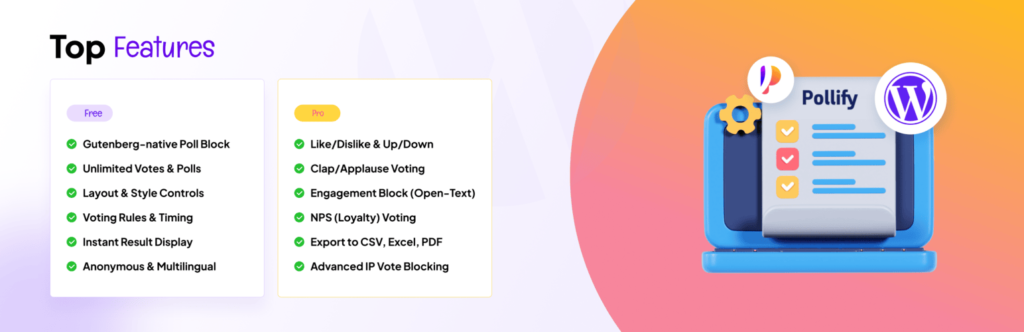
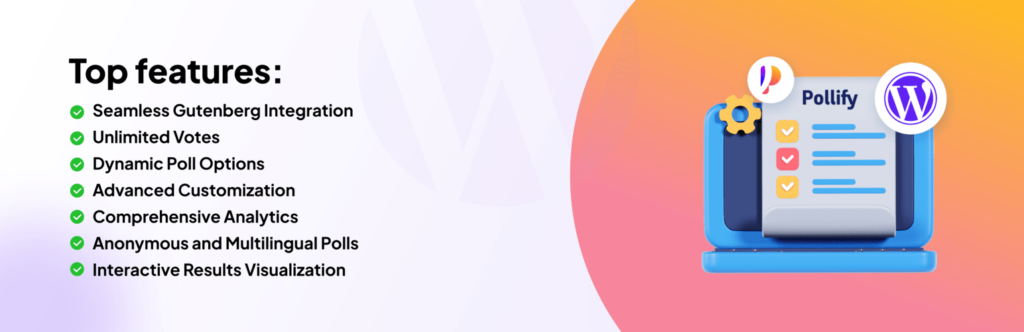
    Pollify-plugin-banner with top features mention

    The result: unverified polls produce data you cannot confidently act on. Is that 70% preference result real, or did three enthusiastic people vote 15 times each? You cannot know.

    User account-based restriction eliminates this uncertainty. A WordPress user account requires registration. Voting twice requires two accounts. Voting 15 times requires 15 accounts.

    At that point, the effort required to manipulate the poll exceeds any reasonable motivation to do so. The data becomes trustworthy enough to make real decisions from.

    Methods to Restrict Voting in WordPress Polls

    Before jumping into the Pollify setup, it helps to understand the landscape of restriction options and where each fits.

    • Cookie restriction (Pollify free): Sets a browser cookie after voting. Stops accidental double-voting and honest visitors. Easily bypassed by clearing cookies or using incognito. Right for casual content polls where the audience is trusted.
    • IP restriction (Pollify Pro): Blocks repeat votes from the same IP address. More reliable than cookies – survives browser clearing and incognito mode. Still bypassed by VPN or mobile data switching. Has the shared-IP false positive problem. Good as a secondary layer, not as the primary mechanism.
    • Login restriction (Pollify Pro): Requires a WordPress user account to vote. Duplicate prevention switches from IP/cookie tracking to user account tracking. Each authenticated user gets one vote tied to their identity. The strongest available mechanism for high-stakes polls.
    • One vote per user (Pollify Pro): Works alongside login restriction to enforce account-level deduplication. When combined, login restriction controls who can vote; one-vote-per-user controls how many times.

    For casual blog polls where you just want a rough sense of reader preference, cookie restriction is fine and completely free. For any poll feeding a real decision – product roadmaps, membership votes, course feedback, employee surveys – login restriction with one-vote-per-user is the setup you want.

    How to Require Login to Vote in WordPress with Pollify

    Login restriction is built directly into the Response Settings panel of every Pollify block. There is nothing to configure globally – you enable it per poll, giving you full control over which polls require authentication and which don’t. For a full technical reference, see the official login restriction documentation.

    Step 1: Install and Activate Pollify

    If you haven’t installed Pollify yet, go to Plugins > Add New in your WordPress dashboard, search for Pollify, and install the free plugin from WordPress.org. Activate it. Then activate your Pro license key under Pollify > License – login restriction is a Pro feature available in all paid plans from $79/yr.

    Step 2: Open Your Poll in the Block Editor

    Open the post or page containing your Pollify block – or create a new one. If you haven’t set up a poll before, see our guide on how to create a poll in WordPress.

    Login restriction works across all Pollify block types: standard polls, Kudos, Up/Down voting, NPS surveys, and Engagement blocks.

    Step 3: Enable “Require Login to Vote”

    Click on the Pollify block to select it. In the right-hand settings panel, find the Response Settings section and expand it. Check the “Require login to vote” checkbox.
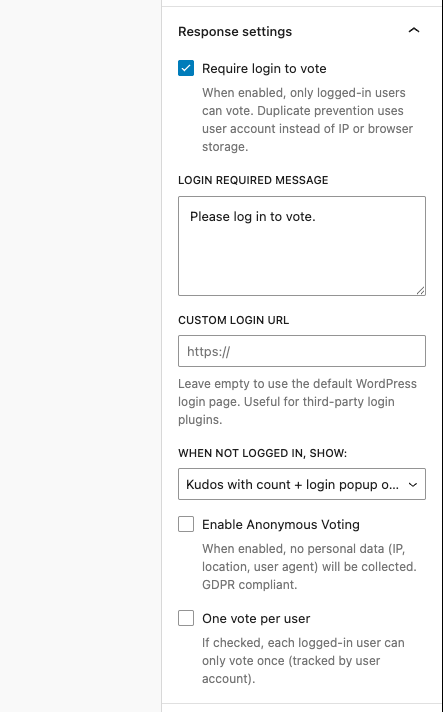
    Pollify Response Settings panel showing require login to vote checkbox and related settings in the WordPress block editor

    Once checked, three additional options appear below the checkbox. From this moment, non-logged-in visitors can no longer submit votes. Duplicate prevention automatically switches from IP/cookie tracking to user account tracking for all new votes on this poll.

    Step 4: Customise the Login Required Message

    The Login Required Message field controls what non-logged-in visitors see when they try to interact with the poll. The default is “Please log in to vote.” – clear and functional.

    Adjust this to match your site’s context and tone. Some examples that work better than the generic default:

    • For membership sites: “Members only – please log in to cast your vote.”
    • For WooCommerce: “Sign in to your account to share your feedback.”
    • For course platforms: “Enrolled students only – log in to participate.”
    • For employee surveys: “Please log in with your team account to respond.”

    The message appears alongside a clickable Login link that redirects visitors to your login page. Keep the message short and action-oriented – it should help the visitor understand what to do in one read.

    Step 5: Set a Custom Login URL (When Needed)

    By default, the Login link points to your standard WordPress login page at /wp-login.php. For most sites this is fine. Leave the Custom Login URL field empty unless you are using a third-party login page.

    If your site uses WooCommerce’s My Account page as the login portal, a custom login page built with MemberPress, Paid Memberships Pro, or any other membership plugin – enter that page URL here. Visitors will be sent to your custom login flow instead of the default WordPress login screen, keeping the brand experience consistent.

    Step 6: Choose What Non-Logged-In Visitors See

    The “When Not Logged In, Show” dropdown gives you three options for how the poll appears to unauthenticated visitors. This is a meaningful UX decision – choose based on whether social proof and poll visibility matter for your context.

    • Poll with login popup on click: The poll block is fully visible including current results or engagement counts. When the visitor clicks to interact, a popup appears with the login message and link. The least intrusive option – visitors see social proof before being prompted to log in.
    • Poll with inline login message: The poll block is visible, but a persistent inline message (“Please log in to vote. Login”) sits directly in the content flow near the block. No popup – the message is always visible without requiring interaction first.
    • Login message only (hide the block): The poll content is completely hidden. Only the login message and link are shown. Use this when the poll content itself is private – internal surveys, member-only questions, or anywhere seeing the options before logging in would undermine the purpose.

    Click Update to save. Your poll now requires authentication to vote.

    How to Limit One Vote Per User in WordPress Polls

    Login restriction controls who can vote. The “One vote per user” checkbox in the same Response Settings panel controls how many times each authenticated user can vote.

    Enable it and each logged-in user can submit one vote. Their second attempt shows the current results without a vote option – the same experience as someone who has already voted in a cookie-restricted poll, but backed by user account tracking instead of browser storage. There is no workaround available to the user short of registering a second account.

    See one vote per user setting at the footer of the below attached screenshot-

    Pollify Response Settings panel with require login to vote and one vote per user both enabled for maximum poll security

    Tip: Always enable both “Require login to vote” and “One vote per user” together. Login restriction without one-vote-per-user still allows the same authenticated user to vote multiple times. One-vote-per-user without login restriction falls back to cookie tracking, which is weaker. The combination gives you the strongest data integrity available in Pollify.

    The combination also unlocks a future capability: because votes are tied to user accounts, you can filter and segment results by user role. Seeing how administrators responded versus subscribers, or how customers in one tier responded versus another, becomes possible when the data is account-linked.

    How It Looks on the Frontend

    Popup Login Prompt

    When a non-logged-in visitor clicks on a poll block set to popup mode, a clean overlay appears on the page showing the login message and a Login link. The poll content and any engagement counts remain visible in the background. The popup includes a close button so visitors can dismiss it without leaving the page.
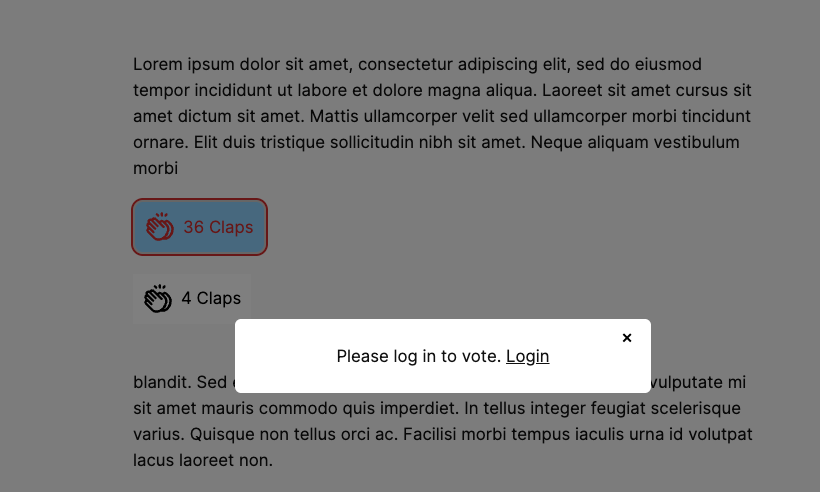
    Pollify login restriction popup showing login prompt overlay on a Kudos voting block for logged-out visitors

    This mode works well for blogs, product pages, and community posts where showing the current vote count or engagement number is part of the value. Visitors see social proof, understand others have participated, and get a clear invitation to join by logging in.

    Inline Login Message

    In inline mode, the login message sits persistently within the page content near the poll block. The poll or voting interface is visible but non-interactive. The message does not require a click to trigger – it is always there for logged-out visitors.
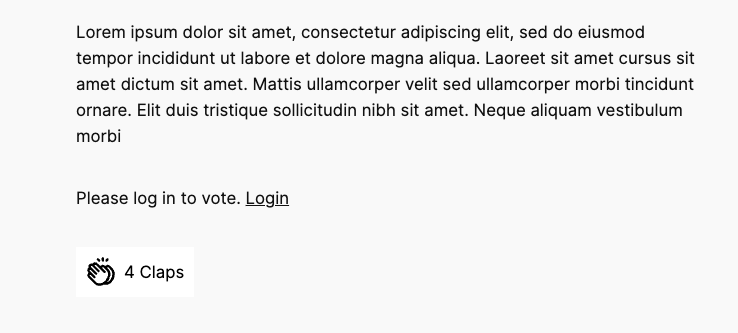
    Pollify inline login restriction message displayed above a Kudos block for non-logged-in visitors

    Inline mode suits documentation pages, course content, and any layout where a popup appearing mid-content would feel disruptive. The message integrates naturally into the reading flow.

    Hidden Block (Login Message Only)

    When set to hide the block, logged-out visitors see only the login message and link – nothing of the poll itself. This is the right choice when the poll question or options are sensitive, internal, or intended exclusively for authenticated users.

    Employee surveys, member-only votes, and private beta feedback polls all benefit from this mode.

    Restrict Poll Voting in WordPress with Pollify: Real-World Use Cases

    Login restriction is not a one-size-fits-all requirement. Here are the specific scenarios where it changes data quality from unreliable to trustworthy.

    Use CasePoll TypeWhy Login Matters
    Membership community voting on site decisionsStandard PollEach paying member gets exactly one verified vote
    WooCommerce post-purchase NPSNPS SurveyOnly real customers with accounts provide satisfaction scores
    Online course lesson feedbackKudos / Engagement BlockOnly enrolled students can respond – not random visitors
    Internal employee pulse surveyUp/Down VotingResponses tied to real team member accounts
    SaaS feature prioritisationStandard PollVotes from actual users, not anonymous visitors or competitors
    Blog post appreciation trackingKudosKnow which logged-in readers found content valuable for segmentation

    Combining Login Restriction with Other Pollify Security Features

    Login restriction is the strongest single mechanism, but it works even better as part of a layered approach.

    • IP blocking (Pro): If a specific IP address is sending spam votes or suspicious activity on public-facing polls, you can block it directly from the Pollify dashboard. See IP blocking documentation for setup. For login-restricted polls, IP blocking adds a secondary layer against coordinated account-based manipulation attempts.
    • Anonymous voting: You can enable login restriction and anonymous voting simultaneously. The vote is tied to the user account for deduplication purposes, but no additional personal data (IP address, location, user agent) is stored. This is the right configuration for GDPR-sensitive contexts where you need one-vote-per-person without creating a data trail. See anonymous poll setup guide.
    • Poll scheduling: Set a close date alongside login restriction for time-bounded research windows. Scheduled login-restricted polls are particularly clean for quarterly NPS surveys and membership renewal votes – you get a defined collection window with account-verified responses. See poll scheduling guide.

    Frequently Asked Questions

    Can I require login for all poll types in Pollify – Kudos, NPS, Up/Down voting?

    Yes. Login restriction works across every Pollify block type: standard polls, Kudos, Up/Down voting, NPS surveys, and Engagement blocks. The setting is in the Response Settings panel for each block and applies the same login gate regardless of block type.

    Does login restriction work with WooCommerce or MemberPress login pages?

    Yes. Enter your custom login page URL in the Custom Login URL field within Response Settings. Visitors who need to log in will be directed to your WooCommerce My Account page, your MemberPress login, or any other custom login URL you specify – instead of the default WordPress login screen. Leave the field empty to use the default /wp-login.php.

    How is one-vote-per-user tracked – by IP or by user account?

    When login restriction is enabled, duplicate prevention switches from IP/cookie tracking to user account tracking. Each WordPress user ID can submit one vote. This tracking is tied to the authenticated session – it cannot be bypassed by clearing cookies, switching browsers, or using incognito mode. A second vote would require a second WordPress user account.

    Can I allow anonymous voting while still requiring login?

    Yes – these are independent settings. “Require login to vote” ensures the voter is authenticated before their vote is accepted. “Enable anonymous voting” controls whether personal data (IP address, location, user agent) is stored alongside the vote. You can require login for deduplication while enabling anonymous voting to avoid storing any additional identifying data. This combination is useful for GDPR-sensitive polls.

    What do visitors see if they are not logged in?

    It depends on the display mode you choose in the “When Not Logged In, Show” dropdown. Popup mode shows the full poll block with a login prompt appearing when the visitor clicks to interact. Inline mode shows the poll block with a persistent login message always visible. Hide mode shows only the login message – the poll content is not visible at all until the visitor authenticates. Choose based on whether showing poll content to logged-out visitors serves your goals.

    Conclusion on How to Require Login to Vote in WordPress

    If your polls feed real decisions – product direction, community votes, customer feedback, employee sentiment – the data needs to be trustworthy. Cookie and IP restriction are useful for casual polls with a trusted audience. For anything more serious, login restriction with one-vote-per-user is the right standard.

    Pollify makes this setup straightforward: one checkbox enables login restriction, a second enables one-vote-per-user, and three display modes give you control over the visitor experience. The whole configuration takes under two minutes per poll, works across all Pollify block types, and produces data you can actually act on.

    Install Pollify free from WordPress.org for cookie-restricted polls. Upgrade to Pollify Pro (from $79/yr) for login restriction, IP blocking, one-vote-per-user, NPS surveys, image polls, and one-click export. Full feature documentation is at wprigel.com/pollify.

    Related Guides

    • How to Create a Poll in WordPress: No-Code Tutorial
    • How to Prevent Duplicate Votes in WordPress Polls
    • How to Create an Anonymous Poll in WordPress
    • How to Schedule WordPress Polls to Auto-Open and Auto-Close
    • Pollify vs Crowdsignal: Voting Restriction Compared
    • Pollify Docs: Voting Rules, Timing, and Confirmation Messages
    • Pollify Docs: IP Blocking for WordPress Polls

    The wpRigel Team

    May 15, 2026
    Pollify
  • wpRigel Weekly Updates: Major Releases across Commandify and Pollify

    wpRigel Weekly Updates: Major Releases across Commandify and Pollify

    This week’s rollout is one of our heaviest yet. Both versions of Commandify received significant new capabilities, and Pollify shipped important privacy and accessibility updates.

    If you work on WordPress sites daily, these changes should give you more control and shave minutes off repetitive tasks.

    Commandify Pro and Free: A Closer Look at What Shipped

    commandify banner with free and pro features listed on it- commandify changelog

    We pushed two releases for Commandify back-to-back v1.0.1 (Dec 1) and v1.0.2 (Dec 2). Together they introduce long-awaited integrations, faster search, and a more consistent command experience across the dashboard.

    Elementor integration arrives

    Elementor has always been one of the top feature requests from our users. This release introduces a complete first version of that integration. It gives you template search, template actions (export, duplicate, copy, rename), “Edit with Elementor” for posts and pages, and quick access to actions like regenerate CSS, sync library, and clear cache.

    We built this with the goal of making it more usable and flexible than similar command palettes offered by competitors such as CommandUI. It’s available in both Free and Pro, with deeper template actions unlocked for Pro users.

    User switching added to Pro

    User Switching is now built directly into Commandify Pro.

    You can switch to any user, browse the last 20 accounts you interacted with, and switch back when you’re done. The palette shows your active switch session in “User Switch Status,” and all URLs work cleanly across multisite setups.

    This is one of the most useful additions for support teams, agencies, and developers replicating user-level issues.

    Speed improvements across search

    We introduced instant static results for common search queries, static result preloading, and a new dynamic action handler that makes command execution more predictable. Redirect URLs now decode HTML entities properly, improving REST-driven actions.

    Commandify also now includes multiple new filters for developer customization including:

    • commandify_search_user_actions
    • commandify_search_{post_type}_actions
    • commandify_search_post_type_args

    A new COMMANDIFY_DEV_MODE constant gives local developers a cleaner way to test Pro features.

    WooCommerce refinements

    Search results are more consistent and now surface recent orders and customers instantly. The internal structure for WooCommerce, Elementor, and User Switching integrations was reorganized for better long-term maintenance.

    Fixes and architecture improvements

    The release also includes adjustments like:

    • Fixing ampersand URL issues
    • Removing duplicate Elementor commands
    • Correcting “Switch Back” logic
    • Using proper WordPress capabilities for User Switching
    • Improved dynamic form evaluation
    • Updated testing documentation and implementation notes

    These updates reflect everything listed in the v1.0.2 changelog and align with the architectural direction documented in our internal references.

    Commandify Free: Quality-of-life Additions

    Version 1.0.1 of Commandify Free introduced several new commands and a cleaner UI.

    New commands

    • Visit Site: open the frontend instantly from the palette
    • Instant Log Out: sign out without navigating to the profile page
    • Post Status Control: change post status directly from command options

    UI and behavior improvements

    • User search now shows proper user icons
    • Media search displays thumbnails
    • Default results always show the latest 10 items across posts, users, and media
    • The palette stays open after maintenance actions like cache clearing or rewrite flush
    • Debounced API requests help search feel smoother while typing

    These updates make the free version more capable for everyday site management.

    Explore Commandify Changlog!

    Pollify Update: Privacy and Accessibility Improvements

    Pollify’s latest update introduces anonymous voting, a key request from users who handle GDPR-sensitive projects. You can now offer polls without linking responses to trackable identifiers.

    We also added the option to send a poll block to Trash right from the editor. Accessibility labels were refined, and an undefined get_result warning was resolved.

    This aligns with our long-term Pollify roadmap described in the knowledge base.

    Explore Pollify Changlog!

    What we are building next for Commandify

    Our current development sprint includes:

    • Integrations for Gravity Forms, Fluent Forms, and WPForms
    • A Bricks Builder integration with navigation and builder-level actions

    These are already in testing and scheduled for rollout within the next few days.

    BFCM Offer 2025 Still Available

    Our Black Friday/Cyber Monday offer is still live.

    Commandify Pro starts at $39/year and Pollify Pro starts at $31/year, with both yearly and lifetime plans included in the discount.

    wpRigel-BFCM-deals

    If you’re exploring our tools for the first time or planning to upgrade, this is the best time to lock in pricing before the next set of integrations ships.

    Stay Connected with wpRigel and The Products We Build

    wpRigel started with a simple goal: build lightweight, focused tools that remove friction for creators, marketers, developers, and agencies working inside WordPress every day.

    We don’t chase bloated feature lists or heavy interfaces. Instead, we ship products that solve specific problems with clean UX and reliable performance.

    Pollify was our first step toward that mission- a block-native poll creator built for the modern Gutenberg editor. No shortcodes, no external dashboards, just a straightforward way to gather feedback and run voting experiences on WordPress sites. Today, Pollify Pro extends that idea with engagement blocks, like/dislike voting, NPS polls, and exportable reports.

    Commandify grew from watching users jump across menus to complete basic tasks. Our goal with Commandify is to give WordPress a command palette that feels fast, predictable, and helpful for both beginners and power users. The new integrations reinforce that direction: an interface where everything you need is a few keystrokes away.

    We are still a small team, but product quality is our priority. The roadmap for both plugins comes directly from user conversations, agency workflows we observe, and our own experience building WordPress sites for years.

    Each release (whether it’s a quality-of-life improvement or a major integration) is meant to reduce the mental overhead of managing multiple plugins, settings, and screens.

    As we continue expanding wpRigel’s product lineup, our focus remains the same: build tools that feel natural inside WordPress and give users more control without adding complexity.

    The wpRigel Team

    December 3, 2025
    Product Updates, Commandify, Pollify
  • Introducing Pollify Pro: Taking WordPress Polls to the Next Level
    Introducing Pollify Pro: Taking WordPress Polls to the Next Level
    When we first introduced you to Pollify, our goal was simple, to bring a powerful, 100% Gutenberg-powered polling experience entirely inside WordPress.

    No SaaS accounts, no clunky shortcodes, no “almost matches” in design. Just a seamless, native way to create polls, surveys, and voting forms right where you already work: in the block editor.

    Since that initial launch, something amazing has happened.

    Hundreds of site owners have been using Pollify to collect feedback, spark conversations, and engage their audiences; from personal blogs to membership sites to online stores.

    But we also started hearing the same request over and over:

    “Pollify is great for simple polls… but I want more advanced poll types, better analytics, and features I can actually use to grow my business- without switching to a SaaS tool like Crowdsignal.”

    That’s exactly why we built Pollify Pro.

    Pollify Pro isn’t just “more of the same”- it’s a complete upgrade designed for creators, marketers, and businesses who need richer interactions, deeper insights, and total control over their data… all while keeping everything inside WordPress.

    So today, we want to show you exactly what’s new in Pollify Pro and why it’s already becoming the go-to choice for serious WordPress users.

    What’s New in Pollify Pro

    When we started building Pollify Pro, we knew it had to be more than “just more options”.

    It had to give you new ways to interact with your audience, collect actionable data, and actually move the needle on your goals- whether that’s sales, content engagement, or community growth.

    Here’s what’s now possible.

    Advanced Poll Types- Engagement That Fits Any Scenario

    The free version of Pollify already lets you create solid multiple-choice polls with single or multiple votes. That’s great for quick feedback, but in reality, your engagement needs aren’t always the same.

    • Sometimes you want fast, lightweight reactions.
    • Sometimes you want deep, open-ended responses.
    • Sometimes you need data you can act on at a strategic level.

    Pollify Pro introduces four advanced poll types that cover all those situations— without having to install separate plugins or pay for SaaS tools.

    Here’s what you get the moment you upgrade:

    1. Kudos Feedback Voting

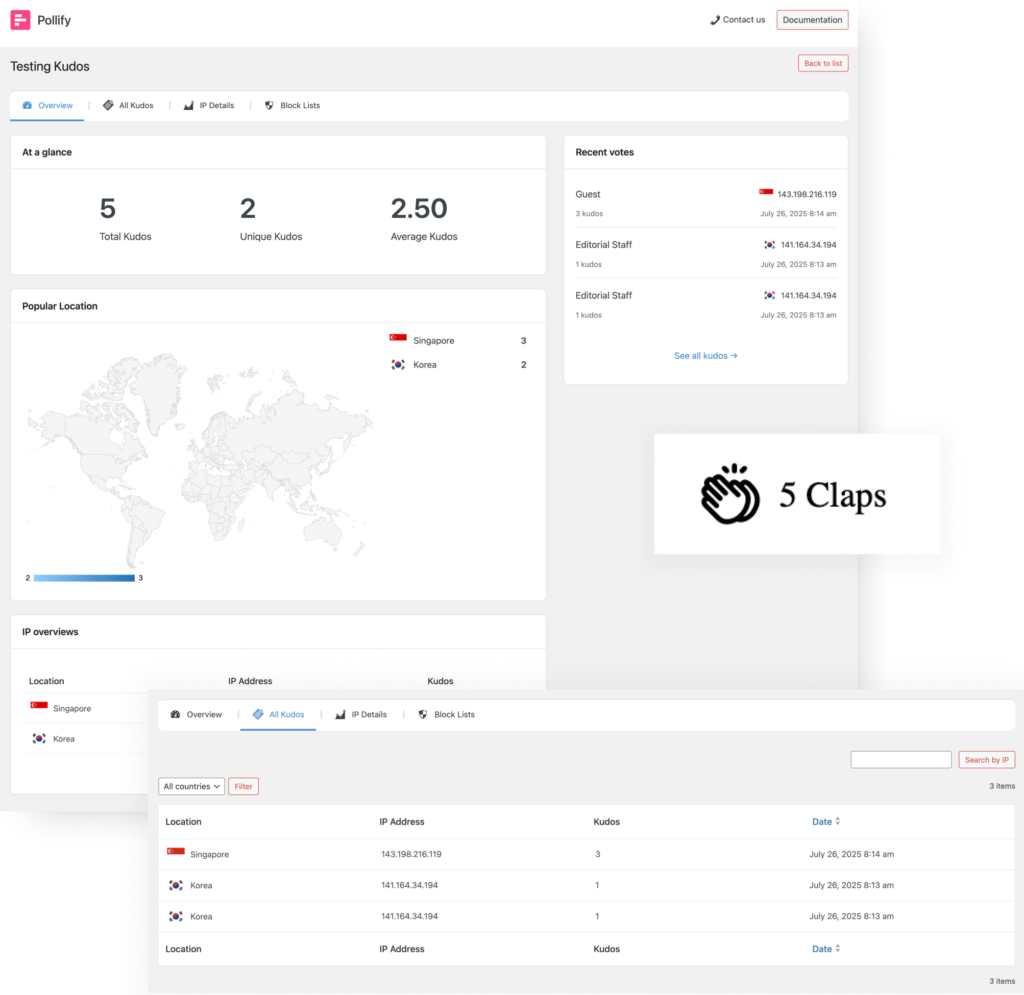
    Sometimes your audience doesn’t want to fill out a whole survey. They just want to say, “Nice job!” without breaking their flow. The Kudos block (you might also think of it as “applause” or “clap voting”) is the perfect lightweight feedback tool for those moments.

    How it works: You place a Kudos block under a blog post, product description, course lesson, or portfolio piece. Visitors can give you a quick thumbs-up in the form of a “clap” — no typing, no long forms.

    clap vote
    Kudos/Applause or Clap voting with Pollify Pro

    Example:
    Imagine you’ve just published a deep-dive guide on SEO trends for 2025. At the end, you add:

    “Did you find this helpful? Give it a clap!”

    Within hours, you’ll know exactly how many readers appreciated it — without having to interpret comment sections or guess from bounce rates.

    Core benefits:

    • Effortless engagement — perfect for audiences that don’t normally leave comments.
    • Content validation — see which posts or pages your audience values most.
    • Idea prioritization — double down on topics that get the most claps.

    2. Up/Down or Like/Dislike Response Polls

    While Kudos voting tells you that people liked something, Up/Down polls tell you how much. Think of it like a quick sentiment check — “Yes, this works” or “No, not for me.”

    How it works: You set up a block with a simple Up arrow and Down arrow. Users click one, and you instantly get a read on public opinion.

    Use cases:

    • Content feedback: “Was this tutorial easy to follow?”
    • Feature testing: “Should we keep this beta feature?”
    • Product feedback: “Did this month’s update improve your experience?”
    Up/Down or Like/Dislike voting with Pollify Pro

    Example: If you run a cooking blog, you could add an Up/Down poll under a recipe asking:

    “Would you make this dish again?”

    Core benefits:

    • Faster decisions — no need to run long surveys for simple questions.
    • Spot patterns early — if a post is getting a lot of downvotes, you can act before it tanks engagement.
    • Highly shareable — people love simple “yes/no” style interactions.

    3. NPS Loyalty Scoring

    If you’ve ever studied customer retention, you’ve probably heard of Net Promoter Score (NPS). It’s the gold standard for measuring brand loyalty, and now you can run NPS surveys right inside WordPress.

    How it works: You ask one question:

    “On a scale of 0 to 10, how likely are you to recommend us to a friend or colleague?”

    Users select their number, and Pollify Pro automatically groups them into Promoters, Passives, and Detractors.

    NPS poll setting in wordpress
    nps overview
    NPS voting with Pollify Pro

    Use cases:

    • Membership sites: Track member satisfaction over time.
    • Product launches: Measure loyalty before and after releasing a new feature.
    • Customer onboarding: See how new users feel after their first 30 days.

    Example: A WordPress agency could send an NPS poll to recent clients to find out if they’d refer them to others — turning happy clients into active advocates.

    Core benefits:

    • Predict churn– low scores often mean a customer is at risk of leaving.
    • Identify promoters– focus on people who will happily spread the word.
    • Track improvement– see if changes in your product or service boost loyalty.

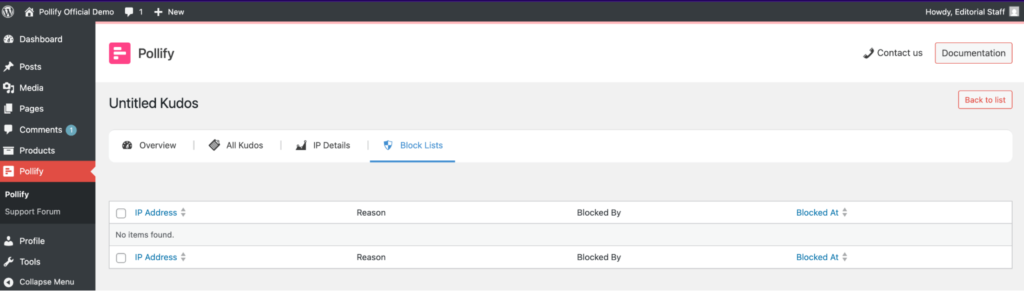
    4. Advanced IP Blocklist

    Sometimes you want to keep your polls clean and accurate by blocking certain IP addresses — whether it’s to stop spam voting, exclude internal team members, or prevent repeated manipulations of results.

    How it works: Pollify Pro lets you add specific IPs to a blocklist. But here’s the game-changer — you get two options:

    1. Keep historical data for those IPs (so past votes still count for analytics).
    2. Completely remove all past records associated with them for a clean slate.

    Use cases:

    • Internal testing: Block your own team’s IPs so internal votes don’t skew results.
    • Prevent abuse: Stop competitors or bots from spamming votes.
    • Geo-specific polls: Block traffic outside your target region.

    Core benefits:

    • Accurate analytics — decisions based on clean, real data.
    • Flexible control — choose whether past data is retained or deleted.
    • Better trust in results — no more second-guessing poll integrity.

    Bottom line: With these poll types and IP blocker, Pollify Pro lets you handle everything from quick mood checks to strategic decision-making. All without leaving the block editor.

    👉 Explore All Pollify Pro Poll Types and Features

    Pro-Level Analytics & Tracking with Pollify Pro: Insights You Can Act On

    Collecting votes is one thing. Knowing who voted, where they’re from, and how their preferences change over time is where real business value comes in.

    ip overview
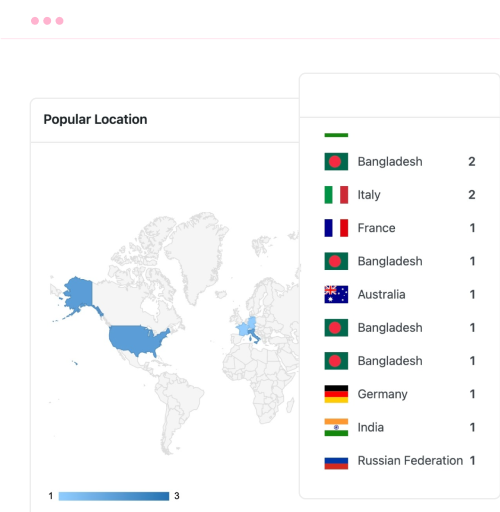
    top voting countries
    nps overview

    Pollify Pro gives you:

    • Vote-by-User & Vote-by-Role Tracking: If you have members, students, or tiered customers, you can see how each group votes. This is huge for tailoring content or offers.
    • Geographic Insights: Discover where your most engaged voters live. Great for planning events, targeting ads, or personalizing content.
    • CSV Export (Coming soon): Hand your poll results straight to your marketing team, data analysts, or clients.
    • Trend Analysis: See how opinions shift week over week or month over month.

    Crowdsignal can give you some of this — but only in the paid SaaS dashboard. Pollify Pro keeps it all inside your WordPress admin, with no monthly bill.

    Design & Branding Freedom – Make It Yours

    Your polls should feel like part of your site, not something bolted on. With Pollify Pro, you get:

    • Extra themes & layout patterns for variety.
    • Advanced styling controls for buttons, typography, spacing, and borders.
    • Theme style inheritance so your polls look native from the start.

    Crowdsignal often struggles here because it loads from their servers. Pollify Pro renders entirely in WordPress- faster load times and pixel-perfect brand matching.

    Marketing & Engagement Features – Turn Polls Into Conversions

    Pollify Pro isn’t just for collecting opinions — it’s for driving action.

    • Email Follow-Up: Send targeted “thank you” messages, special offers, or resources based on answers.
    • Lead Capture: Ask for an email before showing results to grow your list.
    • Answer-Based Redirects: Send users to different landing pages depending on their choice.

    These features mean every poll can double as a list-building tool, upsell opportunity, or engagement funnel.

    Quick Note on What’s Coming Next in Pollify Pro

    I’m not stopping here. A couple of features are already in development, and I’m excited about what they’ll unlock for you:

    • Two New Poll Types: expanding beyond Kudos, NPS, and Up/Down, you’ll soon be able to run VS-style comparison polls (perfect for “this vs that” battles) and Rating polls (stars, emojis, or custom icons).
    • One-Click Data Exports: need to crunch numbers in Excel or share results with your team? You’ll be able to export all your poll data in CSV format instantly, with full filtering options.
    • More Layout Patterns & Themes: We’re working on fresh, professionally-designed templates so your polls can look great right out of the box.

    If you’re already using Pollify Pro, these updates will drop right into your dashboard as soon as they’re ready — no extra purchase needed.

    Pollify Pro vs Crowdsignal: Which One’s Right for You?

    I’ve been in the WordPress space long enough to know there’s no shortage of poll and survey tools. But when it comes to Pollify Pro vs Crowdsignal, the differences run deeper than just “self-hosted vs SaaS.”

    • Both tools can collect votes.
    • Both can display results.

    But the way they do it and what you get for your time and money is a completely different story.

    Installation & Setup: Native vs External

    Pollify Pro: Install it like any other WordPress plugin, and it’s ready to go inside your Gutenberg editor. No extra accounts, no separate dashboard to log into. Everything- from poll creation to results analysis, happens in your WordPress admin.

    Crowdsignal: Even though it has a WordPress plugin, it’s really a front-end for their SaaS platform. You’ll still need a Crowdsignal account, and your polls live on their servers. That means an extra login, a separate UI, and in some cases, less control over your data.

    Winner: Pollify Pro — fewer moving parts, faster setup, and no platform lock-in.

    Poll Types: Who Gives You More Ways to Engage?

    Crowdsignal supports basic multiple-choice, rating scales, and a few custom question types. But if you want things like VS polls, NPS surveys, or open-text feedback without limits, you’ll need to jump to their paid tiers.

    Pollify Pro gives you all advanced poll types out of the box:

    • NPS surveys (1–10 scoring)
    • Up/Down voting for micro-feedback
    • Feedback polls with open-text fields
    • Visual VS polls for side-by-side comparisons and Star or emoji rating polls (coming soon)
    • And, of course, the free multiple-choice and multi-vote polls already in Pollify Free

    Example: Want to run a “Feature A vs Feature B” poll and also collect written reasons for each choice? In Crowdsignal, that’s either impossible without workarounds or requires custom coding. In Pollify Pro, you just add two blocks and you’re done.

    Winner: Pollify Pro — more variety, more flexibility, and no nickel-and-diming for extra poll types.

    Branding & Design Control

    Here’s where the hosted vs self-hosted difference really shows.

    Crowdsignal: Your design options depend on their theme library. You can tweak fonts and colors, but because the polls load from their servers, making them fully match your brand is harder. Advanced customization often means custom CSS overrides and those can break if their code changes.

    Pollify Pro: Since it renders directly in Gutenberg, it inherits your theme styles automatically. Want to override them? You’ve got full control over colors, typography, button styles, spacing, and borders- all inside the block settings. Plus, Pollify Pro ships with extra themes and patterns so you’re not starting from scratch.

    Winner: Pollify Pro — your polls look like they belong on your site from day one.

    Data Ownership & Privacy

    This one’s simple:

    • Pollify Pro stores all results in your WordPress database. You control it, you back it up, you delete it when you want. No third parties touching it.
    • Crowdsignal stores results on their servers. That means GDPR compliance depends partly on them, and exporting all your data isn’t as straightforward.

    If your site deals with sensitive audience data or operates in a strict privacy jurisdiction, owning your poll data matters.

    Winner: Pollify Pro — complete control, no external dependencies.

    Analytics & Reporting

    Crowdsignal has a nice SaaS dashboard with charts, but a lot of premium analytics features are paywalled. You get basic vote counts for free, but for trend data, filtering, and CSV export, you’re upgrading.

    Pollify Pro bakes these in:

    • Vote-by-user & vote-by-role
    • Geographic voting insights
    • Trend analysis over time
    • CSV export for offline reporting or BI tool integration

    And because it’s native to WordPress, you can cross-reference poll data with your Google Analytics, WooCommerce sales, or membership reports — without having to connect two separate platforms.

    Winner: Pollify Pro — pro-grade analytics without the recurring bill.

    Pricing & Value

    Crowdsignal’s free plan is fine for hobby sites but caps you at 2,500 total lifetime responses — across all polls. That’s not monthly. That’s forever. After that, you pay a recurring fee.

    Pollify Pro? No limits on responses, polls, or questions. You pay once per year (or lifetime if you choose), and you can run as many polls as you like — for as many visitors as you can get.

    Winner: Pollify Pro — predictable pricing and no response caps.

    Speed & Performance

    Because Crowdsignal polls load from their servers, there’s always an extra external request. Not a huge deal for some sites, but if you’re chasing Core Web Vitals or trying to keep load times under 2 seconds, it’s another factor to manage.

    Pollify Pro loads entirely from your WordPress site, using optimized block assets. No external dependencies, no third-party script delays.

    Winner: Pollify Pro — faster loads, better performance scores.

    Here’s a clean, quick comparison table you can drop into your article after the detailed comparison section — matches the tone and structure you’ve been using, but makes it easy for readers to scan.

    Pollify Pro vs Crowdsignal At a Glance

    Feature / CriteriaPollify ProCrowdsignal
    Editor Integration100% Gutenberg-native blocks – build polls directly in WordPressSeparate interface, polls embedded via shortcode or script
    Poll TypesStandard polls + Kudos (Applause), Up/Down, NPS, more coming soon (VS & Ratings)Standard polls, surveys, quizzes
    CustomizationFull block styling controls + theme style inheritancePredefined themes; CSS overrides can be tricky
    AnalyticsBuilt-in analytics, vote-by-IP, vote-by-role, geo insights, CSV exportBasic analytics + export; limited advanced tracking
    IP ControlAdvanced IP blocklist (retain or delete vote history)Basic IP restriction only
    PerformanceLightweight, loads inline with page; caching-friendlyLoads external scripts; may affect site performance
    Data Ownership100% on your WordPress siteStored on Crowdsignal’s servers
    Offline AccessData fully accessible in WordPress even if offlineRequires Crowdsignal servers to access results
    Pricing$79/year (unlimited sites in plan)$180/year (per site)
    SupportDirect developer support via wpRigelGeneral Automattic support

    Bottom Line: Why We Recommend Pollify Pro

    If you just need a quick, free poll with minimal customization, Crowdsignal will get the job done.

    But if you want:
    ✅ More poll types
    ✅ Full design control
    ✅ Pro analytics without SaaS lock-in
    ✅ Data ownership
    ✅ Unlimited responses

    …then Pollify Pro is the clear choice.

    We built it for WordPress users who value control, performance, and flexibility- without giving up ease of use.

    What’s Coming Next in Pollify Pro

    We’ve said it before- Pollify Pro is already feature-packed. But I’m nowhere near done. The whole point of building this as a Gutenberg-first plugin is that I can keep pushing what’s possible without asking you to relearn a whole new tool every time.

    Here’s what’s on the roadmap:

    Conditional Logic for Polls

    Soon, you’ll be able to show or hide questions based on previous answers. That means smarter polls where every participant only sees questions relevant to them.

    Example: If someone says they’re an existing customer, they’ll see different follow-up questions than a first-time visitor.

    Why it matters: You get more accurate data and your visitors spend less time answering irrelevant questions.

    Poll Result Sharing

    I’m working on a “Share Results” feature that lets visitors post poll outcomes directly to social media — with branded images generated on the fly.
    Imagine a trend poll going viral because people want to show how they voted. That’s free traffic you can’t buy.

    AI-Assisted Poll Creation

    This one’s experimental, but I’m excited about it. You’ll be able to describe the kind of poll you want, and Pollify will auto-generate questions, answer choices, and even design– ready for you to tweak.
    Perfect for site owners who want speed without sacrificing quality.

    Integration Hub

    Yes, you can already use Pollify with any theme. But soon, I’m adding official integrations with:

    • WooCommerce (product review polls, post-purchase NPS)
    • LMS plugins like LearnDash & TutorLMS (lesson feedback polls)
    • Email platforms like FluentCRM & MailPoet (segment subscribers based on answers)

    Public Results Pages

    You’ll be able to publish a dedicated, SEO-friendly “Poll Results” page with sorting, filters, and charts. Great for transparency and content marketing.

    Advanced Anti-Spam & Moderation

    Vote verification via email or membership logins, plus AI-powered spam detection for open-text answers. More security, less junk data.

    The point is- We’re not building Pollify Pro just for today’s needs. We’re building it to stay ahead of what WordPress site owners will want next year.

    How to Get Started with Pollify Pro

    Pollify Pro-Taking WordPress polls to the next level

    If you’ve read this far, you already know Pollify Pro is built for WordPress users who want more control, better performance, and richer engagement tools than any SaaS poll solution can offer.

    Here’s the quickest way to get started:

    Step 1: Install the Free Version

    You can try Pollify right now by installing the free version from the WordPress plugin repository.

    Now get started following step-by-step docs

    It comes with all the essentials- multiple-choice polls, Gutenberg integration, custom styling, scheduling, and basic analytics.

    Step 2: Upgrade to Pro When You’re Ready

    Once you’re comfortable or if you know you’ll need advanced features from day one, grab Pollify Pro here.

    You’ll unlock:

    • Advanced poll types (NPS, feedback, up/down and more)
    • Geographic & user-role tracking
    • Extra themes & layouts
    • CSV export & pro analytics
    • Lead capture & email integrations

    Step 3: Create Your First Pro Poll

    Head to any page or post, click “Add Block,” search for “Poll,” and start building.

    • Want a collect user feedback? Add a Kudos Feedback poll block.
    • Want to gauge customer loyalty? Add an NPS survey.
    • Want to collect detailed responses? Use a Up/Down poll block.
    • Want to restrict voting from certain areas? Use IP blocking feature.

    Publish, watch the results come in, and start using that data to make smarter decisions.

    Step 4: Keep Growing with New Features

    We release updates regularly — and as a Pro user, you get them all. That means every roadmap feature we mentioned above? You’ll have it the moment it’s ready.

    Your audience is talking. Pollify Pro is how you make it easy and engaging for them to tell you what they think.

    ➡️ Get Pollify Pro today and start building polls your visitors will actually enjoy answering.

    Final Thoughts: Why Now Is the Time to Try Pollify Pro

    If you’ve been relying on generic polling tools, fighting with shortcodes, or paying too much for SaaS platforms that take your data off-site, now’s your moment to switch.

    Pollify Pro isn’t just another poll plugin– it’s a complete audience engagement system built to work inside your WordPress site, exactly where you need it. From NPS surveys and VS polls to lead capture and deep analytics, you get everything in one place without sacrificing speed, control, or branding.

    And this is just the beginning. I’m already working on new features that will make Pollify even more powerful- from advanced integrations to smarter targeting options.

    So here’s my challenge to you:

    Install Pollify Pro today. Create your first poll in minutes. Watch how quickly your audience engages when the experience is seamless and fully branded to your site.

    🔗 Explore Pollify Pro Features
    💰 View Pricing & Plans
    📚 Read the Documentation

    Let’s make your WordPress site a place where every visitor has a voice and where you have the insights to act on it.

    The wpRigel Team

    August 9, 2025
    Pollify
  • Meet Pollify: The First 100% Gutenberg-powered Poll Plugin for WordPress

    Meet Pollify: The First 100% Gutenberg-powered Poll Plugin for WordPress

    Introducing Pollify– the first ever 100% Gutenberg-powered poll plugin in the WordPress ecosystem.

    Polls and surveys help easily generate valuable feedback from your audience. By creating a poll with specific questions on your posts or pages, you can find out if the customers like your products/services or other issues you want to address.

    Moreover, there are lots of instances where you need a poll/online voting solution-

    • Idea generation: Ask your audience which features to add to your upcoming product or which topic to write on for your next newsletters.
    • Product development: You can make a list of challenges or goals and ask users to vote for those they relate to most.
    • Audience feedback: If you run a course business, you can ask audiences how they liked a specific course or class.
    • User engagement: Polls allow visitors to share their thoughts and ideas, making them feel valued and contributing to a better user experience on your site.
    • Gather Leads: You can capture leads and make your email list stronger.

    Let’s run a live test here with the Pollify plugin!

    Do you agree that a Poll plugin has the above use cases?

    If you agree that a poll or online voting app has the above-mentioned use cases then choose the option "Yes". Otherwise, choose "No".

    Yes, our poll maker plugin does just that! You can create any type of poll, survey, or online voting all within your Gutenberg editor, with no shortcode!

    In this write-up, we will dive deep and learn about the features and functionalities of the Pollify plugin and how it helps you add a poll system to your WordPress website.

    Let’s get started!

    Also read: Introducing Pollify Pro- Taking WordPress Polls to the Next Level
    Pollify: First 100% Gutenberg-powered Poll Maker Plugin for WordPress

    Pollify is a powerful WordPress poll creation and survey-making plugin, fully integrated with the Gutenberg. You can design, schedule, and customize polls and add them anywhere on your site without shortcodes. With advanced analytics, multilingual support, and premium features, Pollify provides everything you need to create, manage, and analyze polls seamlessly on your WordPress site.

    You know that Gutenberg has been a revolution in the WordPress industry since the beginning. With every WordPress release, Gutenberg has been getting remarkable updates and functionalities. It’s getting better and more powerful day by day. You can now use blocks to design your own theme and website page. All types of plugins were/are introducing Gutenberg blocks to use their feature.

    Unfortunately, no poll plugins used Gutenberg blocks to add poll questions easily to any webpage. We’re bringing this capability for the first time with Pollify. You can add polls and surveys directly into your Gutenberg editor using our poll maker plugin.

    Let’s take a quick look into Pollify features-

    • Gutenberg Integration
    • Multivote Functionality
    • Scheduled Polls
    • Anonymous Polls
    • Kudos block for quick appreciation voting
    • Real-time Results
    • Customization Options
    • Advanced Analytics
    • Multilingual Support
    • Up/Down voting block for fast sentiment feedback
    • User-Friendly Admin Dashboard
    • Chart Visualization
    • IP Address Tracking
    • Vote Reason Option
    • NPS survey block for detailed customer satisfaction scoring

    Since its initial release, Pollify has grown beyond its original capabilities– adding more block types, deeper styling controls, and improved performance. The plugin now includes engagement-focused blocks like-

    • Kudos/Applause feedback
    • Up/Down voting
    • Native NPS surveys
    • Advance IP blocking

    -making Pollify not just a random poll creation tool but a complete audience interaction suite for WordPress.

    Check Pollify Pro Features at a glance!

    Now let us explore some of its features in detail.

    Pollify Plugin Core Features at a Glance

    pollify plugin feature overview

    Create Poll and Set Questions Right from Gutenberg Editor

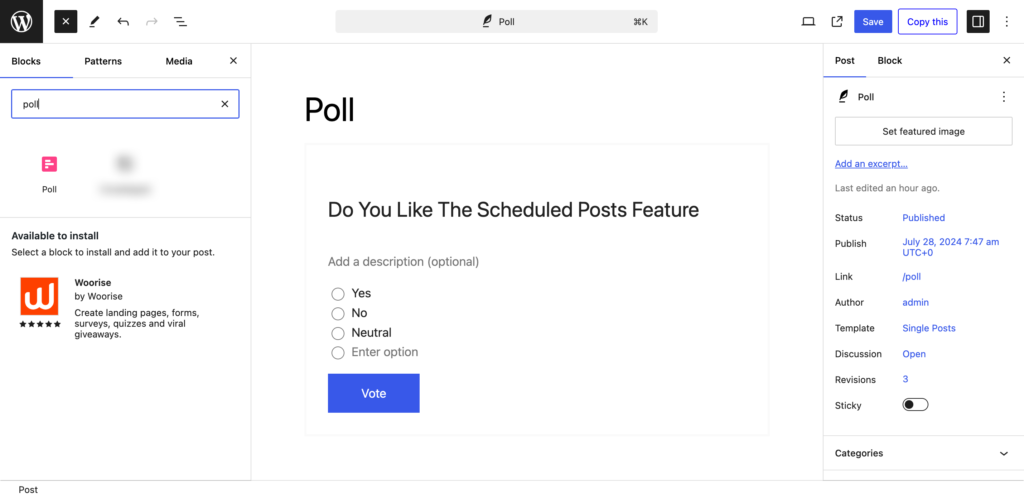
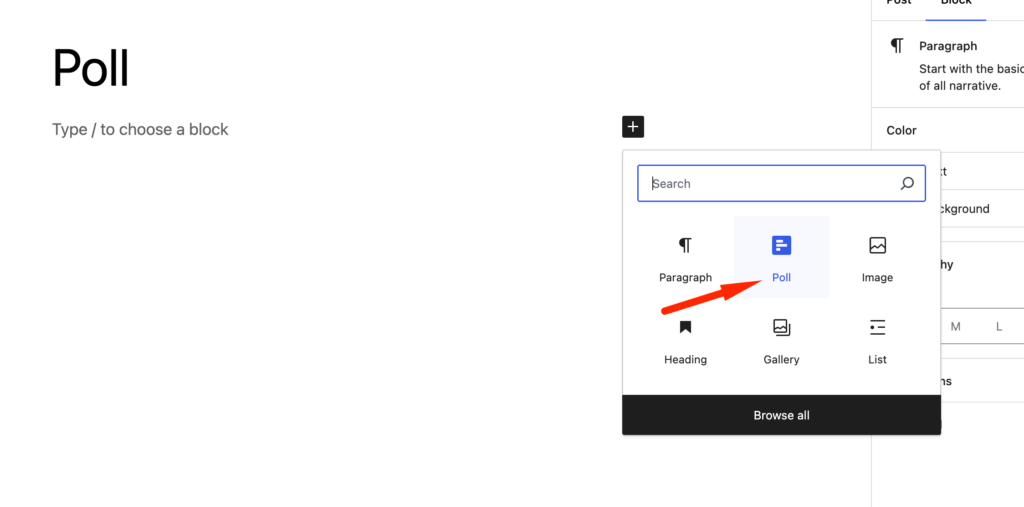
    As we said earlier, you can add poll and set questions using the Gutenberg block allowing you to add poll/survey questions to any post or page. You will find the block in the Gutenberg editor named “Poll” to add poll questions.

    This is a screenshot of choosing  poll block in wordpress post

    Just click the “+” button in the post/page to find the Poll block you are looking for. We will discuss this in detail in the later section of this post.

    You can create unlimited polls or set questions using this free plugin.

    And now, with the latest version, you can also create specialized blocks like Kudos, Up/Down, and NPS directly from the block inserter – no extra configuration or shortcodes required.

    Poll Customization to Make It More Attractive

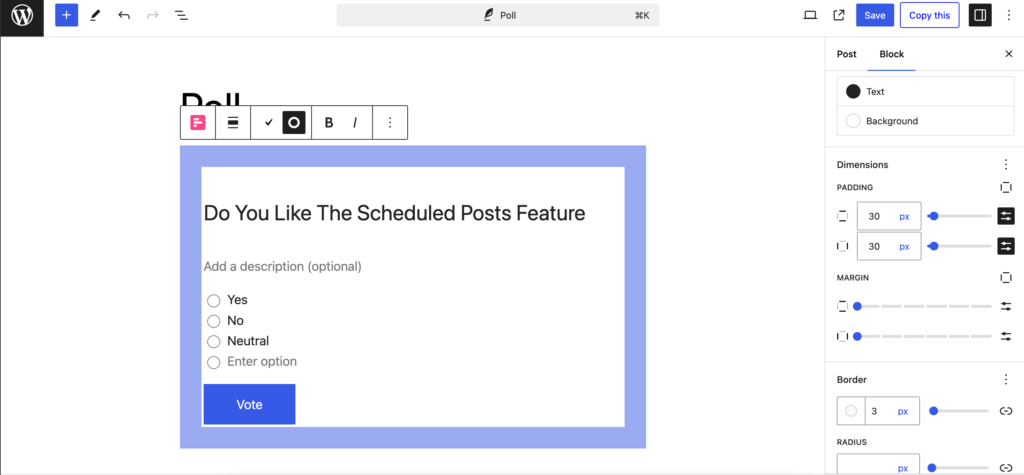
    You can add different customization options to your poll questions using the Pollify poll maker plugin. In the advanced section right-hand side of the menu, you will find the styling options.

    You can add titles and descriptions to your polls. Also, you can customize the vote button to say whatever you like.

    This is a screenshot of poll customization

    Moreover, you can choose the color of the poll closing button. Along with that, you can set the

    • Padding
    • Dimension
    • Border
    • Submission button colors

    to make your poll stand out.

    The latest update also allows you to control typography, adjust spacing per block, and use pre-designed theme patterns for faster styling.

    Multivote System & Single Vote Limitation

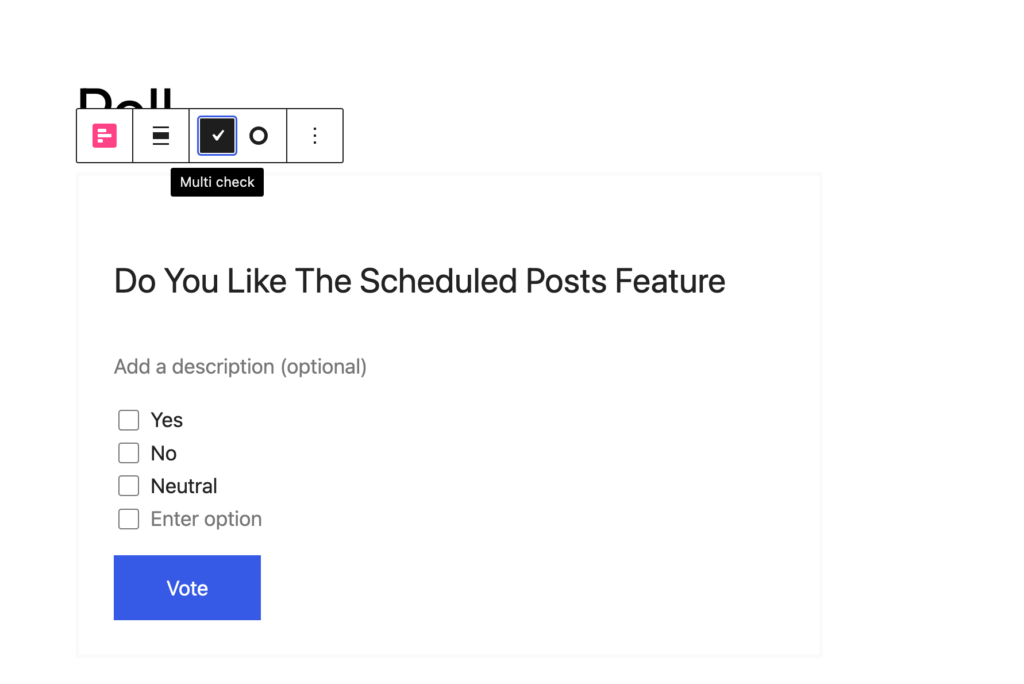
    If you have a poll question that needs a user to choose multiple options, then you can do that with the Pollify poll creator plugin. This way you can get more specified feedback from the users.

    This is a screenshot of pollify multivote option

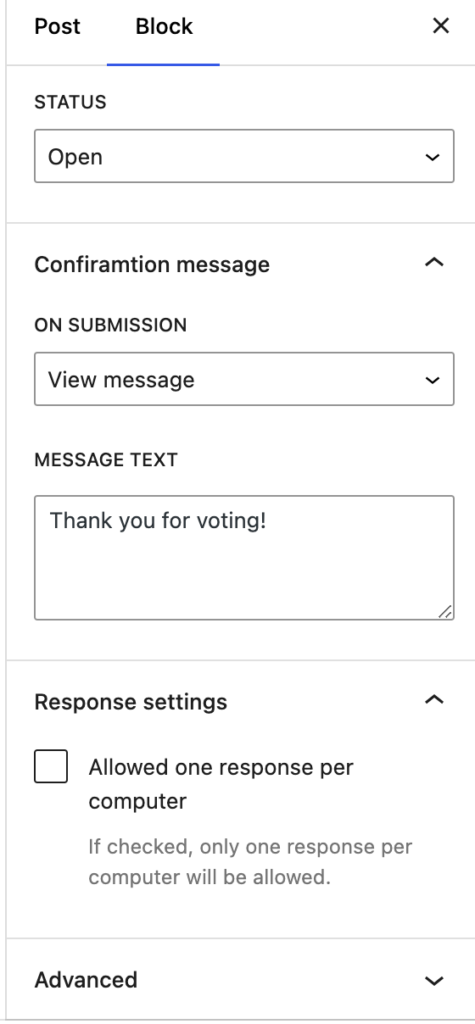
    Also, you can limit the user to choose one option only. It will ensure that you get accurate results from your poll/survey. Just choose the “Allowed one response per computer” option from the right-hand side menu.

    This is a screenshot of pollify settings

    For more control, Pollify Pro now supports vote limits per user role and even per registered account, allowing highly targeted poll setups.

    Poll Scheduling Option

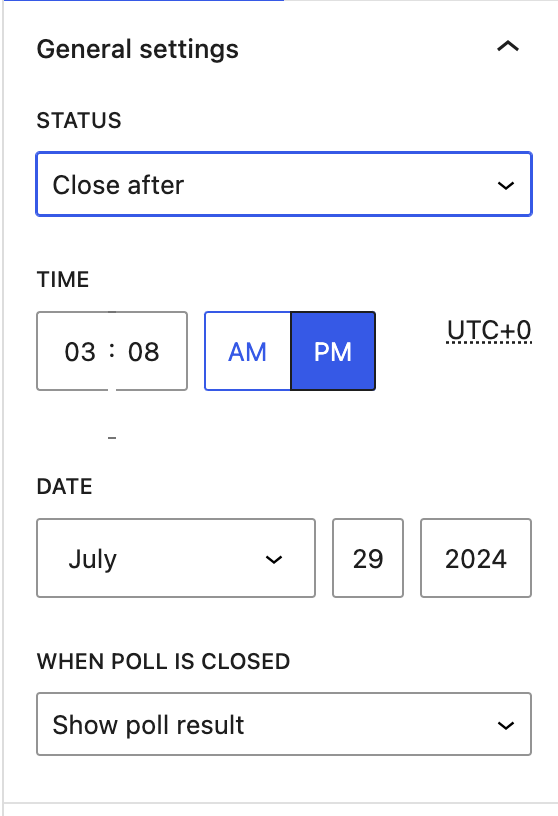
    You can schedule the posts to end at a specific date and time. This will help you survey in your own time and not worry about closing the pole in a specific time.

    This is a screenshot of pollify general settings

    Also, you can set what message you want to show after closing the pole as well. You can hide the poll, show the poll result, or show a customized message to the users.

    With the Pro version, you can also schedule poll visibility in cycles – perfect for recurring events, seasonal campaigns, or monthly voting.

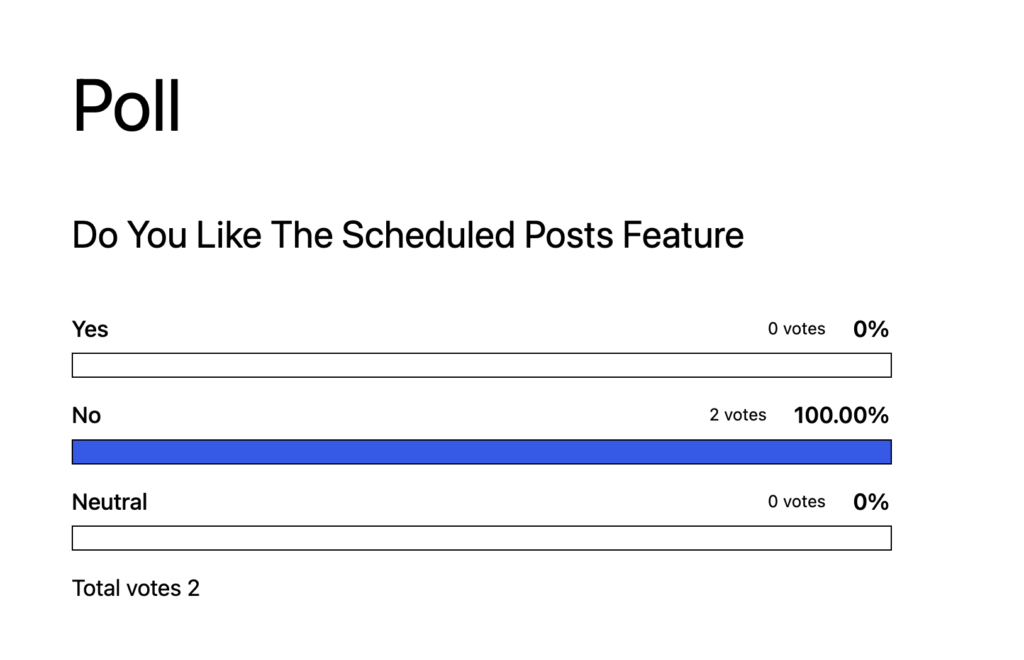
    Front-End Result Display

    If you want to show the results of the poll with sorting options, avatars, and individualized messages for enhanced engagement.

    This is a screenshot of poll results in the front page

    You can now choose between bar charts, pie charts, or percentage views for a more visual and engaging display.

    Anonymous Polls

    You can collect anonymous polls, ensuring participant privacy by collecting minimal data, compliant with GDPR.

    For added trust, Pollify offers clear privacy messaging below polls so users know exactly what data is (and isn’t) being collected.

    User-Friendly Admin Dashboard

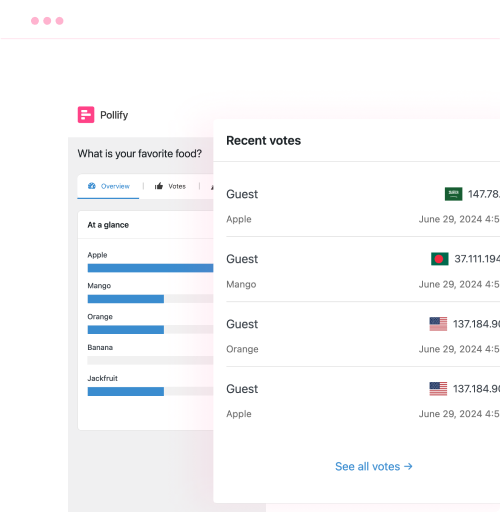
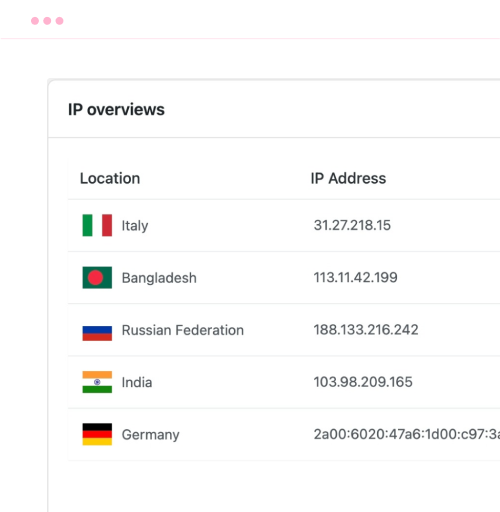
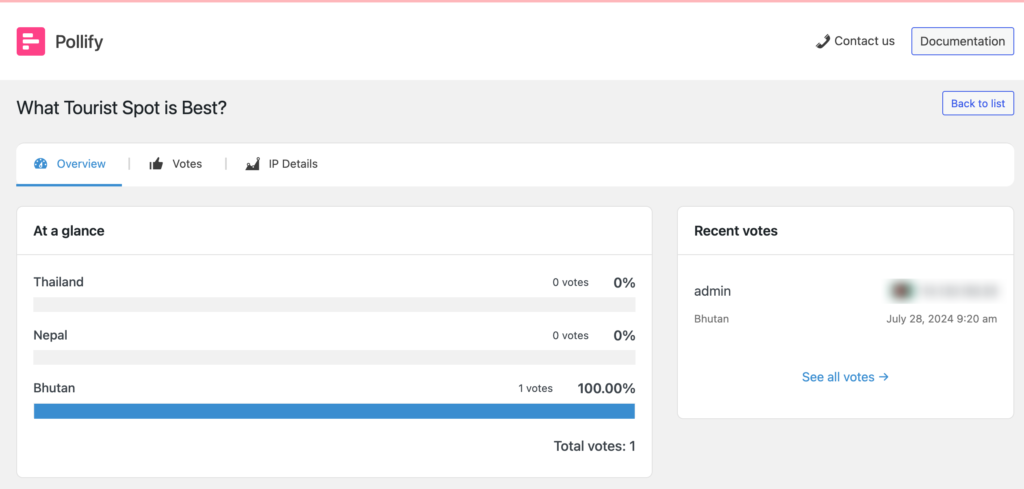
    For the admin, Pollify has a very user-friendly admin dashboard. Admin can view-

    • Results
    • Recent Votes
    • Complete votes list
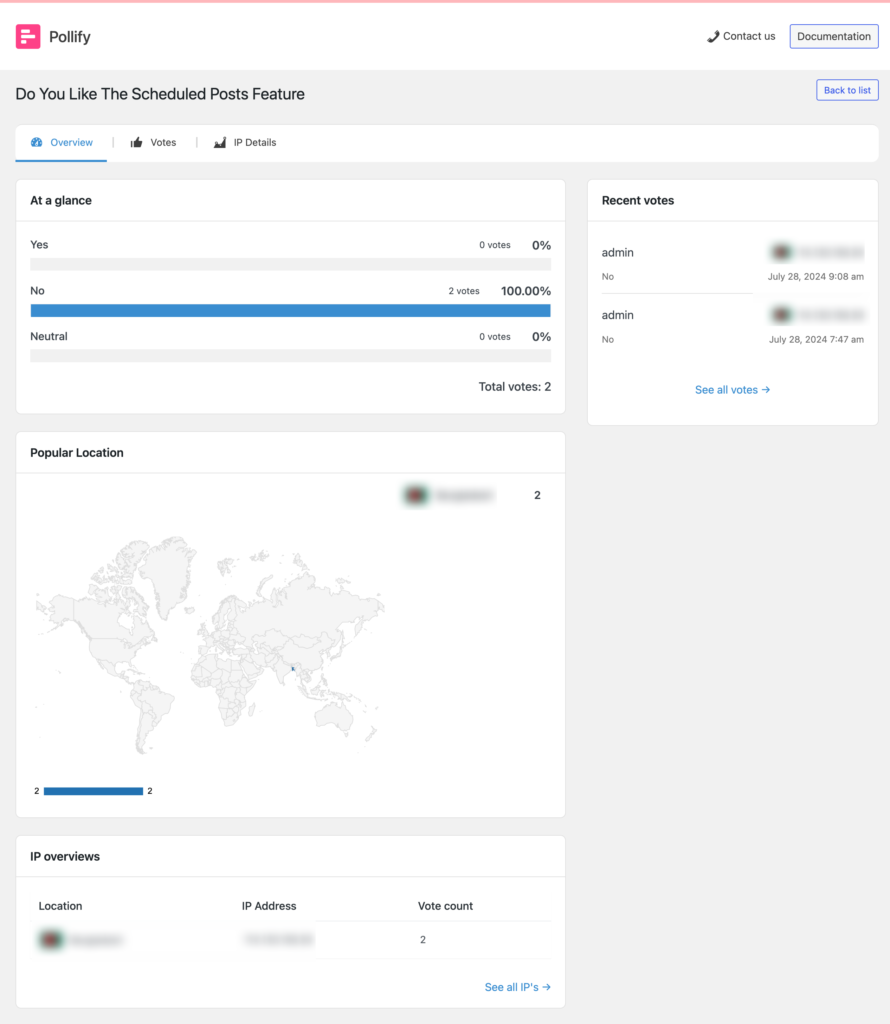
    • Popular location
    • Ip Overviews
    • Ip Details
    This is a screenshot of poll result overview

    This dashboard will help the admin make informed decisions quite easily because the data is very organized and it is easy to understand.

    So, these are the free features of the Pollify plugin.

    The latest dashboard update also integrates CSV export, role-based result filtering, and instant chart previews – all without leaving your WordPress admin.

    Upcoming Free and Pro Features of the Polliy Plugin

    The Pollify plugin is still new and there are plenty of features in the pipeline. Let’s give you an idea of what kind of features you can expect shortly-

    • VS Type of Poll (Versus): Enables the creation of polls comparing options side by side
    • User Information Form: Incorporates a form to gather user details alongside poll participation.
    • Extra 5 Themes or Patterns: It will provide additional visual themes for enhancing poll appearance and engagement.
    • Voted User Location: It displays the geographical location of users who have voted in the poll.
    • Import/Export Polls: It will help in Importing and exporting poll configurations for easy sharing or backup.
    • Send mail to a user: It is integrated with email services
    • Leaderboard Option
    • Export Results to CSV: It allows exporting poll data into CSV format for further analysis or reporting.
    • Vote by user and role
    • Results with Charts: It presents poll results graphically, offering visual insights for easier interpretation.
    • Email campaign using email sending platform

    Many of these features are now live in the Pollify Pro version. Pro users can already enjoy advanced poll types (Rating, NPS, VS), vote-by-role logic, CSV export, and leaderboard displays without waiting for future updates.

    Additionally, Pollify Pro introduces smart poll duplication, bulk scheduling, and integration with third-party tools via webhooks — making it an ideal choice for agencies and high-traffic sites.

    Types of Polls You Can Create With Pollify Poll Maker Plugin

    You will be able to create 7 types of polls (but not limited to) using the Pollify poll plugin-

    • Choosing: Add multiple options for users to choose from, with the option to allow custom entries
    • Dropdown: Present users with a dropdown menu of options for selection. (Upcoming)
    • Up and Down vote: Enable users to vote using like/dislike or emojis, providing quick feedback on products or content. (Upcoming)
    • Rating: Create rating forms, utilizing stars or emojis, to gauge user opinions on products or topics. (Upcoming pro feature)
    • NPS: Allow users to select answers within a 1-10 range. (Upcoming pro feature)
    • VS: Facilitate competition between two options, such as products or individuals, with stylish versus voting formats. (Upcoming pro feature)
    • Feedback: Solicit detailed responses from participants, allowing them to provide comprehensive answers using short text or paragraphs. (Upcoming pro feature)

    Keep an eye on our website to see the new release.

    Today, almost all of the “Upcoming pro features” mentioned above are fully functional in Pollify Pro, including NPS, VS, and Feedback polls. You can try these on our live demo at Pollify Features to see exactly how they work.

    For free users, new block types like Up/Down and Kudos voting are already available, so even without upgrading, you can start adding interactive engagement tools that go beyond simple choice polls.

    In short, the free version of Pollify is perfect for getting started with Gutenberg-based polling, while Pollify Pro transforms it into a complete audience interaction and feedback suite for WordPress sites.

    Let Me Download Pollify for Free and Explore

    Now, let’s see a short tutorial on how to create a poll using the Pollify plugin.

    How to Create a Poll on WordPress using the Pollify Poll Maker Plugin

    So, you have learned about the Pollify plugin and its features. You are curious to know how it works right?

    Step 1: Install the Pollify Poll Maker Plugin

    First, you need to install the plugin from your dashboard. Or you can download the plugin from the WordPress.org site and upload the plugin separately to your WordPress website.

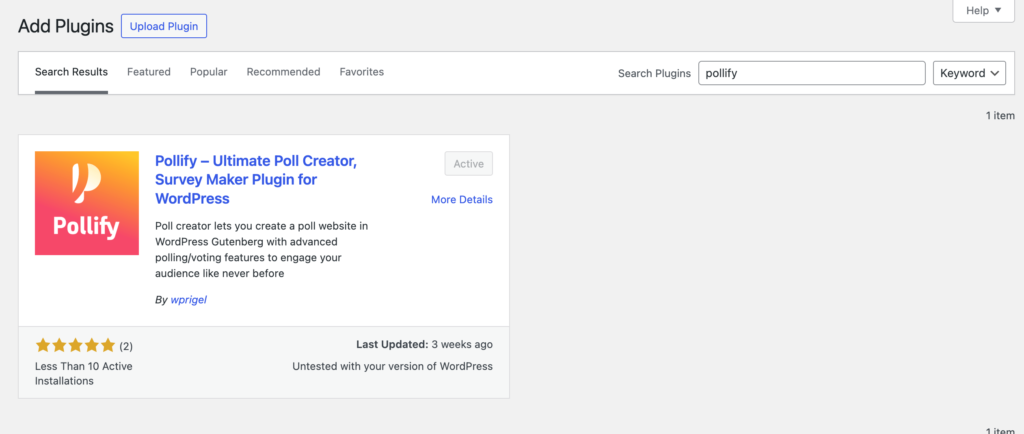
    To install the plugin, go to WP-Admin–> Plugins–> Add New. There type “Pollify” in the search box. Then install and activate the plugin.

    This is a screenshot of installing pollify poll maker plugin

    Tip: You can also install Pollify Pro directly from our pricing page after purchase, and it will automatically unlock all premium blocks and analytics features alongside the free core plugin.

    Step 2: Create a New Page or Post to Create a Poll Question

    Now open a page or post from Posts–> Add New. Then in the post, click on the “+” button and write Poll.

    This is a screenshot of choosing poll block in the post

    That will add a poll block in the post.

    This is a screenshot of adding poll question in the post

    New in 2025: Pro users can insert advanced block types like Rating, NPS, and VS directly in this step, without any extra configuration or external embeds.

    Step 3: Customize the Poll Block

    Next, you need to add a title, description, and poll questions to your poll block. Also, if you want you can customize the voting button as well. Write what you want.

    This is a screenshot of adding poll question in the post

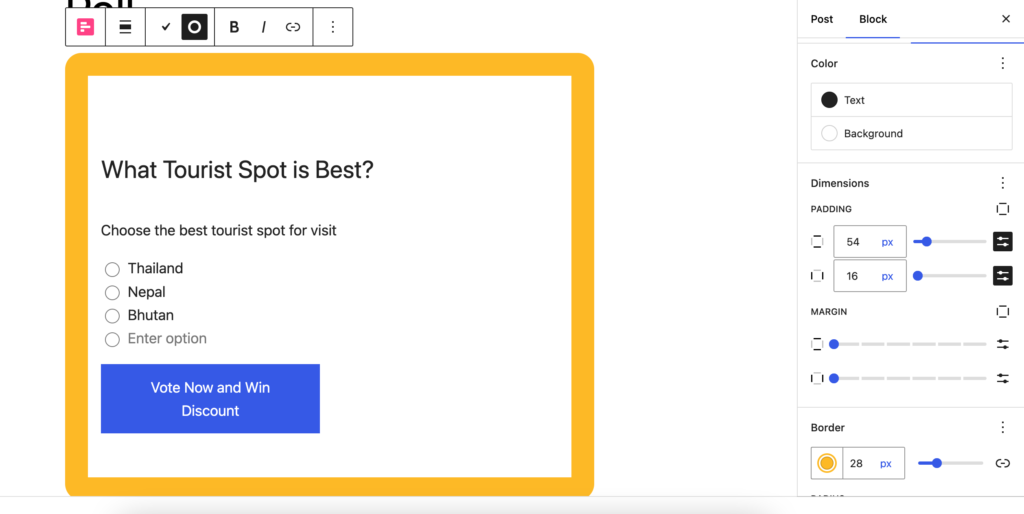
    Moreover, you have the option to set padding, margin, border, and background color. Don’t forget to set what you want to show after

    This is a screenshot of poll customisation

    Pollify Pro now adds theme templates, advanced styling controls, and dynamic content filters, letting you fully match polls to your site branding with no custom CSS needed.

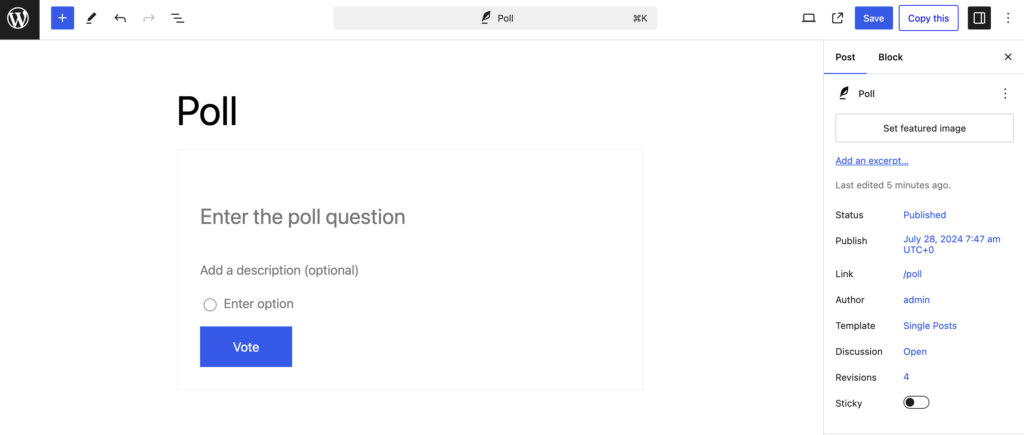
    Step 4: Publish Your Poll and Wait for Results

    Now, it is time to publish your poll questions and wait for the results.

    This is a screenshot of Pollify poll published

    You can see the results in the admin dashboard.

    This is a screenshot of Pollify Admin dashboard

    This is how you can easily create and publish poll questions on any page of the website using the Pollify poll maker plugin

    Pollify Alternative- Crowdsignal

    Other than Pollify, there are quite a few poll-making plugins on WordPress repository. Among them, Crowdsignal stands out.

    crowdsignal review- key features

    Crowdsignal is a SaaS version of PollDaddy WordPress plugin by Automattic designed for creating and managing surveys, polls, quizzes, and forms. It provides a user-friendly interface for users to gather feedback, conduct research, and engage their audience directly from their WordPress site.

    With Crowdsignal, users can easily design their data collection tools, embed them into posts or pages, and analyze responses through comprehensive reporting features.

    Features of Crowdsignal

    1. Customizable Design: Crowdsignal allows users to customize the appearance of surveys and polls to match their website’s theme, including fonts, colors, and layout options.
    2. Real-Time Results: Users can view responses in real-time, enabling them to track engagement and gather insights as they come in.
    3. Multiple Question Types: The plugin supports a variety of question types, including multiple-choice, open-ended, rating scales, and more, offering flexibility in data collection.
    4. Embedded Media: Users can embed images, videos, and audio clips within surveys and polls, making them more interactive and engaging.
    5. Export and Integration Options: Crowdsignal provides options to export data in various formats (e.g., CSV, Excel) and integrates with other platforms like Google Sheets and Mailchimp for seamless data management and communication.

    Limitations or drawbacks of the Crowdsignal

    There are some limitations of the Crowdsignal plugin. Including-

    1. Limited Free Version: The free version of Crowdsignal has restricted features like 2.5k vote limits for life, pushing them towards paid plans
    2. Customization Constraints: While customizable, there may be limitations in design flexibility compared to fully-fledged form builders or survey tools
    3. Response Limits: Higher response limits and advanced reporting features are available only in premium plans
    4. Integration Complexity: Integrating Crowdsignal with certain third-party applications or custom workflows can require additional technical knowledge or support
    5. Mobile Responsiveness: Although generally responsive, some users may experience issues with how certain surveys or polls render on mobile devices

    This is where Pollify shines- it brings the full polling experience inside WordPress with no external SaaS dependency, unlimited responses in both free and pro versions, native Gutenberg blocks, and pricing that’s less than half of Crowdsignal for comparable premium features. Explore the full comparison here: Pollify Features.

    If you want to read about more alternatives to Pollify you can read our guide on best WordPress poll plugins.

    Start Engaging Users with Interactive Polls on WordPress Using Pollify Poll Maker Plugin

    We are at the end of our article and hopefully now you know all about the Pollify poll maker plugin by wpRigel.

    The plugin is new but has immense potential to become one of the best poll-maker plugins. Also, as it is Gutenberg-powered, users will find it easy to use.

    100+ users actively using this Gutenberg block plugin in just a month of realizing it on the WordPress repository, more people choosing it as their best poll creator-online voting solution each day.

    The plugin already has a handful of features that are needed to create and manage interactive polls with more exciting features coming soon. The team is working hard to bring advanced features and make it a full-fledged poll-making system all within Gutenberg!

    As of today, Pollify is no longer “just getting started” — the free version is packed with more engagement blocks, better customization, and live analytics, while Pollify Pro takes it even further with advanced poll types, data exports, role-based voting, email integrations, and much more. You can try the free version from WordPress.org or upgrade instantly at Pollify Pricing to unlock everything.

    Let Me Know About wpRigel!

    If you have any questions or want to know more about the Pollify plugin, then don’t forget to leave a comment in the comment box.

    The wpRigel Team

    October 13, 2024
    Pollify
    Poll maker plugin, Pollify
wprigel logo

wpRigel builds innovative WordPress plugins for developers, marketers and agencies. Be with us, get more users for your business and increase conversion using our powerful tools.

  • x.com icon
  • linkedin icon

Products

  • Pollify
  • Commandify
  • Flowmator (coming soon)

Company

  • Affiliate Program
  • About Us
  • Contact Us
  • Privacy Policy
  • Terms and Conditions

Resources

  • User Docs
  • Blog
  • Support Area
  • Refund policy
  • Pricing for Pollify & Commandify

Comparisons

  • Commandify vs CommandUI
  • Pollify vs CrowdSignal

Changelogs

  • Commandify Changelog
  • Pollify Changelog

wpRigel 2026. All Rights Reserved

  • Terms of use
  • Privacy Policy
  • Cookie Policy