Krom Automation is live. Flat 60% off this week.

Orders, emails, CRM syncs and alerts, all automated inside WordPress.

Buy Now! →
wprigel logo
  • Home
  • Products
    • krom-automation-icon

      Krom Automation

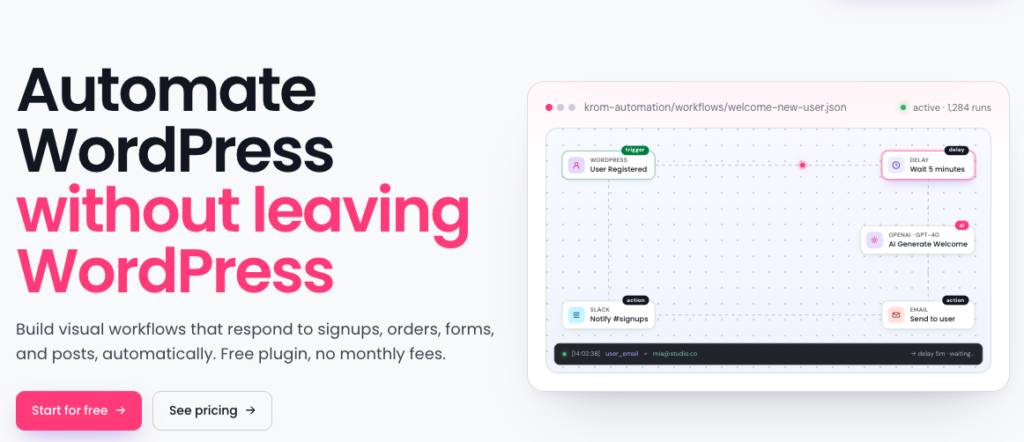
      Build visual workflows that respond to signups, orders, forms, and posts- automatically. Free plugin, no monthly fees.
    • commandify-logo-pink

      Commandify- Best Command Palette Plugin for WordPress

      Navigate, search, and manage everything on your site with a simple keyboard-first workflow.
    • pollify plugin logo

      Pollify- Ultimate Poll Creator Plugin for WordPress

      Build interactive polls, surveys & voting experiences in WordPress with the best Gutenberg-native poll plugin.
  • Docs
  • Blog
  • Contact Us
Pricing
  • Uncanny Automator Pricing 2026: New Plans, Hidden Costs, and How It Compares to Cheaper Alternatives

    Uncanny Automator quietly relaunched its pricing structure in 2026. The old flat yearly plans — $199, $349, $599 — are still available as “legacy” options. But the new default plans are monthly subscriptions bundled with an AI assistant called Uncanny Agent, starting at $25 per month ($300 per year) and scaling to $60 per month ($720 per year).

    That is a significant price increase over what most people remember paying for Uncanny Automator. And most articles covering Uncanny Automator pricing in 2026 have not caught up with this change.

    This article covers both the new AI + Automation plans and the legacy options, what you actually get at each tier, where the pricing gets complicated, and how the total cost compares to alternatives including Krom Automation, which starts at $119 per year with no AI usage limits, no per-seat fees, and no monthly billing.

    Looking for a lower-cost Uncanny Automator alternative? Krom Automation is a visual workflow automation plugin for WordPress. Flat annual pricing, no AI usage caps, no monthly billing. See plans – 60% off launch week with code GETFLAT60.

    Uncanny Automator’s Two Pricing Tracks in 2026

    Before looking at numbers, you need to know that Uncanny Automator now sells two fundamentally different products under the same brand name.

    The first is the AI + Automation plan. This is the new default. It bundles the automation engine (the recipe builder) with Uncanny Agent, an AI assistant that lives inside your WordPress dashboard, and Uncanny Page Builder, an AI-first page builder. Think of it as Uncanny Automator plus an AI co-pilot, priced monthly.

    The second is the Legacy plan. This is the original product, automation only, no AI assistant, no page builder. Sold as an annual flat fee, same as it always was. Legacy plans are still available but are not featured prominently.

    If you are comparing Uncanny Automator pricing from articles written before mid-2026, they are describing legacy pricing. The numbers have changed.

    Uncanny Automator AI + Automation Plans (2026 Default)

    PlanMonthly cost (annual billing)SitesUncanny Agent usage
    Basic$25/month ($300/year)1Standard
    Plus$40/month ($480/year)102x standard
    Elite$60/month ($720/year)504x standard

    All three AI + Automation plans include the full recipe builder, unlimited automations, all integrations, and Uncanny Agent. Plans differ by number of sites and how much AI Agent usage is included.

    What “Uncanny Agent usage” means in practice

    Uncanny Agent runs on AI models that Uncanny Owl manages on your behalf. You do not bring your own API key. You do not choose a model. Usage is measured and capped per plan.

    Standard usage on the Basic plan is described as enough to create 500+ recipes, draft 200+ blog posts, and generate 100+ images per year. For users whose primary need is automation rather than AI content generation, this is likely more than sufficient.

    Plus plan doubles that. Elite quadruples it. Both also offer discounts on top-up usage packs if you hit the ceiling.

    What the AI + Automation plans include beyond automation

    Uncanny Page Builder is included in all AI + Automation plans. This is an AI-first page builder where you describe the page you want and Uncanny Agent builds it. Page building uses your plan’s Agent usage.

    All addons are included in Plus and Elite plans. This is a notable change from the legacy structure where addons (Custom User Fields, Restrict Content, User Lists) were either separate purchases or required a higher tier. On the AI + Automation Plus plan, all addons are included in the $40 monthly fee.

    Elite adds Salesforce and QuickBooks Online via the Elite Integrations Addon, plus a 50% discount on Agent usage top-up packs.

    Uncanny Automator Legacy Plans (Annual, Automation Only)

    PlanAnnual priceSitesAI included
    Basic$199/year1No
    Plus$349/year10No
    Elite$599/year50No

    Legacy plans include the recipe builder, all standard integrations, and unlimited automations. They do not include Uncanny Agent or Uncanny Page Builder.

    If you are on a legacy plan, your renewal price stays the same and your automations keep running. Upgrading to an AI + Automation plan costs the difference in licence price, not a full repurchase.

    Legacy plans are the right choice if you want workflow automation only, have no interest in the AI features, and prefer a one-time annual payment over a monthly subscription.

    The Real Annual Cost: New Plans vs Legacy vs Competitors

    This is where it gets important to model the actual spend.

    Option1 site, 1 year10 sites, 1 yearAI included
    Uncanny Automator AI + Automation Basic$300Not available (need Plus at $480)Yes, capped
    Uncanny Automator Legacy Basic$199Not available (need Plus at $349)No
    Uncanny Automator Legacy Plus$349$349No
    Zapier Professional (750 tasks/month)$240N/A (per account)Draws from task pool
    Krom Automation$119$119 (unlimited sites at Pro tier)Yes, own API key, uncapped
    Krom Automation with GETFLAT60$48$48Yes, uncapped

    A few things stand out in that comparison.

    Uncanny Automator’s new AI + Automation Basic plan at $300 per year is 51% more expensive than the legacy Basic plan and more than double what Krom Automation costs at launch pricing. It now costs more annually than Zapier’s entry tier.

    The legacy plans remain the better value for pure automation needs, but they are not what most buyers encounter when visiting the pricing page today.

    Krom Automation’s AI actions work differently. You bring your own OpenAI, Gemini, or Groq API key. There is no usage cap at the plugin level. You pay your API provider directly for what you use, with no markup. For sites running heavy AI workflows, this model is almost always cheaper than Uncanny’s usage-capped approach.

    Three-Year Cost Comparison for a Single Site

    OptionYear 1Year 2Year 33-year total
    Uncanny AI + Automation Basic$300$300$300$900
    Uncanny Legacy Basic$199$199$199$597
    Zapier Professional$240$240$240$720
    Krom Automation (full price)$119$119$119$357
    Krom Automation (lifetime plan)$119 once$0$0$119

    The lifetime plan on Krom Automation changes the comparison entirely. At $119 paid once, the three-year cost is less than half what Uncanny Legacy Basic costs in a single year.

    What Uncanny Automator Does Better Than the Alternatives

    This article is honest about what Uncanny Automator does genuinely well, because the comparison only means something if it is fair.

    Integration breadth is unmatched

    Uncanny Automator connects to over 240 plugins and apps. No other WordPress-native automation plugin comes close. If you run a niche plugin that your automation needs to interact with, Uncanny Automator is the most likely to support it natively.

    The recipe builder is mature

    Uncanny Automator has been in the market for years. The recipe builder handles complex logic including loops, conditional branches, database queries and multi-trigger recipes. For advanced workflows, it is the most battle-tested option available.

    The AI agent is genuinely integrated

    Uncanny Agent is not a chatbot bolted on. It understands your specific site, can read your actual data, and can build recipes from plain-language descriptions. For non-technical users who want to automate without learning the recipe builder, this is a meaningful capability.

    Support and track record

    Uncanny Owl has been building WordPress plugins for over 13 years and has 40,000+ active installs. That kind of production history matters for mission-critical automation.

    What Uncanny Automator Does Not Do

    No visual canvas builder

    Uncanny Automator uses a list-based recipe editor. You add triggers and actions in sequence. You cannot see the full workflow at a glance, zoom out, or drag nodes around. For anyone coming from a Zapier or Make background, the interface feels linear rather than spatial. Krom Automation uses a drag-and-drop canvas where the full workflow is visible at once.

    No lifetime plan

    Uncanny Automator has never offered a lifetime option. Every plan renews annually. Over three to five years, this adds up significantly compared to tools that offer a one-time payment.

    No step-level execution logs on Basic

    Debugging a recipe that failed requires knowing exactly which step failed and what data it received. Uncanny Automator provides logging, but the depth varies by plan. Krom Automation’s execution logs show every step, the data each step received, what it returned, and the exact error if something went wrong — on every plan.

    AI usage is capped per plan

    If you need heavy AI usage for content generation alongside your automation, you will need to monitor your Agent usage and potentially buy top-up packs. Krom Automation’s AI actions use your own API key with no plugin-level cap.

    No incoming webhook receiver on all plans

    Receiving webhooks from external services like Stripe, GitHub or Shopify requires Uncanny Automator’s webhook support, which is included but works differently from a dedicated incoming webhook endpoint. Krom Automation’s incoming webhook receiver generates a unique HMAC-secured URL per workflow, compatible with any service that sends webhooks.

    Who Should Choose Uncanny Automator’s Legacy Plan

    You are running a WordPress site with complex, multi-step automation needs and your plugin stack includes integrations that only Uncanny Automator supports natively.

    You have used Uncanny Automator before and you are renewing an existing setup that is working well.

    You manage 10 or 50 sites and need the Plus or Elite tier’s multi-site coverage.

    You are comfortable with a list-based recipe builder and do not need a visual canvas.

    Who Should Choose the AI + Automation Plan Instead of Legacy

    You want the AI page builder and AI agent features and are willing to pay $100+ more per year for them.

    You have limited technical knowledge and want an AI assistant that can build recipes for you from plain-language descriptions.

    Your site needs are focused on a single site and the $25 per month entry point fits your budget.

    Who Should Consider Krom Automation Instead
    krom automation pro is live

    You want visual drag-and-drop workflow building on a canvas rather than a list-based interface.

    You want flat annual pricing or a one-time lifetime payment without recurring monthly fees.

    Your automation runs primarily on WordPress-native events: WooCommerce orders, form submissions, course completions, membership sign-ups, BuddyBoss community events.

    You want AI actions without a usage cap, bringing your own OpenAI, Gemini or Groq key at no additional plugin cost.

    You want step-level execution logs that show exactly what each workflow step received, returned, and did — on every plan.

    You are starting fresh and want a lower entry price without sacrificing core capability.

    See the Krom Automation features page and the WooCommerce integration guide for details on what each integration covers.

    The free version on WordPress.org covers 16 triggers, 21 actions, WooCommerce, and full AI actions with no usage limits. No account required.

    Frequently Asked Questions About Uncanny Automator Pricing

    What happened to Uncanny Automator’s $199 Basic plan?

    It still exists as a “Legacy” plan. The new default is the AI + Automation Basic plan at $25 per month ($300 per year). Legacy plans do not include Uncanny Agent or Uncanny Page Builder. Both options are available from the pricing page, but the AI + Automation plans are featured more prominently.

    Can I still buy Uncanny Automator without the AI features?

    Yes. The Legacy plans include the recipe builder and all standard integrations without Uncanny Agent. They are priced at $199, $349 and $599 per year for 1, 10 and 50 sites respectively.

    Is there a lifetime plan for Uncanny Automator?

    No. Uncanny Automator has never offered a lifetime licence. All plans renew annually or monthly. If a one-time payment matters to you, Krom Automation offers a lifetime plan currently discounted to $48 with code GETFLAT60.

    Does Uncanny Automator have a free version?

    Yes. The free version on WordPress.org includes hundreds of triggers and actions for WordPress plugin integrations. It does not include app integrations, Uncanny Agent, or advanced features like loops and conditions. It is useful for testing whether the plugin fits your workflow before upgrading.

    How does Uncanny Automator’s AI compare to Krom Automation’s AI?

    Uncanny Agent is a managed AI assistant that understands your site, can answer questions, complete tasks, and build recipes. You do not configure a model or provide an API key. Usage is capped per plan tier.

    Krom Automation’s AI actions (Generate Text, Content Moderation, Auto-Tag, and Workflow Generation) require your own API key from OpenAI, Gemini or Groq. There is no usage cap at the plugin level. You pay your provider directly. For automation-focused AI use, Krom’s model is usually cheaper. For conversational AI assistance and site management tasks, Uncanny Agent is more capable.

    What is the 14-day money-back guarantee on Uncanny Automator?

    Uncanny Owl offers a full refund within 14 days of purchase, as long as you have used 5% or less of your Uncanny Agent usage. This condition means heavy early use of the AI features can disqualify you from a refund. Read the terms before purchasing if refund eligibility matters to your decision.

    Uncanny Automator is a great plugin. It is also more expensive than it used to be. If you want visual drag-and-drop workflow automation for WordPress at a lower price, Krom Automation starts at $119 per year and $48 at launch pricing with code GETFLAT60. Lifetime plan available. See all plans

    The wpRigel Team

    September 16, 2026
    Plugin review
  • Turbo Admin Review: A Keyboard-First Way to Navigate WordPress Admin Faster

    Turbo Admin Review: A Keyboard-First Way to Navigate WordPress Admin Faster

    Let’s take a look at the problem Turbo Admin is trying to solve on WordPress sites.

    WordPress admin has grown steadily over the years. Core features, plugins, page builders, eCommerce extensions- everything adds more screens, more menus, and more clicks.

    For a single site, this is manageable.

    For people working across multiple WordPress installs every day, it becomes slow.

    Most of that time isn’t spent doing complex tasks. It’s spent navigating: opening the post list, switching screens, hunting for orders, jumping between sites in a multisite network.

    Turbo Admin exists to reduce that friction. It doesn’t change how WordPress works. It changes how you move through it.

    What Is Turbo Admin?

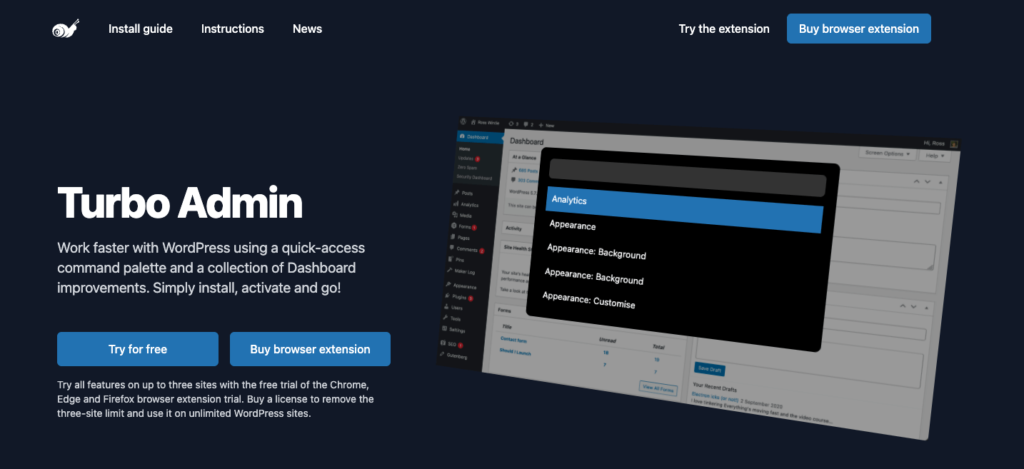
    Turbo Admin is a WordPress command palette delivered as a browser extension.

    Instead of installing a plugin on each site, you install Turbo Admin in your browser. When you log in to a WordPress dashboard, the extension detects it and activates automatically.

    turbo-admin-homepage

    From there, you get:

    • A global command palette inside wp-admin
    • Keyboard shortcuts for fast navigation
    • Search-driven access to content, admin pages, and supported integrations

    This model is intentional. Turbo Admin is designed to follow the user, not the website.

    How Turbo Admin Works in Practice

    Once installed, Turbo Admin adds a command launcher you can open with a keyboard shortcut.

    When the palette is open, you type what you’re looking for: a post title, an admin page, an order number, a site name.

    Results appear instantly. Selecting one takes you directly to that screen.

    There’s no separate interface to learn. It sits quietly until you need it, then disappears again.

    Because it runs at the browser level:

    • The same shortcuts work across all WordPress sites you access
    • Your preferences are saved per browser
    • You don’t have to modify client sites or staging environments

    For people managing many logins, this consistency is the core appeal.

    Content Search Without Loading Admin Screens

    One of Turbo Admin’s most practical features is its content search.

    Instead of: Dashboard → Posts → Search → Filter → Edit

    You can:

    • Open the command palette
    • Type part of a post or page title
    • Jump straight into editing or viewing it

    On content-heavy sites, this reduces both page loads and mental overhead. You stop thinking about where things live and focus on what you want.

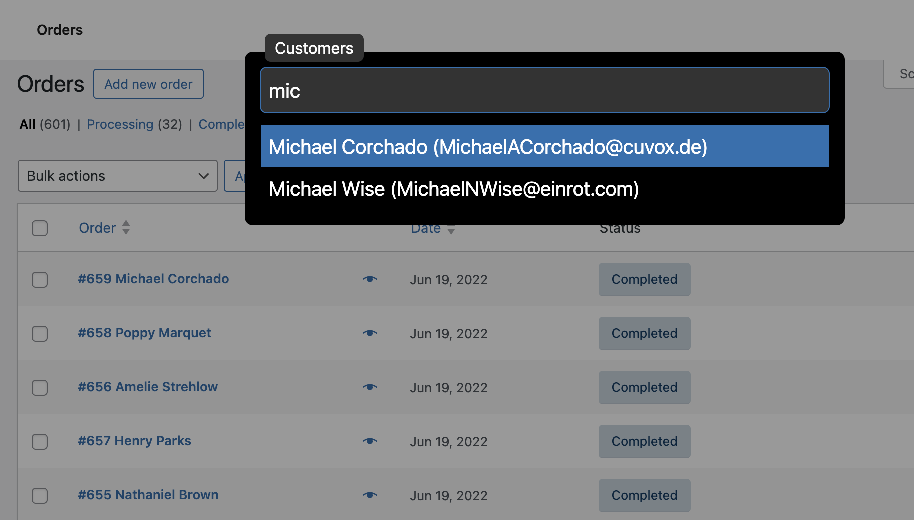
    WooCommerce Search for Orders and Customers

    Turbo Admin includes built-in WooCommerce search support.

    woocommerce functionality on turbo admin

    From the command palette, you can search:

    • Orders by number or customer reference
    • Customers directly, without opening WooCommerce tables first

    This is especially useful for store owners and support workflows where speed matters more than browsing.

    It doesn’t replace WooCommerce management screens, but it shortens the path to them.

    Faster Navigation in Multisite Networks

    WordPress multisite introduces another layer of complexity: switching between sites.

    Turbo Admin detects multisite setups and allows:

    • Quick searching of network sites
    • Direct navigation to individual dashboards

    Instead of using network menus or bookmarks, you type the site name and move on.

    For agencies managing large networks, this removes one of the most repetitive admin tasks.

    Cleaning Up the WordPress Editor Experience

    Turbo Admin also includes small but deliberate admin refinements.

    These focus on reducing interruptions rather than adding new UI:

    • Disable the block editor’s full-screen mode by default
    • Remove the welcome guide overlay
    • Keep the editing environment predictable across sites

    These changes don’t alter content or themes. They simply make the editor behave the same way every time you open it.

    Managing Admin Notices (Experimental)

    Admin notices are one of WordPress’s long-standing pain points.

    Turbo Admin offers an experimental notice management feature that:

    • Collects notices into a dedicated panel
    • Keeps dashboards usable even on plugin-heavy sites

    It’s not meant to hide problems permanently, but to stop notices from overwhelming the interface.

    For developers working on client sites, this alone can make wp-admin feel manageable again.

    Keyboard Navigation in List Tables (Experimental)

    Turbo Admin is clearly built with keyboard users in mind.

    An experimental feature allows keyboard navigation inside WordPress list tables, including:

    • Moving between rows
    • Opening items without using the mouse

    This isn’t essential for every user, but it shows Turbo Admin’s long-term direction: deeper keyboard control over WordPress admin.

    What Makes Turbo Admin Different From Plugins

    The defining trait of Turbo Admin is not a feature. It’s the extension-first architecture.

    turbo-admin-feature and home page overview

    Because it’s not tied to a specific site:

    • You don’t need client approval to install it
    • There’s no risk of breaking themes or plugins
    • It works equally on production, staging, and local sites

    This makes Turbo Admin a personal productivity tool rather than a site-level solution.

    That distinction matters when choosing it.

    Who Turbo Admin Is Best Suited For

    Turbo Admin works best when:

    • One person manages many WordPress sites
    • Speed of navigation matters more than automation
    • Installing plugins everywhere isn’t practical
    • Keyboard workflows are preferred over menus

    It’s a focused tool. It doesn’t try to replace wp-admin. It tries to get you through it faster.

    Where Turbo Admin Stops And What a True Command-Driven Tool Looks Like

    How commandify works on WordPress- top commands

    Navigation Is Helpful But It’s Only One Layer of Productivity

    Turbo Admin does one thing very well: it helps you get to places faster.

    You type, you jump, you land on the right screen.

    For many workflows, that already feels like a big improvement over clicking through menus.

    But once the navigation problem is solved, another question naturally appears:

    Why do I still have to open a screen just to do something simple?

    This is where the difference between a search/navigation palette and a command-driven system becomes obvious.

    Introducing Commandify The Best Command Palette for WordPress

    introducing commandify

    Commandify approaches WordPress productivity from a different direction.

    Instead of asking: “Where do you want to go?”

    It asks: “What do you want to do?”

    Commandify lives inside WordPress as a plugin and provides a command palette that is action-first, not navigation-first. The palette is designed to execute tasks directly, often without loading the related admin screen at all.

    This difference sounds subtle at first. In practice, it changes how you interact with WordPress entirely.

    Search vs Commands: Why the Distinction Matters

    commandify top features at a glance- why its best alternative to turbo admin

    Turbo Admin’s core interaction model is search-based:

    • Search posts
    • Search orders
    • Search admin pages
    • Navigate to results

    Commandify uses commands, which can include search—but are not limited to it.

    A command can:

    • Navigate
    • Trigger an action
    • Modify state
    • Execute multi-step logic
    • Respond dynamically based on context

    That’s why Commandify doesn’t describe itself as “admin search”. It’s closer to how command palettes work in development tools.

    The 7 Command Types That Define Commandify

    Commandify organizes everything around command types, not screens.

    This structure is what allows it to go beyond navigation.

    Here’s how those command types work in real WordPress usage.

    1. Navigation Commands

    These are the most familiar and closest to what Turbo Admin does.

    Navigation commands take you to:

    • Dashboard
    • Posts
    • Pages
    • WooCommerce sections
    • Plugin settings
    • Any registered admin page

    The difference is that navigation is treated as one command type, not the entire system.

    It’s there when you need it—but it’s not the ceiling.

    2. Action Commands (Do Something, Instantly)

    Action commands execute tasks immediately.

    Examples include:

    • Clear cache
    • Regenerate files
    • Sync data
    • Trigger background processes

    Instead of:
    Dashboard → Plugin → Settings → Button → Confirm

    You type one command and it’s done.

    This is where users often start to feel the limitation of navigation-only tools. With Turbo Admin, you still have to go somewhere to act. With action commands, the destination disappears.

    3. Sub-Menu Commands (Contextual Actions)

    Sub-menu commands represent actions that belong to something else.

    For example:

    • Empty trash
    • Bulk cleanup tasks
    • Reset specific settings

    These commands don’t make sense as standalone navigation items. They make sense as secondary actions, exposed only when relevant.

    This mirrors how experienced users think: not “open trash screen”, but “empty trash”.

    4. Search Commands (But Smarter)

    Commandify still includes search—but it treats it as a command, not the core mechanic.

    Search commands can:

    • Search posts
    • Search pages
    • Search any custom post type
    • Respect context (current site, user role, installed plugins)

    The key difference is extensibility. Search is structured so it can be combined with actions or follow-up commands, rather than being a dead end that only navigates.

    5. Dynamic Pattern Commands (Where It Gets Interesting)

    This is where Commandify clearly moves beyond tools like Turbo Admin.

    Dynamic pattern commands adapt based on what you type.

    For example:

    • Typing #1 could immediately reference the latest form entry
    • Patterns can represent objects, states, or recent activity
    • Commands respond differently depending on matched patterns

    Instead of static search results, the system becomes context-aware.

    This is the foundation for workflows that feel “smart” rather than fast.

    6. Toggle Commands (State-Based Actions)

    Toggle commands let you switch things on or off directly from the palette.

    Examples:

    • Enable / disable features
    • Toggle modes
    • Flip plugin states
    • Switch environments or behaviors

    These commands don’t navigate anywhere. They simply change state and confirm it.

    In traditional WordPress admin, toggles are buried inside settings screens. Commandify brings them forward.

    7. Workflow-Oriented Commands

    While not always labeled as a separate category, Commandify supports commands that:

    • Chain multiple actions
    • Adapt based on context
    • Reduce repeated admin routines into single entries

    This is where users who manage stores, memberships, or form-heavy sites start to notice the difference.

    Why This Matters for Everyday WordPress Work

    At first glance, Turbo Admin and Commandify can look similar: both have a command palette, both are keyboard-first, both aim to save time.

    The difference becomes clear after extended use.

    Turbo Admin helps you move faster inside WordPress.
    Commandify helps you do more without moving at all.

    Neither approach is inherently wrong. They simply solve different layers of the same problem.

    The Gap Users Often Feel Over Time

    Many users start with navigation tools and feel productive quickly.
    Then the friction returns in a different form:

    • Still opening screens just to click one button
    • Still repeating the same admin actions daily
    • Still relying on plugin-specific UIs for simple tasks

    That’s usually the point where command-driven tools start to make sense.

    Not because navigation is bad—but because it’s incomplete.

    Turbo Admin vs Alternatives (And When Commandify Makes More Sense)

    turbo admin vs commandify

    Evaluating WordPress Command Tools the Right Way

    By now, it’s clear that Turbo Admin and Commandify are not trying to solve the exact same problem.

    To compare them fairly, the question shouldn’t be: “Which one is faster?”

    It should be: “What kind of productivity do you actually need from WordPress admin?”

    To answer that, we’ll look at a few practical criteria that matter once you move beyond basic navigation.

    Turbo Admin vs Commandify: A Practical Comparison

    CriteriaTurbo AdminCommandify
    Primary focusFast navigation & searchAction-driven workflows
    Delivery modelBrowser extensionWordPress plugin
    Setup on client sitesNot requiredRequired (site-level)
    Navigation via command paletteYesYes
    Execute actions directlyLimitedCore feature
    Command structureSearch-basedMultiple command types
    Custom post type supportSearchSearch + actions
    WooCommerce workflowsNavigation/searchActions + workflows
    Context-aware commandsNoYes
    Dynamic pattern handlingNoYes
    Toggle & state commandsNoYes
    Team-wide consistencyPer browserPer site

    This table highlights a key distinction.

    Turbo Admin is excellent when your main bottleneck is getting to the right screen.

    Commandify becomes more useful when the bottleneck is what you have to do after you arrive.

    Why Commandify Often Becomes the “Next Step”

    For many users, Turbo Admin is a first productivity upgrade. It removes friction quickly and feels immediately helpful.

    Over time, though, the workflow evolves:

    • Navigation becomes fast
    • But repetitive actions remain repetitive
    • Admin screens still need to load
    • Small tasks still require multiple steps

    That’s where command-driven systems start to show their value.

    Commandify doesn’t replace WordPress admin screens entirely.
    It reduces how often you need them.

    By supporting navigation commands, action commands, sub-menu commands, search commands, dynamic patterns, and toggle commands, it allows WordPress to be operated, not just browsed.

    That difference becomes more noticeable on:

    • WooCommerce sites
    • Form-heavy setups
    • Membership or LMS platforms
    • Admin teams doing daily maintenance work

    Other Alternatives to Turbo Admin (Briefly)

    Turbo Admin and Commandify aren’t the only tools in this space, but most alternatives lean in one of two directions:

    • Admin search plugins
      These improve finding posts or settings but stop at navigation.
    • Dashboard cleanup tools
      Useful for decluttering, but not interactive or command-based.

    What makes Commandify stand out among alternatives is not that it replaces everything but that it introduces a command system WordPress never had.

    WordPress Command Palette Tools: Choosing the Right Tool Based on How You Work

    There isn’t a universal winner. There is a better fit.

    Turbo Admin is a strong choice if:

    • You manage many unrelated WordPress sites
    • You don’t want to install plugins everywhere
    • Your main goal is faster navigation
    • You prefer browser-level tooling

    Commandify makes more sense if:

    • You want to execute actions directly from a palette
    • You manage WooCommerce or dynamic content
    • You work inside the same sites regularly
    • You want workflows, not just shortcuts

    In practice, many users start with navigation tools and later realize they want something deeper.

    Frequently Asked Questions

    Is Turbo Admin a WordPress plugin?

    Turbo Admin is primarily a browser extension, not a traditional WordPress plugin. It activates automatically when you log into a WordPress admin area.

    Does Turbo Admin work on all browsers?

    Turbo Admin supports Chromium-based browsers and Firefox. Safari is not supported.

    Can Turbo Admin perform actions like clearing cache?

    No. Turbo Admin focuses on navigation and search. You still need to open the relevant plugin or admin screen to perform actions.

    What makes Commandify different from admin search plugins?

    Commandify is built around commands, not just search. It supports actions, toggles, dynamic patterns, and workflows that don’t require loading admin screens.

    Can Commandify search custom post types?

    Yes. Search is a command type in Commandify and can work with posts, pages, and custom post types.

    Do I need Commandify if Turbo Admin already works for me?

    Not necessarily. Turbo Admin may be enough if navigation is your only pain point. Commandify becomes relevant when you want to do more directly from a command palette.

    The wpRigel Team

    January 7, 2026
    Plugin review
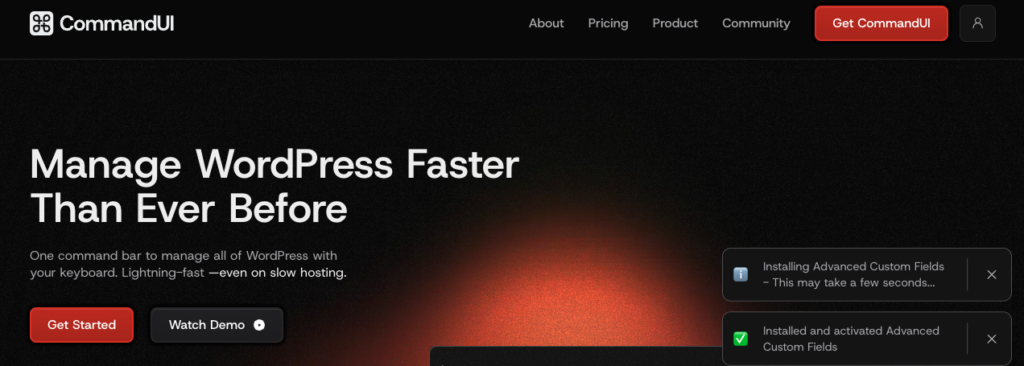
  • CommandUI Review: The Most Powerful WordPress Command Palette Plugin Right Now?

    CommandUI Review: The Most Powerful WordPress Command Palette Plugin Right Now?

    A practical look at how CommandUI changes daily WordPress workflows.

    If you’ve ever wished WordPress worked more like Spotlight on macOS or Raycast on desktop, CommandUI is basically that idea dropped straight inside your admin panel. No hunting through menus. No waiting for page loads just to tweak something small. You hit a shortcut, a clean command bar appears, and you jump wherever you need to go.

    While WP Spotlight sits in the same “admin productivity” category, CommandUI goes deeper. It’s not just a search bar. It’s more like a workflow engine hidden behind a keyboard shortcut.

    Before diving into features, here’s a quick snapshot.

    CommandUI At A Glance

    Type: Premium WordPress command palette plugin
    Best for: Agencies, developers, content teams, a11y-focused workflows
    Pricing: Annual + lifetime options with site limits

    Standout abilities:

    • Full admin navigation
    • Post/page/CPT search with instant actions
    • Plugin install/activate from the palette
    • Global shortcuts
    • Solid integrations with Elementor, Bricks, Beaver Builder, WS Form, wpDataTables, Yoast SEO, LS Cache
    • Keyboard-first and screen-reader friendly

    Looking for a better alternative to CommandUI?… Try Commandify! Especially if you are running WooCommerce store or complex WordPress sites.

    What Is CommandUI?

    commandui website home page

    CommandUI brings a real command palette to WordPress. The idea is simple: instead of clicking around the admin, you press Cmd/Ctrl + K or Shift + Shift, type what you need, and jump straight there. It feels modern. Fast. Clean. And honestly, quite addictive once you get used to it.

    The plugin works almost everywhere:

    • WordPress admin
    • Gutenberg editor
    • Frontend (handy for editing or jumping to templates)
    • Builders like Elementor, Bricks, Beaver Builder
    • Plugin settings from dozens of third-party tools

    CommandUI started as a personal tool built by Calvin Alkan because he was “tired of click-hell in WP admin.” The early prototype took just a couple of hours, but the idea was too good to leave as a personal script. Today, it runs a full engine that understands posts, pages, CPTs, media, users, plugins, templates, forms, and more.

    Looking for a better alternative to CommandUI?… Try Commandify! Especially if you are running WooCommerce store or complex WordPress sites.

    CommandUI Review: Main Features That Actually Matter

    commandUI review by experts

    Global Navigation Without Touching Menus

    This is the feature you feel instantly.

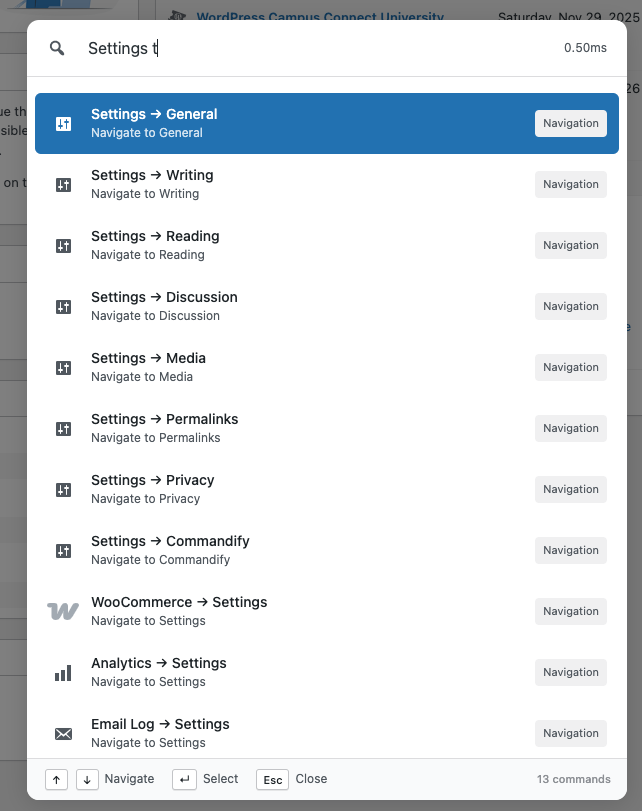
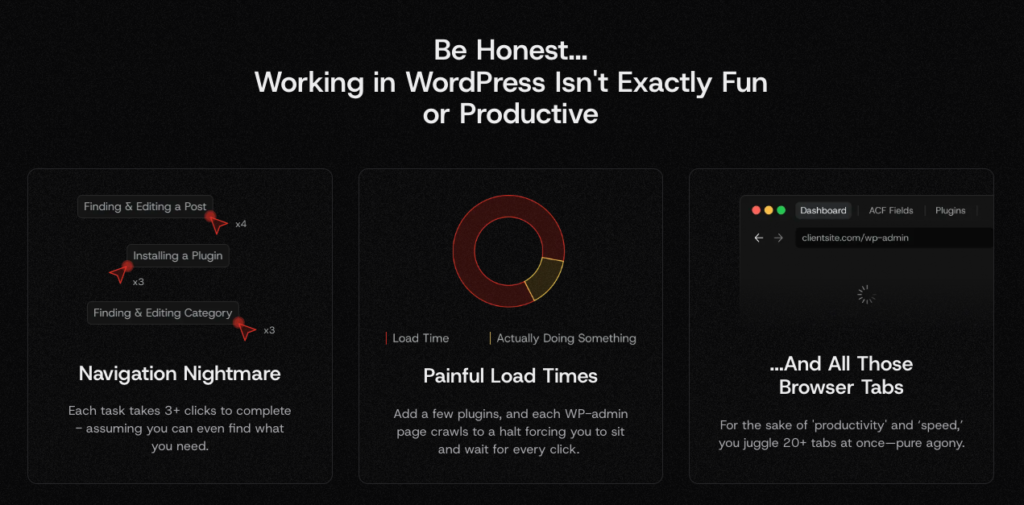
    In WordPress, even simple things take too many clicks. Need to tweak LS Cache? Different submenu. Want Pollify settings? Depends on your site’s layout, but again — more clicks.

    With CommandUI, you type “Woo status,” “LS Cache,” or “Pollify settings,” hit Enter, and you’re in.

    A few real examples:

    • Opening Elementor → Tools, which is normally buried under several screens.
    • Accessing custom CPT settings added by plugins (events, quizzes, polls).
    • Moving from WordPress Dashboard → Reading Settings → Permalinks in seconds.

    On large client sites with long admin menus, this difference is huge. No scrolling. No remembering where something lives. You tell the palette what you want, and it takes you there.

    Fast Content Search With Instant Actions

    CommandUI doesn’t just find content — it lets you act on it immediately. Every search result includes contextual actions that pop right beside it.

    Some actions include:

    • Edit
    • View
    • Open in builder
    • Copy permalink
    • Copy post ID
    • Quick duplicate (for some CPTs)
    • Open related templates (Bricks)

    This matters more than it sounds.

    Say you’re editing a blog post and need to update a related page, category, or Pollify poll. Instead of navigating away:

    • Hit Cmd/Ctrl+K
    • Type the title
    • Press Enter
    • You’re already editing it

    No loading screens. No switching menus. And because CommandUI supports drafts, private posts, scheduled posts, and custom post types, you can pull up almost anything without shifting context.

    Commandify – Command Palette, Content Search, Themes Control, Product Edits, Context Actions

    Create Anything From a Shortcut

    Press C and CommandUI switches to “create mode.”

    From there, you can create:

    • Posts
    • Pages
    • Custom post types
    • Forms (WS Form)
    • Tables (wpDataTables)
    • Any registered CPT on your site

    This is a huge quality-of-life improvement.

    You don’t have to open “Products → Add New” or “Pages → Add New.”
    You tell the palette “create product” or “create page,” and you’re already in the editor.

    It’s not flashy, but when you write and manage content every day, this feels like the workflow WordPress should’ve had all along.

    Looking for a better alternative to CommandUI?… Try Commandify! Especially if you are running WooCommerce store or complex WordPress sites.

    Plugin Management Straight From the Palette

    This is the moment most users realize CommandUI is more than “search.”

    You can:

    • Search WordPress.org for plugins
    • Install plugins
    • Activate or deactivate
    • Jump to plugin settings pages
    • Jump to plugin modules (like LS Cache → Cache → Object)
    • Disable a plugin using a shortcut (P → D)

    Instead of:

    Plugins → Add New → Search → Install → Activate → Wait…

    …it becomes:

    Cmd/Ctrl+K → “contact form” → Enter → Install/Activate.

    If you manage a lot of client sites, this feature alone feels priceless.

    User Search + Troubleshooting Tools

    Support teams love this.

    You can type the name or email of a user and immediately:

    • View their account
    • See their roles
    • Open their profile
    • Switch into their account (with User Switching)

    Cmd/Ctrl+K → name → Enter → Switch User → test → switch back

    It removes half the friction in support workflows.

    Global Shortcuts That Save Seconds All Day

    CommandUI includes a small set of global shortcuts that feel similar to editor shortcuts in VS Code or Raycast.

    Some useful ones:

    • E — Edit the current page
    • P then D — Deactivate a plugin
    • P then T — Open list of post types
    • U then U —Search users
    • C — Create new content

    If they conflict with something you use, you can disable them. But in practice, most users keep them on because the time savings add up.

    Editing the current page with one key press is a good example, feels tiny until you do it 30 times a day.

    Commandify – Command Palette, Content Search, Themes Control, Product Edits, Context Actions

    CommandUI Review: Integrations With Popular Plugins

    CommandUI becomes really valuable when you work inside page builders and plugin-heavy sites.

    Elementor

    You can jump straight into Elementor for any supported post type.
    And because it respects Elementor’s Role Manager, you won’t accidentally give a client too much access.

    Examples:

    • “Edit with Elementor” on any page
    • Opening Elementor tools/settings
    • Jumping to templates or theme builder parts

    Bricks Builder

    This integration goes deeper than Elementor’s.

    If you’re on the frontend of a page built with Bricks, CommandUI can:

    • Detect all templates rendering that page
    • Let you open the correct template immediately
    • Reduce the guesswork in template-heavy setups

    Bricks users especially appreciate this because Bricks sites often use layered template structures. CommandUI basically becomes the router.

    Beaver Builder

    You can:

    • Open the current page in Beaver
    • Jump directly to Beaver settings
    • Quickly find Beaver-enabled CPTs

    This keeps Beaver editing much smoother, especially on large sites.

    On plugin-heavy sites, this saves a surprising amount of time.

    Accessibility Built Into The Core

    Unlike many admin tools, CommandUI is built with accessibility in mind.

    • ARIA-compliant combobox
    • Proper focus handling
    • Clean keyboard navigation
    • Screen-reader friendly action logs
    • Works entirely without a mouse

    For a tool that sits inside wp-admin, this is rare. Teams with accessibility needs won’t hit roadblocks here.

    ZeroLatency Navigation (Upcoming)

    This feature aims to reduce waiting time between admin pages by cutting unnecessary reloads. You get a smoother experience that feels closer to a modern single-page app.

    So instead of:

    Dashboard → Posts → Edit → Template → Render

    …you’ll move through these transitions almost instantly.

    Even if your hosting is slow, the experience should stay snappy.
    If it launches as promised, this becomes one of the plugin’s biggest selling points.

    Looking for a better alternative to CommandUI?… Try Commandify! Especially if you are running WooCommerce store or complex WordPress sites.

    How CommandUI Actually Improves Daily Workflow

    top issues with managing a wordpress site

    Massively Fewer Page Loads

    WordPress is still very page-load heavy.
    CommandUI removes most of those transitions.

    Instead of:

    Menu → Submenu → Wait → Click → Wait → Edit

    You just:

    Cmd/Ctrl+K → type → Enter.

    On slower hosting (shared, cheap VPS, client sites), this feels like a different CMS.

    Better Flow in Page Builders

    If you build sites with Bricks, Elementor, or Beaver, the palette helps you:

    • Jump between templates
    • Switch between editing modes
    • Find components or settings
    • Move from frontend → builder → template with zero friction

    This reduces mental load and speeds up creative work.

    More Predictable Support Workflows

    Support teams move between:

    • Users
    • Orders
    • Products
    • Settings
    • Cache tools
    • SEO panels

    CommandUI puts all of this behind a single shortcut.

    It makes switching tasks less painful and reduces the number of steps to reproduce customer issues.

    Content Teams Stay Focused

    Opening drafts, editing pages, attaching media, or finding related content becomes simple.
    You don’t lose your flow because you aren’t digging through menus anymore.

    Real-World Use Cases

    commandUI review by experts

    Agencies Managing Many Sites

    When you manage 20, 50, or even 200 client sites, shaving off 30–60 seconds per task adds up quickly.
    CommandUI makes admin navigation, plugin updates, form editing, and builder template switching far more manageable.

    Developers Working With Bricks, Elementor, Beaver

    Switching templates is painless.
    Diagnosing where a page’s layout comes from is faster.
    Finding buried settings becomes instant.

    Large Content Sites

    If you publish often — news, blogs, communities — searching, editing, and creating content becomes a smoother loop.

    Accessibility-Focused Workflows

    CommandUI is one of the few admin tools where screen-reader and keyboard-only users don’t feel left out

    Pricing & Licensing Explained Clearly

    CommandUI is a premium plugin only. There’s no free version, and honestly, it doesn’t feel like a plugin that would fit the free model anyway. It’s geared toward people who live inside WordPress every day — devs, support teams, agencies, content teams — folks who are willing to pay for saved time.

    Pricing Tiers (Annual + Lifetime Options)

    CommandUI offers three tiers:

    • Site Owner – for personal or small business sites
    • Freelancer – for people handling multiple client builds
    • Agency – for teams running many production sites

    Each tier comes in both annual and lifetime versions.
    Lifetime licenses are more expensive upfront but pay off quickly if you plan to keep CommandUI in your toolset long-term. For agencies or power users, the LTD option makes the most sense.

    Here’s the pricing table for CommandUI (both yearly and lifetime) to include in Part 2:

    PlanYearly PriceSites IncludedLifetime PriceSites Included
    Site OwnerUS $5.99/month (billed annually) → approx US $71.88/year5 sitesUS $299 one-time5 sites
    FreelancerUS $11.99/month (billed annually) → approx US $143.88/year50 sitesUS $499 one-time50 sites
    AgencyUS $19.99/month (billed annually) → approx US $239.88/year150 sitesUS $899 one-time150 sites

    CommandUI doesn’t limit users or devices, only registered sites. So if you have multiple team members, everyone gets full access on the same site.

    Looking for a better alternative to CommandUI?… Try Commandify! Especially if you are running WooCommerce store or complex WordPress sites.

    How Site Limits Actually Work

    This is something people often misunderstand.
    Each license allows activation on a certain number of sites. But “site” means any environment where the plugin runs, including:

    • Production
    • Staging
    • Development
    • Local environments (depending on setup)

    The dev has mentioned that staging/local environments usually count in some form. So if you’re an agency juggling 50+ sites with staging mirrors, the Agency tier is the safest pick.

    A good habit is to only activate CommandUI on sites where it actually improves your workflow. For example, for internal testing or quick edits on experimental sites, you can skip activation entirely.

    Refund Policy & Trial Comfort

    CommandUI offers a 14-day refund window. Their own description is relaxed- essentially a “try it and see if it sticks” approach.

    Given the nature of CommandUI, two weeks is enough to know if it fits your muscle memory. You’ll either find yourself opening it constantly, or you’ll know it isn’t for you.

    Commandify – Command Palette, Content Search, Themes Control, Product Edits, Context Actions

    Criticisms & Common Complaints

    Not everything is perfect and that’s okay. The critiques tend to be consistent and fair.

    Slight learning curve

    If someone isn’t comfortable with keyboard shortcuts, CommandUI takes a bit of getting used to.
    Most folks adapt quickly, but it’s worth mentioning.

    Shortcuts can clash

    If you use other keyboard-driven tools, some shortcuts may overlap.
    Thankfully, CommandUI lets you disable or adjust shortcuts, but it still causes friction for a few users.

    Not a “search everything” engine

    Some reviewers expected CommandUI to index everything — options tables, plugin-specific data structures.
    It doesn’t.
    It focuses on navigation, actions, CPTs, users, templates, and plugin settings.

    WooCommerce order table limitation

    CommandUI doesn’t fully search Woo’s new “custom orders table” yet. If you rely heavily on Woo order management, this is something to know.

    Not customizable enough (yet)

    A few users wish they could:

    • Add their own custom commands
    • Add macros or workflows
    • Reorder or rename commands

    Some of this is on the roadmap, but at the moment, customization is limited.

    Looking for a better alternative to CommandUI?… Try Commandify! Especially if you are running WooCommerce store or complex WordPress sites.

    Common Questions About CommandUI

    A good review should answer questions users actually ask.
    Here are the big ones — answered in simple language.

    Is there a free version of CommandUI?

    No. CommandUI is premium-only.
    It’s positioned as a professional workflow tool, not a consumer plugin.

    Will CommandUI slow down my WordPress site?

    No — it helps you avoid page loads.
    In most cases, it makes slow hosting feel faster because you spend less time waiting for screens to reload.

    And once ZeroLatency Navigation ships, the speed gap should grow even more.

    Does CommandUI work with Elementor, Bricks, Beaver Builder?

    Yes, those are some of its strongest integrations.

    You can:

    • Jump into templates
    • Edit pages directly in the builder
    • Switch builder contexts without navigating menus

    Is CommandUI safe?

    Yes.
    It had one false-positive scan result with Wordfence, which was quickly clarified and resolved. The codebase is clean, and updates are frequent.

    Can I customize keyboard shortcuts?

    You can:

    • Disable global shortcuts
    • Use only Cmd/Ctrl+K
    • Adjust behavior in settings

    You can’t yet build custom macro commands, but that’s something users have asked for.

    Does CommandUI support non-Latin languages and IME input?

    Yes.
    The command palette supports IME languages like Japanese, which many tools struggle with.

    How often is CommandUI updated?

    Very often.
    Its release changelog shows frequent improvements, bug fixes, and new integrations.

    CommandUI is clearly an active project — not a “set it and forget it” plugin.

    Is CommandUI better than the native WordPress command palette?

    Yes — in every way except price.

    The native WordPress palette:

    • Only works inside the Site Editor
    • Handles a small set of commands
    • Doesn’t integrate with plugins
    • Doesn’t have deep actions
    • Doesn’t improve general wp-admin navigation

    CommandUI works across the entire admin and inside builders.

    It’s not even a fair comparison.

    Will CommandUI help non-technical users?

    Yes — if they’re willing to learn the command bar habit.

    Writers, editors, and store managers pick it up quickly because the palette removes the biggest frustration: navigating complex wp-admin menus.

    Can teams control who sees what commands?

    CommandUI respects WordPress roles and plugin-level role managers (like Elementor’s).
    So users only see commands they’re allowed to use.

    For example:

    • Editors won’t see plugin settings
    • Subscribers won’t see admin screens

    This is important for agency sites, membership sites, or LMS platforms where different people share backend access.

    CommandUI vs WP Spotlight: Which WordPress Command Palette Plugin Fits Better?

    Only two plugins sit in this space right now: CommandUI and WP Spotlight.
    Both aim to fix WordPress navigation.
    But the way they approach the problem is very different.

    CommandUI behaves more like a workflow engine — deep actions, shortcuts, plugin integrations, builder awareness.
    WP Spotlight leans toward being a universal admin search tool, with a stronger focus on updates and multisite utilities.

    Here’s a clearer breakdown.

    CommandUI

    Best for users who want:

    • Fast movement across wp-admin
    • Deep plugin integrations
    • Builder-friendly workflows
    • Command-based actions
    • Keyboard-first navigation
    • Accessibility-focused design
    • Plugin install/activation from the palette
    • Power shortcuts (E, P→D, C, U→U)

    It’s built for people who work inside WordPress all day, developers, agencies, content teams.

    WP Spotlight

    Best for users who want:

    • A simple global search bar
    • Multisite-focused tools
    • Quick updates (plugins, themes, translations)
    • Light, predictable search
    • Lower learning curve

    WP Spotlight doesn’t dig as deep into builders or plugin structures, but it’s solid for multisite owners and admins who want a central search box.

    Feature Comparison Table

    Here’s a simplified table readers can scan quickly:

    FeatureCommandUIWP Spotlight
    Global admin searchYesYes
    Instant actions (edit/view/copy ID/etc.)Yes(basic)
    Plugin install/activate/deactivate(deep)(limited)
    Multisite site switching(not main focus)strong
    Page builder integrationsstrong (Elementor, Bricks, Beaver)minimal
    Settings search for third-party pluginsdeeplimited
    Global shortcuts (E, C, P→D, etc.)Yescustomizable
    Accessibility-first designYesYes
    “Command palette” feelfullymore like search engine

    The biggest difference is that CommandUI feels like Raycast for WordPress, while WP Spotlight feels closer to a central search bar with update utilities.

    Looking for a better alternative to CommandUI and WP Spotlight?… Try Commandify! Especially if you are running WooCommerce store or complex WordPress sites.

    When CommandUI Is The Better Choice

    Choose CommandUI if you:

    • Work in Elementor, Bricks, or Beaver Builder
    • Run agency workflows with 20–200 client sites
    • Prefer a keyboard-driven admin
    • Want plugin and settings navigation without effort
    • Jump between post types constantly
    • Want a tool that cuts page loads dramatically
    • Need accessibility-first admin tools

    If you want a true WordPress command palette, CommandUI is the clear pick.

    When WP Spotlight Makes More Sense

    Choose WP Spotlight if:

    • You mainly run multisite networks
    • You prioritize quick updates (plugins/themes/translations)
    • You prefer simple search without deep integrations
    • You don’t work inside builders or complex setups
    • You want something lightweight with minimal learning curve

    WP Spotlight is capable — just not built with the same “workflow depth” as CommandUI.

    Getting Started with CommandUI- Quick Setup Guide

    Here’s a simple onboarding flow for new users.

    1. Install the Plugin

    • Download from your CommandUI account
    • Go to Plugins → Add New → Upload
    • Activate normally

    Since this is a premium ZIP, it installs like any paid tool.

    2. Activate Your License

    Once activated, you’ll see a license field.
    Enter your key, connect your site, and you’re done.

    If you’re an agency, assigning the right sites to the right license tier is the only thing to watch here.

    3. Open the Command Palette

    Use one of the two default shortcuts:

    • Cmd/Ctrl + K
    • Shift + Shift (like Spotlight)

    Pick whichever fits your muscle memory.

    4. Test Common Searches

    Try searching for:

    • Posts
    • Pages
    • Custom post types
    • Plugin settings (“Yoast”, “LS Cache”, “Pollify”)
    • Users

    You’ll see how CommandUI groups results intelligently.

    5. Try Actions on Results

    Open a page in:

    • Gutenberg
    • Elementor
    • Beaver
    • Bricks

    Test actions like “copy permalink” and “open template”—it helps build confidence.

    6. Learn 2–3 Shortcuts

    You don’t need them all.
    Start with:

    • E → Edit current page
    • C → Create new content
    • P then D → Deactivate plugin

    Once these become automatic, CommandUI feels natural.

    7. Train Your Flow for a Week

    Most users say it becomes part of their workflow within 3–5 days.
    By the end of the week, navigating wp-admin without it feels slow.

    Final Verdict on CommandUI Review: Is It Worth Buying?

    CommandUI isn’t a “nice-to-have” plugin. It’s a productivity shift, the kind that changes how you move inside WordPress.

    If your day involves:

    • Editing posts
    • Jumping inside builders
    • Troubleshooting user accounts
    • Tweaking plugin settings
    • Repeating admin tasks across many sites
    • Supporting clients
    • Working on content-heavy pages

    …CommandUI saves hours every month.

    It’s not magic. It’s not over-engineered. It’s simply the workflow WordPress should’ve had from the start.

    Who Gets the Most Value?

    • Agencies (big time saver across 20–200 sites)
    • Developers (Bricks/Beaver/Elementor workflows)
    • Content teams (fast movement across drafts, pages, media)
    • Accessibility-focused teams
    • Power users who prefer keyboard-first navigation

    And because it works everywhere (admin, Gutenberg, frontend, builder screens) CommandUI becomes the central command hub you use constantly.

    For anyone serious about workflow, this is one of the best productivity plugins in the entire WordPress ecosystem.

    Looking for a better alternative to CommandUI?… Try Commandify! Especially if you are running WooCommerce store or complex WordPress sites.

    The wpRigel Team

    November 10, 2025
    Plugin review
wprigel logo

wpRigel builds innovative WordPress plugins for developers, marketers and agencies. Be with us, get more users for your business and increase conversion using our powerful tools.

  • x.com icon
  • linkedin icon

Products

  • Pollify
  • Commandify
  • Krom Automation (Now Live 🎉)

Company

  • Affiliate Program
  • About Us
  • Contact Us
  • Privacy Policy

Resources

  • Docs
  • Blog
  • Support Area
  • Refund policy

Comparisons

  • Commandify vs CommandUI
  • Pollify vs CrowdSignal
  • Krom Automation vs others

Changelogs

  • Commandify Changelog
  • Pollify Changelog
  • Krom Automation Pro Changelog

wpRigel 2026. All Rights Reserved

  • Terms of use
  • Privacy Policy
  • Cookie Policy