wprigel logo
  • Home
  • Products
    • commandify icon

      Commandify- Best Command Palette Plugin for WordPress

      Navigate, search, and manage everything on your site with a simple keyboard-first workflow.
    • pollify plugin logo

      Pollify- Ultimate Poll Creator Plugin for WordPress

      Build interactive polls, surveys & voting experiences in WordPress with the best Gutenberg-native poll plugin.
  • Docs
  • Blog
  • Contact Us
Pricing
  • WordPress Poll Plugin Features Explained By Industry Experts

    WordPress Poll Plugin Features Explained By Industry Experts

    WordPress poll plugin lets you collect data from your audience. It helps in getting product feedback or planning the roadmap for upcoming features or anything you want to know their thoughts on.

    You need to have certain poll plugin features that enable audience easily vote and view the results. Otherwise, you won’t be able to collect data from your audience.

    If your poll/survey is not attractive enough to get the user’s attention or confuses users on how to answer the poll questions, then you will lose audience interest in participating.

    You poll plugin should be easy to use. You shouldn’t have to break a sweat while designing and customizing your poll questions.

    To make sure you don’t end up installing the wrong WordPress poll plugin, we are going to discuss the features that should be present on a poll plugin. This will help you make the right choice while choosing a poll plugin.

    Pollify – Feedback Polls, Anonymous Polls, Up/down Voting and NPS Surveys

    Lets start-

    10 Must-Have Poll Plugin Features You Should Look for

    After researching some WordPress poll plugins and talking with some site owners who have published poll questions on their site, we have come up with 10 feature list that should be present in every WordPress poll plugin-

    1. Easy Configuration
    2. Ultimate Customization Options
    3. Various Poll Types and Formats
    4. Responsive Design
    5. Advanced Poll-Survey Features
    6. Security and Anti-Spam
    7. Analytics, Tracking and Reporting
    8. Integration with 3rd Party Tools
    9. Multilingual and Localization
    10. Support and Resources

    Let’s get into the details-

    1. Easy Configuration

    Your poll plugin should be designed with simplicity in mind, allowing even non-technical users to set up and configure polls without difficulty. The dashboard should be user-friendly, with clearly labeled options and easy navigation.

    This will make sure that creating and managing polls is an easy process.

    Having a Gutenberg block will also throw away a lot of learning curve. As most WordPress users have gotten used to the block culture of WordPress, a poll plugin with a poll block feature can go a long way.

    A drag-and-drop builder also improves usability by allowing users to create and arrange poll elements without writing a single line of code.

    This feature enables users to build polls by dragging and dropping different question types, options, and elements into place, making the process both quick and flexible.

    2. Ultimate Customization Options

    Online Polls & Surveys in WordPress

    Pre-designed templates can save your time and effort, but the ability to customize these templates is essential. You should be able to select from a variety of templates and then tweak them to match their specific needs. Like adjusting the layout, adding branding elements, or modifying the structure of the poll.

    To make sure the poll is in line with the website’s overall design, the plugin should offer design customization options. Users should be able to change colors, fonts, and styles, ensuring that the poll visually integrates with the rest of the website.

    Also, the plugin should support various field types to accommodate different kinds of questions. This includes multiple-choice fields, dropdown menus, text input fields, and more. The flexibility to choose the appropriate field type for each question ensures that the poll can gather accurate information from respondents.

    3. Various Poll Types and Formats

    A versatile poll plugin should support different types of polls, such as single-choice (where respondents select one answer), and multiple-choice (where respondents can select more than one answer).

    This variety allows users to create polls that are best suited to their specific needs, whether they are seeking a simple yes/no answer or a more detailed response.

    To make polls more engaging, the plugin should allow users to add media such as images, videos, or GIFs within poll questions. This can be particularly useful in visual or interactive polls, where respondents may need to view a video or image before answering a question.

    4. Responsive Design

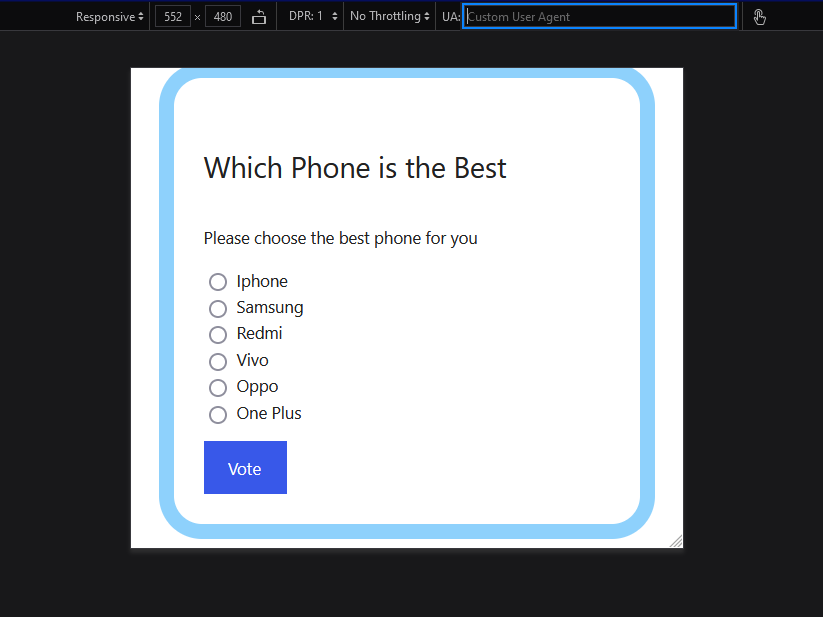
    In today’s mobile-centric era, polls must look good and function seamlessly on all devices, including smartphones and tablets.

    poll design customization on wordpress using Pollify plugin

    The plugin should ensure that polls are fully responsive, automatically adjusting to fit the screen size and resolution of the device being used. This ensures that users can participate in polls regardless of the device they are using, enhancing accessibility and participation rates.

    5. Advanced Features Like Conditional Logic and Poll Scheduling

    Conditional logic allows for a more personalized poll experience by showing or hiding questions based on previous answers. For example, if a respondent answers “Yes” to a question, the next question might dive deeper into that response, whereas a “No” answer might skip to a different question.

    This feature makes sure that users only see relevant questions, reducing survey fatigue.

    Additionally, the ability to schedule polls is essential for managing time-sensitive content. Website owners should be able to set specific start and end dates for their polls.

    It will allow them to go live automatically at a predetermined time and close when the polling period ends. This feature is particularly useful for polls related to events, promotions, or campaigns.

    Randomization features can help reduce bias in polls by randomizing the order of questions or answer choices. This prevents respondents from being influenced by the order in which options are presented, leading to more accurate and reliable data.

    6. Security and Anti-Spam

    The plugin should integrate CAPTCHA technology to prevent spam and ensure that only legitimate respondents participate in the poll. CAPTCHA helps to block automated bots from submitting multiple votes, ensuring the integrity of the poll results.

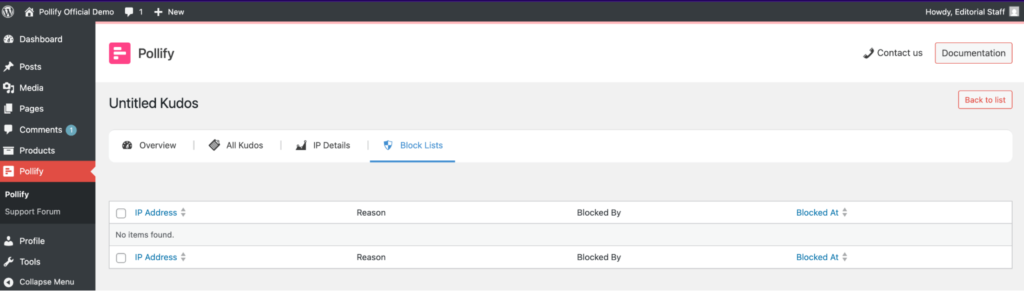
    To further enhance the security and accuracy of poll results, the plugin should also offer IP blocking features. This prevents multiple votes from the same IP address, which can be particularly useful in ensuring that each respondent only votes once in cases where one vote per person is desired.

    7. Analytics, Tracking and Reporting

    Showing real-time results is important for keeping respondents engaged and informed. This feature allows respondents to see the current state of the poll immediately after they submit their answers, which can encourage participation and transparency.

    Also, you will need analytics for understanding and interpreting poll responses. The plugin should offer detailed reports that provide insights into the data collected, including charts, graphs, and summary statistics. The poll plugin feature to export these reports in various formats (e.g., CSV, PDF) allows users to share or analyze the data further.

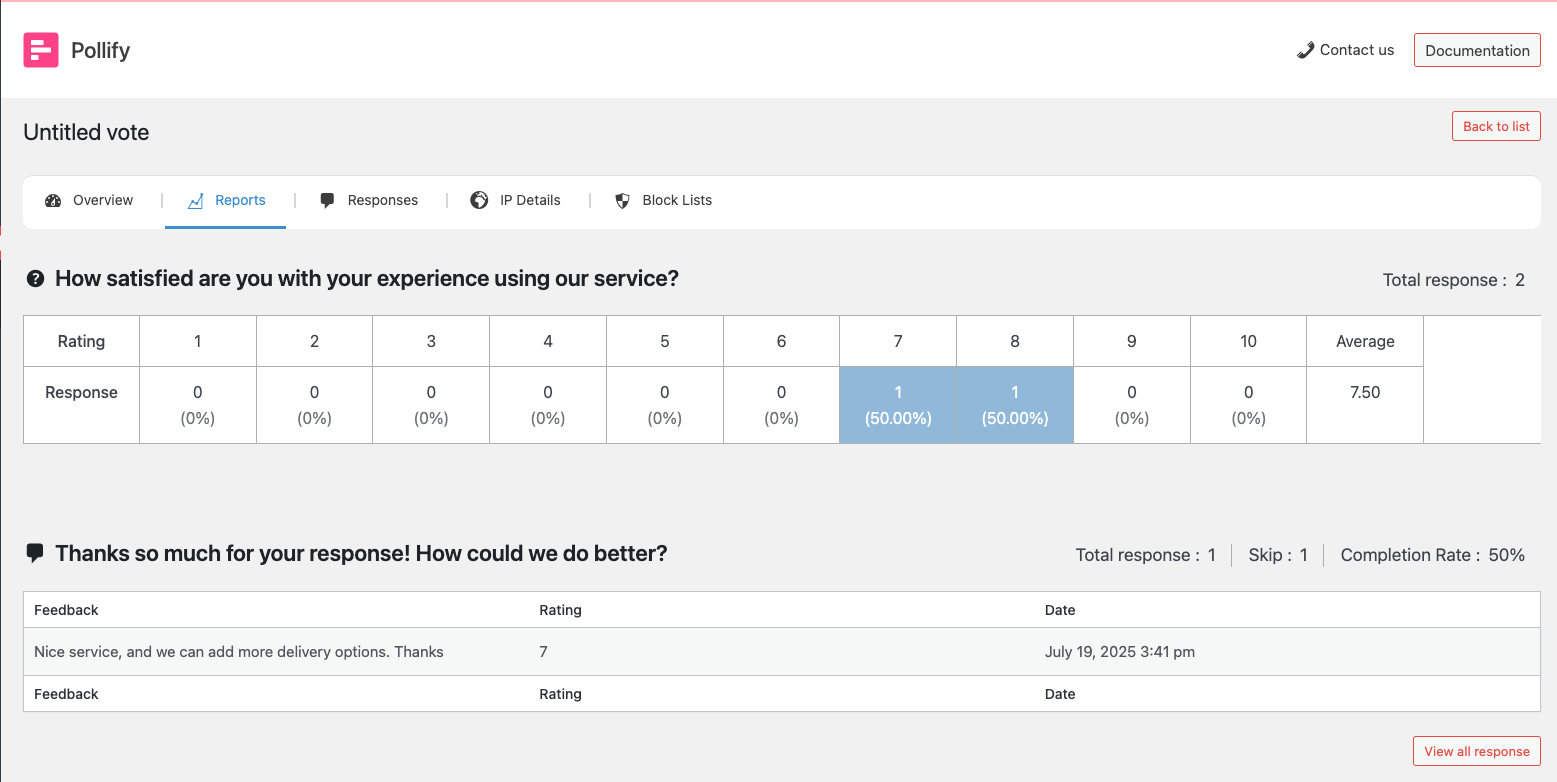
    pollify analytics dashboard with polling data for admin

    The poll plugin should also track additional voter insights, such as demographic information, geographic location, and other relevant data. This can help users understand who is responding to the poll and identify trends or patterns in the responses, leading to more informed decision-making.

    8. Integration with 3rd Party Tools Like Email and CRM

    Polls are a valuable source of data for email marketing campaigns. The plugin should offer integration with email marketing platforms, allowing users to automatically send poll results or follow-up emails to specific addresses based on responses. This can enhance engagement and nurture relationships with respondents.

    The plugin should also include a social media sharing option feature to increase the reach of polls. This allows respondents to easily share the poll or its results on platforms like Facebook, Twitter, and LinkedIn, potentially driving more traffic to the polls.

    CRM (Customer Relationship Management) systems and marketing automation tools are essential for businesses to leverage poll data for targeted marketing efforts.

    The plugin should allow integration of poll responses with these systems, enabling users to trigger automated actions based on the data collected. For example, sending personalized emails or updating customer profiles.

    Pollify – Feedback Polls, Anonymous Polls, Up/down Voting and NPS Surveys

    9. Multilingual and Localization

    The poll plugin needs to be capable of creating polls in multiple languages for a global audience. This feature is particularly important for websites with a diverse user base, ensuring that language is not a barrier to participation.

    Beyond just language translation, the plugin should allow users to customize various elements of the poll, such as messages, buttons, and labels, to suit different cultural contexts. This ensures that the poll resonates with respondents from different regions and provides a more personalized experience.

    10. Support and Resources

    Reliable customer support is crucial for resolving any issues or questions that may arise. The plugin should offer multiple channels for support, such as email, live chat, or forums, ensuring that users can get help quickly and efficiently when they need it.

    Moreover, comprehensive and easy-to-understand documentation is important for helping users get the most out of the plugin. This should include step-by-step guides, tutorials, FAQs, and troubleshooting tips that cover everything from basic setup to advanced features.

    These are the poll plugin features every WordPress poll plugin should have.

    WordPress Poll Plugins: Are They Worth It?

    So now you know what poll plugin feature you need to look out for while choosing a polling software.

    If you have a WordPress site, then you are in luck. Because there are quite a few poll plugins available in the WordPress repo.

    If we make a list, then the first name that comes on top is Crowdsignal.

    Crowdsignal is a WordPress polling plugin for creating and managing surveys, polls, quizzes, and forms. It offers a user-friendly interface, customizable design options, real-time results, and support for various question types, making it an excellent tool for gathering feedback and engaging with your audience.

    However, Crowdsignal has some disadvantages. The free version is quite limited, pushing users toward paid plans for advanced features. Customization options, while available, might not be as flexible as other form builders. Additionally, some users may encounter challenges with integration complexity and mobile responsiveness.

    So, is there any other poll plugin that you can use without going over your budget and that is more user-friendly?

    Yes, there is. and you should go for Pollify Poll Maker plugin.

    Pollify is the first 100% Gutenberg-powered poll plugin for WordPress, designed to easily integrate with the Gutenberg editor, making it incredibly easy to create and manage polls directly from your posts or pages.

    This plugin allows users to add poll questions using a dedicated Gutenberg block, eliminating the need for shortcodes and providing a easier and hassle free experience.

    With Pollify, you can customize poll questions to match your site’s design, including options to adjust titles, descriptions, button texts, colors, and more. It also supports features like multivote systems, single-vote limitations, and poll scheduling, giving you full control over how your polls operate.

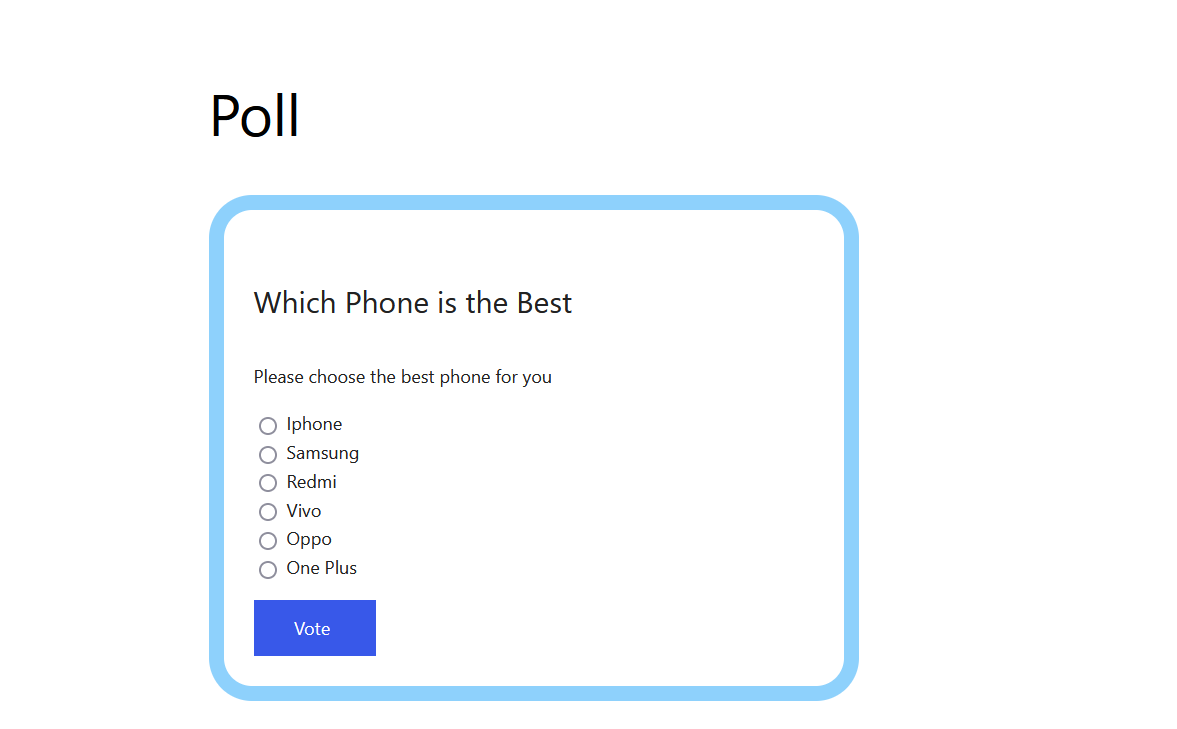
    This is a screenshot of Pollify poll plugin block

    Pollify offers a free version with unlimited poll questions, real-time results displays, and a user-friendly admin dashboard for easy management.

    You will also find features like advanced poll types like VS (Versus) polls, rating systems, and results export options.

    Best of all, Pollify’s premium version is set to be more affordable than Crowdsignal while offering a wider range of features even in its free version. This makes it an excellent choice for WordPress users looking to engage their audience without breaking the bank.

    Explore Pollify Plugin and Its Features

    Powerful Features of Pollify WordPress Poll Plugin

    • Includes a block in the Gutenberg editor named “Poll” to create polls
    • Multivote Functionality allows respondents to select multiple answers within a specified limit
    • Poll scheduling with end dates, streamlining event management and data collection
    • IP restriction to prevent multiple votes from the same user
    • Customize result pages with sorting options, avatars, and individualized messages
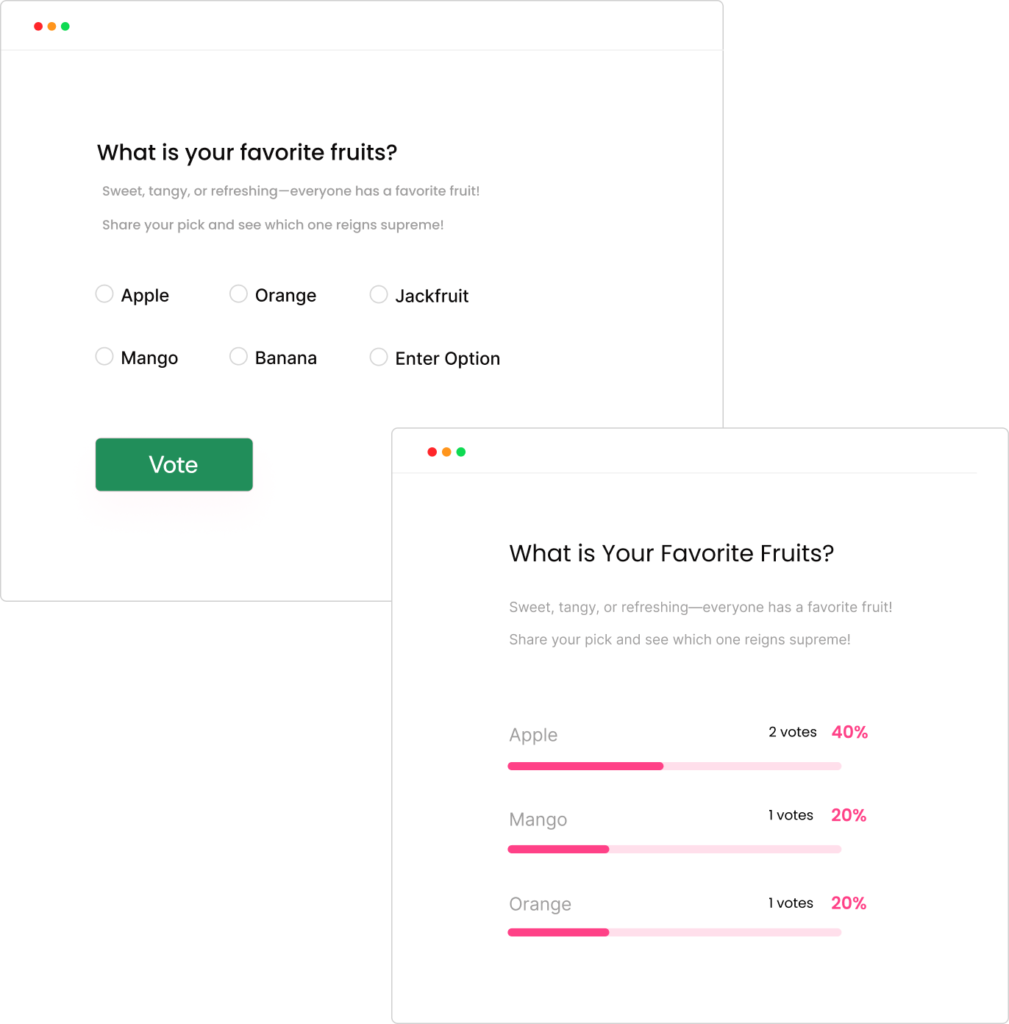
    • Visualize results with bar charts with all voting details
    • Customizable fields, improving your insights and marketing efforts
    • Notification alerts for each vote submitted
    • Specify user roles eligible to participate, ensuring targeted engagement.
    • Redirect voters post-poll based on their responses.
    • Safeguard poll privacy with Google Recaptcha-protected access
    • Mailchimp Integration

    You can see that the Pollify poll plugin has all the features that we mentioned in the must have features list.

    Pollify – Feedback Polls, Anonymous Polls, Up/down Voting and NPS Surveys

    Choose the Right WordPress Poll Plugin for Your WordPress Site

    Choosing the right WordPress poll plugin is crucial for effectively engaging your audience and collecting meaningful data. With the right features, a poll plugin can transform your website into a tool for gathering feedback, driving engagement, and making informed decisions.

    While Crowdsignal offers a solid option, its limitations in the free version and flexibility might steer users toward more versatile and budget-friendly alternatives like Pollify.It stands out as a modern, Gutenberg-powered poll plugin that combines ease of use with powerful features, all while remaining affordable.

    Whether you need to create simple polls or more complex surveys, Pollify provides a solution that integrates seamlessly with the WordPress environment.

    By understanding and prioritizing the essential features discussed in this blog, you can select a poll plugin that not only meets your needs but also enhances your overall website experience. Remember, the right poll plugin can significantly impact how you engage with your audience, gather insights, and drive your website’s success.

    So, make your choice wisely and start capturing valuable audience insights today.

    Download Pollify for FREE!

    The wpRigel Team

    November 20, 2024
    user guides
  • How To Boost User Engagement in WordPress with Interactive Polls

    How To Boost User Engagement in WordPress with Interactive Polls

    Businesses are constantly looking for innovative strategies to engage their audience. One of the most powerful tools in this regard is interactive content, particularly polls, quizzes, and quick surveys.

    These dynamic elements capture user attention and significantly enhance engagement rates and you can get benefited with invaluable insights into consumer behavior and preferences.

    Polls are best kind of content online that engages your audience. People love interacting the most through polls on all popular social platforms including Instagram, LinkedIn, X (Twitter), Facebook, Reddit and so on. The fact is same for your business website.

    Today, we will explore the benefits of interactive content and useful user engagement techniques with polls. Also, show you how it can help your business build more meaningful and lasting connections with your audience.

    Let’s start.

    What is Interactive Content?

    Interactive content is all about engaging users through active participation. Unlike static posts or articles, interactive content responds to user actions by creating a more dynamic and engaging experience.

    Interactive content generates 2x more engagement than static content. Plus, 81% of marketers say it grabs attention better. That means it’s a powerful tool to stand out online.

    Popular Types of Interactive Content

    1. Polls
    Polls are quick, easy, and fun. They let users vote and see instant results with creating a sense of involvement. For example, “Which feature do you want in our next update?” is a simple poll that encourages user interaction.

    2. Surveys
    Surveys go deeper, helping you gather insights into user preferences and behavior. They’re great for understanding what your audience wants and how to serve them better.

    A survey asking, “How satisfied are you with our service?” will give valuable feedback and boost engagement.

    3. Quizzes
    Quizzes are a fun way to engage users while providing personalized results. Think personality quizzes like, “What type of traveler are you?” or knowledge tests.

    78% of marketers report that quizzes increase audience engagement, also make them a hit on social media.

    4. Interactive Infographics
    Infographics are already popular for sharing data, but making them interactive takes it a step further. Users can click or hover over different elements to reveal more information. You can make complex data more engaging and easy to understand.

    5. Calculators
    Interactive calculators are perfect for providing instant value. They’re widely used in finance, fitness, and even home improvement. For instance, a mortgage calculator lets users input their data to see estimated monthly payments.

    Benefits of Interactive Content and Polls for Your Business

    poll design customization on wordpress using Pollify plugin

    Before you start utilizing user engagement techniques with polls, quizzes, and surveys, let us shed some light on the power of having interactive polls and content on your website.

    Why Interactive Content Works?

    • Quick Feedback: Users love seeing results right away. It makes them feel heard.
    • Personalized Experience: Custom results based on answers make users feel valued.
    • Boosts User Engagement: Interactive elements keep users on your site longer with increasing the chances of conversion.

    Check the top benefits of Interactive polls-

    • User Engagement Through Active Participation
    • Entertaining and Educational
    • Effective Way to Gain Opinions
    • Collect In-Depth Insights from Your Audience
    • Encouraging Social Media Engagement
    • Promote User-Generated Content
    • Build Stronger Customer Relationships
    • Increase Brand Awareness
    • Boost Conversion Rates

    Let’s explore details-

    Improve User Engagement Through Active Participation

    Interactive content is undoubtedly more engaging than traditional static content. Unlike passive content that requires minimal involvement from the user, quizzes, polls, and surveys demand active participation.

    This interaction creates a sense of involvement and connection, making users more likely to stay on your website and explore further. As a result, you can significantly improve user retention rates and encourage more in-depth exploration of their offerings. Employing user engagement techniques with polls is particularly effective in achieving this goal.

    Polls are A Quick and Effective Way to Gain Opinions

    Polls are another excellent interactive tool, offering users a quick and easy way to express their opinions and compare their views with those of others.

    Polls are particularly effective for gaining public sentiment on trending topics, product preferences, or brand perceptions. The instant results provided by polls create a sense of community and involvement among users.

    For example, employing user engagement techniques with polls, such as asking users to choose their favorite new product feature, can provide immediate feedback to your team while simultaneously engaging your audience in a meaningful way.

    Quizzes Work as The Entertaining and Educational Tool

    Quizzes are a highly effective tool for engaging users because they are both fun and educational. Quizzes designed to assess knowledge, personality traits, or preferences by catering to a wide range of interests.

    The immediate feedback or results provided by quizzes keeps your users engaged, often leading to a desire to share their outcomes with others. This sharing behavior drives more traffic to your site.

    For example, a quiz on “Which Product Suits Your Lifestyle?” could not only educate users about your product range but also provide personalized recommendations, creating a stronger connection with your brand.

    Surveys Help Gathering In-Depth Insights from Your Audience

    Surveys are invaluable for gathering detailed information on customer satisfaction, preferences, and feedback.

    Unlike quizzes and polls, which are generally short and focused, surveys are more comprehensive as they allow businesses to dive deep into audience needs and concerns. This detailed data provides a solid foundation for improving products and services, ensuring they align more closely with customer expectations.

    One effective strategy to increase survey response rates is by offering incentives.

    Increase Social Media Engagement

    Interactive content is far more likely to be shared than traditional content. Users enjoy sharing quiz results, poll outcomes, and even survey opinions on social media platforms, extending the reach of your content and enhancing its viral potential.

    Quizzes, polls, and surveys are particularly well-suited for social media, where users are constantly seeking engaging and shareable content. By integrating these interactive elements into your social media strategy, particularly through user engagement techniques with polls, you can significantly boost engagement rates, attract new followers, and enhance brand visibility.

    Promote User-Generated Content

    Interactive content also encourages users to create and share their own content, further increasing your reach and engagement.

    A quiz on “What Type of Traveler Are You?” might prompt users to share their results along with their favorite travel photos or experiences, creating a ripple effect that extends your brand’s presence across social media platforms.

    This user-generated content not only increases your visibility but also adds a layer of authenticity to your brand, as content shared by peers is often perceived as more trustworthy than brand-generated content.

    Build Stronger Customer Relationships

    Interactive content helps businesses build stronger relationships with their audience by involving customers actively in the brand experience. This active participation fosters a sense of loyalty, as customers feel more connected and valued.

    Boost Conversion Rates and Brand Image

    Engaged users are more likely to convert. By capturing attention and providing value through interactive content, businesses can effectively guide users down the sales funnel, leading to higher conversion rates and improved ROI.

    Interactive content portrays a brand as innovative, customer-centric, and responsive. By showing that your company values user input and is willing to engage in meaningful dialogue, you can enhance your brand image and reputation.

    Data Collection Through Interactive Content, Polls and Surveys: The Easy Way

    interactive content

    So, you have collected all the data from your interactive content. Now, how this data will help you?

    Well for starters, this data will help you-

    Unlocking Insights into Customer Behavior

    One of the most significant advantages of using quizzes, polls, and surveys is the ability to collect valuable data about your audience.

    This data is crucial for refining marketing strategies, personalizing user experiences, and enhancing products or services. Interactive content provides real-time insights into customer behavior, preferences, and emerging trends.

    For example, a survey can reveal why certain products are more popular, or a quiz can indicate which features of your service are most appealing to users. Employing user engagement techniques with polls can reveal instant insights into customer preferences, making it easier to tailor your offerings to better meet their needs and expectations.

    Segmenting and Personalizing Marketing Efforts

    By analyzing the data collected from quizzes, polls, and surveys, businesses can segment their audience based on preferences, demographics, or behavior.

    This segmentation allows for more targeted and personalized marketing efforts, which have been proven to be more effective in engaging customers and driving conversions.

    If a quiz reveals that a significant portion of your audience prefers eco-friendly products, you can tailor your marketing campaigns to highlight the sustainability aspects of your offerings, thereby increasing their relevance and appeal.

    How to Implement Interactive Content in Your Marketing Strategy

    Implementing interactive content in your marketing strategy can significantly boost audience engagement, gather valuable insights, and improve overall brand perception. Here’s how to effectively integrate quizzes, polls, and surveys into your marketing efforts:

    Choose the Right Tool for You

    A variety of platforms are available for creating quizzes, polls, and surveys, each offering unique features tailored to different needs and budgets.

    Popular options include SurveyMonkey for surveys, Pollify WordPress plugin for creating aesthetically pleasing polls, and BuzzFeed for engaging quizzes.

    The choice of tool depends on your specific requirements, such as the type of interactive content you wish to create, the level of customization needed, and your budget. It’s important to select a platform that aligns with your goals and provides the necessary features to create compelling and effective interactive content.

    Let Me Try Pollify Poll Creator Plugin

    Create Content That Truly Engages

    The success of quizzes, polls, and surveys heavily depends on their ability to engage users. To create compelling interactive content, consider the following tips:

    1. Tailor your content to the specific preferences and interests of your audience. Understanding what resonates with your users is key to creating content that captures their attention and keeps them engaged.
    2. Ensure your content is closely aligned with your brand and offers real value to users. Relevant content not only engages users but also reinforces your brand message.
    3. Use humor, appealing visuals, and interesting topics to keep users entertained. Engaging content is often light-hearted and enjoyable, making users more likely to participate and share.
    4. Offer something of value in return for participation, such as personalized recommendations, insights, or even small rewards. Providing tangible benefits encourages users to engage with your content and increases the likelihood of repeat participation.

    Analyze and Leverage Results

    After deploying quizzes, polls, and surveys, it’s crucial to analyze the results for actionable insights. Look for patterns and trends in the data to inform your marketing strategies, product development, and customer service improvements.

    For example, employing user engagement techniques with polls can quickly reveal popular opinions or preferences, allowing you to adapt your offerings accordingly. Regular analysis and adaptation based on these insights can help you stay ahead of the competition and continuously meet the evolving needs of your audience.

    Interactive Content and Polls: Real-World Success Stories

    Several brands have successfully leveraged interactive content to engage their audience and drive business outcomes:

    BuzzFeed Quizzes

    BuzzFeed has built a reputation for its highly engaging quizzes on a wide variety of topics. These quizzes are shared millions of times on social media, driving massive traffic to the site and significantly boosting user engagement.

    This is a screenshot of Buzzfeed quiz

    Netflix Surveys

    Netflix uses surveys to gather detailed feedback on user preferences and viewing habits. This data helps Netflix tailor content recommendations to individual users, keeping subscribers engaged and enhancing the overall user experience.

    Starbucks Polls

    Starbucks frequently uses polls on social media to engage their audience and gather feedback on new products or flavors. These polls not only provide valuable insights but also create a sense of community among Starbucks’ customers, fostering brand loyalty.

    This is a screenshot of Starbucks poll

    How to Create a Poll using the Pollify Poll Maker Plugin

    boosting user engagement through Interactive-Polls-on-WordPress

    Creating a poll using the Pollify Poll Maker plugin is an easy to go process.

    “Pollify“- the first ever 100% Gutenberg-powered poll plugin. Pollify is a user-friendly tool that integrates seamlessly with WordPress, making it easy to create, customize, and embed polls on your website. Here’s a step-by-step guide on how to create a poll using the Pollify Poll Maker plugin

    Let’s show you.

    Step 1: Install the Pollify Poll Maker Plugin

    First, you need to install the plugin from your dashboard. Or you can download the plugin from the WordPress.org site and upload the plugin separately to your WordPress website.

    To install the plugin, go to WP-Admin–> Plugins–> Add New. There type “Pollify” in the search box. Then install and activate the plugin.

    This is a screenshot of installing pollify poll maker plugin

    Step 2: Create a New Page or Post to Create a Poll Question

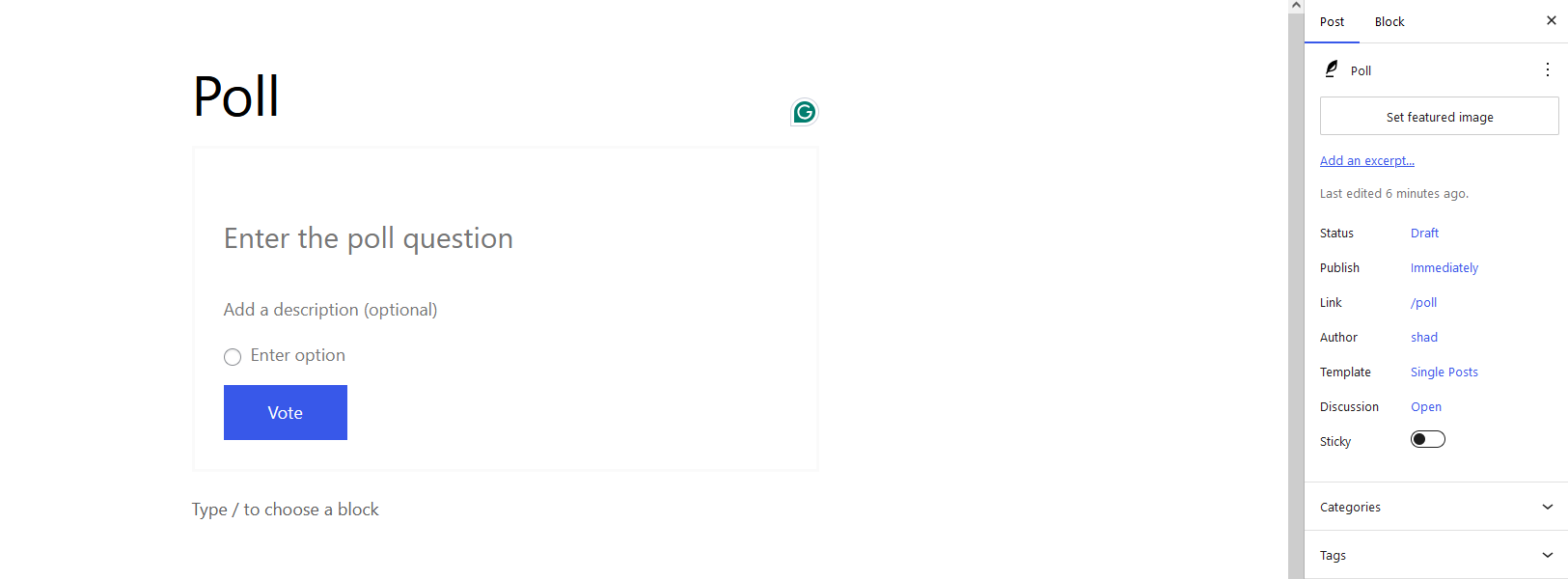
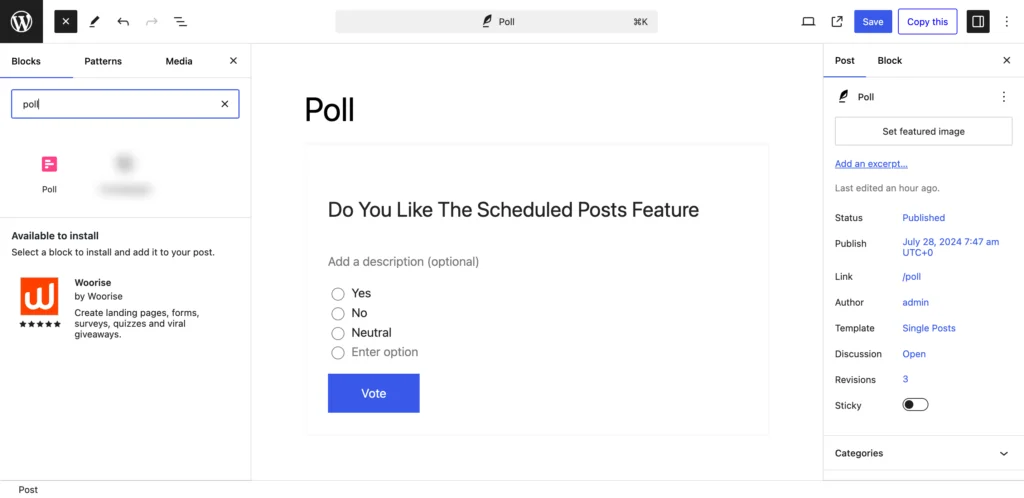
    Now open a page or post from Posts–> Add New. Then in the post, click on the “+” button and write Poll.

    This is a screenshot of choosing poll block in the post

    That will add a poll block in the post.

    This is a screenshot of adding poll question in the post

    Step 3: Customize the Poll Block

    Next, you need to add a title, description, and poll questions to your poll block. Also, if you want you can customize the voting button as well. Write what you want.

    This is a screenshot of adding poll question in the post

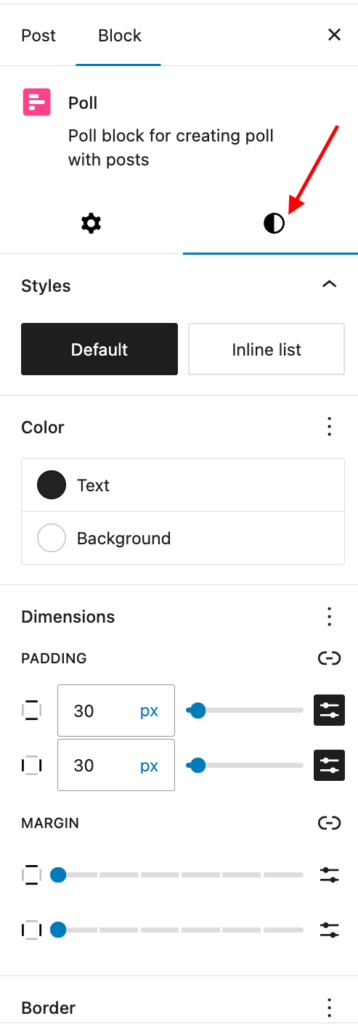
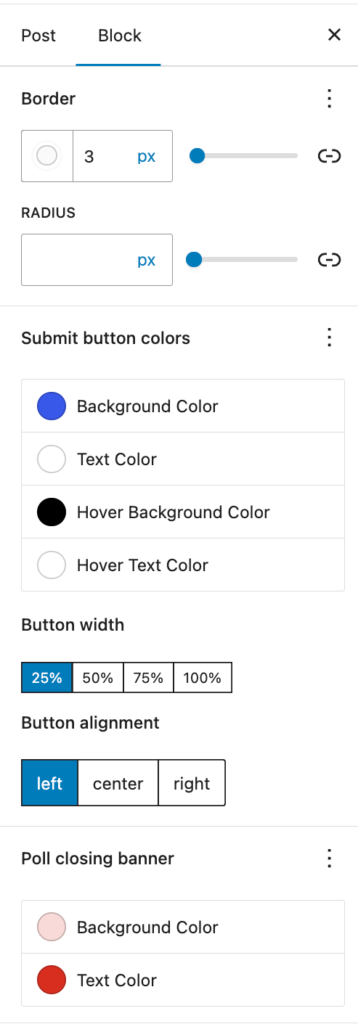
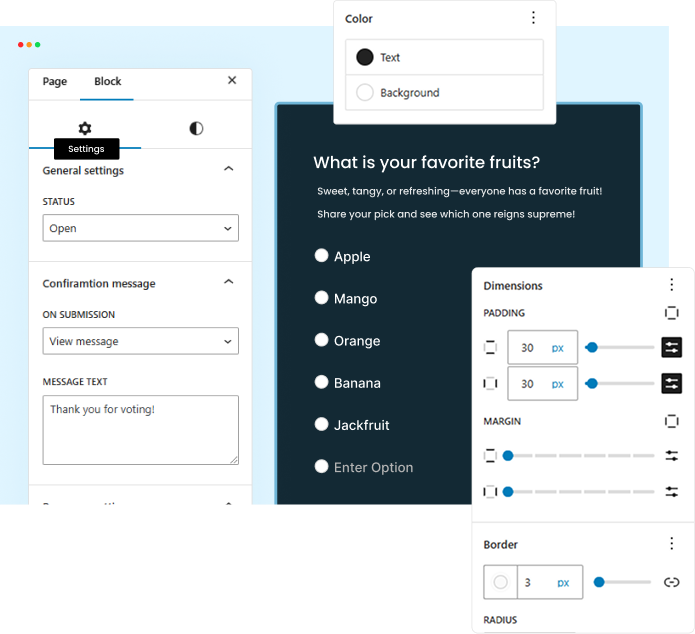
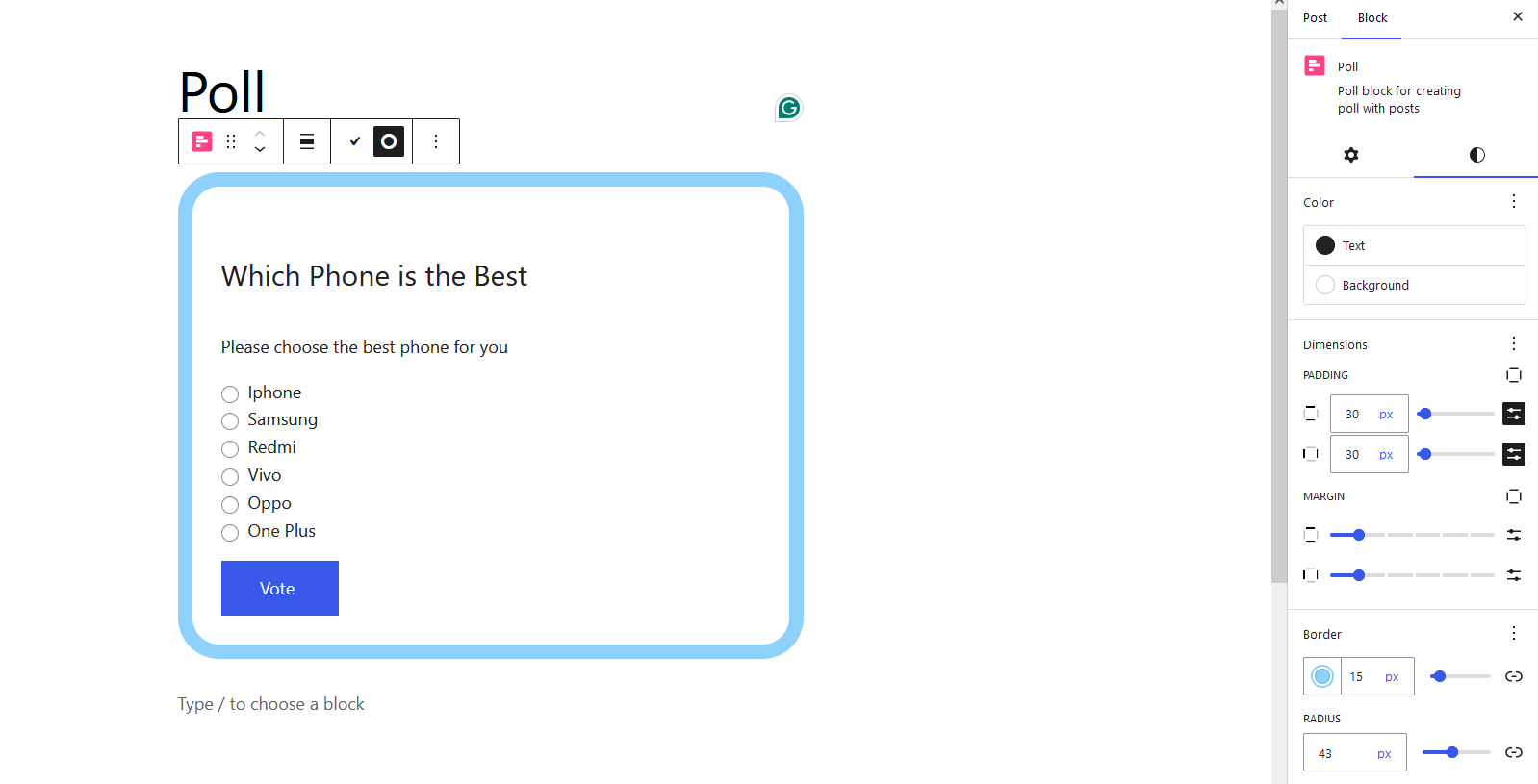
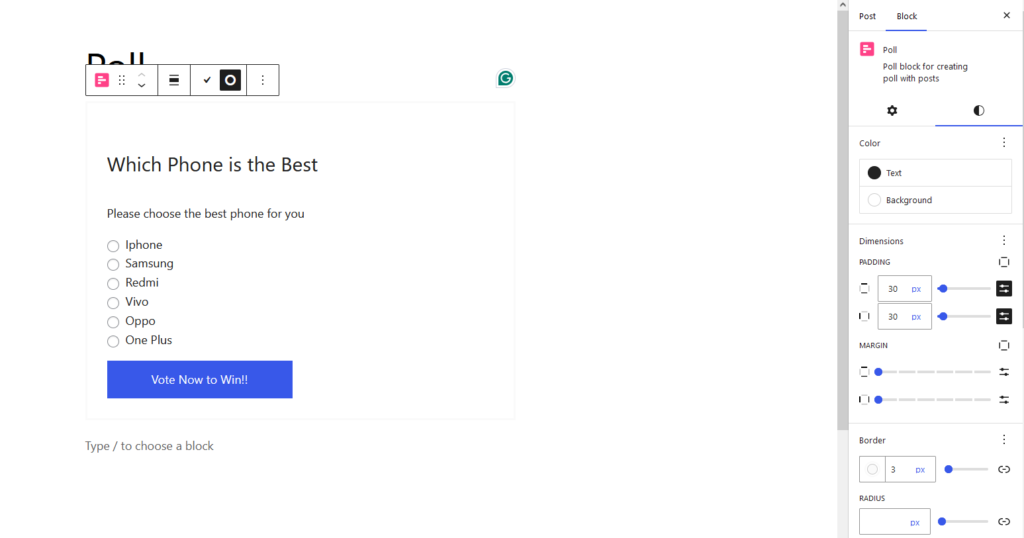
    More, you have the option to set padding, margin, border and background color. Don’t forget to set what you want to show after

    This is a screenshot of poll customisation

    Step 4: Publish Your Poll and Wait for Results

    Now, it is time to publish your poll questions and wait for the results.

    This is a screenshot of Pollify poll published

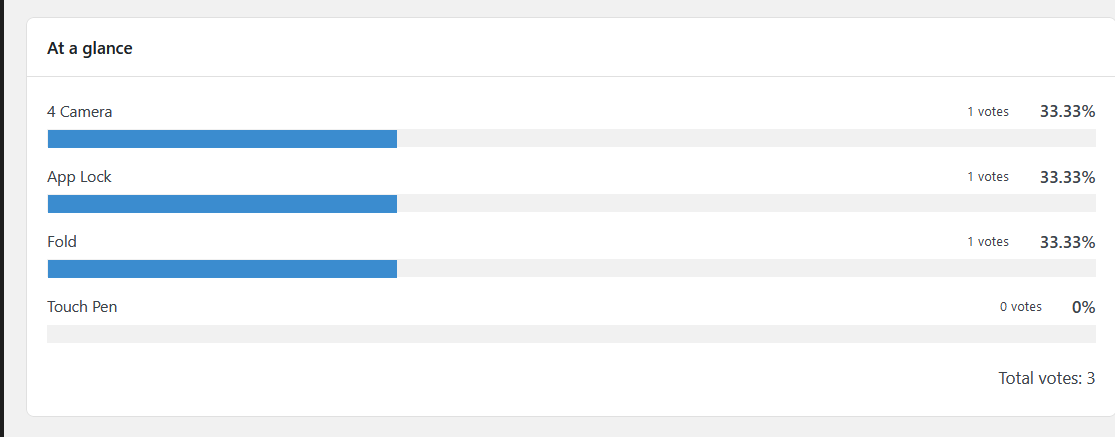
    You can see the results in the admin dashboard.

    This is a screenshot of Pollify Admin dashboard

    This is how you can easily create and publish poll questions in any page of the website using the Pollify poll maker plugin.

    You can explore step-by-step user docs on Pollify.

    If you want to read about more alternatives to Pollify you can read our guide on best WordPress poll plugins.

    Challenges in Interactive Content Implementation

    Adding quizzes, polls, and surveys are highly rewarding, but it comes with its own set of challenges. Understanding and addressing these challenges can help ensure that your interactive content strategy is effective and sustainable.

    Here are some common challenges in interactive content implementation-

    Ensuring Privacy and Data Security

    When collecting data through quizzes, polls, and surveys, it’s essential to prioritize user privacy and data security. Be transparent about how you will use the data and implement robust security measures to protect it. This transparency builds trust and encourages users to participate.

    Pollify handle user privacy and data security in a most secure way.

    Keeping Content Fresh and Relevant

    To maintain engagement, it’s important to regularly update your interactive content with new topics and formats. This continuous refresh keeps your audience interested and encourages repeat participation.

    Balancing Entertainment with Professionalism

    While interactive content should be fun and engaging, it’s crucial to balance entertainment with the seriousness of the information being collected. Ensure that your content remains professional and aligned with your brand’s tone and values, even when it’s designed to entertain.

    Quizzes, polls, and surveys offer businesses a powerful way to engage their audience, gather valuable data, and enhance customer relationships. By carefully implementing these tools and continuously analyzing the results, businesses can not only boost engagement but also drive meaningful business outcomes, particularly by employing effective user engagement techniques with polls.

    Last Words on User Engagement Techniques with Polls and Interactive Content

    Adding interactive polls into your marketing strategy is a powerful way to boost user engagement and gather valuable insights. Polls offer a quick and easy method for users to share their opinions, creating a more dynamic and engaging experience.

    By using polls, businesses can foster a sense of community, encourage participation, and enhance their understanding of customer preferences. Moreover, the data collected from polls are instrumental in refining marketing strategies, tailoring products or services, and driving conversions.

    Ultimately, interactive polls not only captivate your audience but also build stronger, more meaningful connections that contribute to long-term brand loyalty and success.

    Let Me Explore Pollify Poll Maker Plugin for Free

    The wpRigel Team

    November 2, 2024
    user guides
    User engagement
  • Meet Pollify: The First 100% Gutenberg-powered Poll Plugin for WordPress

    Meet Pollify: The First 100% Gutenberg-powered Poll Plugin for WordPress

    Introducing Pollify– the first ever 100% Gutenberg-powered poll plugin in the WordPress ecosystem.

    Polls and surveys help easily generate valuable feedback from your audience. By creating a poll with specific questions on your posts or pages, you can find out if the customers like your products/services or other issues you want to address.

    Moreover, there are lots of instances where you need a poll/online voting solution-

    • Idea generation: Ask your audience which features to add to your upcoming product or which topic to write on for your next newsletters.
    • Product development: You can make a list of challenges or goals and ask users to vote for those they relate to most.
    • Audience feedback: If you run a course business, you can ask audiences how they liked a specific course or class.
    • User engagement: Polls allow visitors to share their thoughts and ideas, making them feel valued and contributing to a better user experience on your site.
    • Gather Leads: You can capture leads and make your email list stronger.

    Let’s run a live test here with the Pollify plugin!

    Do you agree that a Poll plugin has the above use cases?

    If you agree that a poll or online voting app has the above-mentioned use cases then choose the option "Yes". Otherwise, choose "No".

    Yes, our poll maker plugin does just that! You can create any type of poll, survey, or online voting all within your Gutenberg editor, with no shortcode!

    In this write-up, we will dive deep and learn about the features and functionalities of the Pollify plugin and how it helps you add a poll system to your WordPress website.

    Let’s get started!

    Also read: Introducing Pollify Pro- Taking WordPress Polls to the Next Level

    Pollify: First 100% Gutenberg-powered Poll Maker Plugin for WordPress

    Pollify is a powerful WordPress poll creation and survey-making plugin, fully integrated with the Gutenberg. You can design, schedule, and customize polls and add them anywhere on your site without shortcodes. With advanced analytics, multilingual support, and premium features, Pollify provides everything you need to create, manage, and analyze polls seamlessly on your WordPress site.

    You know that Gutenberg has been a revolution in the WordPress industry since the beginning. With every WordPress release, Gutenberg has been getting remarkable updates and functionalities. It’s getting better and more powerful day by day. You can now use blocks to design your own theme and website page. All types of plugins were/are introducing Gutenberg blocks to use their feature.

    Unfortunately, no poll plugins used Gutenberg blocks to add poll questions easily to any webpage. We’re bringing this capability for the first time with Pollify. You can add polls and surveys directly into your Gutenberg editor using our poll maker plugin.

    Let’s take a quick look into Pollify features-

    • Gutenberg Integration
    • Multivote Functionality
    • Scheduled Polls
    • Anonymous Polls
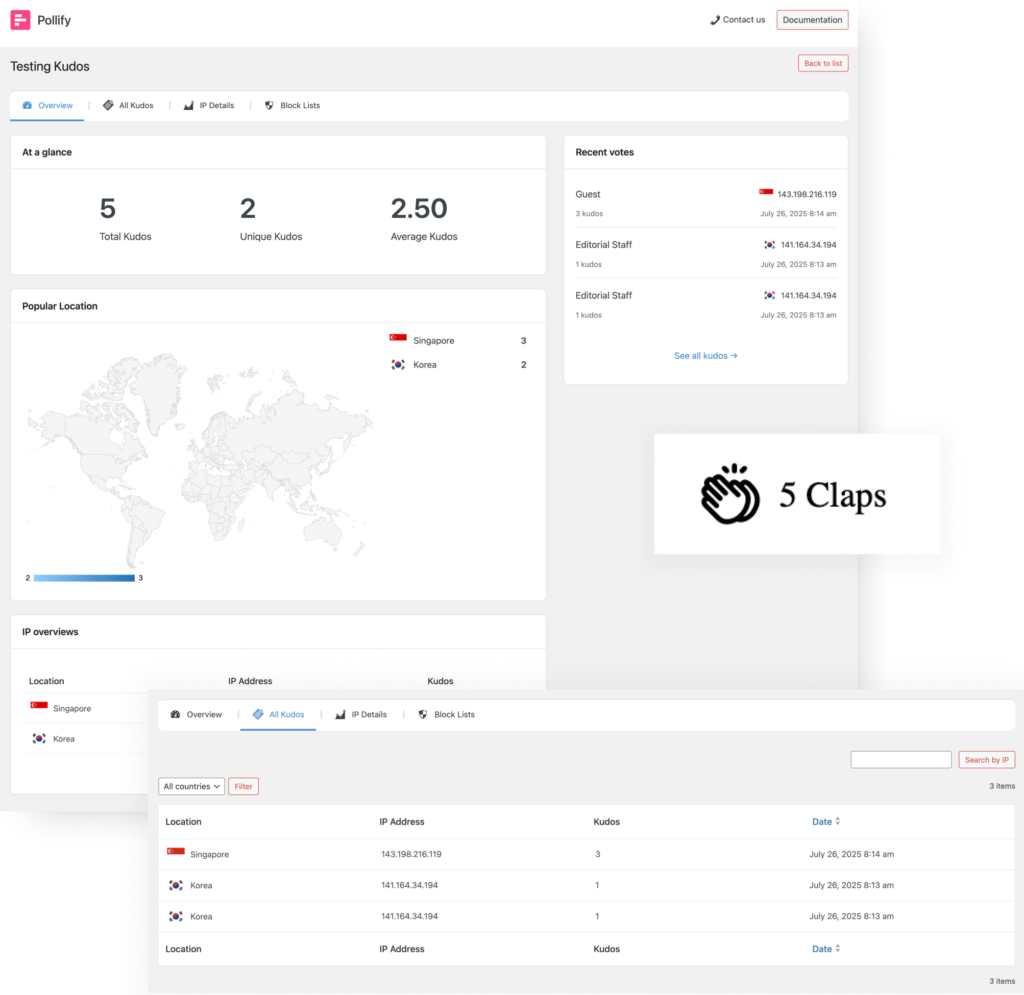
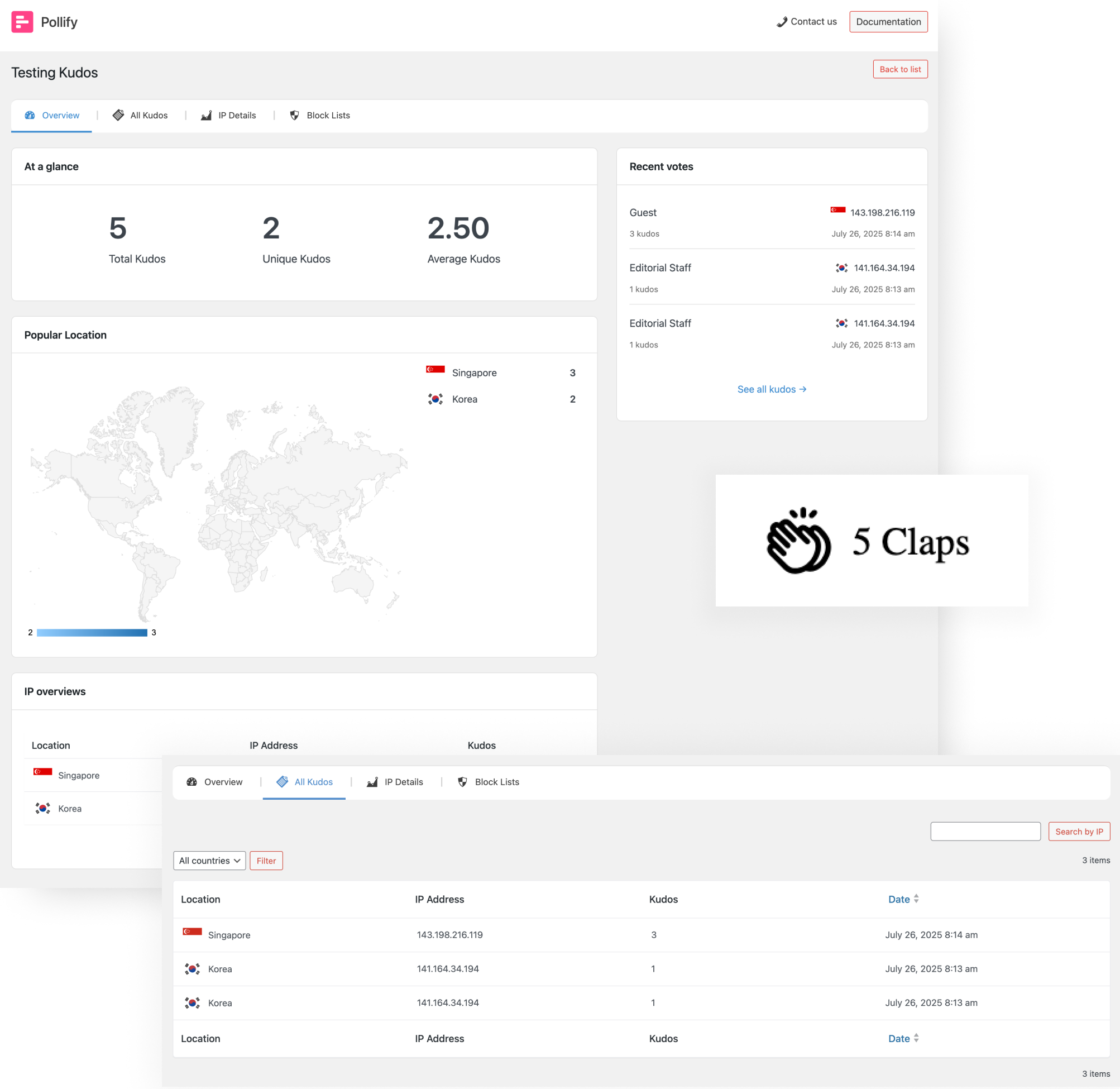
    • Kudos block for quick appreciation voting
    • Real-time Results
    • Customization Options
    • Advanced Analytics
    • Multilingual Support
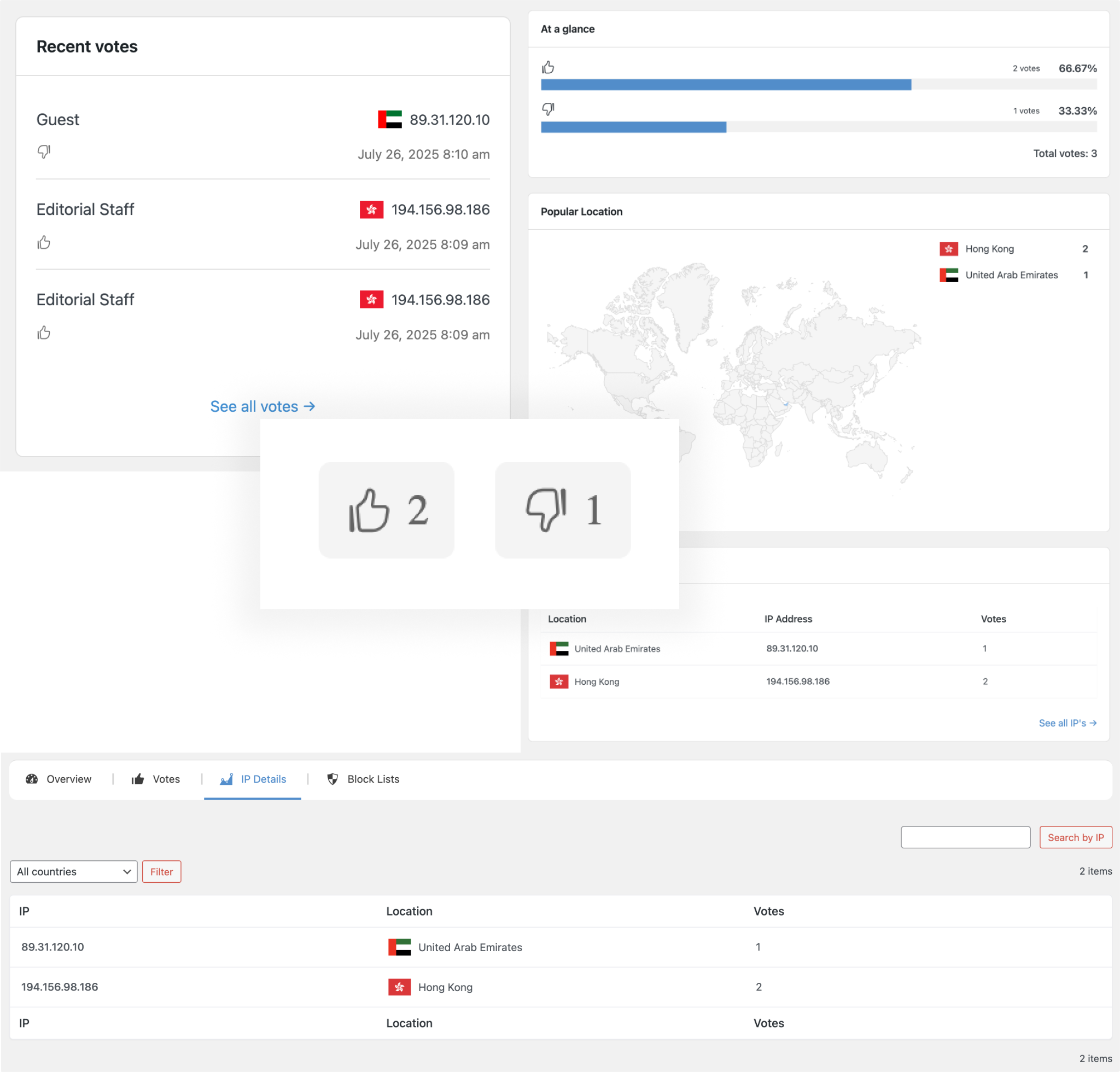
    • Up/Down voting block for fast sentiment feedback
    • User-Friendly Admin Dashboard
    • Chart Visualization
    • IP Address Tracking
    • Vote Reason Option
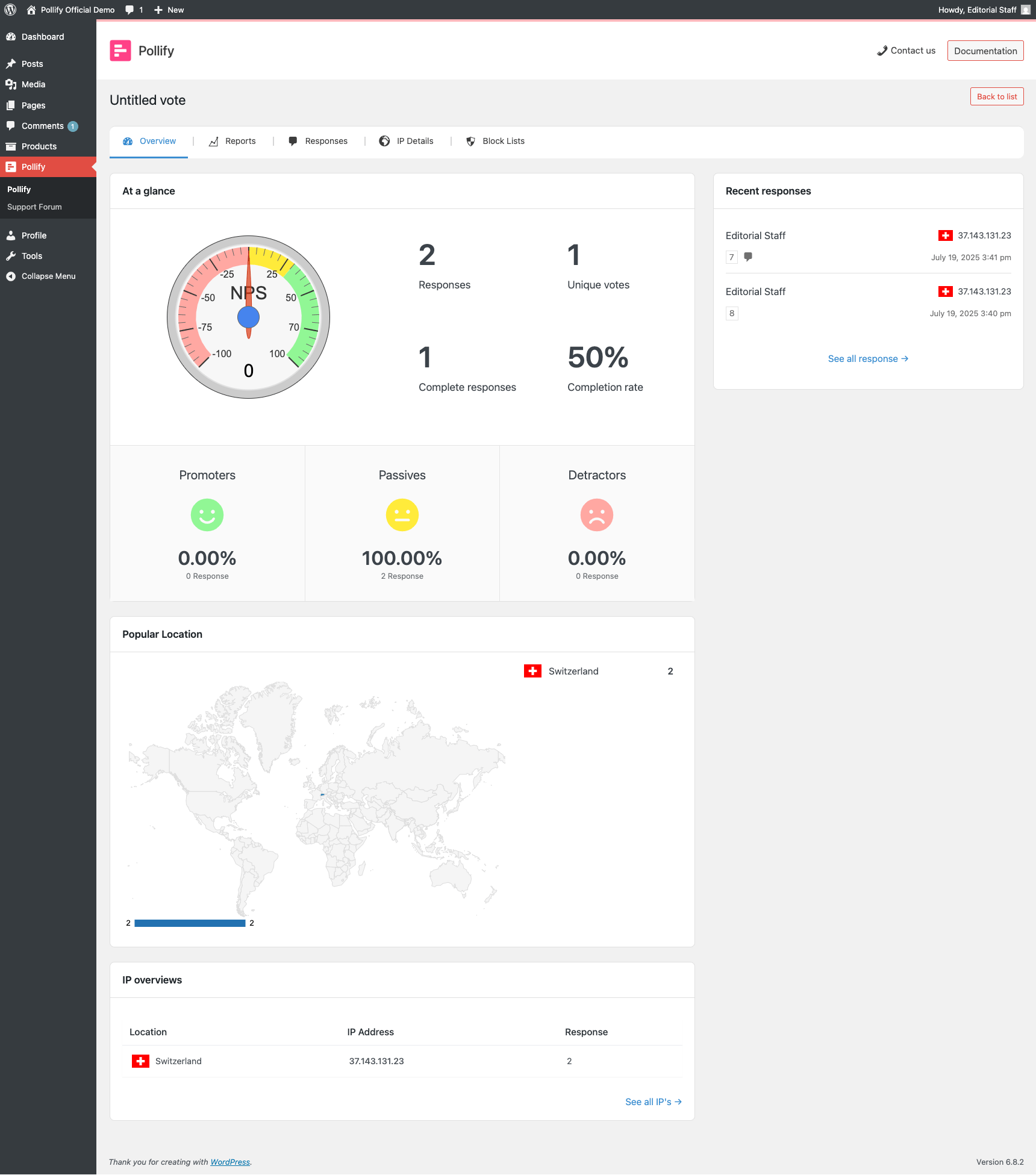
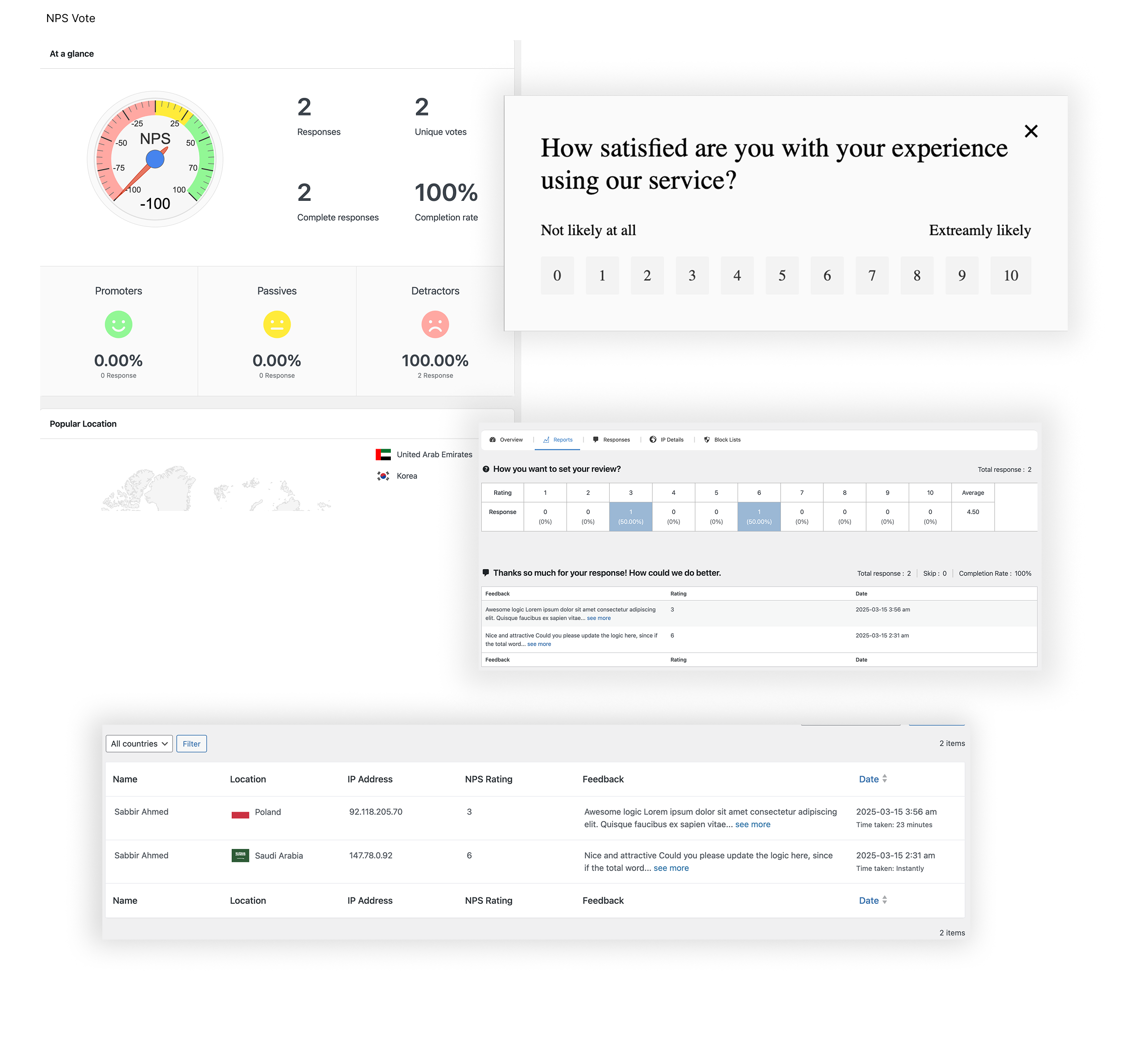
    • NPS survey block for detailed customer satisfaction scoring

    Since its initial release, Pollify has grown beyond its original capabilities– adding more block types, deeper styling controls, and improved performance. The plugin now includes engagement-focused blocks like-

    • Kudos/Applause feedback
    • Up/Down voting
    • Native NPS surveys
    • Advance IP blocking

    -making Pollify not just a random poll creation tool but a complete audience interaction suite for WordPress.

    Check Pollify Pro Features at a glance!

    Now let us explore some of its features in detail.

    Pollify Plugin Core Features at a Glance

    pollify plugin feature overview

    Create Poll and Set Questions Right from Gutenberg Editor

    As we said earlier, you can add poll and set questions using the Gutenberg block allowing you to add poll/survey questions to any post or page. You will find the block in the Gutenberg editor named “Poll” to add poll questions.

    This is a screenshot of choosing  poll block in wordpress post

    Just click the “+” button in the post/page to find the Poll block you are looking for. We will discuss this in detail in the later section of this post.

    You can create unlimited polls or set questions using this free plugin.

    And now, with the latest version, you can also create specialized blocks like Kudos, Up/Down, and NPS directly from the block inserter – no extra configuration or shortcodes required.

    Poll Customization to Make It More Attractive

    You can add different customization options to your poll questions using the Pollify poll maker plugin. In the advanced section right-hand side of the menu, you will find the styling options.

    You can add titles and descriptions to your polls. Also, you can customize the vote button to say whatever you like.

    This is a screenshot of poll customization

    Moreover, you can choose the color of the poll closing button. Along with that, you can set the

    • Padding
    • Dimension
    • Border
    • Submission button colors

    to make your poll stand out.

    The latest update also allows you to control typography, adjust spacing per block, and use pre-designed theme patterns for faster styling.

    Multivote System & Single Vote Limitation

    If you have a poll question that needs a user to choose multiple options, then you can do that with the Pollify poll creator plugin. This way you can get more specified feedback from the users.

    This is a screenshot of pollify multivote option

    Also, you can limit the user to choose one option only. It will ensure that you get accurate results from your poll/survey. Just choose the “Allowed one response per computer” option from the right-hand side menu.

    This is a screenshot of pollify settings

    For more control, Pollify Pro now supports vote limits per user role and even per registered account, allowing highly targeted poll setups.

    Poll Scheduling Option

    You can schedule the posts to end at a specific date and time. This will help you survey in your own time and not worry about closing the pole in a specific time.

    This is a screenshot of pollify general settings

    Also, you can set what message you want to show after closing the pole as well. You can hide the poll, show the poll result, or show a customized message to the users.

    With the Pro version, you can also schedule poll visibility in cycles – perfect for recurring events, seasonal campaigns, or monthly voting.

    Front-End Result Display

    If you want to show the results of the poll with sorting options, avatars, and individualized messages for enhanced engagement.

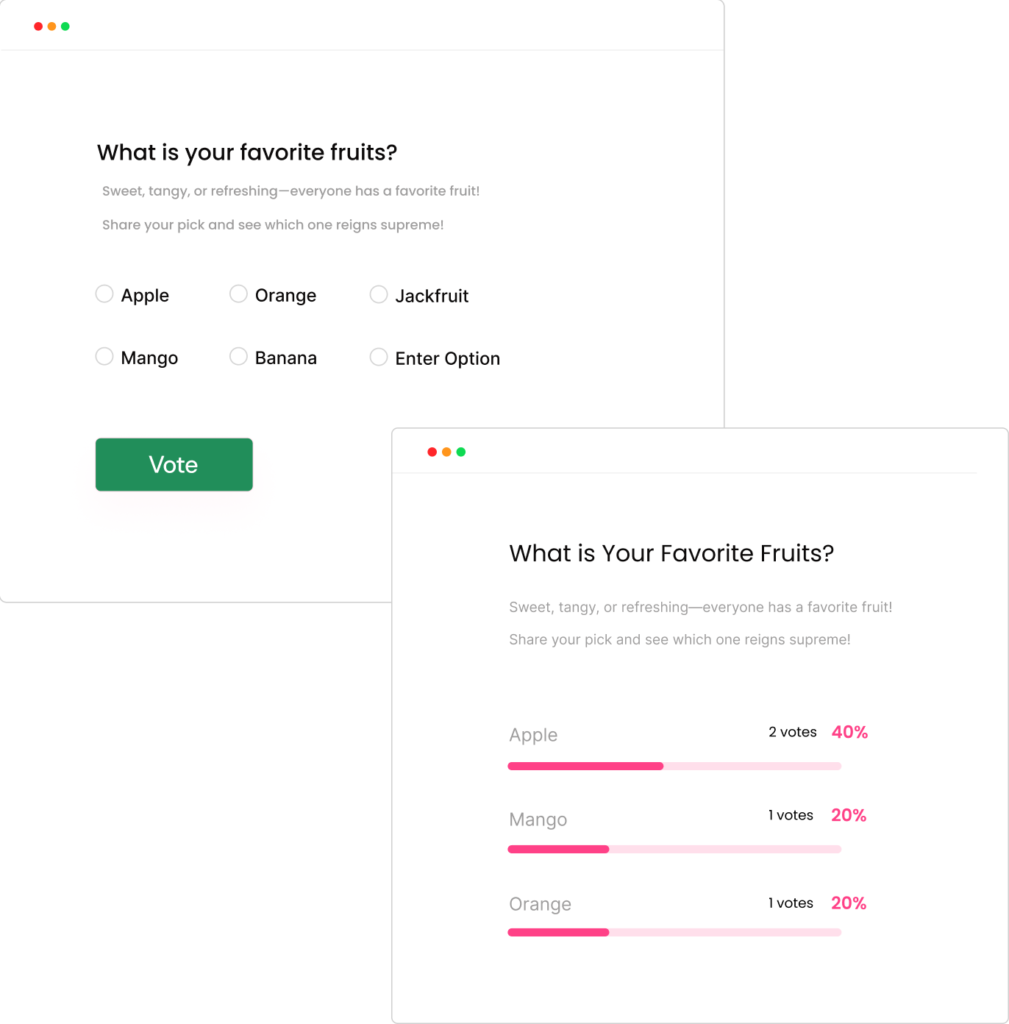
    This is a screenshot of poll results in the front page

    You can now choose between bar charts, pie charts, or percentage views for a more visual and engaging display.

    Anonymous Polls

    You can collect anonymous polls, ensuring participant privacy by collecting minimal data, compliant with GDPR.

    For added trust, Pollify offers clear privacy messaging below polls so users know exactly what data is (and isn’t) being collected.

    User-Friendly Admin Dashboard

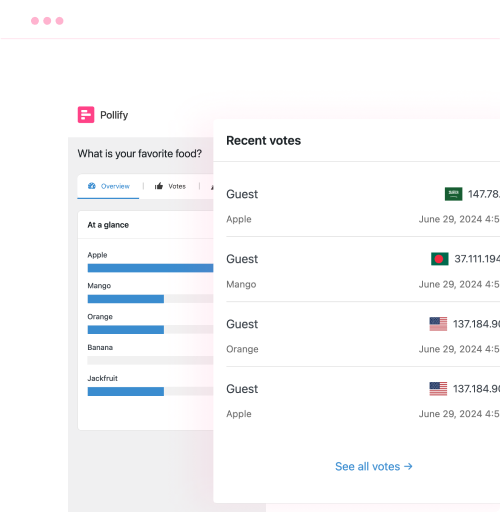
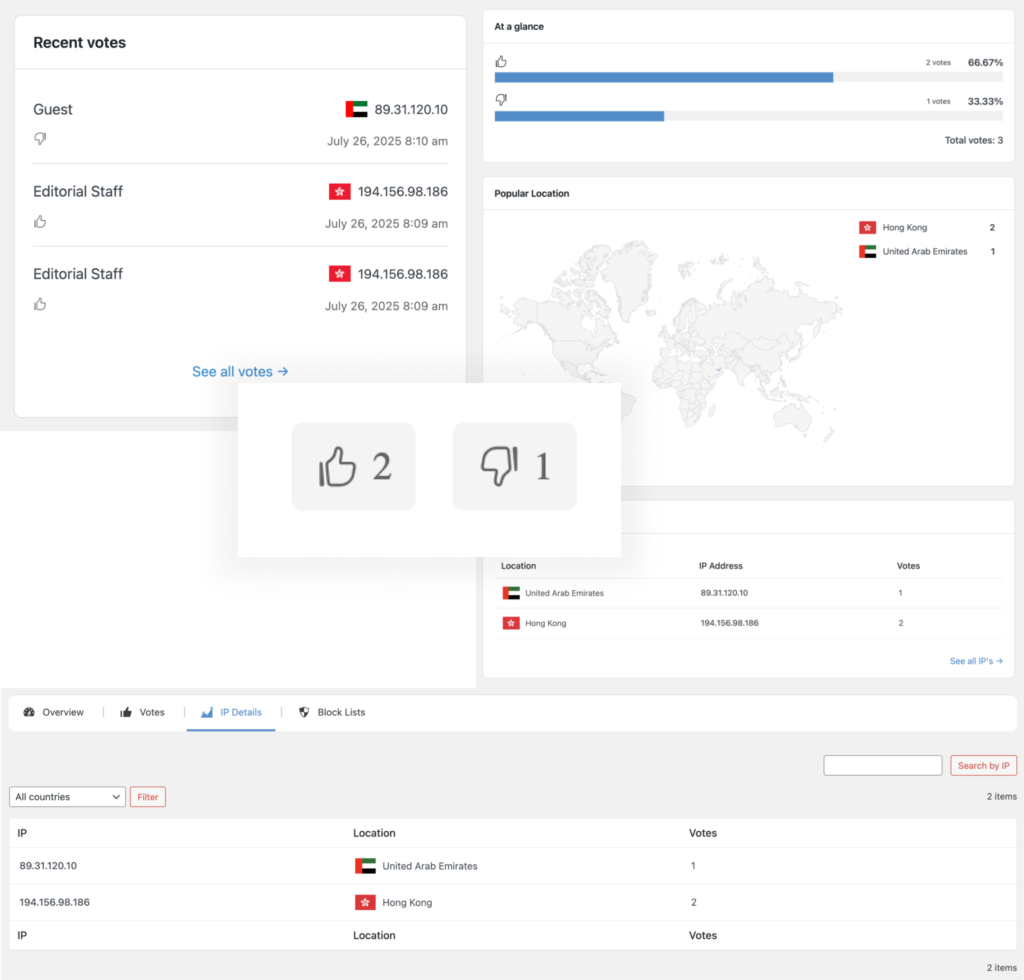
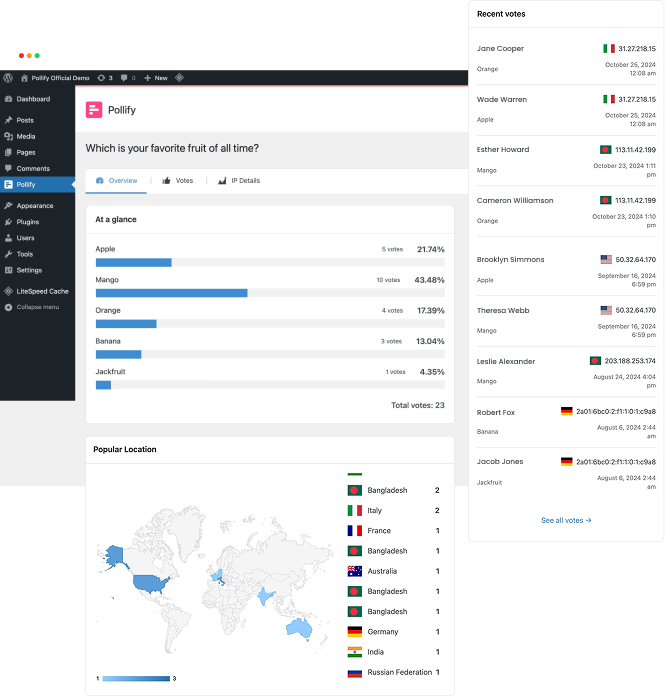
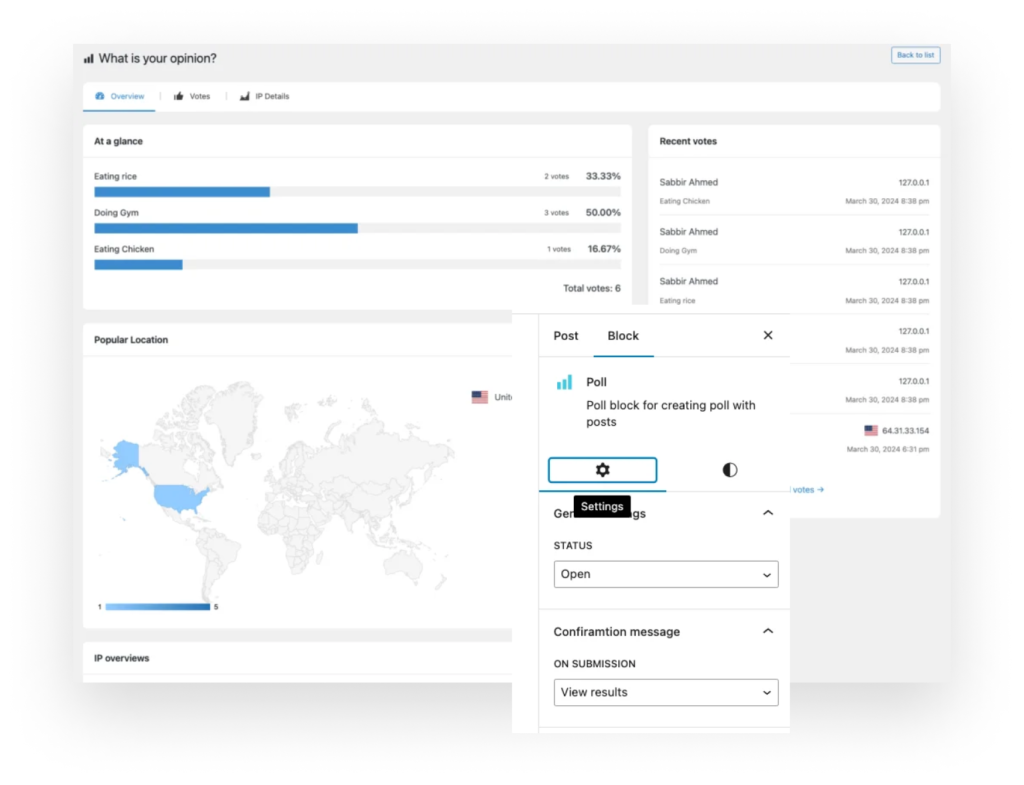
    For the admin, Pollify has a very user-friendly admin dashboard. Admin can view-

    • Results
    • Recent Votes
    • Complete votes list
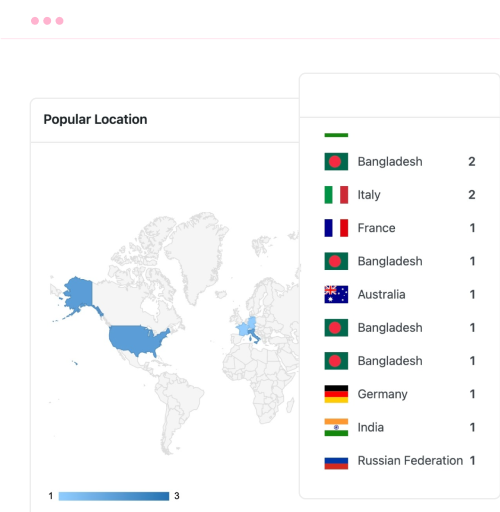
    • Popular location
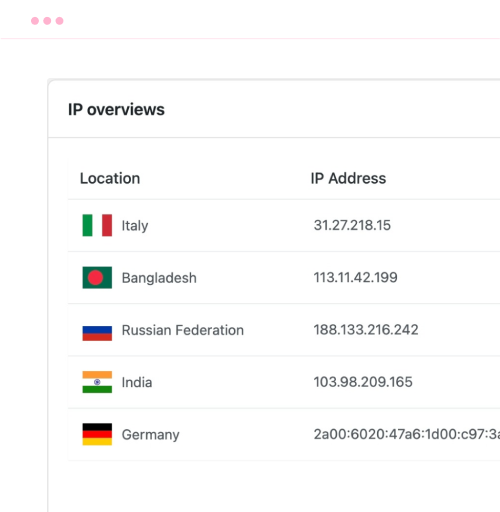
    • Ip Overviews
    • Ip Details
    This is a screenshot of poll result overview

    This dashboard will help the admin make informed decisions quite easily because the data is very organized and it is easy to understand.

    So, these are the free features of the Pollify plugin.

    The latest dashboard update also integrates CSV export, role-based result filtering, and instant chart previews – all without leaving your WordPress admin.

    Upcoming Free and Pro Features of the Polliy Plugin

    The Pollify plugin is still new and there are plenty of features in the pipeline. Let’s give you an idea of what kind of features you can expect shortly-

    • VS Type of Poll (Versus): Enables the creation of polls comparing options side by side
    • User Information Form: Incorporates a form to gather user details alongside poll participation.
    • Extra 5 Themes or Patterns: It will provide additional visual themes for enhancing poll appearance and engagement.
    • Voted User Location: It displays the geographical location of users who have voted in the poll.
    • Import/Export Polls: It will help in Importing and exporting poll configurations for easy sharing or backup.
    • Send mail to a user: It is integrated with email services
    • Leaderboard Option
    • Export Results to CSV: It allows exporting poll data into CSV format for further analysis or reporting.
    • Vote by user and role
    • Results with Charts: It presents poll results graphically, offering visual insights for easier interpretation.
    • Email campaign using email sending platform

    Many of these features are now live in the Pollify Pro version. Pro users can already enjoy advanced poll types (Rating, NPS, VS), vote-by-role logic, CSV export, and leaderboard displays without waiting for future updates.

    Additionally, Pollify Pro introduces smart poll duplication, bulk scheduling, and integration with third-party tools via webhooks — making it an ideal choice for agencies and high-traffic sites.

    Types of Polls You Can Create With Pollify Poll Maker Plugin

    You will be able to create 7 types of polls (but not limited to) using the Pollify poll plugin-

    • Choosing: Add multiple options for users to choose from, with the option to allow custom entries
    • Dropdown: Present users with a dropdown menu of options for selection. (Upcoming)
    • Up and Down vote: Enable users to vote using like/dislike or emojis, providing quick feedback on products or content. (Upcoming)
    • Rating: Create rating forms, utilizing stars or emojis, to gauge user opinions on products or topics. (Upcoming pro feature)
    • NPS: Allow users to select answers within a 1-10 range. (Upcoming pro feature)
    • VS: Facilitate competition between two options, such as products or individuals, with stylish versus voting formats. (Upcoming pro feature)
    • Feedback: Solicit detailed responses from participants, allowing them to provide comprehensive answers using short text or paragraphs. (Upcoming pro feature)

    Keep an eye on our website to see the new release.

    Today, almost all of the “Upcoming pro features” mentioned above are fully functional in Pollify Pro, including NPS, VS, and Feedback polls. You can try these on our live demo at Pollify Features to see exactly how they work.

    For free users, new block types like Up/Down and Kudos voting are already available, so even without upgrading, you can start adding interactive engagement tools that go beyond simple choice polls.

    In short, the free version of Pollify is perfect for getting started with Gutenberg-based polling, while Pollify Pro transforms it into a complete audience interaction and feedback suite for WordPress sites.

    Let Me Download Pollify for Free and Explore

    Now, let’s see a short tutorial on how to create a poll using the Pollify plugin.

    How to Create a Poll on WordPress using the Pollify Poll Maker Plugin

    So, you have learned about the Pollify plugin and its features. You are curious to know how it works right?

    Step 1: Install the Pollify Poll Maker Plugin

    First, you need to install the plugin from your dashboard. Or you can download the plugin from the WordPress.org site and upload the plugin separately to your WordPress website.

    To install the plugin, go to WP-Admin–> Plugins–> Add New. There type “Pollify” in the search box. Then install and activate the plugin.

    This is a screenshot of installing pollify poll maker plugin

    Tip: You can also install Pollify Pro directly from our pricing page after purchase, and it will automatically unlock all premium blocks and analytics features alongside the free core plugin.

    Step 2: Create a New Page or Post to Create a Poll Question

    Now open a page or post from Posts–> Add New. Then in the post, click on the “+” button and write Poll.

    This is a screenshot of choosing poll block in the post

    That will add a poll block in the post.

    This is a screenshot of adding poll question in the post

    New in 2025: Pro users can insert advanced block types like Rating, NPS, and VS directly in this step, without any extra configuration or external embeds.

    Step 3: Customize the Poll Block

    Next, you need to add a title, description, and poll questions to your poll block. Also, if you want you can customize the voting button as well. Write what you want.

    This is a screenshot of adding poll question in the post

    Moreover, you have the option to set padding, margin, border, and background color. Don’t forget to set what you want to show after

    This is a screenshot of poll customisation

    Pollify Pro now adds theme templates, advanced styling controls, and dynamic content filters, letting you fully match polls to your site branding with no custom CSS needed.

    Step 4: Publish Your Poll and Wait for Results

    Now, it is time to publish your poll questions and wait for the results.

    This is a screenshot of Pollify poll published

    You can see the results in the admin dashboard.

    This is a screenshot of Pollify Admin dashboard

    This is how you can easily create and publish poll questions on any page of the website using the Pollify poll maker plugin

    Pollify Alternative- Crowdsignal

    Other than Pollify, there are quite a few poll-making plugins on WordPress repository. Among them, Crowdsignal stands out.

    crowdsignal review- key features

    Crowdsignal is a SaaS version of PollDaddy WordPress plugin by Automattic designed for creating and managing surveys, polls, quizzes, and forms. It provides a user-friendly interface for users to gather feedback, conduct research, and engage their audience directly from their WordPress site.

    With Crowdsignal, users can easily design their data collection tools, embed them into posts or pages, and analyze responses through comprehensive reporting features.

    Features of Crowdsignal

    1. Customizable Design: Crowdsignal allows users to customize the appearance of surveys and polls to match their website’s theme, including fonts, colors, and layout options.
    2. Real-Time Results: Users can view responses in real-time, enabling them to track engagement and gather insights as they come in.
    3. Multiple Question Types: The plugin supports a variety of question types, including multiple-choice, open-ended, rating scales, and more, offering flexibility in data collection.
    4. Embedded Media: Users can embed images, videos, and audio clips within surveys and polls, making them more interactive and engaging.
    5. Export and Integration Options: Crowdsignal provides options to export data in various formats (e.g., CSV, Excel) and integrates with other platforms like Google Sheets and Mailchimp for seamless data management and communication.

    Limitations or drawbacks of the Crowdsignal

    There are some limitations of the Crowdsignal plugin. Including-

    1. Limited Free Version: The free version of Crowdsignal has restricted features like 2.5k vote limits for life, pushing them towards paid plans
    2. Customization Constraints: While customizable, there may be limitations in design flexibility compared to fully-fledged form builders or survey tools
    3. Response Limits: Higher response limits and advanced reporting features are available only in premium plans
    4. Integration Complexity: Integrating Crowdsignal with certain third-party applications or custom workflows can require additional technical knowledge or support
    5. Mobile Responsiveness: Although generally responsive, some users may experience issues with how certain surveys or polls render on mobile devices

    This is where Pollify shines- it brings the full polling experience inside WordPress with no external SaaS dependency, unlimited responses in both free and pro versions, native Gutenberg blocks, and pricing that’s less than half of Crowdsignal for comparable premium features. Explore the full comparison here: Pollify Features.

    If you want to read about more alternatives to Pollify you can read our guide on best WordPress poll plugins.

    Start Engaging Users with Interactive Polls on WordPress Using Pollify Poll Maker Plugin

    We are at the end of our article and hopefully now you know all about the Pollify poll maker plugin by wpRigel.

    The plugin is new but has immense potential to become one of the best poll-maker plugins. Also, as it is Gutenberg-powered, users will find it easy to use.

    100+ users actively using this Gutenberg block plugin in just a month of realizing it on the WordPress repository, more people choosing it as their best poll creator-online voting solution each day.

    The plugin already has a handful of features that are needed to create and manage interactive polls with more exciting features coming soon. The team is working hard to bring advanced features and make it a full-fledged poll-making system all within Gutenberg!

    As of today, Pollify is no longer “just getting started” — the free version is packed with more engagement blocks, better customization, and live analytics, while Pollify Pro takes it even further with advanced poll types, data exports, role-based voting, email integrations, and much more. You can try the free version from WordPress.org or upgrade instantly at Pollify Pricing to unlock everything.

    Let Me Know About wpRigel!

    If you have any questions or want to know more about the Pollify plugin, then don’t forget to leave a comment in the comment box.

    The wpRigel Team

    October 13, 2024
    Pollify
    Poll maker plugin, Pollify
  • Crowdsignal Review: Everything You Wanted to Know

    Crowdsignal Review: Everything You Wanted to Know

    Crowdsignal, formerly known as Polldaddy, stands out as one of the prominent tools available for creating surveys, polls, quizzes, and ratings on WordPress.

    Understanding your audience has always been crucial while running a business, especially online ones.

    Whether you’re seeking customer feedback, collecting people’s opinions, or looking to engage students; effective survey management tools are your only hope.

    If you don’t know much about Crowdsignal, no worries. In this ultimate Crowdsignal review, we aim to provide a detailed analysis including features, ease of use, pros-cons, pricing, and overall effectiveness. 

    So, keep reading to explore everything about Crowdsignal and eventually decide whether it’s the perfect choice for your business or you should look further!

    Pollify – Feedback Polls, Anonymous Polls, Up/down Voting and NPS Surveys

    Bonus Part: Meet Pollify- A Better WordPress Alternative to Crowdsignal

    If you love the idea of interactive polls but want something faster, cleaner, and more WordPress-friendly than Crowdsignal, Pollify is exactly that. It’s a Gutenberg-native poll plugin (no embeds, no external dashboards), just add the Pollify block, type your question, and publish.

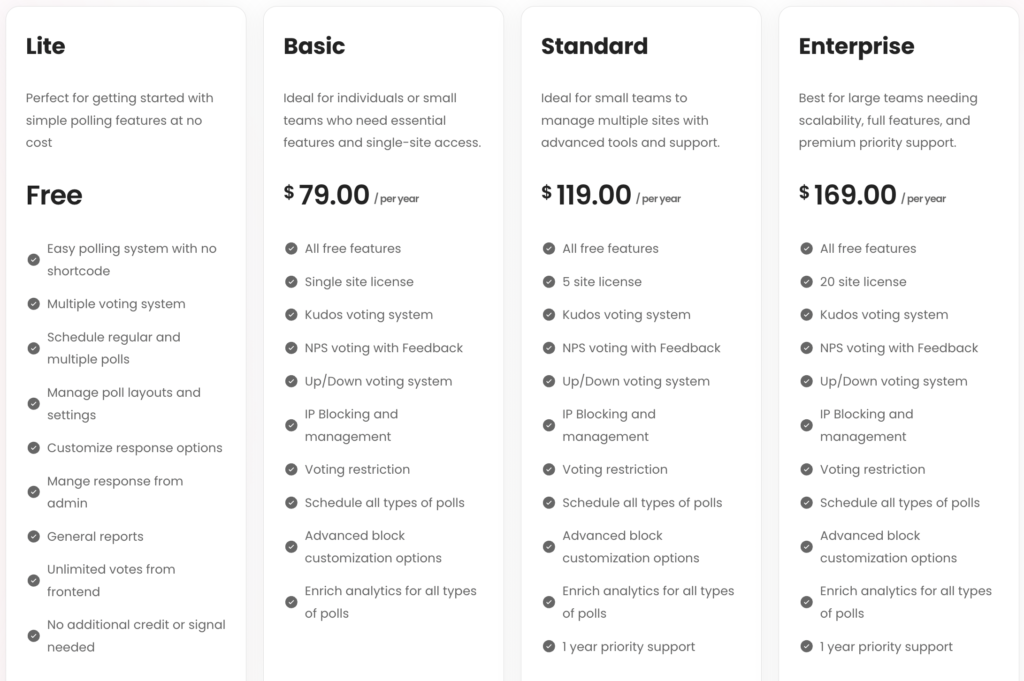
    Where Crowdsignal limits free accounts to a few thousand “signals” and costs around $180/year, Pollify starts at only $79/year with unlimited polls and votes. Everything stays inside your site, under your brand, with complete control over layouts, scheduling, and vote settings.

    Pollify’s focus is on speed, simplicity, and ownership. You don’t manage another platform- you manage your own audience directly in WordPress. And with live results, reaction polls, and export options built in, it’s more than just a poll maker. It’s an engagement tool that fits naturally into your site.

    Try Pollify Free first, and you’ll see why so many site owners now choose it as their modern alternative to Crowdsignal.

    Claim 60% Flat Discount on Pollify Poll Plugin Now!

    What is Crowdsignal?

    Crowdsignal is a popular online platform designed to help you create engaging and interactive content within WordPress.

    crowd signal home page- crowd signal review

    Previously it was known as Polldaddy (freemium plugin licensed under GPL) created by Automattic Inc. – the same company behind WordPress and many other successful products like WooCommerce and Jetpack.  

    Crowdsignal is a SaaS product but you can still get its free plugin version with the previous name polldaddy.

    The plugin has more than 100,000 active installations, but they’re not giving priority to it for a while. You can check the review of this plugin- only 2.7 out of 5. 

    The Crowdsignal SaaS version is doing very well nowadays. It empowers you to go beyond static text and visuals by offering a suite of tools for crafting:

    • Polls: Gauge audience sentiment on a particular topic with multiple-choice polls.  
    • Surveys: Gather in-depth feedback through various question types, including open-ended, scaled, and ranking options.
    • Quizzes: Transform learning and assessment with interactive quizzes that can be used for educational purposes or fun audience engagement.

    Crowdsignal goes beyond simply creating these interactive elements. Plus, it offers robust analytics and reporting features to analyze the collected data and gain valuable insights from your audience. 

    How Crowdsignal Works for WordPress and Across Social Media

    Crowdsignal is designed to make creating and sharing surveys, polls, quizzes, and ratings simple and effective. 

    Here’s how it works:

    Step 01: Sign up and Set up

    First, you need to sign up for a Crowdsignal account.

    You can choose a free plan or one of the paid options, depending on your needs.

    Once you’ve signed up, you can log in to your dashboard, where you’ll manage all your surveys and polls.

    Step 02: Create a Survey or Poll

    From your dashboard, you can start creating a new survey or poll by clicking on the relevant button. 

    creating polls and surveys with crowd signal- crowd signal review

    Crowdsignal provides a user-friendly interface that guides you through the process step by step:

    • Choose a Type: Select whether you want to create a survey, poll, quiz, or rating.
    • Add Questions: Add questions to your survey or poll. You can choose from various question types like multiple choice, text, rating scales, and more.
    • Customize Design: Customize the look of your survey or poll. You can change the theme, colors, and fonts to match your brand or personal style.
    Pollify – Feedback Polls, Anonymous Polls, Up/down Voting and NPS Surveys

    Step 03: Embed and Share

    Once your survey or poll is ready, you can share it in several ways:

    • Embed: Crowdsignal provides embed codes to easily add your survey or poll to your WordPress website or blog.
    • Share Links: You can share the survey or poll link via social media, email, or any other communication channel.
    embedding poll/survey links in WordPress or sharing on social media created with crowd signal

    Step 04: Collect Responses

    As people participate in your survey or poll, Crowdsignal collects their responses in real-time.

    You can monitor the number of responses and see the data coming in live from your dashboard.

    Step 05: Analyze Data

    Crowdsignal offers robust reporting tools to help you analyze the data you’ve collected:

    • View Results: See the results in various formats such as charts and tables.
    • Export Data: Export the data to CSV, Excel, or PDF for further analysis. 

    This streamlined workflow makes Crowdsignal accessible for users of all experience levels.

    You can quickly create engaging content, share it with your audience, and gain valuable insights – all within a user-friendly platform.

    Related Article: 150+ Poll and Survey Questions

    Crowdsignal Key Features to Create Polls, Surveys and Quizzes

    crowdsignal review- key features

    Now you know what is Crowdsignal and how it works. It’s time to show you the key features of Crowdsignal.

    Let’s get started with the first one –  

    1. Easy Drag-and-Drop Builder

    Crowdsignal simplifies the survey creation process with its intuitive drag-and-drop builder. This feature eliminates the need for any technical expertise.

    You can easily drag different question types, such as multiple choice, text boxes, and rating scales, into your survey and arrange them to suit your needs. 

    This user-friendly approach speeds up the survey creation process and ensures that anyone, regardless of their technical skills, can create professional and effective surveys.

    2. Advanced Form Settings

    Crowdsignal provides advanced form settings to enhance the functionality of your surveys. These settings include options for question branching and conditional logic, allowing you to create dynamic surveys that adapt based on respondents’ answers.

     For example, you can set specific questions to appear only if a respondent selects a certain answer to a previous question.

    This helps in gathering more relevant data and improves the overall respondent experience by making surveys more engaging and personalized.

    3. Customization Options

    Customization is a key feature of Crowdsignal, enabling you to design surveys that align with your brand identity.

    You can choose from various themes, adjust colors, fonts, and add your logo to create a consistent look and feel. 

    crowd signal offers multiple styling of polls and surveys

    This level of customization not only makes your surveys visually appealing but also reinforces your brand’s presence, making respondents more likely to engage with the survey.

    With Crowdsignal, your surveys can look professional and uniquely yours.

    4. Advanced Configuration

    Crowdsignal offers detailed configuration controls to ensure your surveys function exactly as you need them to.

    You can-

    • set response limits to cap the number of responses
    • schedule start and end dates to control when your survey is active
    • password-protect your surveys for added security

    These configuration options provide flexibility and control, allowing you to tailor each survey to your specific requirements and ensuring it runs smoothly from start to finish.

    5. Real-Time Reporting

    Crowdsignal’s data analysis tools make it easy to understand and interpret the results of your surveys. You can view responses in real-time, with the data presented in clear charts and graphs.

    This immediate access to visual data helps you quickly identify trends and insights.

    reporting feature of crowd signal

    Additionally, you can filter and segment data to dive deeper into specific areas of interest. These analysis tools empower you to make data-driven decisions based on the feedback you collect.

    6. Export/Share Data

    Crowdsignal allows you to export your collected data in various formats, including CSV, Excel, and PDF. This feature is crucial for sharing results with your team or integrating the data into other systems for further analysis. 

    you can export poll/survey reports and results in any data format you like

    Exporting data ensures that you can utilize the insights gained from your surveys in reports, presentations, and other applications, making it easier to act on the feedback you’ve gathered and share findings with stakeholders.

    7. Spam Protection

    Protecting the integrity of your survey data is essential, and Crowdsignal includes robust spam protection features to ensure that the responses you receive are genuine.

    You can use CAPTCHA and other verification tools to prevent automated bots and spam respondents from skewing your data. 

    This ensures that the feedback you collect is accurate and reliable, allowing you to make better-informed decisions based on valid responses.

    Related Article: online polls and surveys in WordPress

    Pros and Cons of Using Crowdsignal for Your Business 

    You may have already guessed the pros and cons of the Crowdsignal solution. That being said, in this segment, we will show you the main pros and cons of the Crowdsignal. 

    Let’s discuss the Crowdsignal positive aspects first! 

    Pros of Crowdsignal

    • User-Friendly Interface: Crowdsignal has an intuitive and easy-to-navigate interface, making it accessible even for those with little to no technical expertise.
    • Versatile Question Types: Offers a wide range of question types, including multiple choice, text, rating scales, and more, allowing for varied and comprehensive data collection.
    • Customization Options: Users can customize surveys and polls with different themes, colors, and fonts to match their brand or personal style.
    • Real-Time Reporting: Provides real-time results tracking, enabling users to monitor responses as they come in and make timely decisions based on the data.
    • Export and Analysis Tools: Offers robust reporting features and the ability to export data to CSV, Excel, and PDF formats for further analysis and sharing.
    • Flexible Sharing Options: Surveys and polls can be shared via embed codes, direct links, social media, and email, ensuring a broad reach.

    Cons of Crowdsignal

    Yes, Crowdsignal has some shortcomings. You should clearly focus on this part to know what disadvantage you may face while using the Crowdsignal for your business. 

    • Design Limitations: While customizable, the design options may be somewhat limited compared to other advanced survey tools, which offer more in-depth customization.
    • Potential Support Issues: Some users have reported challenges with customer support, including slow response times or insufficient assistance for more complex issues.
    • No Restrictions on File Formats: There’s no option to limit what kind of file formats a user can upload. This can lead to security issues as hackers can upload malware.
    • Limited Analytics: The data is enough for beginners. But if you’re looking for detailed analysis, you may find Crowdsignal’s analytics limited.
    • No Addons: There are no addons to extend functionality and add more features to your form.
    • No Integrations: You can’t integrate with your email provider to sync your forms to your email campaigns
    • Limited Free Plan: Crowdsignal offers very limited free plan. You can take up to 2.5k responses or vote.
    • No Active WordPress plugin: Crowdsignal is a SaaS platform, it has a WordPress plugin to create polls-surveys but it’s not well maintained for a long time.

    Crowdsignal Pricing Plans

    Crowdsignal comes with 4 different pricing plans. Also, each plan has two billing methods – Monthly and Annual.

    If you choose annual billing, you’ll be able to save up to 40%. 

    Crowdsignal Pricing Plans- Crowdsignal review

    Here are the packages for you: 

    • Free: $0, no credit card required. You get unlimited questions, surveys, polls, and ratings. You can collect up to 2,500 signals (that is votes, poll responses, and answered questions).
    • Premium: $25 per month with unlimited forms and unlimited responses. Get access to entry restrictions, language translation, branching logic, and instant notifications.
    • Business: $59 per month with added features like customizable CSS, custom domain name, traffic redirection, email surveys, and API access.
    • Team: $29 per month for 3 members and is best suited for team collaboration.

    Note: Every paid plan comes with a 30-day money-back guarantee.

    Pollify – Feedback Polls, Anonymous Polls, Up/down Voting and NPS Surveys

    Support System of Crowdsignal

    Crowdsignal doesn’t offer support for the free plan.

    However, if you are using the plugin version, you can connect with them on the plugin’s support page in the WordPress repository.

    They have a series of guides and resources to help you get started and learn more about the platform on your own. In case you can’t find your answer, there’s an inquiry form that you can fill up and submit on their website.

    If you are a paid subscriber, you get access to their support staff that’s available 24/7.

    Who Should Use Crowdsignal and Create Polls- Surveys?

    Crowdsignal isn’t just for marketers! Anyone looking to gather feedback and boost engagement can use it. 

    Let’s check what can you do with Crowdsignal-

    • Content creators can use polls and surveys to understand their audience.
    • Marketers can conduct surveys and gather customer insights. 
    • Educators can create quizzes and polls to make learning interactive. 
    • Businesses can use Crowdsignal for employee surveys, event planning, and more! 

    Overall, we can say that Crowdsignal is a good option for beginners, small websites, students, and researchers.

    Bonus: Top 5 Crowdsignal Alternatives

    If you are, by any chance, wondering who are the alternatives of the Crowdsignal tool, this part is for you.

    Here we are going to briefly discuss the top 5 alternatives to Crowdsignal. 

    Note: We mainly listed down the SaaS platforms here, not regular free WordPress plugins.

    Here are the alternatives to Crowdsignal:

    1. Pollify: This poll creator plugin by wpRigel lets you create a poll website in WordPress with awesome polling/online voting capabilities in no time. Unlock a series of advanced poll creation features to engage your audience like never before.
    2. SurveyMonkey: A veteran in the survey world, SurveyMonkey offers a comprehensive suite of features for creating professional surveys and in-depth analysis. It caters well to businesses and researchers needing robust data collection and reporting tools.
    3. Typeform: Known for its visually appealing interface and conversational survey style, Typeform is a great choice for creating engaging and user-friendly surveys. It excels at gathering feedback from a broader audience and keeping them interested.
    4. Google Forms: Who doesn’t know the Google Forms, right? This free and user-friendly option from Google integrates seamlessly with other Google products. It’s ideal for basic surveys and quizzes, especially for educators and those comfortable within the Google ecosystem.
    5. Alchemer Survey: If advanced features and customization are your priorities, Alchemer Survey is worth considering. It offers powerful branching logic, skip logic, and question piping for complex surveys, catering to research-heavy projects.
    Pollify – Feedback Polls, Anonymous Polls, Up/down Voting and NPS Surveys

    Wrapping up the Crowdsignal Reviews: Let Us Know Your Opinion

    Crowdsignal is a powerful and versatile tool that makes creating and sharing surveys, polls, quizzes, and ratings simple and effective. Especially for WordPress users.

    Its user-friendly interface, diverse question types, and extensive customization options ensure that you can easily design engaging and professional surveys. 

    That being said, if you have a different opinion regarding the Crowdsignal tool, or, if you want to recommend another tool as its better alternative, feel free to do that using the comment box below.

    We are open to receiving any suggestions from you. Thank you!

    Pollify – Feedback Polls, Anonymous Polls, Up/down Voting and NPS Surveys

    The wpRigel Team

    June 12, 2024
    Tools
    poll plugins
  • 9 Best WordPress Poll Plugins for 2025 and Beyond

    9 Best WordPress Poll Plugins for 2025 and Beyond

    If you’re running your business website on WordPress, you can easily integrate a poll plugin to collect valuable user feedback. 

    A dynamic poll maker plugin can help you in various ways. Whether planning an event, designing a product, or deciding on a restaurant for a team lunch, a poll plugin lets you quickly gather feedback from your audience or team members.  

    With so many options available in the repository, selecting the right WordPress poll plugin can be challenging. To help you, we have compiled a list of the best WordPress poll plugins in this blog post. 

    But before getting into the list, let’s show you a featured product and the basic features of a poll plugin.

    Pollify (Featured Plugin)- Now with Powerful Pro Features

    Pollify is the first-ever 100% Gutenberg-native poll and survey plugin for WordPress, now available in both Free and Pro versions. Whether you’re running a blog, WooCommerce store, membership site, or an LMS, Pollify lets you effortlessly collect feedback, run surveys, and boost engagement- all without shortcodes or external SaaS tools.

    What makes Pollify different is its seamless block editor integration and purpose-built features designed for modern WordPress users. The Pro version takes things further with advanced interaction types and admin-level controls.

    Pollify Basic Features at a Glance

    • Built fully on Gutenberg
    • Multiple Poll Types
    • Responsive Design
    • Analytics Dashboard
    • Get Email Notifications
    • Customize Polls as you wish
    • Real-time Results
    • User-friendly Interface
    • Embed Anywhere
    • Multi-language Support

    Pollify Pro Features:

    • NPS & loyalty polls to measure satisfaction
    • Up/down vote, like/dislike, and applause (clap) voting styles
    • Engagement Block to collect open-text and interactive feedback
    • Voting control with IP blocking and vote limits
    • Export results to PDF, Excel, CSV, or Google Docs
    • Works natively across posts, pages, products, courses, and more

    Pollify also supports multilingual sites and anonymous voting, even in the free version- making it one of the most complete poll plugins in the ecosystem.

    • Try Pollify Free- from wp.org
    • Upgrade to Pollify Pro- See Pricing
    • Explore Pollify Docs

    Early Bird Offer: Flat 60% Off on all Pro plans, starting at just $31/year (1 site license).
    Lifetime licenses also available with 60% off (limited-time offer). Coupon auto-applied!

    Explore Pollify Features and Pricng!

    What to Consider Before Choosing WordPress Poll Plugins

    Online Polls & Surveys in WordPress

    As you know, WordPress offers several excellent poll plugins for its users. Each plugin has unique, useful features to facilitate your needs. However, not all plugins are suitable for all businesses. 

    Suppose you want to run a poll or survey that requires custom branding, integration with existing platforms, or complex survey question types. A poll plugin that lacks these features may not bring the expected benefits to your business. 

    Before choosing a WordPress poll plugin, consider several factors to ensure it meets your needs and objectives. 

    First, evaluate the poll plugin’s features and functionality. It should support various question types, such as multiple-choice, single-choice, and open-ended, so that you can create different polling systems according to your requirements. 

    Note: We already published two quality posts on online polls and surveys in WordPress and 150+ random poll questions. Don’t forget to give them a check.

    You should also check the customization options (themes, colors, fonts) and result display formats (charts, graphs, tables).

    The next important thing is to check the poll plugin’s compatibility with your site’s WordPress theme and other plugins. 

    You should also pick a plugin that is easy to use and intuitive for administrators and respondents. 

    Though the number of mobile users is rising rapidly, the poll plugin must be responsive and mobile-friendly. To provide a consistent user experience, make sure that the polls render correctly on various devices and screen sizes.

    The main object of running a poll or survey is to gain deep insights into user behavior. So, emphasize the poll plugin’s analytics and reporting capabilities. Look for features such as real-time response tracking, demographic insights, and exportable reports.

    Once you have checked these factors, shortlist the plugins. Then, install them one by one on your site, and finally decide which one perfectly aligns with your goal. 

    Does it sound like finding the needle in the haystack? Don’t worry. In the next part of the article, we’ll share a list of 9 popular WordPress survey plugins with you. All of these plugins have good ratings and a high installation number. 

    9 Best WordPress Poll Plugins to Check Out in 2024

    Here are our top 9 poll plugins to actively engage with your audience, gather valuable feedback, and make informed decisions. 

    1. Crowdsignal Dashboard 
    2. YOP Poll 
    3. Social Poll
    4. TS Poll 
    5. Poll Maker
    6. WP-Poll 
    7. Democracy Poll
    8. User Feedback 
    9. WP Poll Maker 

    Let’s get into the details:

    1. Crowdsignal Dashboard (Polldaddy)

    • Installations:  (100,000+)
    • Rating on wordpress.org: 2.7 out of 5 stars

    Ideal for comprehensive survey management and data analysis.

    Crowdsignal makes creating and managing polls simple and fast. This plugin comes with several customization options, so you can create different types of polls, surveys, and quizzes.

    And most importantly, you can perform all these tasks right from your Gutenberg editor. 

    But yes, Crowdsignal is now a 100+ SaaS platform and follows a subscription-based business model. It was previously known as Polldaddy but they didn’t take care it in the right way.

    If you want to use Crowdsignal, you should go for it’s SaaS solution with $15 monthly cost.

    Crowdsignal Top Features:

    1. Integrates directly into your WordPress admin panel
    2. Allows you to craft custom polls quickly without any coding
    3. Offers a variety of design templates 
    4. Provides real-time results from polls
    5. Supports advanced customization tools for users

    Crowdsignal Pros-Cons

    ProsCons
    -Drag-and-Drop poll builder
    -Data export options are available
    -user-friendly design
    -Limited question types compared to other advanced tools
    -Limited conditions are available for the free plan

    Crowdsignal Pricing

    Price: Besides the free version available that is still available on WordPress repository with limited feature, Crowdsignal Dashboard offers three premium tires for additional features.

    Crowdsignal is now a 100% SaaS platform and follows a subscription model in pricing.

    Pricing starts at $15 per month, and all plans come with a 30-day money-back guarantee.

    Pollify – Feedback Polls, Anonymous Polls, Up/down Voting, NPS Surveys, Export data

    2. YOP Poll

    • Installations:  10,000+
    • Rating on wordpress.org: 4.4 out of 5 stars

    Best for creating simple and effective polls to engage your audience.

    YOP Poll is a versatile WordPress plugin that allows you to create and manage polls for your website. You can customize your polls in various ways, including questions, answers, duration, and appearance.

    Once created, you can embed the poll into posts, pages, or sidebars using a shortcode or widget in YOP Poll plugin.

    YOP Poll Top Features

    1. Allows you to create single or multiple-choice polls 
    2. Enables you to set start and end dates for polls
    3. Restricts multiple votes from the same IP address or user
    4. Gives options to customize polls design
    5. Displays real-time poll results within the WordPress dashboard or on the frontend
    6. Includes options to export poll data for further analysis or reporting purposes.

    YOP Poll Pros-Cons

    ProsCons
    -It comes with an intuitive interface
    -Seamless integration with various WordPress themes & plugins
    -Offers extensive customization option
    -Lacks some advanced features
    -Scalability issues may arise when handling a large volume of traffic or data

    YOP Poll Pricing

    Price: YOP Poll offers a free version, but it also offers paid plans for advanced features like custom designs, media integration, and detailed results.

    These plans range from a one-time fee of $27 for a single-site license to $97 for a license usable on up to seven websites.

    3. Social Poll

    • Installations: 10,000+
    • Rating on wordpress.org: 4.4 out of 5 stars

    Perfect for creating versatile polls, surveys, and quizzes with advanced customization options.

    Social Poll is a standout choice for WordPress users. It lets you add interactive elements like polls, surveys, and quizzes to your websites. This plugin offers a variety of poll types, like list polls, image polls, thumbnail polls, and head-to-head polls.

    Social Poll Top Features

    1. Supports dynamic poll and quiz options
    2. Offers comprehensive survey tools
    3. Features smart logic branching and built-in lead forms
    4. Gives automatic visual reporting and real-time notifications
    5. Offers a dedicated support center to assist with any issue

    Social Poll Pros-Cons

    ProsCons
    -Comes with GDPR Compliance
    -Fully responsive across all devices
    -User-friendly interface with drag-and-drop functionality
    -Free plan limits responses per month
    -Advanced data analysis features require paid plans
    -Limited integrations in the free plan

    Price: This plugin offers a tiered pricing structure with a free plan. Paid plans start at USD 25 per month, or $300/year. 

    4. TS Poll

    • Installations: 5,000+
    • Rating on wordpress.org: 4.7 out of 5 stars

    Great for creating simple yet professional polls for your website with ease. 

    Our next pick is the TS poll. It is another popular WordPress poll plugin that effortlessly creates and manages polls.

    The TS poll supports multiple poll types. Whether you need a simple yes/no poll or something more complex, the TS Poll provides the flexibility to generate various types of questions.

    TS Poll Top Features

    1. Offers a simple installation & configuration process
    2. Comes with a wider variety of question types (e.g., ranking, matrix grids)
    3. Includes a range of useful customization options
    4. Supports responsive design to look great on all devices
    5. Integrates with other tools and plugins available on WordPress.

    TS Poll Pros-Cons

    ProsCons
    -Features a user-friendly interface
    -It comes with helpful support resources
    -The developers provide regular updates to keep the plugin secure and efficient
    -Limited functionalities compared to advanced survey tools
    -Not ideal for highly complex surveys
    -Limited data analysis features in the free plan

    TS Poll Pricing

    Price: A free plan with basic features is available. For around $200, you can also buy the paid plan with a 14-day money-back guarantee.

    Note: We already published two quality posts on online polls and surveys in WordPress and 150+ random poll questions. Don’t forget to give them a check.

    5. Poll maker

    • Installations:  6,000+
    • Rating on wordpress.org: 4.2 out of 5 stars

    Excellent choice for engaging your audience and collecting valuable feedback through interactive polls.

    Poll Maker is a dynamic tool designed to engage your audience and gather valuable insights. Poll Maker plugin has an intuitive interface and powerful features.

    It allows you to create highly customizable polls that seamlessly integrate into your website or social media channels.

    Poll maker Top Features

    • Offers advanced customization options for polls
    • Provides real-time analytics for monitoring voting trends
    • Gives integration flexibility for embedding polls on websites and social media
    • Ensures seamless voting experience on all devices.
    • Lets users insert interactive elements like images, videos, and GIFs 

    Poll maker Pros-Cons

    ProsCons
    -Creates a seamless user experience with your brand identity
    -There are diverse formats available to create polls
    -Easy sharing of poll results for a wider audience reach.
    -Limited customization options compared to advanced design tools
    -A learning curve for new users
    -Limited design templates.

    Poll maker Pricing

    Price: Poll Maker offers a free basic polling plan for individuals and small businesses. Premium plans, which start at $23/month, provide more features, like customization and analytics.

    6. WP-Polls

    • Installations:  60,000+
    • Rating on wordpress.org: 4.1 out of 5 stars

    Best for adding basic poll functionality to your WordPress website.

    “WP-Polls” was developed by Lester’ GaMerZ’ Chan. This plugin is renowned for its flexibility and interactive user interface. WP-Polls offers extensive customizations through templates and CSS styles.

    It’s a developer-friendly tool. With basic coding knowledge, you can easily include hooks and filters for further extension and customization.

    WP-Polls Top Features

    1. Allows respondents to select multiple answers
    2. Offers extensive design options with templates and CSS
    3. Offers 9 animated types to display voting results
    4. Supports a user-friendly poll management system 
    5. Compatible with all major caching plugins

    WP-Polls Pros-Cons

    ProsCons
    -Available in 15 different languages
    -WP-Polls tends to be lightweight
    -Fully responsive and easy to customize
    -Offers fewer advanced features and customization options
    -The design options for polls may be relatively basic
    -May not receive regular updates or comprehensive support

    WP-Polls Pricing

    Price: WP-Polls by Lester ‘GaMerZ’ Chan is a free plugin available for download from the WordPress Plugin Directory. Users can install and use the plugin on their WordPress websites without spending money.

    7. Democracy Poll

    • Installations:  9,000+
    • Rating on wordpress.org: 4.7 out of 5 stars

    Perfect for conducting democratic-style polls and gathering opinions from your audience.

    Democracy Poll allows users to set up polls with single or multiple voting options, enabling visitors to add their answers.

    This flexibility makes it ideal for gathering a wide range of responses. The plugin also has features like setting an end date for polls and restricting voting to registered users only.

    This can help you manage the polls efficiently.

    Democracy Poll Top Features

    1. Gives many advanced administration features
    2. Allows users to change the poll design using CSS themes 
    3. Offers flexibility to configure user roles and settings
    4. Works seamlessly with the latest WordPress version
    5. Ensures compatibility with the latest digital trends and security standards

    Democracy Poll Pros-Cons

    ProsCons
    -Specifically designed to facilitate democratic-style voting processes
    -Multisite support and compatibility
    -Detailed documentation and support
    -Has a steeper learning curve compared to simpler polling plugins
    -Lack of extensive customization options
    -Doesn’t offer  regular updates or comprehensive support

    Democracy Poll Pricing

    Price: Democracy Poll is another free plugin for WordPress. It allows you to incorporate democratic-style polls into your websites without additional cost.

    8. User Feedback

    • Installations: 200,000+
    • Rating on wordpress.org: 4.8 out of 5 stars

    Great for collecting feedback and suggestions from users to improve your website or products.

    User Feedback plugin is a powerful plugin that enables website owners to collect and analyze feedback from their users effortlessly.

    Its unique feature lies in its ability to create customizable feedback forms and surveys. Therefore, businesses can collect relevant data with ease.

    With User Feedback, you can engage users in meaningful conversations and make informed decisions to enhance their offerings and user experience.

    User Feedback Plugin Top Features

    • Utilizes multiple question types such as text, multiple-choice, and rating scales
    • Implements conditional logic to create dynamic survey flows
    • Allows users to monitor feedback and analytics in real-time 
    • Sends email notifications for new responses to stay updated
    • Integrates effortlessly with popular CMS platforms and other plugins

    User Feedback Plugin Pros-Cons

    ProsCons
    -Customizable feedback forms and surveys
    -Easy integration into websites
    -GDPR compliance options for data protection
    -Requires some technical knowledge for initial setup and integration
    -Limited support options
    -Limited scalability for large-scale feedback collection projects.

    User Feedback Plugin Pricing

    Price:  User Feedback also offers premium plans with additional features and capabilities. It has 3 premium packages- elite, pro, and plus.

    9. WP Poll Maker 

    • Installations: 1000+
    • Rating on wordpress.org: 4.2 out of 5 stars

    Ideal for creating polls and conducting voting contests or online elections on your WordPress site.

    WP Poll Maker allows its users to create five different types of polls for their WordPress site.

    It has 30 style options and seven pre-built themes to align the polls with your website. The plugin generates a unique shortcode for each survey, which you can easily embed into your posts or pages.

    WP Poll Maker Top Features

    1. Allows users to schedule polls for specific dates and times
    2. Enables poll visibility based on user roles
    3. Ensures each participant can only vote once
    4. Directs participants to a different webpage after voting
    5. Offers integration with Google Sheets and Klaviyo for efficient data handling

    WP Poll Maker Pros-Cons

    ProsCons
    -Supports anonymous voting
    -Interactive content to engage users and gather new leads
    -Vast integration support
    -Lack of advanced features
    -Design options for polls may be relatively basic
    -Users may encounter compatibility issues

    WP Poll Maker Pricing

    Price: WP Poll Maker is a free WordPress plugin. You can easily download the plugin from WordPress.org or search for the plugin in your WordPress dashboard. 

    We have reached the end of the list. Each plugin can be considered the best poll plugin for WordPress. You just have to choose according to your needs. 

    Comparison Table of Top 10 Best Poll Plugins for WordPress

    You’ve just explored the top 9 WordPress poll plugins for 2024. And now you’re wondering which one is the best fit for your website. Let’s help you make an informed decision!

    Here, we’re going to show you a comparison table with all the important data in one place. Hopefully, it will help you narrow down your choices and finally choose a poll plugin that matches your requirements.

    Plugin NameFeaturesEase of UseCustomization Options
    Crowdsignal DashboardComprehensive polling, surveys, and quizzesModerateExtensive
    YOP PollMultiple poll types, scheduling, and customizationModerateExtensive
    Social PollCustomizable polls, surveys, and quizzesModerateExtensive
    TS PollBasic polling functionalityEasyLimited
    Poll makerVersatility in poll creation, easy customizationModerateExtensive
    WP-PollBasic polling functionalityEasyLimited
    Democracy PollSimple polls, easy installationEasyLimited
    User FeedbackFeedback collection, customizable formsModerateExtensive
    WP Poll MakerPoll creation, scheduling, and customizationModerateExtensive

    Enhance User Interaction with Top-Rated WordPress Poll Plugins

    Now that you understand each plugin’s features and capabilities, you should consider your website’s specific requirements and audience preferences to choose the best poll plugin for your WordPress site.

    Explore the individual plugin pages, read user reviews, and test out demo versions to see which one best suits your goals and objectives.

    Remember, the right poll plugin can increase user engagement and provide valuable insights, helping you make data-driven decisions about your website’s growth and success.

    Note: We already published two quality posts on online polls and surveys in WordPress and 150+ random poll questions. Don’t forget to give them a check.

    If you encounter any further difficulties in picking the best WordPress poll plugin, use the comment section and share your queries. We’ll be there to help you out!

    The wpRigel Team

    May 18, 2024
    user guides
    poll plugins
  • 150+ Random Poll Questions for Work Events, Occasions, Students, Technologies, and Everything You Need

    150+ Random Poll Questions for Work Events, Occasions, Students, Technologies, and Everything You Need

    Random poll questions- a collection of poll questions based on categories like common, random, multiple choice, etc, and occasion-wise like Halloween poll, New Year poll, or about films, hobbies, favorite schools, etc.

    Are you planning to add a fun and interactive poll system to engage your audience?

    As you know, an optimized poll system can benefit your business in many aspects. It’s an effective way to collect valuable feedback from your users. They can also help you boost interest and build a strong connection with your audience.

    You can create polls on different occasions and publish them on your official website or social media platforms. 

    However, creating engaging polls isn’t always easy. You need to be creative and consider your users’ preferences. Moreover, your poll questions may vary significantly depending on industry specifics.

    To help you out, we’ve listed 150+ random poll questions with 4 multiple-choice options for each question on this blog.

    Table of Contents

    • Random Poll Questions for New Year
    • Random Poll Questions about Entertainment
    • Random Poll Questions about Hobby
    • Random Poll Questions for Halloween
    • Random Poll Questions for Classroom
    • Multiple choice poll questions for work
    • Poll Questions for Instagram
    • Poll questions for the group chat
    • Poll questions for high school students
    • Best poll questions for Facebook
    • Best poll questions for YouTube
    • Business poll questions for LinkedIn
    • Digital marketing poll questions for LinkedIn
    • Poll questions on WordPress
    • Poll questions on Shopify
    • 20 Popular poll questions for different purposes
    • Best Time for Business Owners to Create A Poll Question
    • What to Consider When Creating Effective Poll Questions
    • Utilize Poll Questions for Meaningful Engagement

    Let’s check them out!

    Random Poll Questions for New Year

    random poll questions- Online Polls & Surveys in WordPress

    1. How do you typically celebrate New Year’s Eve?

    a) Attending a party

    b) Having a quiet night in

    c) Watching fireworks

    d) Going out for dinner

    2. What’s your New Year’s resolution for the upcoming year?

    a) Get in shape/lose weight

    b) Travel more

    c) Learn a new skill or hobby

    d) Spend more time with family and friends

    3. What’s your favorite New Year’s tradition?

    a) Making resolutions

    b) Watching the ball drop in Times Square

    c) Toasting with champagne

    d) Eating special New Year’s foods

    4. Where would you most like to celebrate New Year’s?

    a) New York City

    b) Paris

    c) Sydney

    d) Tokyo

    5. What’s your preferred way to ring in the New Year?

    a) Attend a countdown event

    b) Have a cozy gathering with loved ones

    c) Travel to a new destination

    d) Reflect quietly on the past year

    6. What’s your go-to New Year’s Eve outfit?

    a) Glamorous dress/suit

    b) Casual attire

    c) Festive costume

    d) Pajamas

    7. How do you feel about New Year’s resolutions?

    a) I make them every year and stick to them

    b) I make them but rarely keep them

    c) I don’t bother making them

    d) I prefer setting goals throughout the year

    8. What’s your favorite part of New Year’s Day?

    a) Brunch with friends/family

    b) Watching the Rose Parade

    c) Taking a leisurely stroll

    d) Relaxing at home

    9. How do you plan to start the New Year?

    a) With a big breakfast

    b) By exercising or going for a run

    c) Watching the sunrise

    d) Sleeping in late

    10. What’s your New Year’s wish for the world?

    a) Peace and harmony

    b) Prosperity and success

    c) Health and happiness

    d) Environmental sustainability

    Pollify – Ultimate Poll Creator, Survey Maker Plugin for WordPress

    Random Poll Questions about Entertainment

    11. What’s your favorite movie genre?

    a) Action

    b) Comedy

    c) Drama

    d) Science Fiction

    12. Who is your favorite actor of all time?

    a) Tom Hanks

    b) Meryl Streep

    c) Leonardo DiCaprio

    d) Scarlett Johansson

    13. Which film franchise do you love the most?

    a) Marvel Cinematic Universe

    b) Harry Potter

    c) Star Wars

    d) James Bond

    14. What’s your favorite animated movie?

    a) The Lion King

    b) Toy Story

    c) Frozen

    d) Spirited Away

    15. Which director’s style do you admire the most?

    a) Steven Spielberg

    b) Quentin Tarantino

    c) Christopher Nolan

    d) Martin Scorsese

    16. What’s your all-time favorite movie quote?

    a) “Here’s looking at you, kid.” – Casablanca

    b) “You can’t handle the truth!” – A Few Good Men

    c) “I’ll be back.” – The Terminator

    d) “May the Force be with you.” – Star Wars

    17. What’s the best movie you’ve seen recently?

    a) Parasite

    b) Joker

    c) Once Upon a Time in Hollywood

    d) Black Panther

    28. What’s your favorite movie soundtrack?

    a) Guardians of the Galaxy

    b) The Lord of the Rings

    c) La La Land

    d) Pulp Fiction

    19. Which film adaptation of a book do you think was the best?

    a) The Lord of the Rings trilogy

    b) Harry Potter series

    c) The Shawshank Redemption

    d) Jurassic Park

    20. What’s your favorite movie from the 80s?

    a) Back to the Future

    b) The Breakfast Club

    c) Raiders of the Lost Ark

    d) Die Hard

    Random Poll Questions about Hobby

    Random Poll Questions for work events and occasions

    21. What’s your favorite indoor hobby?

    a) Reading

    b) Cooking

    c) Painting/Drawing

    d) Playing video games

    22. Which outdoor hobby do you enjoy the most?

    a) Hiking

    b) Gardening

    c) Cycling

    d) Photography

    23. What’s your go-to hobby for relaxation?

    a) Yoga

    b) Meditation

    c) Knitting/Crocheting

    d) Listening to music

    24. Which hobby have you always wanted to try?

    a) Learning a musical instrument

    b) Pottery/Ceramics

    c) Rock climbing

    d) Woodworking

    25. What’s your favorite DIY (Do It Yourself) hobby?

    a) Home decor crafting

    b) Upcycling furniture

    c) Sewing

    d) Candle making

    26. What’s your preferred hobby for socializing?

    a) Board games/card games

    b) Dancing

    c) Cooking/baking classes

    d) Joining a sports team

    27. Which hobby makes you feel most accomplished?

    a) Completing puzzles

    b) Learning a new language

    c) Training for a marathon

    d) Building model kits

    28. What’s your favorite hobby-related TV show or YouTube channel?

    a) The Great British Bake Off

    b) Fixer Upper

    c) MasterChef

    d) Bob Ross’s The Joy of Painting

    29. Which hobby helps you express your creativity?

    a) Writing/Storytelling

    b) Photography

    c) DIY crafting

    d) Playing a musical instrument

    30. What’s your all-time favorite hobby?

    a) Gardening

    b) Traveling

    c) Playing sports

    d) Collecting stamps/coins

    Pollify – Ultimate Poll Creator, Survey Maker Plugin for WordPress

    Random Poll Questions for Halloween

    31. What’s your favorite Halloween candy?

    a) Chocolate bars

    b) Candy corn

    c) Gummy worms

    d) Reese’s Peanut Butter Cups

    32. Which classic Halloween movie is your favorite?

    a) Hocus Pocus

    b) Nightmare Before Christmas

    c) The Addams Family

    d) Beetlejuice

    33. What’s your preferred Halloween costume theme?

    a) Classic monsters (e.g., vampires, werewolves)

    b) Superheroes and villains

    c) Movie characters

    d) Zombies and undead

    34. How do you like to celebrate Halloween?

    a) Trick-or-treating

    b) Attending costume parties

    c) Carving pumpkins

    d) Watching scary movies at home

    35. Which Halloween tradition do you enjoy the most?

    a) Bobbing for apples

    b) Haunted house visits

    c) Telling ghost stories

    d) Visiting pumpkin patches

    36. What’s your favorite spooky activity?

    a) Ghost tours

    b) Corn mazes

    c) Scary hayrides

    d) Visiting haunted attractions

    37. Which mythical creature would you want to encounter on Halloween night?

    a) Ghost

    b) Witch

    c) Vampire

    d) Werewolf

    38. What’s your preferred Halloween color scheme?

    a) Orange and black

    b) Purple and green

    c) Red and black

    d) White and black

    39. How do you like to decorate for Halloween?

    a) Jack-o’-lanterns

    b) Fake spider webs

    c) Scary skeletons

    d) Gravestones and tombstones

    40. Which Halloween activity gives you the biggest thrill?

    a) Visiting haunted attractions

    b) Watching horror movies

    c) Participating in costume contests

    d) Attending midnight ghost tours

    Random Poll Questions for Classroom

    41. What’s your favorite subject in school?

    a) Math

    b) Science

    c) English/Language Arts

    d) History

    42. Which extracurricular activity do you enjoy the most?

    a) Sports

    b) Music/Band

    c) Drama/ Theater

    d) Debate/Quiz Bowl

    43. How do you prefer to study for exams?

    a) Reviewing notes

    b) Making flashcards

    c) Group study sessions

    d) Taking practice tests

    44. What’s your preferred learning style?

    a) Visual (e.g., diagrams, charts)

    b) Auditory (e.g., lectures, discussions)

    c) Kinesthetic (e.g., hands-on activities)

    d) Reading/Writing (e.g., textbooks, writing essays)

    45. Which school event are you most excited about?

    a) Field trips

    b) Science fairs

    c) Talent shows

    d) Prom/Homecoming

    46. How do you feel about group projects?

    a) Love them! I enjoy collaborating with classmates.

    b) They’re okay, but sometimes it’s hard to coordinate with others.

    c) Not a fan. I prefer working alone.

    d) Depends on the group and the project.

    47. What’s your favorite part of the school day?

    a) Lunch/recess

    b) Art/Music class

    c) Science experiments

    d) Reading time

    48. How do you like to participate in class discussions?

    a) Active participant, always raising my hand

    b) Listen attentively but prefer not to speak up

    c) Engage when prompted by the teacher

    d) Contribute occasionally when I have something to say

    49. What motivates you to do well in school?

    a) Achieving high grades

    b) Pursuing personal interests/passions

    c) Making my parents proud

    d) Building a better future for myself

    50. What’s your favorite thing about your school?

    a) Teachers

    b) Friends/classmates

    c) Extracurricular activities

    d) Facilities/resources

    Pollify – Ultimate Poll Creator, Survey Maker Plugin for WordPress

    Multiple choice poll questions for work

    51. How do you prefer to communicate with your team during remote work?

    a) Email
    b) Slack
    c) Microsoft Teams
    d) Zoom

    52. What motivates you the most at work?

    a) Recognition and praise
    b) Opportunities for growth
    c) Flexible work hours
    d) Competitive salary

    53. Which work-related skill do you think is most important for career advancement?

    a) Leadership
    b) Time management
    c) Communication
    d) Problem-solving

    54. How do you prefer to receive feedback from your supervisor?

    a) One-on-one meetings
    b) Written feedback
    c) Team feedback sessions
    d) Performance reviews

    55. What type of office environment do you prefer?

    a) Open office layout
    b) Cubicles for privacy
    c) Remote work
    d) Hybrid work model

    56. Which aspect of your job do you find most challenging?

    a) Meeting deadlines
    b) Managing workload
    c) Dealing with difficult colleagues
    d) Adapting to changes

    57. How do you prioritize tasks at work?

    a) To-do lists
    b) Calendar reminders
    c) Urgency of tasks
    d) Importance of tasks

    58. What is your preferred method for brainstorming ideas at work?

    a) Team meetings
    b) Brainstorming sessions
    c) Online collaboration tools
    d) Individual reflection

    59. Which company perk is most important to you?

    a) Flexible work hours
    b) Health benefits
    c) Professional development opportunities
    d) Remote work options

    60. How do you maintain work-life balance?

    a) Setting boundaries
    b) Taking regular breaks
    c) Time management techniques
    d) Seeking support from colleagues

    Pollify – Ultimate Poll Creator, Survey Maker Plugin for WordPress

    Poll Questions for Instagram

    61. What type of content do you enjoy seeing most on Instagram?

    a) Lifestyle posts
    b) Travel photos
    c) Food pics
    d) Inspirational quotes

    62. How often do you check Instagram per day?

    a) Once
    b) 2-5 times
    c) 6-10 times
    d) More than 10 times

    63. Which Instagram feature do you use most frequently?

    a) Stories
    b) Feed
    c) Reels
    d) IGTV

    64. What motivates you to engage with content on Instagram?

    a) Interesting visuals
    b) Captivating captions
    c) Relevance to my interests
    d) Trending topics

    65. How do you discover new accounts to follow on Instagram?

    a) Explore page
    b) Hashtags
    c) Recommendations from friends
    d) Sponsored posts

    66. What type of Instagram poll do you prefer participating in?

    a) Yes/No questions
    b) Multiple choice questions
    c) Emoji slider
    d) Quiz polls

    67. Which Instagram filter do you use most often?

    a) Clarendon
    b) Gingham
    c) Juno
    d) Lark

    68. How do you engage with Instagram Stories?

    a) Viewing
    b) Responding with messages
    c) Participating in polls
    d) Sharing

    69. What makes you unfollow an account on Instagram?

    a) Irrelevant content
    b) Overly promotional posts
    c) Lack of engagement
    d) Inappropriate content

    70. How do you curate your Instagram feed?

    a) Posting consistently
    b) Using a cohesive theme
    c) Sharing high-quality photos
    d) Mixing personal and professional content

    Poll questions for the group chat

    71. What’s your preferred messaging app for group chats?

    a) WhatsApp
    b) Telegram
    c) Facebook Messenger
    d) Discord

    72. How often do you participate in group chats?

    a) Daily
    b) Several times a week
    c) Occasionally
    d) Rarely

    73. What’s the most annoying thing about group chats?

    a) Too many notifications
    b) Off-topic conversations
    c) Cluttered interface
    d) Lack of organization

    74. How do you handle disagreements in group chats?

    a) Ignore them
    b) Address them directly
    c) Mute the conversation
    d) Leave the group

    75. What type of content do you prefer sharing in group chats?

    a) Memes and jokes
    b) Interesting articles
    c) Personal updates
    d) Event invitations

    76. What makes a group chat enjoyable for you?

    a) Active participation
    b) Positive atmosphere
    c) Interesting discussions
    d) Sense of community

    77. How do you set boundaries in group chats?

    a) Establishing chat rules
    b) Communicating preferences
    c) Using the mute option
    d) Limiting participation

    78. What’s the ideal size for a group chat?

    a) Small (2-5 members)
    b) Medium (6-10 members)
    c) Large (11-20 members)
    d) Very large (20+ members)

    79. What role do you usually play in group chats?

    a) Leader/organizer
    b) Active participant
    c) Lurker/observer
    d) Mediator/peacemaker

    80. How do you leave a group chat?

    a) Quietly exit without notice
    b) Announce departure with a farewell message
    c) Discuss reasons for leaving
    d) Remove oneself without explanation

    Poll questions for high school students

    81. What’s your favorite subject in high school?

    a) Math
    b) Science
    c) English
    d) History

    82. How do you prepare for exams in high school?

    a) Studying alone
    b) Group study sessions
    c) Using study guides
    d) Attending review classes

    83. What extracurricular activity do you enjoy the most?

    a) Sports
    b) Music
    c) Drama
    d) Debate

    84. How do you manage your time during the school week?

    a) Creating a study schedule
    b) Prioritizing tasks
    c) Using time management apps
    d) Seeking help from teachers

    85. What’s the biggest source of stress for you in high school?

    a) Academic pressure
    b) Social relationships
    c) Family expectations
    d) Extracurricular commitments

    86. How do you cope with exam anxiety?

    a) Deep breathing exercises
    b) Visualization techniques
    c) Seeking support from friends
    d) Talking to a counselor

    87. What’s your preferred method for taking notes in class?

    a) Handwritten notes
    b) Typed notes on a laptop
    c) Audio recordings
    d) Visual diagrams/mind maps

    88. How do you stay motivated to study in high school?

    a) Setting goals
    b) Rewarding yourself for progress
    c) Finding a study buddy
    d) Visualizing success

    89. How do you balance academics with social life in high school?

    a) Prioritizing tasks
    b) Setting boundaries
    c) Participating in both
    d) Finding a healthy balance

    90. What’s your favorite memory from high school so far?

    a) Graduation day
    b) Prom night
    c) Winning a competition
    d) Field trips and outings

    Pollify – Ultimate Poll Creator, Survey Maker Plugin for WordPress

    Best poll questions for Facebook

    91. How often do you check Facebook?

    a) Multiple times a day
    b) Once a day
    c) Several times a week
    d) Rarely

    92. What’s your favorite type of content to see on Facebook?

    a) Photos and videos
    b) Status updates
    c) Articles and news
    d) Memes and jokes

    93. How do you react to posts on Facebook?

    a) Like
    b) Love
    c) Haha
    d) Wow

    94. How do you engage with Facebook groups?

    a) Active participation
    b) Lurking and observing
    c) Starting discussions
    d) Sharing relevant content

    95. What’s the main reason you use Facebook?

    a) Keeping in touch with friends and family
    b) Networking for professional purposes
    c) Discovering interesting content
    d) Promoting personal projects or businesses

    96. What’s your opinion on Facebook’s privacy settings?

    a) They’re sufficient
    b) They could be improved
    c) They’re too complicated
    d) I don’t pay attention to them

    97. How do you handle negative comments on your Facebook posts?

    a) Ignore them
    b) Delete them
    c) Respond politely
    d) Block the user

    98. What’s your preferred method for sharing content on Facebook?

    a) Posting directly on your timeline
    b) Sharing in groups
    c) Creating Facebook Stories
    d) Using Messenger to share with specific friends

    99. How do you discover new content on Facebook?

    a) Newsfeed algorithm
    b) Recommendations from friends
    c) Joining relevant groups
    d) Exploring trending topics

    100. How do you feel about Facebook’s ad targeting?

    a) It’s helpful and relevant
    b) It’s intrusive and annoying
    c) I don’t notice ads on Facebook
    d) I actively engage with ads that interest me

    Best poll questions for YouTube

    101. How often do you watch videos on YouTube?

    a) Daily
    b) Several times a week
    c) Occasionally
    d) Rarely

    102. What type of content do you enjoy watching on YouTube?

    a) Vlogs and lifestyle videos
    b) Educational and informative content
    c) Entertainment and comedy
    d) How-to tutorials and DIYs

    103. What’s your preferred device for watching YouTube videos?

    a) Smartphone
    b) Laptop/Desktop
    c) Tablet
    d) Smart TV

    104. How do you engage with YouTube videos?

    a) Like
    b) Comment
    c) Share
    d) Subscribe to the channel

    105. What’s your favorite YouTube channel category?

    a) Gaming
    b) Beauty and fashion
    c) Food and cooking
    d) Travel and lifestyle

    106. How do you discover new YouTube channels?

    a) Recommendations from YouTube
    b) Searching for specific topics
    c) Social media shares
    d) Word of mouth recommendations

    107. What’s your opinion on YouTube ads?

    a) They’re tolerable
    b) They’re annoying and intrusive
    c) I use ad blockers
    d) I don’t mind ads as long as they’re relevant

    108. How do you feel about YouTube’s monetization policies?

    a) They’re fair and reasonable
    b) They’re too strict
    c) They’re constantly changing
    d) I don’t pay attention to them

    109. How important is video quality to you when watching YouTube?

    a) Very important
    b) Somewhat important
    c) Not very important
    d) I don’t notice/care about video quality

    110. What’s your preferred length for YouTube videos?

    a) Short (under 5 minutes)
    b) Medium (5-15 minutes)
    c) Long (15-30 minutes)
    d) Very long (over 30 minutes)

    Business poll questions for LinkedIn

    111. How satisfied are you with your current job?

    a) Very satisfied
    b) Satisfied
    c) Neutral
    d) Dissatisfied

    112. What’s your most important factor when considering a new job opportunity?

    a) Salary and benefits
    b) Work-life balance
    c) Career growth opportunities
    d) Company culture

    113. Have you ever considered starting your own business?

    a) Yes, I’m actively planning to start one
    b) Yes, but I’m still exploring ideas
    c) No, I prefer working for others
    d) No, entrepreneurship isn’t for me

    114. How often do you network with professionals in your industry?

    a) Regularly, at least once a week
    b) Occasionally, once a month or less
    c) Rarely, only when necessary
    d) Never, I prefer working independently

    115. What’s your preferred platform for professional networking?

    a) LinkedIn
    b) Networking events/conferences
    c) Industry-specific forums
    d) Social media platforms

    Pollify – Ultimate Poll Creator, Survey Maker Plugin for WordPress

    Digital marketing poll questions for LinkedIn

    116. Which digital marketing channel do you find most effective for lead generation?

    a) Email marketing
    b) Social media marketing
    c) Search engine optimization (SEO)
    d) Pay-per-click (PPC) advertising

    117. How often do you update your digital marketing strategy?

    a) Quarterly
    b) Monthly
    c) Annually
    d) As needed, based on performance metrics

    118. What’s your biggest challenge in digital marketing?

    a) Generating quality leads
    b) Increasing website traffic
    c) Improving conversion rates
    d) Measuring ROI effectively

    119. Which social media platform do you prioritize for your digital marketing efforts?

    a) Facebook
    b) Instagram
    c) LinkedIn
    d) Twitter

    120. What’s your preferred content format for digital marketing campaigns?

    a) Blog posts/articles
    b) Infographics
    c) Videos
    d) Podcasts

    Poll questions on WordPress

    121. How often do you update your WordPress plugins and themes?

    a) Weekly
    b) Monthly
    c) Quarterly
    d) Irregularly, only when necessary

    122. What’s your favorite WordPress plugin for website optimization?

    a) Yoast SEO
    b) Jetpack
    c) WooCommerce
    d) Contact Form 7

    123. What’s the biggest challenge you face with WordPress website management?

    a) Website security
    b) Performance optimization
    c) Content management
    d) Technical troubleshooting

    124. How do you prefer to handle WordPress backups?

    a) Manual backups
    b) Automatic backups with a plugin
    c) Hosting provider backups
    d) Don’t backup regularly

    125. Which WordPress hosting provider do you recommend or use?

    a) Bluehost
    b) SiteGround
    c) HostGator
    d) WP Engine

    Poll questions on Shopify

    126. What’s your primary reason for choosing Shopify as your e-commerce platform?

    a) Ease of use
    b) Customization options
    c) Payment gateway integration
    d) App and plugin ecosystem

    127. How often do you optimize your Shopify store for better performance?

    a) Weekly
    b) Monthly
    c) Quarterly
    d) Annually or less frequently

    128. What’s your favorite Shopify app for boosting sales?

    a) Oberlo
    b) Yotpo
    c) Klaviyo
    d) Bold Upsell

    129. What’s the biggest challenge you face with running a Shopify store?

    a) Driving traffic to the store
    b) Improving conversion rates
    c) Managing inventory and orders
    d) Competing with other online stores

    130. How satisfied are you with the Shopify customer support service?

    a) Very satisfied
    b) Satisfied
    c) Neutral
    d) Dissatisfied

    20 Popular poll questions for different purposes

    131. What’s your favorite pizza topping?

    132. If you could time travel, would you go to the past or the future?

    133. Which fictional universe would you want to live in?

    134. What’s your preferred mode of transportation: flying car or teleportation?

    135. Which superpower would you choose: invisibility or the ability to fly?

    136. If you could only eat one cuisine for the rest of your life, what would it be?

    137. What’s your favorite season: spring, summer, fall, or winter?

    138. Would you rather have unlimited money or unlimited wisdom?

    139. If you could be any animal for a day, which would you be?

    140. What’s your favorite type of weather: sunny, rainy, snowy, or cloudy?

    141. Which Hogwarts house do you think you’d belong to?

    142. If you could have dinner with any historical figure, who would it be?

    143. What’s your go-to karaoke song?

    144. Where would you go if you could visit any planet in the solar system?

    145. What’s your favorite childhood cartoon?

    146. Which movie character do you relate to the most?

    147. If you could learn any skill instantly, what would it be?

    148. What’s your favorite board game?

    149. Would you rather explore the depths of the ocean or outer space?

    150. What would you choose if you could have any mythical creature as a pet?

    151. Which is the most popular place to visit for you?

    You can use these poll questions to spark engagement and conversation with your audience.

    Best Time for Business Owners to Create A Poll Question

    There would be several reasons to run a poll survey among your audience. Maybe you’re planning to launch a new product or you want to improvise your current services. In contrast, you just want to know your users better and make them feel more connected with your brand. 

    However, here are some optimal times and scenarios for creating poll questions with a poll creator solution:

    Product Development and Improvement:

    You’re planning to launch a new product or service or make enhancements to existing ones. In that case, you can create poll questions to gather feedback from customers. This will help you in shaping product features, pricing strategies, and marketing approaches.

    Better Market Research:

    Before entering a new market or launching a marketing campaign, you need to conduct market research and gain insights into consumer behavior, preferences, and trends. You can easily do these tasks by using effective polls. 

    Strong Customer Engagement:

    You can strengthen your relationships with your users through poll questions. You can ask about customer satisfaction levels, preferences for future products or services, and suggestions for improvement. 

    Event Planning and Promotion:

    When organizing events such as product launches, webinars, or workshops, businesses can create poll questions. It helps you to know users’ interest, determine preferred dates and times, and gather feedback on topics or speakers. 

    Effective Social Media Interaction:

    Businesses can leverage social media platforms to create poll questions as part of their content strategy. This encourages interaction with followers, increases visibility, and generates valuable insights into audience preferences and opinions. 

    Employee Engagement and Feedback:

    Poll questions are not limited to external audiences. They can also be used internally to engage employees and gather feedback on workplace policies, processes, and culture. 

    In short, you can reap the benefits of running polls in several ways. Especially when you need to collect feedback from your audience or know their opinions, polls are always a great way to proceed. 

    What to Consider When Creating Effective Poll Questions

    Creating effective random poll questions requires careful thought and consideration. Here are a few tips to help you get started:

    • Keep it simple: Make sure your question is clear and easy to understand. Avoid using jargon or complex language that may confuse your audience. Remember, the goal is to encourage participation, so simplicity is key.
    • Make it relevant: Random poll questions are not always tied to a specific topic. But it’s important to make them relevant to your audience. Consider your audience’s interests and preferences when crafting your questions.
    • Provide options: Give your audience multiple options to choose from. This not only makes it easier for them to participate but also allows you to gather more useful insights.
    • Mix it up: Don’t be afraid to experiment with different types of questions. You can ask for opinions, preferences, or even fun facts. Variety will keep your audience engaged and excited to participate.

    After people answer the questions, you need to collect all the responses. Then, use special computer programs to analyze the answers and find out what people think or feel. 

    When collecting responses, ensure that you respect your audience’s privacy. Be transparent about how the data will be used and stored. Also, give them the option to remain anonymous if desired.

    Pollify – Ultimate Poll Creator, Survey Maker Plugin for WordPress

    Utilize Poll Questions for Meaningful Engagement

    One of our biggest concerns as business owners is keeping our target audience connected and satisfied with our brand. To do this, we have to adopt different approaches and techniques continuously. 

    Conducting relevant polls is one of the most effective practices. Over time, the form of this technique has changed a lot, but its effectiveness is still high. 

    Poll questions empower businesses to stay agile, responsive, and customer-centric in an ever-evolving marketplace. However, creating poll questions may seem daunting. That’s why we’ve shared a list of questions on this blog.

    Please use this poll question list as inspiration. People love to interact with fresh and unique content, so you must craft a unique poll experience for your audience that also aligns with your brand voice. 

    If you need further assistance creating a poll question for a particular occasion, comment below. We’ll provide you with relevant suggestions. 

    Contact us forany type of poll related queries and poll creation tools

    The wpRigel Team

    April 27, 2024
    user guides
    poll questions
  • Online Polls and Surveys in WordPress: Everything You Need to Know

    Online Polls and Surveys in WordPress: Everything You Need to Know

    One of the major concerns of today’s businesses is making happy customers. Happy customers are the main driving force of any business. 

    But making happy customers is undoubtedly a challenging job. Moreover, the way you keep your customers happy today may not work tomorrow.

    Customer satisfaction can fluctuate over time due to various factors, such as changing needs, preferences, or market dynamics. Continuous improvement and staying attuned to customer feedback are essential to maintaining long-term satisfaction and loyalty.

    Luckily, there are several ways to connect with your potential customers and get their feedback. One fine way could be through online polls & surveys.

    If you’re running your business website on WordPress, you can use helpful plugins to conduct online polls & surveying WordPress. These tools help you collect user feedback and identify their preferences. Later, you can use them to upgrade your marketing strategies and enhance the customer experience.

    In today’s blog, we’ll discuss everything about online surveys and polls, so you get a clear idea of these useful tools and how they could benefit your business. Also, you’ll learn how to utilize them for your WordPress site.

    Table of Contents

    • What is an Online Poll?
      • How do Online Polls Work?
    • What is an Online Survey?
      • How do Online Surveys Work?
    • Basic Differences Between Online Polls and Surveys
    • When and Why Use Online Polls & Surveys in WordPress?
      • How You Can Use Online Polls & Surveys in WordPress
    • How You Can Use Online Polls & Surveys in WordPress
    • Best Practices for Conducting Online Polls and Surveys in WordPress
    • Closing Notes on Online Polls & Surveys in WordPress

    Let’s start with the most basic question-

    What is an Online Poll?

    Online Polls & Surveys in WordPress

    An online poll is a classic survey method to gather opinions and choices from a group. Polls enable you to determine the effectiveness of any action or the success of an event.

    It could be a way to engage with participants and obtain valuable insights quickly and efficiently.

    You can create an online poll ranging from “What’s your favorite pizza topping?” to the serious decision “Should we have a dress code at work?“.

    How do Online Polls Work?

    Previously, polls were mostly carried out in person. A question was given to the participants, and they were asked to raise their hands to indicate their choice. This was often used for yes/no questions or selecting one option from a few presented verbally. 

    After that, telephone polls came where a respondent had to dial a number as an answer. Online polls have made this process digital, and now you can collect information from a broad range of people quickly and efficiently.

    Suppose you’re planning to launch new features for your existing product. But you are confused about what features to include first.

    Create a poll to know your customers’ interest in different functionalities.

    This helps you prioritize development efforts and ensure your product meets market needs.

    These typically present poll questions in various formats, such as

    • multiple-choice
    • rating scales
    • or closed-ended questions.

    Participants can easily select their answers or provide feedback with a few clicks or taps on their computers, smartphones, or other connected devices.

    Online polls are widely utilized across diverse fields, including

    • market research
    • politics, academia
    • and social media.

    What is an Online Survey?

    An online survey is like a digital questionnaire that asks people questions to learn about their opinions or experiences. Online surveys are great for getting information from many people quickly and easily. 

    You can use them for different purposes, like discovering what people think about a new product or service you’ve launched recently.

    How do Online Surveys Work?

    Back in the old days, people used to do surveys face-to-face or over the phone.

    Then, they switched to using pens and paper. But now, everything’s online!

    You can conduct surveys on your website or through emails. It enables you to reach a large number of people at once.

    Imagine you want to know what flavor of ice cream your customers like most. You could ask them individually, but that would take a while.

    Instead, you can utilize an online survey to ask everyone at once. You can create questions like “What’s your favorite ice cream flavor?” with choices like chocolate, vanilla, or strawberry.

    Now, share the survey online through

    • email
    • a website
    • Or even a QR code. 

    Your customers will answer the questions on their phones or computers. Once everyone answers, you can see all the results together. This helps you see which flavor is most popular!

    Online surveys have different questions, like

    • picking one answer from a list
    • choosing multiple answers
    • Or typing in your own answer.

    You can also add pictures or videos to make your survey more interesting.

    Next, you are responsible for collecting all the responses. You can run different data analytics algorithms and generate meaningful insights. A good practice is to store these reports in the most commonly used formats, such as.xls ,.pdf, or .ppt.

    Basic Differences Between Online Polls and Surveys

    Online Polls & Surveys in WordPress

    There’s a difference between polls and surveys, although both help you gather information. Imagine a poll like a quick game of “Guess Who.” It asks a single question with a few answer choices. It’s perfect for getting a snapshot of opinions.

    Surveys, on the other hand, are more like in-depth interviews. They use multiple questions with choices and open-ended options. This approach aims to paint a detailed picture of your audience’s thoughts and experiences.

    Online Polls:Online Surveys:
    Polls typically consist of a single question or a series of concise questions.Surveys are used to gather in-depth insights.
    Polls are designed to quickly capture respondents’ opinions Surveys usually cover a broader range of questions, covering various aspects of a topic.
    Polls often use multiple-choice, yes/no, or rating scale formats Surveys can include open-ended questions, multiple-choice questions, ranking questions, and more.
    Polls are ideal for gathering immediate feedback or opinions.Surveys are perfect for conducting market research, customer satisfaction assessments, and other data-driven analyses.
    Polls take short time to complete or focus on immediate feedbackSurveys usually take longer to complete compared to polls but provide more detailed and delicate information.

    When and Why Use Online Polls & Surveys in WordPress?

    As mentioned above, you can run surveys or polls in different ways. One interactive way could be through your website. 

    Polls and surveys make your website more engaging and attractive for your visitors.

    You can use these tools to get valuable user feedback and generate leads. It’ll also help increase visitors’ average time spent on your site. 

    How do you design and incorporate a poll or survey on your website?

    If you’re using WordPress to run your site, you are in luck! WordPress offers many plugins and tools that allow you to embed interactive polls on your site.  

    These tools introduce an innovative way to connect with your visitors. It’s like you’re directly talking to your potential customers and asking for their preferences. It’ll make them feel special and connected.

    An interactive WordPress poll or survey lets you:

    • Gather feedback and opinions from your audience.
    • Encourage your audience to participate actively and interact with your content. 
    • Offer a cost-effective solution for conducting market research.
    • Gather direct insights into audience opinions and preferences.
    • Make informed decisions based on the collected data.

    If you’re selling products or services from your WordPress site, polls and surveys can help you gather insights into customer preferences, pain points, and needs. These powerful tools are also useful to increase your WordPress site’s retention rate. 

    As your main target is to create satisfied customers, it’s better to ask them before changing your strategy, products, or website. 

    By collecting data through polls and surveys, you can make more informed decisions about your website or business content, products, marketing strategies, and other attributes. 

    Key Takeaways: Polls and surveys will make your WordPress site fun and useful. They help you understand what people like and don’t like. You can use them to ask questions and get feedback. This enables you to make better decisions. Plus, it makes visitors feel involved and heard.

    How You Can Use Online Polls & Surveys in WordPress

    To create an interactive poll in WordPress, you’ll need a plugin with powerful features and functionalities.

    You can easily install a reliable polling and survey plugin from the WordPress repository. Some popular options include Poll Creator, Form Builders plugins, and so forth.
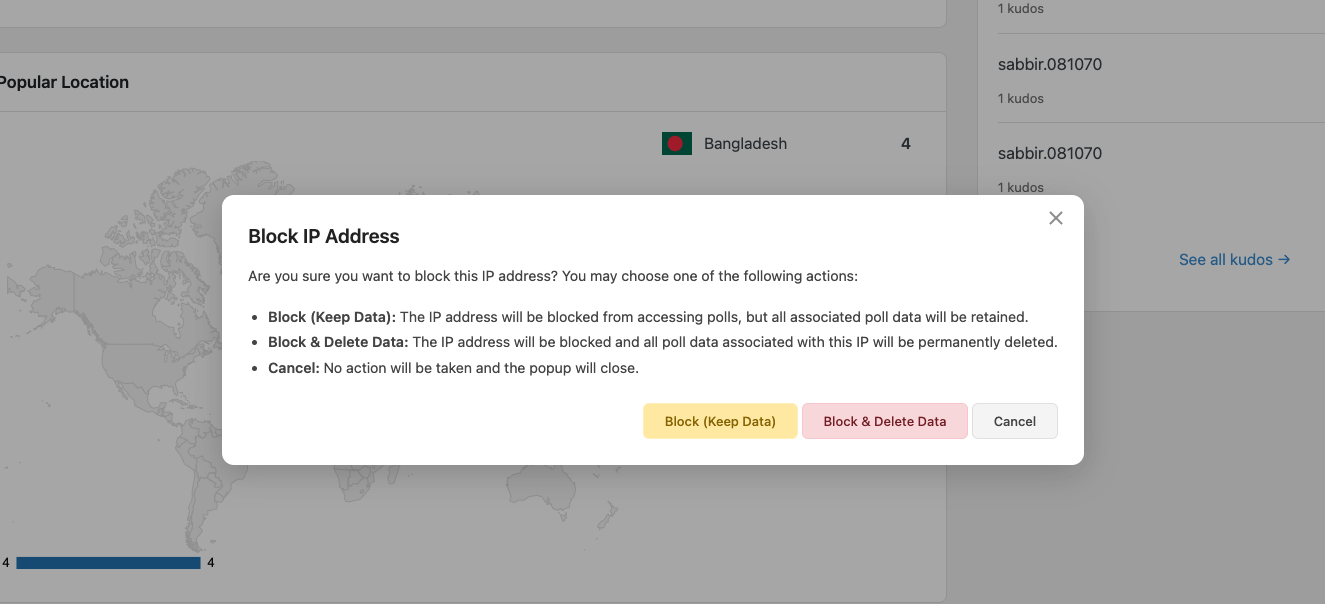
    • After installing and activating the plugin, go for general configurations. Once you are done, it’s time to create a new poll or survey.
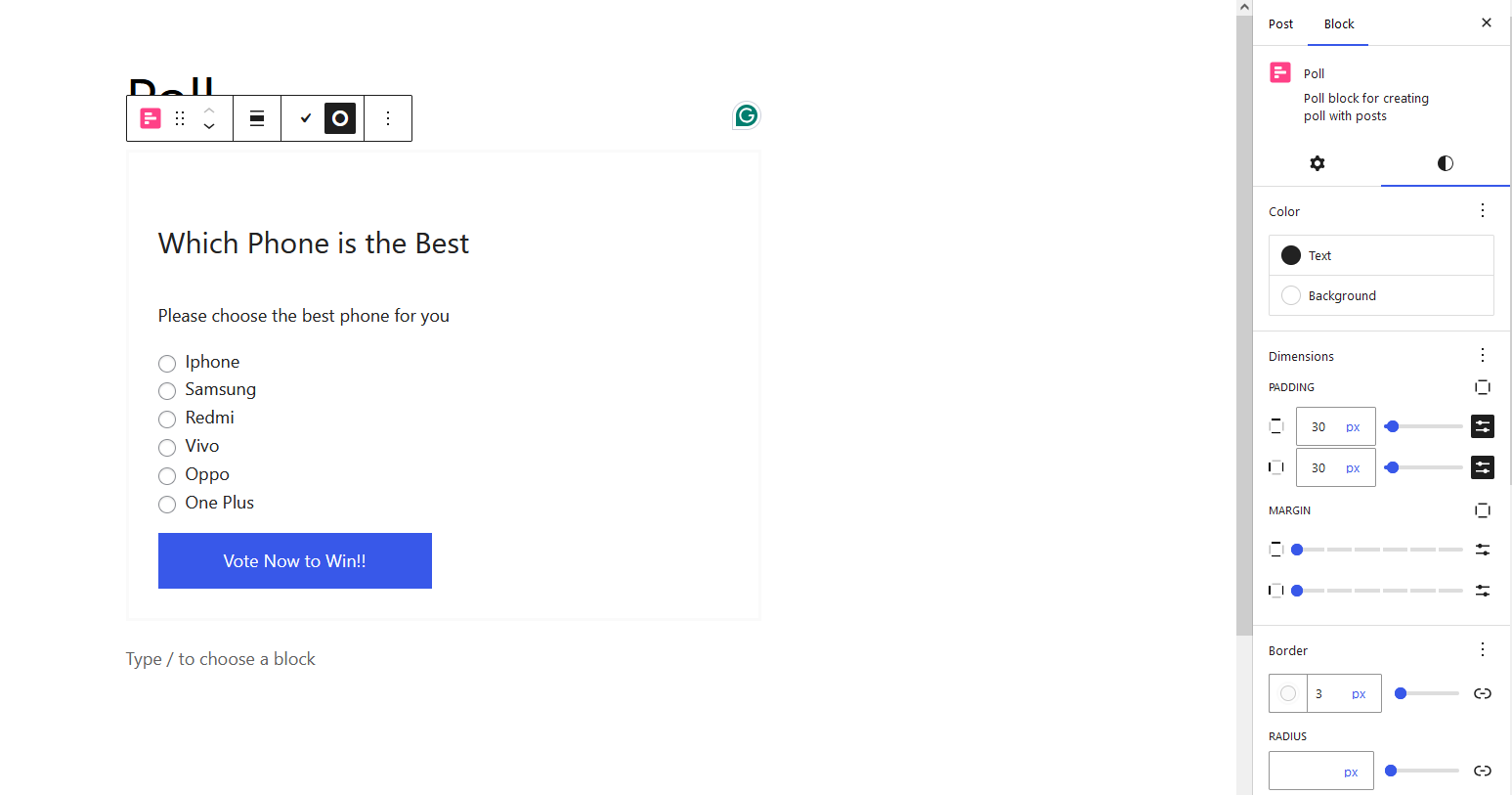
    • Provide a title & description, and customize the appearance and behavior of the poll or survey according to your preferences.
    • Next, add questions and answer options to your poll or survey.

    Depending on the plugin you are using, you may have different question types available. Such as

    • multiple-choice
    • text-based
    • or rating questions.

    Ensure that your questions are clear, concise, and relevant to your objectives.

    For special cases, you might want to configure additional settings like allowing multiple submissions from the same user, setting up conditional logic, or enabling notifications for new responses.

    Once satisfied with the setup, publish the poll or survey on your WordPress website. Most plugins provide shortcodes to embed your polls in a post, page, or widget.

    As you can see, there is a lot to do with your poll plugins, so it’s important to evaluate a plugin before using it.

    So, you can ensure that the plugin is perfect for your needs or not.

    Pollify – Ultimate Poll Creator, Survey Maker Plugin for WordPress

    Best Practices for Conducting Online Polls and Surveys in WordPress

    Random Poll Questions for work events and occasions

    WordPress plugins help you in every way to create effective online polls and surveys in WordPress. So you can collect useful data for your business. But you also need to give some input to get the most out of it. 

    To ensure the success of your online polls and surveys, it’s important to follow some best practices.

    Below, we’ve listed some important ones:

    • Display the purpose: Clearly tell your users the purpose of your polls and surveys. Explain how their responses will be used and the benefits of participating.
    • Test before launching: Test your polls and surveys with a small group of users before launching them to a wider audience. This will help you identify any issues or areas for improvement.
    • Monitor and analyze the responses: Regularly monitor and analyze the responses to identify any patterns or trends. This will help you make timely adjustments or improvements.
    • Update your polls and surveys: Update your polls and surveys periodically to keep them relevant and engaging. Outdated polls and surveys may not attract participation.
    • Respect user privacy: Ensure that you have a clear privacy policy in place. Let your users know how their data will be used and provide options for opting out if desired.

    With these best practices, you can conduct online polls and surveys that yield accurate and valuable data.

    Closing Notes on Online Polls & Surveys in WordPress

    We’re at the end of today’s blog. We believe you’ve already got a clear understanding of using polls & surveys on your WordPress site and their incredible benefits. 

    Both of these tools establish a strong communication channel between you and your audience. However, there are some basic differences between them.

    Depending on your needs, you have to decide when you should utilize which approach for your WordPress site.

    Luckily, you’ll find many poll & survey plugins in the WordPress repository. You can evaluate some popular options and go for the desired one.

    These plugins help you build a direct connection with your potential users and collect their opinions. By gathering feedback from your customers or website visitors, you can make data-driven decisions that will ultimately benefit your business. 

    Do you still have some further questions about the online poll & survey in WordPress? We’re ready to assist you further.

    Get updated about wpRigel through our contact page.

    The wpRigel Team

    April 20, 2024
    user guides
    online polls, online surveys
Previous Page
1 … 3 4 5
wprigel logo

wpRigel builds innovative WordPress plugins for developers, marketers and agencies. Be with us, get more users for your business and increase conversion using our powerful tools.

  • x.com icon
  • linkedin icon

Products

  • Pollify
  • Commandify
  • Automatify (coming soon)

Company

  • Affiliate Program
  • About Us
  • Contact Us
  • Privacy Policy
  • Terms and Conditions

Resources

  • Docs & User Guides
  • Blog
  • Support Area
  • Refund policy
  • Pricing for Pollify & Commandify

Comparisons

  • Commandify vs CommandUI
  • Pollify vs CrowdSignal

Changelogs

  • Commandify Changelog
  • Pollify Changelog

wpRigel 2026. All Rights Reserved

  • Terms of use
  • Privacy Policy
  • Cookie Policy