



Commandify Free vs Pro: Full Feature Comparison and Which One You Need

Let’s be direct about something most plugin comparison articles won’t tell you.
Commandify’s free version is not a stripped-down teaser. It’s a fully functional command palette that solves real problems for real WordPress users from the moment you install it. If you run a simple blog, a portfolio, or a content-focused site, you may never need to upgrade.
But Pro is a different category of tool entirely. Not because of artificial feature locks, but because the workflows it unlocks are genuinely more complex. WooCommerce store management, page builder integrations, contact form workflows, pattern recognition, contextual commands. These require deep access to your WordPress data layer. That access is what Pro provides.
This guide covers every feature in both tiers with real context, a clear comparison table, honest upgrade guidance for specific user types, and pricing details so you can make the right call for your situation.
What Commandify Free Includes
The free version is available on WordPress.org. No account required. No credit card. No nag screens. You install it, press Cmd/Ctrl + K, and it works immediately.
Here is everything you get without spending a cent.
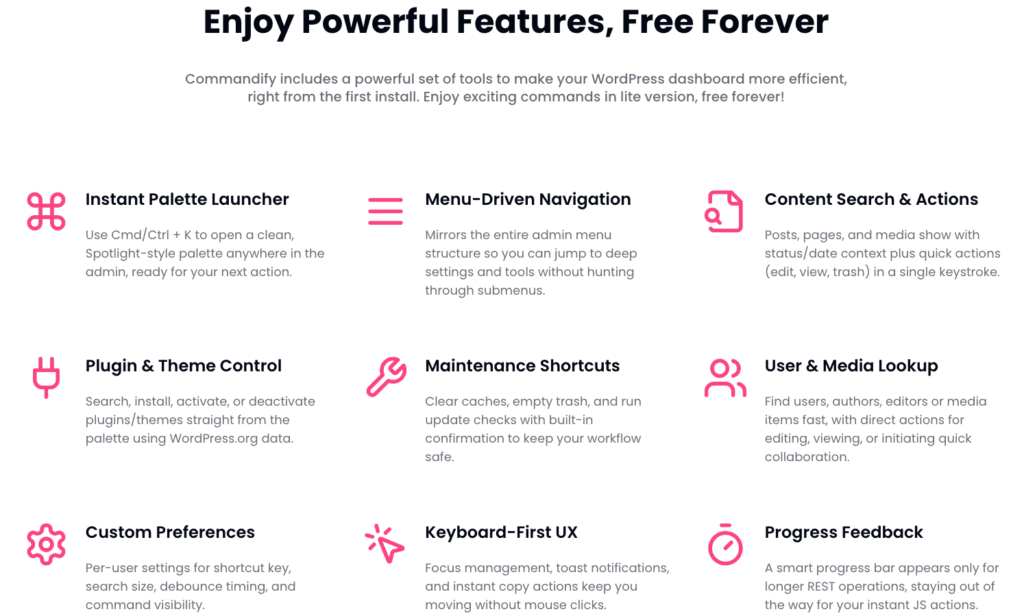
Global Command Palette (Cmd/Ctrl + K)
The core feature. A clean, centered command interface that opens instantly from any screen in your WordPress admin. No configuration, no learning curve. Press the shortcut, type what you want, press Enter.
Most WordPress professionals spend an embarrassing amount of time clicking through nested menus to get to settings pages they visit every day. The command palette eliminates this entirely. Type “Permalinks” and you’re there. Type “Discussion” and you’re there. Type the name of any plugin’s settings page and you’re there. Instantly.
What makes this different from simply bookmarking pages is that the palette mirrors your entire admin structure dynamically. Every submenu, every custom post type screen, every settings page added by third-party plugins appears automatically. You don’t configure anything. It just works.
Full Admin Navigation
Commandify reads your complete wp-admin menu structure and makes every item searchable. That includes nested submenus three levels deep, custom admin pages added by your plugins and theme, and any screen that WordPress registers with a menu entry.
On a site with 20 active plugins, your left sidebar becomes a dense column of items most users scroll past looking for the one thing they need. With Commandify, you just type the name. Two keystrokes and you’re there.
This alone is worth the install for anyone managing a plugin-heavy site.
Universal Content Search
Search posts, pages, media files, users, and any custom post type registered by your theme or plugins. All from the same search bar.
Each result shows meaningful context. Status (published, draft, pending), date, author. And each result includes quick actions without opening the item first. Edit, View, Preview, Trash, Permanent Delete. You find the content and act on it in one step.
For editorial teams managing hundreds of posts, this removes a daily navigation pattern that wastes minutes every single time. You stop visiting the Posts list to find a draft. You stop visiting Users to find a profile. You type and you go.
Plugin and Theme Management
This is the feature that surprises most people. Commandify free lets you activate, deactivate, install, and search plugins directly from the palette. Including searching the WordPress.org repository and installing a plugin without visiting the Plugins screen.
Same goes for themes. Search, activate, manage from the palette.
Most command palette tools lock plugin management behind a paid tier. Commandify ships it free. For developers and agencies who activate and deactivate plugins as part of their daily troubleshooting workflow, this is a genuinely useful free feature.
User Search and Lookup
Find any user by name, email, or role and open their profile immediately. Direct actions available from the result: Edit profile, View, or initiate quick collaboration.
On sites with memberships, LMS enrollments, or customer logins, this saves the daily routine of navigating to Users, filtering by role, searching manually. You open the palette, type the person’s name, and you’re on their profile in two seconds.
Bulk Maintenance Commands
Clear cache. Empty trash. Delete spam comments. Check for updates. Remove expired transients. Rebuild image thumbnails.
These are the routine housekeeping tasks that normally require you to visit multiple admin screens, install separate plugins, or remember which menu item is buried under which section. Commandify free exposes them as direct commands. One keystroke and they run, with a confirmation dialog for destructive actions.
The transient cleanup alone is more useful than most standalone maintenance plugins. It handles 100,000+ records safely without timing out.
Fuzzy Search
The search engine handles typos and partial matches naturally. Type “plgins” and it finds Plugins. Type “woo prod” and it surfaces WooCommerce products. Type “perm” and it finds Permalinks.

This matters because the quality of a command palette depends entirely on how confident you feel typing quickly without precision. A palette that only works when you type exact names forces you to slow down. Commandify’s fuzzy search lets you type how humans actually type under normal working conditions.
Frontend Command Palette
Commandify also works on the frontend of your site for logged-in administrators. Press Cmd/Ctrl + K while browsing any page of your site and the palette opens with theme-independent styling.
This is useful for developers who review the public-facing site and want instant access to admin actions without switching tabs. It’s useful for content editors who spot a typo while previewing a page and want to jump directly to the editor. The frontend palette is often overlooked in comparisons but it’s a genuinely practical feature in day-to-day use.
Per-User Preferences
Every user on the site can configure Commandify to fit their personal workflow. Change the shortcut key. Adjust the number of search results shown. Modify debounce timing for faster or more deliberate triggering. Control which command categories appear.
This makes Commandify genuinely multi-user ready. The editor who prefers Alt+K doesn’t interfere with the developer who uses Ctrl+K. Each person gets their own experience without affecting others.
What Commandify Pro Adds
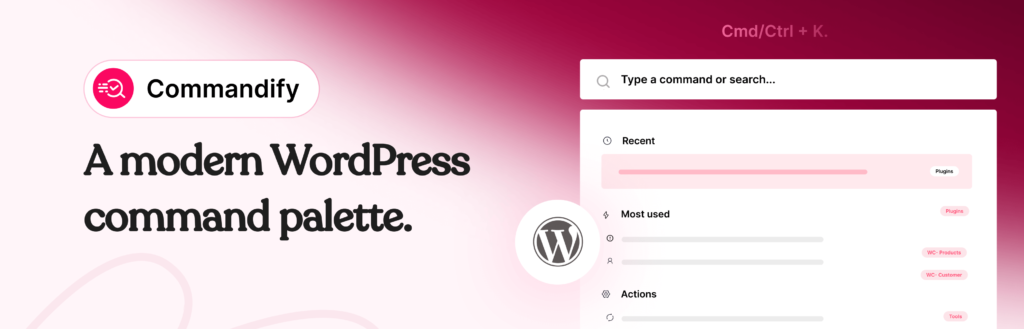
Pro builds directly on everything in the free version. Every free feature is retained. What Pro adds is a completely different depth of capability, specifically built for professional WordPress workflows that go beyond navigation and content search.
The key distinction is this: free navigates you to things. Pro lets you do things to them without visiting those screens at all.
WooCommerce Command Suite
This is the flagship Pro feature and the reason most WooCommerce store owners upgrade.
Think about how a typical day looks for a store manager. A customer emails about their order. You go to WooCommerce, click Orders, wait for the page to load, search for the order by customer name or number, click the order, check the status, add a note, update the status, navigate back. That’s eight to ten actions for a workflow you repeat dozens of times a day.
With the WooCommerce command suite, you press Cmd/Ctrl + K, type the order number or customer email, and the order appears in your palette with available actions. Change the status to Completed. Add a note. Apply a coupon. Recalculate totals. All with modal confirmations so you never make an accidental change.
Products and variations work the same way. Every product in your catalogue appears as its own searchable palette entry. Every variation within a product is individually accessible. Edit pricing, update stock, change SKUs, view or delete. No Plugins screen visit required.
Customer management is fully integrated too. Search by name or email. Open the profile. View their recent orders. Send an email. The kind of lookup a support team does twenty times a day becomes a two-second action instead of a six-click workflow.
Dynamic Pattern Recognition
This is one of the most underappreciated Pro features and one of the most useful in real support workflows.
When a customer contacts you with an order number, you typically copy it from the email or ticket and then manually search for it inside WooCommerce. With pattern recognition, you just paste it directly into the command palette. Commandify recognises the format automatically.
Type #4152 and it jumps directly to WooCommerce order 4152. Type @sarah and it opens the user profile for Sarah. Paste a customer email address and it identifies it as a customer lookup and shows their profile with direct actions. Type a product SKU and it opens the product. No search required. No pattern matching by you. The palette does it.
For agencies handling support queries across multiple client sites, this feature alone changes the pace of the workday significantly.
Contextual Commands
Commandify Pro detects which screen you’re currently viewing and surfaces relevant commands before you type anything. In the post editor, it shows Publish, Save Draft, Preview, and Duplicate. On the Orders list, it shows order-specific actions. On a product page, it shows product management options.
This is the difference between a dumb search tool and a smart workflow layer. Instead of always starting from a blank palette, Pro opens with commands that make sense for what you’re doing right now. It anticipates instead of waits.
Smart Suggestions, Favorites, and Usage History
The Pro palette opens with curated command groups. Favorites shows commands you’ve pinned. Recent shows what you accessed last. Most Used surfaces the actions you run repeatedly, surfaced automatically based on your real usage patterns.
This means on a busy day when you’re repeating the same five actions over and over, the palette opens and those actions are right there. Zero typing required. For WooCommerce stores during a busy period like a sale or promotion, this is a genuine time-saver.
Elementor Template Management
Search, open, duplicate, rename, and delete Elementor templates without navigating to the Templates screen. For agencies and developers who work across large template libraries, this change removes a persistent daily friction point.
Finding a specific template across a library of 50+ entries normally means opening Templates, scrolling or searching, clicking in. With Commandify Pro you type the template name and open it directly. On sites where templates are the core of the work, this is accessed dozens of times a day.
Bricks Builder Template Management
Full template management for Bricks Builder works the same way. Search, open, and manage templates directly from the palette. Commandify includes intelligent post type detection and gives you direct builder access from any screen in the admin.
If you’ve moved to Bricks and your template library is growing, this feature becomes more valuable every week. See the existing guide on managing Bricks Builder templates faster for specific workflow examples.
Contact Form 7 and Flamingo Integration
Search all Contact Form 7 forms from the palette. Edit them, copy shortcodes, duplicate or delete them. View and search Flamingo submission entries without visiting the Flamingo inbox screen. Search posts and pages containing specific CF7 shortcodes.
For sites where contact forms are a core lead generation or support tool, managing them through the palette removes a lot of tab switching and screen navigation.
Fluent Forms Integration
Search and open Fluent Forms, manage form entries and transactions, access Fluent Forms settings. Everything available from a single palette entry without visiting the Fluent Forms admin section.
Advanced Settings Forms
Edit core WordPress settings like site title, tagline, timezone, and discussion options directly from the palette through clean, validated forms. Settings display their current live values before you edit them, loaded via REST so you always see the actual current state.
Toggle commands like maintenance mode show accurate true/false state before you act. You’re never guessing whether maintenance mode is on or off. You see it in the palette and toggle it from there.
Free vs Pro: Complete Feature Comparison
| Feature | Free | Pro |
|---|---|---|
| Global command palette (Cmd/Ctrl + K) | Yes | Yes |
| Full admin navigation (all menus, submenus, CPTs) | Yes | Yes |
| Content search (posts, pages, media, CPTs) | Yes | Yes |
| Quick actions on content (edit, view, trash) | Yes | Yes |
| Plugin management (install, activate, deactivate) | Yes | Yes |
| Theme management | Yes | Yes |
| User search and profile access | Yes | Yes |
| Bulk maintenance commands (cache, transients, trash) | Yes | Yes |
| Fuzzy, typo-tolerant search | Yes | Yes |
| Frontend command palette for admins | Yes | Yes |
| Per-user preferences and shortcut configuration | Yes | Yes |
| WooCommerce order search and actions | No | Yes |
| WooCommerce product and variation management | No | Yes |
| WooCommerce customer tools | No | Yes |
| Dynamic pattern recognition (#ID, @user, email, SKU) | No | Yes |
| Contextual commands (screen-aware suggestions) | No | Yes |
| Smart suggestions, favorites, usage history | No | Yes |
| Elementor template management | No | Yes |
| Bricks Builder template management | No | Yes |
| Contact Form 7 + Flamingo integration | No | Yes |
| Fluent Forms integration | No | Yes |
| Advanced settings forms with live REST values | No | Yes |
| Toggle and state commands (maintenance mode etc.) | No | Yes |
Commandify Pro Pricing
Three plans. All come with a 14-day money-back guarantee.
| Plan | Sites Covered | Annual Price | Lifetime Price |
|---|---|---|---|
| Basic | 5 sites | $47/year | $135 one-time |
| Professional | 30 sites | $79/year | $215 one-time |
| Enterprise | 100 sites | $159/year | $399 one-time |
Basic covers 5 sites at $47/year. That is less than $4 per month. For a WooCommerce store owner who recovers even 15 minutes of daily admin time, that payback is measured in hours, not months.
Professional at $79/year covers 30 sites. For a freelancer managing a client portfolio, that works out to under $2.65 per site per year. See full pricing details here.
Who Should Stay on Free
Free is the right choice when your work inside WordPress is primarily navigation and content creation. If you write blog posts, manage pages, and handle a handful of standard admin tasks each day, the free version removes the friction that matters to you without costing anything.
Bloggers and content editors working within WordPress’s native tools will find the free version covers their workflow completely. You get fast navigation, content search, plugin management, maintenance commands, and a better admin experience from day one. There’s no expiry on these features and no limits that pressure you to upgrade.
If you don’t run WooCommerce, don’t work with Elementor or Bricks, and don’t handle contact form submissions daily, you may never need Pro at all.
Who Should Upgrade to Pro
WooCommerce Store Owners and Managers
If you manage orders, products, and customer queries daily inside WooCommerce, this is the clearest upgrade case. The WooCommerce command suite cuts 5 to 10 clicks from every common workflow. Across a full workday of support queries and order management, the recovered time is significant.
At $47/year for 5 sites, the Basic plan costs less than most monthly SaaS subscriptions that save far less time. The math is straightforward.
Agencies and Freelancers Managing Multiple Sites
The Professional plan at $79/year covers 30 sites. For a freelancer handling 10 to 20 client installs, the per-site cost drops to almost nothing. The workflow improvements multiply across every site you manage daily. Client support, monthly maintenance, content updates, WooCommerce management for e-commerce clients. Pro makes every one of these faster.
Elementor and Bricks Builder Users
If template management is a core part of your daily workflow, the page builder integrations justify the upgrade on their own. The daily friction of navigating to a template, finding the right one in a long list, and opening it adds up fast. Commandify Pro removes that friction entirely.
Support Teams and High-Volume Admins
Anyone handling customer support with access to the WordPress admin spends a large part of their day doing lookups. Order numbers from tickets. Customer emails from support conversations. User handles from forum threads. Pattern recognition turns each of these lookups from a multi-step process into a two-second palette interaction.
If this describes your team, Pro pays for itself in the first week.
Not sure which fits you? Start with Commandify free on WordPress.org. Use it for a week. When you find yourself wishing for order lookup, template management, or WooCommerce actions, the upgrade path is clear. Commandify Pro starts at $47/year with a 14-day money-back guarantee.
Real Workflow Comparisons: Free vs Pro in Practice
Numbers and feature tables are useful. But the clearest way to understand the difference is to see specific workflows side by side.
Workflow 1: Handling a WooCommerce Support Query
With Free: Customer emails with order #4152 asking why it hasn’t shipped. You navigate to WooCommerce, click Orders, wait for the page, search by order number, find the order, click it, check the status and notes, respond. Six to eight actions. One page load.
With Pro: Press Cmd/Ctrl + K. Type #4152. The order appears with its current status. You add a note and update the status directly from the palette. Two actions. No page load.
Workflow 2: Finding and Editing an Elementor Template
With Free: Navigate to Templates via the left sidebar. Wait for the templates list to load. Scroll or search for the specific template. Click it. Wait for the builder to open.
With Pro: Press Cmd/Ctrl + K. Type the template name. Select it. Builder opens directly. The difference is a few seconds each time, which adds up to minutes every day across dozens of template edits.
Workflow 3: Looking Up a User
With Free: Navigate to Users. Search by email or name. Click the user. Their profile opens.
With Pro: Press Cmd/Ctrl + K. Paste the email directly. Pattern recognition identifies it as a customer email. Their profile and available actions appear immediately. One step instead of four.
Frequently Asked Questions on Commandify Free vs Pro
Can I use Commandify free forever without upgrading?
Yes. The free version on WordPress.org is permanently free. No trial period, no feature expiry, no messages pressuring you to upgrade. All navigation, content search, plugin management, maintenance tools, and per-user preferences are available indefinitely at no cost.
Pro is an optional upgrade for specific professional workflows, not a requirement for using Commandify effectively.
Does Commandify Pro work with WooCommerce High-Performance Order Storage (HPOS)?
Yes. The WooCommerce command suite is fully compatible with HPOS, which became the default storage engine in WooCommerce 8.2. If you’ve enabled HPOS on your store, all order search, lookup, and management commands work correctly.
What happens to my settings if I upgrade from free to Pro?
Your existing installation is upgraded in place. All per-user preferences, customised shortcut keys, and existing settings are preserved. Pro features activate immediately after license validation. There is no reinstall, no reconfiguration, and no data loss.
Does Commandify work on WordPress multisite?
Yes. Commandify Pro works on multisite installations. Each subsite in a multisite network counts toward your license limit. The Basic plan covers 5 sites, Professional covers 30, and Enterprise covers 100.
Will Commandify slow down my WordPress site?
No. Commandify loads its scripts only in wp-admin for logged-in administrators. It adds nothing to the public-facing site for regular visitors. Most commands use client-side filtering with no additional server requests per keystroke.
Longer operations like maintenance cleanup show a progress bar so you know what’s happening. Performance impact on normal WordPress operation is effectively zero.
How does Commandify compare to CommandUI and WP Spotlight?
CommandUI and WP Spotlight are both command palette alternatives with their own strengths. CommandUI is more expensive than Commandify Pro for comparable site counts. WP Spotlight focuses more on search and navigation than on action-depth.
Neither matches Commandify Pro’s WooCommerce command suite depth, pattern recognition, or page builder integrations. The full breakdown is in the CommandUI vs Commandify comparison if you want a detailed look at the alternatives.
Is there a money-back guarantee?
Yes. All Commandify Pro plans come with a 14-day money-back guarantee. If you upgrade and decide it’s not right for your workflow, you can request a full refund within 14 days of purchase.