



How to Schedule a WordPress Poll to Close Automatically (Free)

To close a WordPress poll automatically, set the poll’s Status to Close after and pick a date and time. With Pollify, a free poll block for the WordPress editor, voting then stops at that moment on its own.
You also decide what visitors see once it closes: the final results, a short message, or nothing at all. This guide walks through the setup, how to handle an opening date, and the scheduling patterns that keep your poll data useful.
Why Give Your Poll an End Date
A poll with no end date keeps collecting votes for months. Answers from last spring get mixed with answers from this week, even though your traffic, your audience and the context have all changed.
A fixed window gives you a clean snapshot. Run the same question again next quarter and you can see what actually shifted.
A deadline also helps participation. “Vote by Friday” gives people a reason to answer now instead of later, and later often never comes.
How to Make a WordPress Poll Close Automatically
You need a poll block on the page first. If you have not added one yet, follow our guide on how to create a poll in WordPress, then come back here.
- Open the post or page with your poll in the block editor.
- Click the poll block to select it.
- In the right-hand sidebar, open General settings.
- Set Status to Close after.
- Pick the date and time when voting should stop.
- Click Update (or Publish) to save.
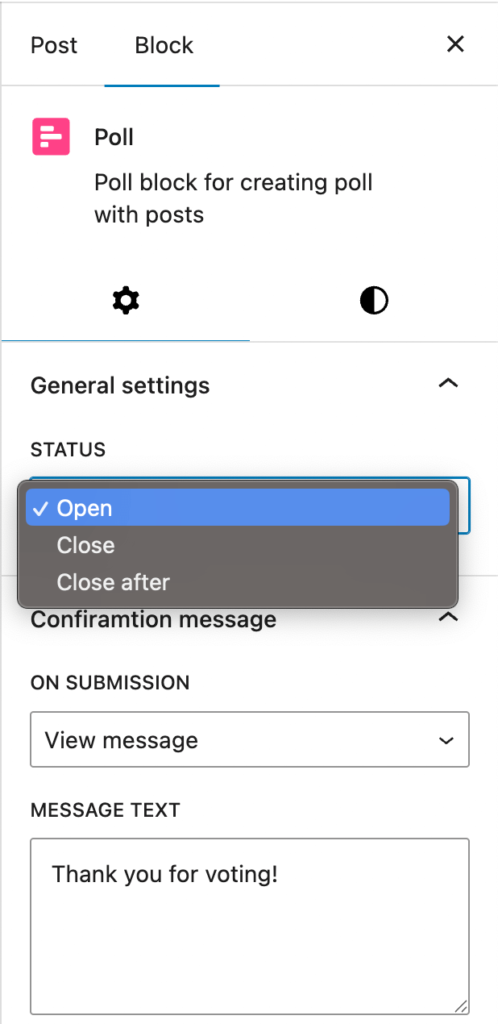
Before you pick the time, check that your site’s time zone is right under Settings > General (see the WordPress General Settings docs). A wrong time zone is the most common reason a poll closes a few hours early or late.
Choose what visitors see after the poll closes
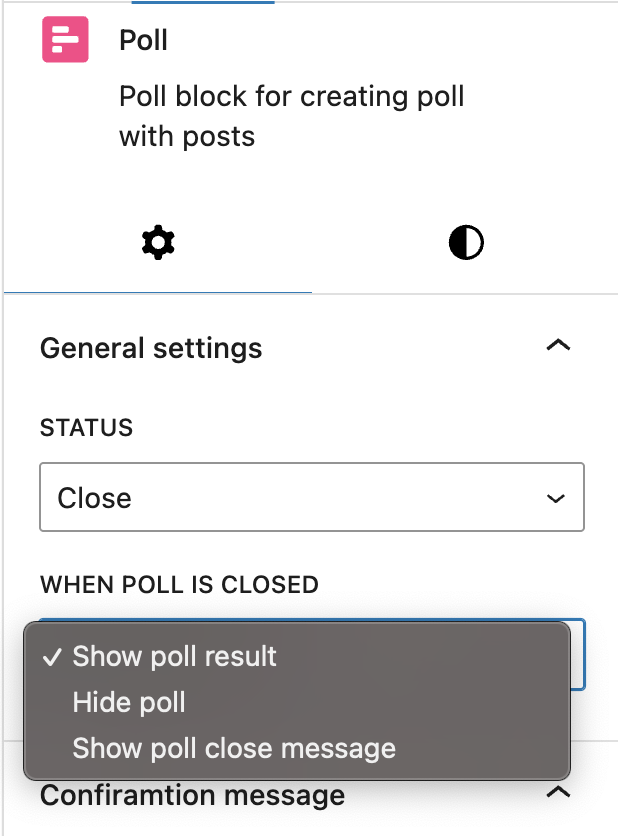
In the same panel, When poll is closed gives you three options:
- Show poll result: visitors see the final tally. Good for public questions where the outcome is part of the story.
- Hide poll: the poll disappears from the page. Good for time-limited offers or internal votes.
- Show poll close message: a line of text you write, such as “Voting has ended. Results in next week’s newsletter.”
What About an Opening Date?
Pollify does not have a separate opening date. Its Status setting is Open, Close or Close after. There are two simple ways to start a poll at a set time:
- Schedule the post itself. Write the post with the poll inside, set Status to Close after, then schedule the post to publish in the future from the Publish panel. The poll goes live with the post and closes on your end date.
- Keep it closed until launch. For a poll on a page that is already live, set Status to Close with Hide poll. On launch day, switch Status to Close after with your end date and click Update.
Scheduling Patterns That Work
Weekly content polls
“What should we write about next?” works well on a 7-day cycle. Close it on Sunday, read the results on Monday, plan the week around them.
Monthly audience check-ins
For bigger questions like “What is your biggest challenge with X?”, a 30-day window collects enough votes from different traffic sources without the data going stale.
Launch and campaign polls
Open the poll when the campaign starts and close it when the campaign ends. The answers then belong clearly to that campaign’s audience.
Yearly repeat polls
If you ask the same question every year, close each year’s poll on time and add a fresh poll block the next year. You get clean year-over-year comparisons.
Combine an End Date With Duplicate Protection
An end date controls when people vote. Duplicate protection controls how often. In Response settings you can tick Allowed one response per computer (checked by IP address) or Require login to vote with One vote per user. Our guide on preventing duplicate votes in WordPress polls explains which one to pick.
What Happens to the Votes After a Poll Closes
Closing a poll stops new votes. It does not delete anything. Every vote stays in your dashboard under Pollify > All Polls, where you can open the poll to see totals, percentages and recent votes.
Want to run the same poll again from zero? Hover over it in the list and click Reset. That clears the votes and keeps the poll itself.
Frequently Asked Questions
Is poll scheduling free in Pollify?
Yes. The Status setting, including Close after, and the options for what visitors see after closing are all in the free version.
Can I reopen a closed poll?
Yes. Set Status back to Open (or pick a new Close after date) and click Update. Votes that were already recorded are kept.
Can two polls on one page close at different times?
Yes. Each poll block has its own settings, so one can close on Friday while another stays open all month.
Will the poll close if nobody visits the page?
Yes. The closing time is part of the poll’s settings, so the poll is closed for the next visitor after that time, however long the page has been quiet.
Next Steps
Pick the end date for your next poll before you publish it, and decide now what people should see afterwards. If the poll matters for decisions, add duplicate protection too, or make it anonymous for sensitive questions.