



Uncanny Automator Pricing 2026: New Plans, Hidden Costs, and How It Compares to Cheaper Alternatives

Uncanny Automator quietly relaunched its pricing structure in 2026. The old flat yearly plans — $199, $349, $599 — are still available as “legacy” options. But the new default plans are monthly subscriptions bundled with an AI assistant called Uncanny Agent, starting at $25 per month ($300 per year) and scaling to $60 per month ($720 per year).
That is a significant price increase over what most people remember paying for Uncanny Automator. And most articles covering Uncanny Automator pricing in 2026 have not caught up with this change.
This article covers both the new AI + Automation plans and the legacy options, what you actually get at each tier, where the pricing gets complicated, and how the total cost compares to alternatives including Krom Automation, which starts at $119 per year with no AI usage limits, no per-seat fees, and no monthly billing.
Looking for a lower-cost Uncanny Automator alternative? Krom Automation is a visual workflow automation plugin for WordPress. Flat annual pricing, no AI usage caps, no monthly billing. See plans – 60% off launch week with code GETFLAT60.
Uncanny Automator’s Two Pricing Tracks in 2026
Before looking at numbers, you need to know that Uncanny Automator now sells two fundamentally different products under the same brand name.
The first is the AI + Automation plan. This is the new default. It bundles the automation engine (the recipe builder) with Uncanny Agent, an AI assistant that lives inside your WordPress dashboard, and Uncanny Page Builder, an AI-first page builder. Think of it as Uncanny Automator plus an AI co-pilot, priced monthly.
The second is the Legacy plan. This is the original product, automation only, no AI assistant, no page builder. Sold as an annual flat fee, same as it always was. Legacy plans are still available but are not featured prominently.
If you are comparing Uncanny Automator pricing from articles written before mid-2026, they are describing legacy pricing. The numbers have changed.
Uncanny Automator AI + Automation Plans (2026 Default)
| Plan | Monthly cost (annual billing) | Sites | Uncanny Agent usage |
|---|---|---|---|
| Basic | $25/month ($300/year) | 1 | Standard |
| Plus | $40/month ($480/year) | 10 | 2x standard |
| Elite | $60/month ($720/year) | 50 | 4x standard |
All three AI + Automation plans include the full recipe builder, unlimited automations, all integrations, and Uncanny Agent. Plans differ by number of sites and how much AI Agent usage is included.
What “Uncanny Agent usage” means in practice
Uncanny Agent runs on AI models that Uncanny Owl manages on your behalf. You do not bring your own API key. You do not choose a model. Usage is measured and capped per plan.
Standard usage on the Basic plan is described as enough to create 500+ recipes, draft 200+ blog posts, and generate 100+ images per year. For users whose primary need is automation rather than AI content generation, this is likely more than sufficient.
Plus plan doubles that. Elite quadruples it. Both also offer discounts on top-up usage packs if you hit the ceiling.
What the AI + Automation plans include beyond automation
Uncanny Page Builder is included in all AI + Automation plans. This is an AI-first page builder where you describe the page you want and Uncanny Agent builds it. Page building uses your plan’s Agent usage.
All addons are included in Plus and Elite plans. This is a notable change from the legacy structure where addons (Custom User Fields, Restrict Content, User Lists) were either separate purchases or required a higher tier. On the AI + Automation Plus plan, all addons are included in the $40 monthly fee.
Elite adds Salesforce and QuickBooks Online via the Elite Integrations Addon, plus a 50% discount on Agent usage top-up packs.
Uncanny Automator Legacy Plans (Annual, Automation Only)
| Plan | Annual price | Sites | AI included |
|---|---|---|---|
| Basic | $199/year | 1 | No |
| Plus | $349/year | 10 | No |
| Elite | $599/year | 50 | No |
Legacy plans include the recipe builder, all standard integrations, and unlimited automations. They do not include Uncanny Agent or Uncanny Page Builder.
If you are on a legacy plan, your renewal price stays the same and your automations keep running. Upgrading to an AI + Automation plan costs the difference in licence price, not a full repurchase.
Legacy plans are the right choice if you want workflow automation only, have no interest in the AI features, and prefer a one-time annual payment over a monthly subscription.
The Real Annual Cost: New Plans vs Legacy vs Competitors
This is where it gets important to model the actual spend.
| Option | 1 site, 1 year | 10 sites, 1 year | AI included |
|---|---|---|---|
| Uncanny Automator AI + Automation Basic | $300 | Not available (need Plus at $480) | Yes, capped |
| Uncanny Automator Legacy Basic | $199 | Not available (need Plus at $349) | No |
| Uncanny Automator Legacy Plus | $349 | $349 | No |
| Zapier Professional (750 tasks/month) | $240 | N/A (per account) | Draws from task pool |
| Krom Automation | $119 | $119 (unlimited sites at Pro tier) | Yes, own API key, uncapped |
| Krom Automation with GETFLAT60 | $48 | $48 | Yes, uncapped |
A few things stand out in that comparison.
Uncanny Automator’s new AI + Automation Basic plan at $300 per year is 51% more expensive than the legacy Basic plan and more than double what Krom Automation costs at launch pricing. It now costs more annually than Zapier’s entry tier.
The legacy plans remain the better value for pure automation needs, but they are not what most buyers encounter when visiting the pricing page today.
Krom Automation’s AI actions work differently. You bring your own OpenAI, Gemini, or Groq API key. There is no usage cap at the plugin level. You pay your API provider directly for what you use, with no markup. For sites running heavy AI workflows, this model is almost always cheaper than Uncanny’s usage-capped approach.
Three-Year Cost Comparison for a Single Site
| Option | Year 1 | Year 2 | Year 3 | 3-year total |
|---|---|---|---|---|
| Uncanny AI + Automation Basic | $300 | $300 | $300 | $900 |
| Uncanny Legacy Basic | $199 | $199 | $199 | $597 |
| Zapier Professional | $240 | $240 | $240 | $720 |
| Krom Automation (full price) | $119 | $119 | $119 | $357 |
| Krom Automation (lifetime plan) | $119 once | $0 | $0 | $119 |
The lifetime plan on Krom Automation changes the comparison entirely. At $119 paid once, the three-year cost is less than half what Uncanny Legacy Basic costs in a single year.
What Uncanny Automator Does Better Than the Alternatives
This article is honest about what Uncanny Automator does genuinely well, because the comparison only means something if it is fair.
Integration breadth is unmatched
Uncanny Automator connects to over 240 plugins and apps. No other WordPress-native automation plugin comes close. If you run a niche plugin that your automation needs to interact with, Uncanny Automator is the most likely to support it natively.
The recipe builder is mature
Uncanny Automator has been in the market for years. The recipe builder handles complex logic including loops, conditional branches, database queries and multi-trigger recipes. For advanced workflows, it is the most battle-tested option available.
The AI agent is genuinely integrated
Uncanny Agent is not a chatbot bolted on. It understands your specific site, can read your actual data, and can build recipes from plain-language descriptions. For non-technical users who want to automate without learning the recipe builder, this is a meaningful capability.
Support and track record
Uncanny Owl has been building WordPress plugins for over 13 years and has 40,000+ active installs. That kind of production history matters for mission-critical automation.
What Uncanny Automator Does Not Do
No visual canvas builder
Uncanny Automator uses a list-based recipe editor. You add triggers and actions in sequence. You cannot see the full workflow at a glance, zoom out, or drag nodes around. For anyone coming from a Zapier or Make background, the interface feels linear rather than spatial. Krom Automation uses a drag-and-drop canvas where the full workflow is visible at once.
No lifetime plan
Uncanny Automator has never offered a lifetime option. Every plan renews annually. Over three to five years, this adds up significantly compared to tools that offer a one-time payment.
No step-level execution logs on Basic
Debugging a recipe that failed requires knowing exactly which step failed and what data it received. Uncanny Automator provides logging, but the depth varies by plan. Krom Automation’s execution logs show every step, the data each step received, what it returned, and the exact error if something went wrong — on every plan.
AI usage is capped per plan
If you need heavy AI usage for content generation alongside your automation, you will need to monitor your Agent usage and potentially buy top-up packs. Krom Automation’s AI actions use your own API key with no plugin-level cap.
No incoming webhook receiver on all plans
Receiving webhooks from external services like Stripe, GitHub or Shopify requires Uncanny Automator’s webhook support, which is included but works differently from a dedicated incoming webhook endpoint. Krom Automation’s incoming webhook receiver generates a unique HMAC-secured URL per workflow, compatible with any service that sends webhooks.
Who Should Choose Uncanny Automator’s Legacy Plan
You are running a WordPress site with complex, multi-step automation needs and your plugin stack includes integrations that only Uncanny Automator supports natively.
You have used Uncanny Automator before and you are renewing an existing setup that is working well.
You manage 10 or 50 sites and need the Plus or Elite tier’s multi-site coverage.
You are comfortable with a list-based recipe builder and do not need a visual canvas.
Who Should Choose the AI + Automation Plan Instead of Legacy
You want the AI page builder and AI agent features and are willing to pay $100+ more per year for them.
You have limited technical knowledge and want an AI assistant that can build recipes for you from plain-language descriptions.
Your site needs are focused on a single site and the $25 per month entry point fits your budget.
Who Should Consider Krom Automation Instead
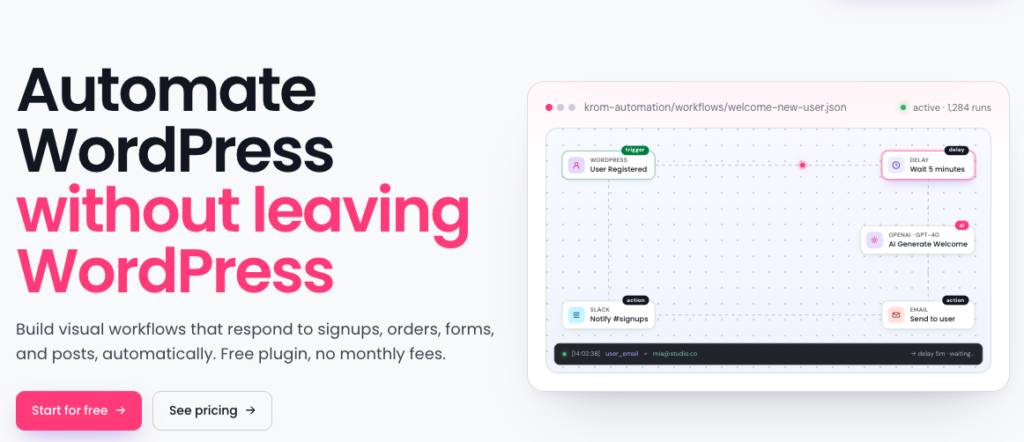
You want visual drag-and-drop workflow building on a canvas rather than a list-based interface.
You want flat annual pricing or a one-time lifetime payment without recurring monthly fees.
Your automation runs primarily on WordPress-native events: WooCommerce orders, form submissions, course completions, membership sign-ups, BuddyBoss community events.
You want AI actions without a usage cap, bringing your own OpenAI, Gemini or Groq key at no additional plugin cost.
You want step-level execution logs that show exactly what each workflow step received, returned, and did — on every plan.
You are starting fresh and want a lower entry price without sacrificing core capability.
See the Krom Automation features page and the WooCommerce integration guide for details on what each integration covers.
The free version on WordPress.org covers 16 triggers, 21 actions, WooCommerce, and full AI actions with no usage limits. No account required.
Frequently Asked Questions About Uncanny Automator Pricing
What happened to Uncanny Automator’s $199 Basic plan?
It still exists as a “Legacy” plan. The new default is the AI + Automation Basic plan at $25 per month ($300 per year). Legacy plans do not include Uncanny Agent or Uncanny Page Builder. Both options are available from the pricing page, but the AI + Automation plans are featured more prominently.
Can I still buy Uncanny Automator without the AI features?
Yes. The Legacy plans include the recipe builder and all standard integrations without Uncanny Agent. They are priced at $199, $349 and $599 per year for 1, 10 and 50 sites respectively.
Is there a lifetime plan for Uncanny Automator?
No. Uncanny Automator has never offered a lifetime licence. All plans renew annually or monthly. If a one-time payment matters to you, Krom Automation offers a lifetime plan currently discounted to $48 with code GETFLAT60.
Does Uncanny Automator have a free version?
Yes. The free version on WordPress.org includes hundreds of triggers and actions for WordPress plugin integrations. It does not include app integrations, Uncanny Agent, or advanced features like loops and conditions. It is useful for testing whether the plugin fits your workflow before upgrading.
How does Uncanny Automator’s AI compare to Krom Automation’s AI?
Uncanny Agent is a managed AI assistant that understands your site, can answer questions, complete tasks, and build recipes. You do not configure a model or provide an API key. Usage is capped per plan tier.
Krom Automation’s AI actions (Generate Text, Content Moderation, Auto-Tag, and Workflow Generation) require your own API key from OpenAI, Gemini or Groq. There is no usage cap at the plugin level. You pay your provider directly. For automation-focused AI use, Krom’s model is usually cheaper. For conversational AI assistance and site management tasks, Uncanny Agent is more capable.
What is the 14-day money-back guarantee on Uncanny Automator?
Uncanny Owl offers a full refund within 14 days of purchase, as long as you have used 5% or less of your Uncanny Agent usage. This condition means heavy early use of the AI features can disqualify you from a refund. Read the terms before purchasing if refund eligibility matters to your decision.
Uncanny Automator is a great plugin. It is also more expensive than it used to be. If you want visual drag-and-drop workflow automation for WordPress at a lower price, Krom Automation starts at $119 per year and $48 at launch pricing with code GETFLAT60. Lifetime plan available. See all plans