



Pollify vs WPForms Polls: Which Is Better for WordPress Polls?

If you only need polls, a dedicated poll block is simpler and cheaper. Pollify’s free version covers most polls, while poll results in WPForms need the Surveys and Polls addon, which comes with WPForms Pro and above.
If you already pay for WPForms Pro for your contact or payment forms, its addon is a sensible choice. Below is how the two compare in practice, including where WPForms is clearly the better tool.
The Core Difference: A Poll Block vs a Form Builder
WPForms is a form builder. Polls are one feature inside it: you build a form, turn on survey and poll reporting, then place the form on a page with its block or shortcode.
Pollify is only a poll plugin. You add a Poll block in the editor, type the question and answers on the canvas, and the poll is part of the page.
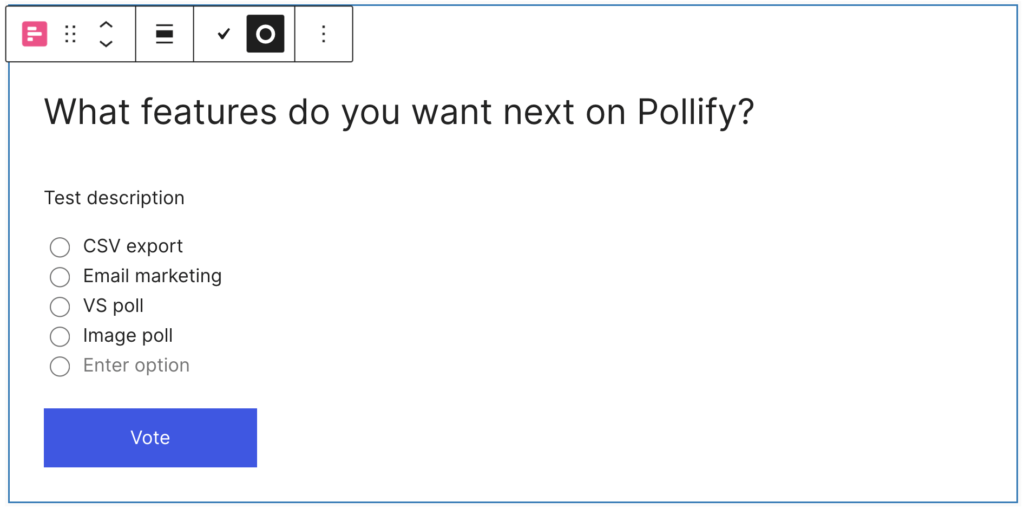
Neither approach is wrong. A form builder gives you many question types and integrations. A poll block gives you speed and less to configure.
What You Pay for Polls
| Pollify | WPForms | |
|---|---|---|
| Polls on the free version | Yes, unlimited | No poll results in WPForms Lite |
| Cheapest plan with polls | Free | Pro, listed at $199.50/yr |
| Paid plan | Pro from $79/yr (single site), or $199 lifetime | Pro and above |
Prices are the regular prices on WPForms’ Surveys and Polls page and Pollify’s pricing page in October 2026. Both run discounts, so check before you buy.
Building a Poll: Side by Side
In WPForms
- Open the WPForms form builder and create a new form.
- Add a multiple-choice field for your question.
- Turn on poll results in the form settings.
- Save the form, then add it to a page with the WPForms block or shortcode.
In Pollify
- In the post or page editor, click + and add the Poll block.
- Type your question and answer options.
- Pick what voters see after voting in General settings: the results or a thank-you message.
- Click Update.
Our step-by-step poll tutorial covers the Pollify side in more detail.
Feature Comparison
| Feature | Pollify Free | Pollify Pro | WPForms Pro |
|---|---|---|---|
| Single and multiple choice polls | Yes | Yes | Yes |
| Show results after voting | Yes | Yes | Yes |
| Anonymous voting (no IP stored) | Yes | Yes | Not a dedicated setting |
| NPS surveys | No | Yes | Yes (survey fields) |
| Multi-question surveys, Likert scales | No | No | Yes |
| Export results | No | CSV, Excel, PDF, Word | Yes |
| CRM and email integrations | No | No | Yes |
Where WPForms Wins
- Real surveys. Multi-page surveys, Likert scales and conditional logic are what a form builder is for.
- Integrations. Sending answers to your CRM or email list is built into the WPForms ecosystem.
- One plugin for everything. If your contact, payment and registration forms already run on WPForms Pro, polls cost you nothing extra.
Where Pollify Wins
- Cost. Free polls, with no license needed.
- Speed. The poll is built where it appears, so there is no separate builder to switch to.
- Anonymous voting. One tick stops IP collection, with browser-based duplicate protection instead. See our anonymous poll guide.
- Vote controls. One vote per IP, one vote per logged-in user and a closing date are all free. See preventing duplicate votes and scheduling a poll to close.
Three Real Scenarios
A blog that wants reader polls
A food blogger wants a quick “Which recipe next?” poll in a few posts each month. WPForms Pro would mean paying for a form builder to ask one question. A free poll block does the job in a minute per post.
A store that already runs WPForms Pro
A WooCommerce shop uses WPForms Pro for its contact, wholesale and returns forms. Adding a product preference poll with the Surveys and Polls addon costs nothing extra and keeps everything in one dashboard. That is a good reason to stay with WPForms.
A membership site running a sensitive vote
A community wants honest feedback on pricing without members worrying about being identified. A poll with anonymous voting switched on, where no IP addresses are stored, fits better than a form that records each submission.
Which Should You Choose?
Choose WPForms if you already have a Pro license, or if what you need is really a survey with many question types and integrations.
Choose Pollify if you want quick polls on posts and pages, need anonymous voting, or do not want to pay for a form builder just to ask one question.
Frequently Asked Questions
Can WPForms Lite run polls?
You can add a multiple-choice field to a free WPForms form, but showing poll results to voters needs the Surveys and Polls addon, which comes with WPForms Pro and above.
Can I use Pollify and WPForms on the same site?
Yes. They do different jobs, so many sites use WPForms for forms and a poll block for quick polls.
Which is better for a quick blog poll?
A poll block. It takes a minute to add, and readers vote without leaving the article.
Next Steps
For more options, our roundup of the best WordPress poll plugins compares other tools too, and Pollify vs Crowdsignal covers the hosted alternative.