



We built something we needed ourselves and could not find anywhere. Today it is yours.
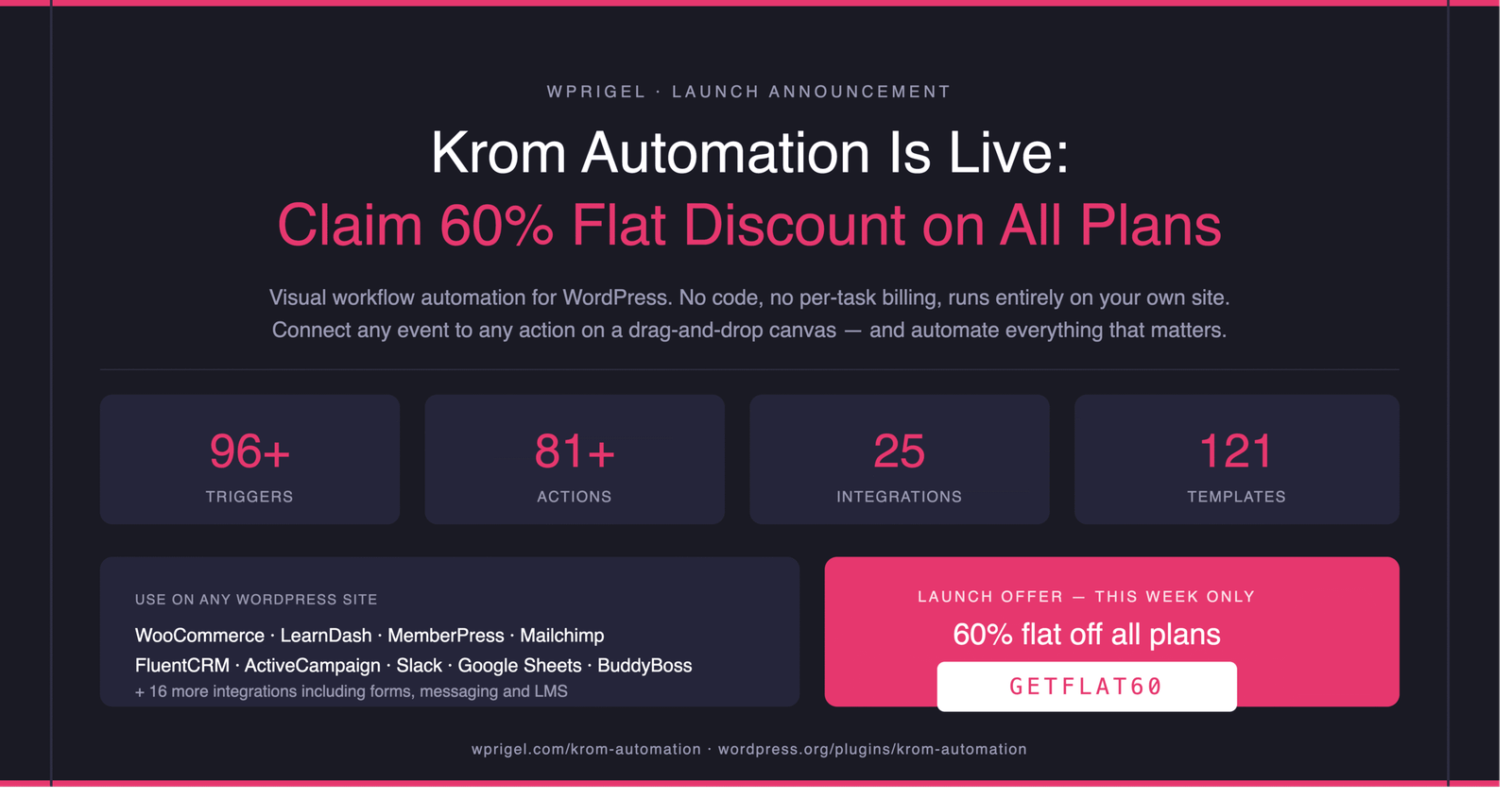
Krom Automation is officially live on WordPress.org. It is a visual workflow automation plugin for WordPress- the kind that connects any site event to any action on a drag-and-drop canvas, no code, no external dashboard, no per-task billing.
To celebrate the launch, we are offering flat 60% off all plans, both yearly and lifetime, for this week only.
Use code GETFLAT60 at checkout.
Get Krom Automation Pro- 60% Off
This offer runs for a few days. If you have been looking for a Zapier alternative that actually lives inside WordPress, keep reading.
The problem every WordPress site owner eventually hits
Your WordPress site is not passive. It generates events constantly.
Users register. Orders complete. Payments fail. Courses finish. Forms get submitted. Posts get published. Comments land in the queue waiting for someone to approve them.
Most sites respond to almost none of this automatically.
- A new member signs up and gets a bare WordPress default email. Then nothing for days, sometimes weeks.
- An order completes and the customer hears silence until the product ships.
- A payment fails and the member quietly loses access without a single follow-up.
- A course finishes and nobody sends the certificate or nudges the student toward the next one.
This is not a technical problem. The events are happening. The data is right there in WordPress. What is missing is the wiring between the event and the response.
For a while, most people solve this with Zapier or Make.com. Until the bill arrives. Or until a workflow breaks silently at 2am and nobody knows for three days. Or until the task count spikes one busy month and the overages add up.
Krom Automation is the native solution to that problem. Everything runs on your own WordPress install. Your data never leaves your server.
There is no per-task cap. And when something runs, you get a full step-by-step log of exactly what happened.
What Krom Automation actually does
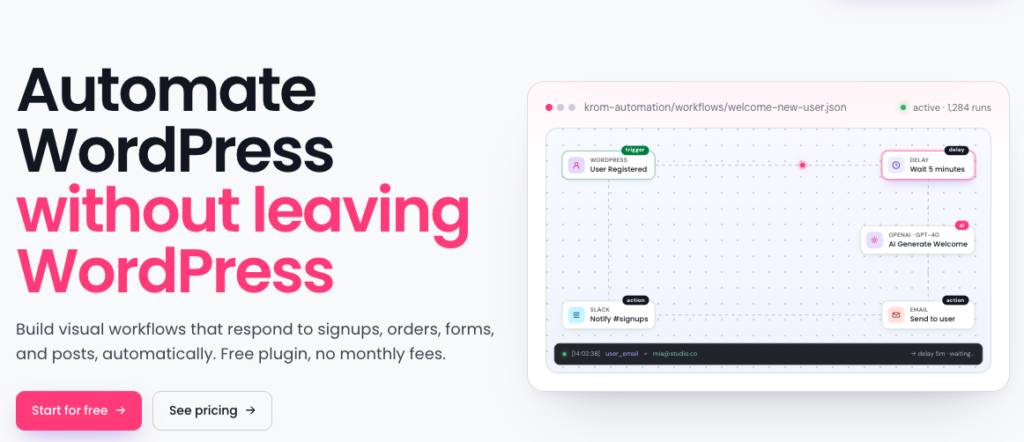
At its core, Krom Automation works on a simple principle: pick something that happens on your site, then decide what should happen next.
You build it on a drag-and-drop canvas inside WordPress. Pick a trigger — the thing that fires. Add actions — what happens next. Connect them. Set it live. That is the whole model.
Triggers are the events. A user registering. A WooCommerce order completing. A LearnDash course finishing. A form being submitted. A payment failing. A product going out of stock.
Actions are the responses. Send an email. Update a CRM contact. Post a Slack message. Log a row to Google Sheets. Create a coupon. Tag someone in Mailchimp. Enrol them in the next course. All in the same workflow, one after another, with delays and conditions in between.
Merge tags inject live data into any field. {{first_name}} becomes the actual person. {{order.total}} becomes the real number. Every email, every message, every action is specific to that event, not a generic blast.
Conditions let you branch. Order over $500? Alert the team and send a VIP welcome. Under $500? Just send the confirmation. One workflow, different paths.
Delays let you time it right. Welcome email ten minutes after registration, not one second. Review request seven days after delivery, not at the moment of shipping.
And before any of it touches real people, the workflow simulator runs the whole thing against real site data with zero actual emails sent, zero CRM records updated, zero side effects of any kind. You see exactly what would have happened at every step.
Krom Automation Pro in numbers
The free version alone is more capable than most people expect.
| Free | Pro | |
|---|---|---|
| Triggers | 16 | 96+ |
| Actions | 21 | 81+ |
| Integrations | WooCommerce built in | 25 integrations |
| Templates | 20 | 121 |
| AI actions | Included | Included |
| Schedule trigger | — | Hourly, daily, weekly, custom |
| Incoming webhooks | — | Yes, HMAC-secured |
| Visual email builder | — | Yes |
AI is part of the workflow, not a separate tab
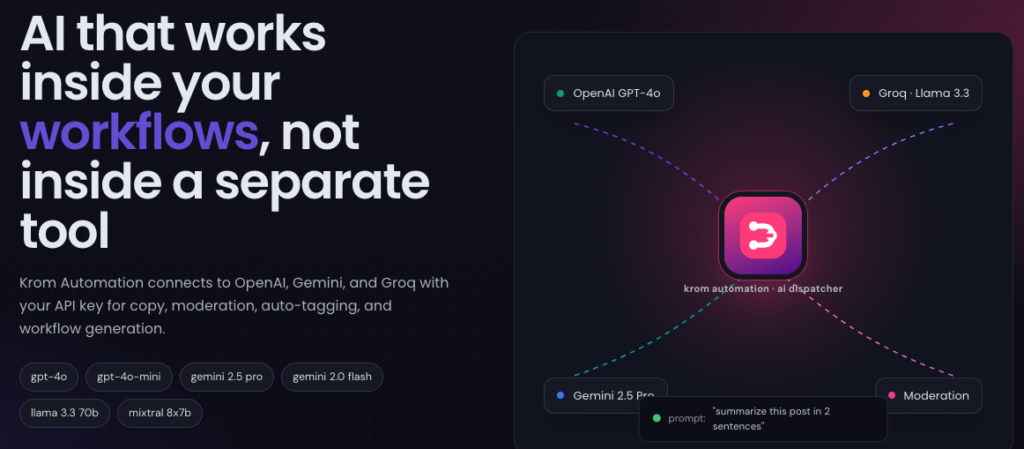
Three AI actions are built into Krom Automation, and they are available in the free version.
AI Generate Text: Write a prompt, get text back. Use it to generate personalised email copy, post excerpts, social captions, or anything else you would normally write by hand for every occurrence.
AI Content Moderation: Run any comment or form submission through an AI filter before it goes anywhere. Flag it, hold it, move it to spam — with thresholds you control.
AI Auto-Tag: Analyse a post and apply the right tags and categories automatically. Works on publish or as part of a batch processing workflow.
You connect your own OpenAI, Gemini, or Groq API key. No token markups, no per-call charges, no credits to buy. The AI costs what your provider charges, and not a cent more.
And in Pro, there is one more AI capability worth knowing about. AI Workflow Generation lets you describe what you want to automate in plain English and it builds the workflow for you. Type “when a WooCommerce order completes, send a thank-you email and add the customer to my Mailchimp audience.” It maps the triggers, sets the actions, and opens the result paused for your review before anything runs.
25 integrations for Krom Automation Pro: Everything your stack already uses
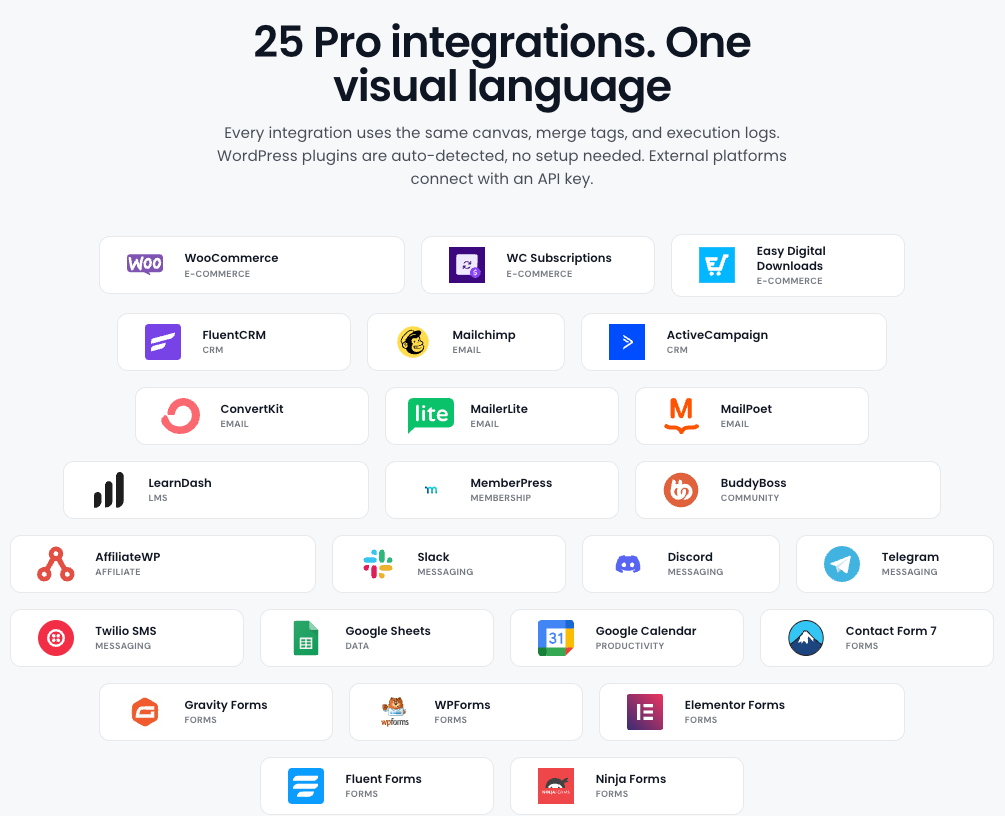
Pro connects to 25 integrations across every major WordPress plugin category. Every one uses the same canvas, the same merge tags, the same execution logs.
- eCommerce: WooCommerce, WooCommerce Subscriptions, Easy Digital Downloads
- CRM: FluentCRM, ActiveCampaign
- Email marketing: Mailchimp, ConvertKit, MailerLite, MailPoet
- LMS: LearnDash, TutorLMS
- Membership & community: MemberPress, BuddyBoss
- Forms: Gravity Forms, WPForms, Fluent Forms, Contact Form 7, Elementor Forms, Ninja Forms
- Messaging: Slack, Discord, Telegram, Twilio SMS
- Data & productivity: Google Sheets, Google Calendar
- Affiliate: AffiliateWP
WordPress plugins are detected automatically. No setup needed beyond activating them. External platforms connect with an API key.
Krom Automation Pro: Who it is for
WooCommerce store owners
Your orders, subscriptions and customers generate events all day. Most go unanswered.
Set up a review request that goes out seven days after delivery, not the moment the order ships. Build a payment failure recovery sequence that sends three timed emails before a subscription lapses. Create a coupon automatically when a customer hits their fifth order. Alert your team on Slack for high-value orders without checking the dashboard.
Course creators and LMS operators
Students who complete one course are your best candidates for the next. Most sites wait for them to come back on their own.
Automate the full journey: enrolment welcome email, lesson reminders, quiz result branching, certificate delivery, and automatic enrolment in the next course. LearnDash and TutorLMS both connect natively.
Membership site owners
New member joins, gets a default WordPress email, and then nothing. That gap is where communities lose people.
Build a welcome sequence that starts the moment someone activates. Set up dunning emails when a payment fails. Send a win-back campaign when a subscription is cancelled. Tag members in your CRM by plan level. None of this should require your attention once it is built.
MemberPress integration · BuddyBoss integration
Agencies and developers
Export any workflow as JSON and import it on any client site running Krom Automation. The same welcome sequence, the same order automation, the same CRM sync — deployed in minutes rather than built from scratch every time.
Connect to external services via the incoming webhook receiver: a unique HMAC-secured URL per workflow, compatible with Stripe, GitHub, Shopify and anything else that sends webhooks. Or use the HTTP Request action to call any external API directly from a workflow step.
Krom Automation Pro Pricing
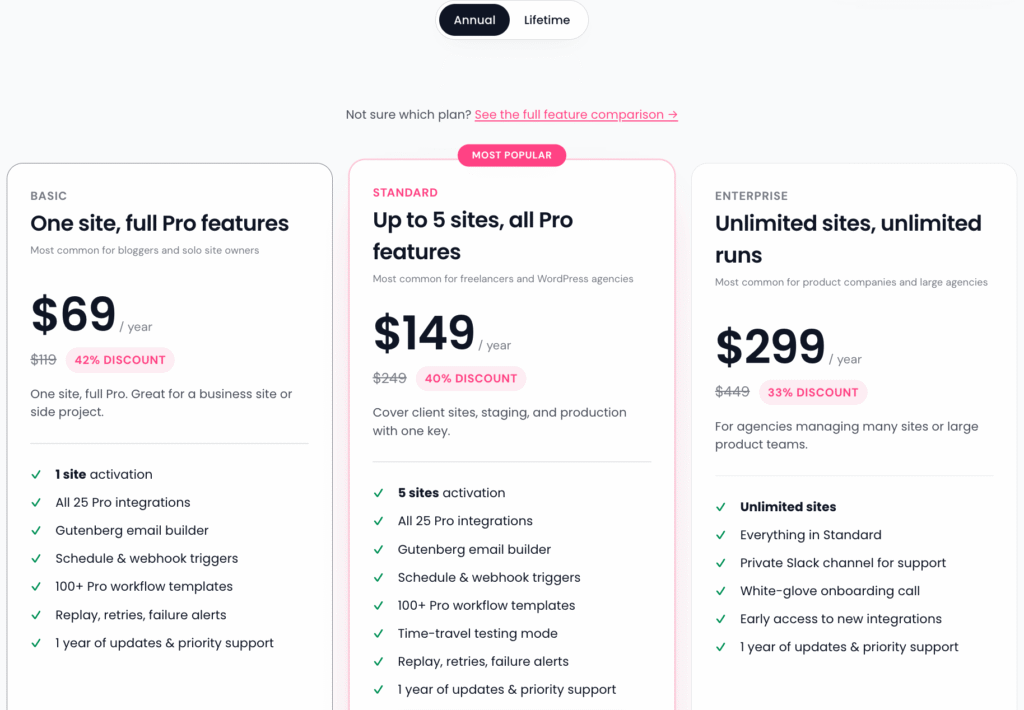
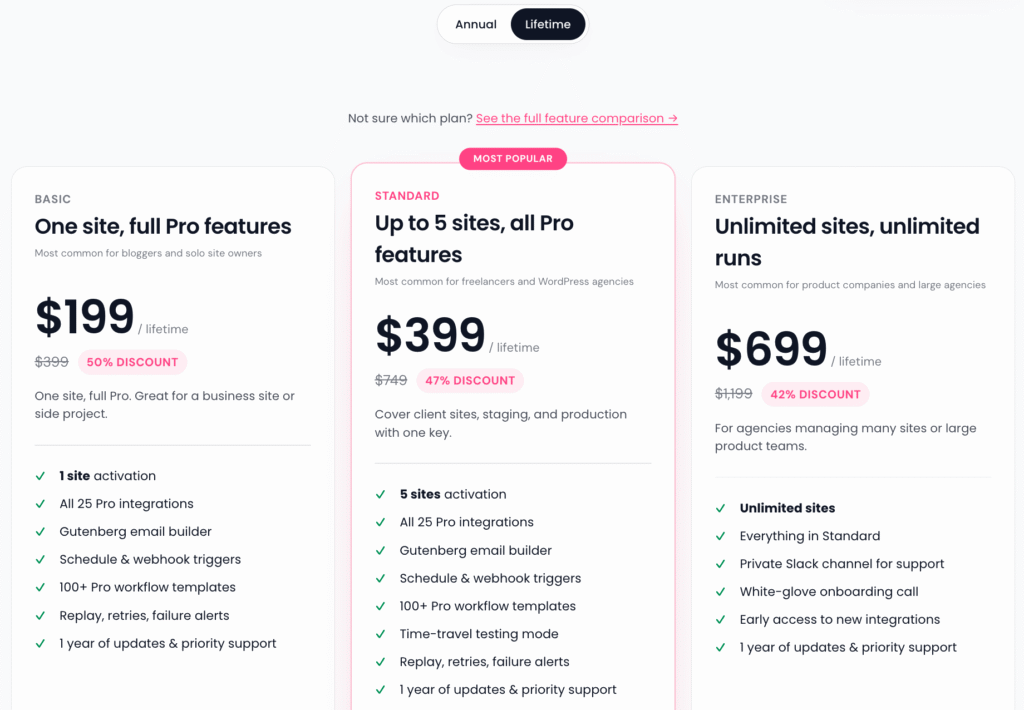
This is the section most tools hide in small print. We prefer to put it front and centre.
| Uncanny Automator | WP Fusion | Zapier Professional | Krom Automation | With GETFLAT60 | |
|---|---|---|---|---|---|
| Entry plan, 1 site | $199/year | $297/year | $240/year | $119/year | $48/year |
| Per-task billing | No | No | Yes | No | No |
| Self-hosted | Yes | Yes | No, SaaS | Yes | Yes |
| Lifetime plan | No | Yes | No | Yes | $119 once |
| BuddyBoss integration | Yes | CRM sync only | No | Yes, 14 triggers | Yes |
| Visual canvas builder | Limited | No | No | Yes | Yes |
| Execution logs | Basic | Basic | Basic | Step-level | Step-level |
On Uncanny Automator: A solid plugin and the most common comparison. Their entry plan is $199/year for one site, integrations sometimes sold separately as add-ons. At full price Krom is 40% less. At launch price it is less than a quarter of what Uncanny charges at entry.
On WP Fusion: Excellent at CRM sync, but that is specifically what it does. It is not a general automation engine and is often purchased alongside an automation plugin, adding to your total stack cost.
On Zapier: The most recognisable name in automation, and not a bad tool. But it is external SaaS with per-task billing. The Professional plan gives you 750 tasks per month. A five-step workflow burns four tasks per run — 200 form submissions a month blows past the base tier on a single workflow. And your workflow data, credentials and execution history all live on Zapier’s servers, not yours.
Krom Automation at $48 this week is less than two months of Zapier’s entry plan. With a lifetime option at $119 — or $48 with GETFLAT60 — you pay once and you are done.
The launch discount on Krom Automation
This week only, 60% off all plans, yearly and lifetime.
Use code GETFLAT60 at checkout. No complicated tiers. No “up to” fine print. Flat 60% off whatever you choose.
The honest version of how we got here
We wanted to ship this six months ago.
The original name was Automatify. That was taken. We rebuilt the brand around Flowmator, got it ready, wrote 51 documentation pages, built the site, locked the colours.
Three weeks before launch the WordPress.org review team flagged it as too close to an existing plugin.
So we started again. Third name: Krom Automation. Approved.
Along the way we hit the payment problem. We operate from Bangladesh, where PayPal is not available and most payment processors are not ready to support a new software business.
We delayed the launch of our first plugin by five months trying to find an alternative to Freemius before eventually shipping on it anyway. A customer told us plainly that Freemius was the reason he would not buy. He was not wrong.
So we built our own licensing system in collaboration with Paddle. Krom Automation runs on it from day one. No Freemius. No third-party checkout. No external account required to purchase.
We are later than planned. Every piece of it works better for the delay.
Get started Today
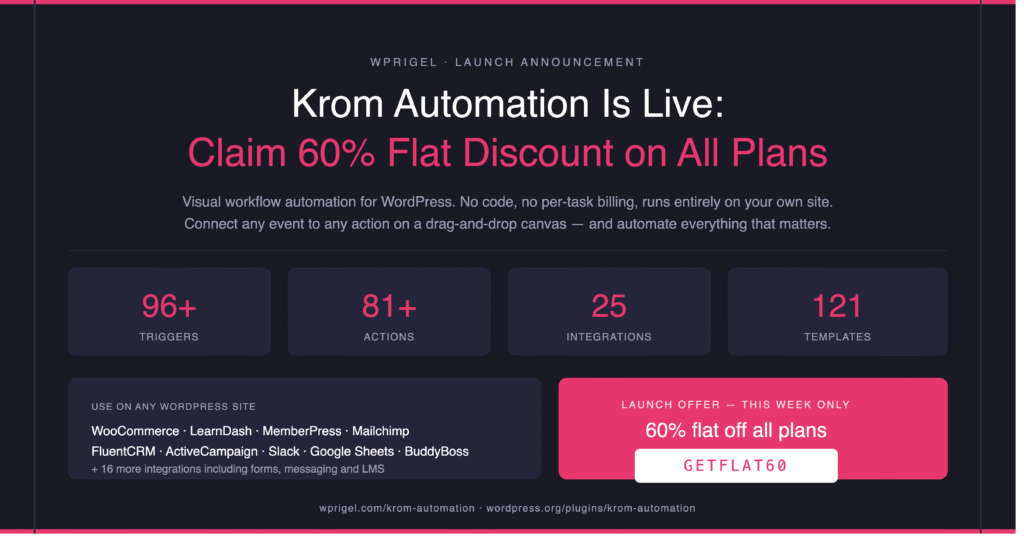
Three ways in, depending on where you are:
1. Start free. Install the free version from WordPress.org. 16 triggers, 21 actions, AI actions, WooCommerce, full execution logs. Build your first workflow today.
Free Download on WordPress.org
2. Get Pro at 60% off. Unlock all 25 integrations, 121 templates, AI workflow generation, the visual email builder, and the incoming webhook receiver. Code GETFLAT60 at checkout. This week only.
3. Read the docs first. If you want to understand the full capability before committing, the documentation covers every trigger, action, integration and feature in detail.
Frequently asked questions on Krom Automation Pro Launch
Does Krom Automation work without WooCommerce?
Yes. WooCommerce is optional and auto-detected when active. The core plugin works for any WordPress site regardless of whether you run an online store.
Do I need an AI API key?
Only for AI actions. The core plugin, all triggers, all standard actions, and all integrations work without one. You only need a key from OpenAI, Gemini or Groq if you want to use AI Generate Text, AI Content Moderation or AI Auto-Tag.
Is there a free version?
Yes, and it is genuinely capable. 16 triggers, 21 actions, full WooCommerce support, AI actions, merge tags, conditions, delays, execution logs and 20 workflow templates. Available on WordPress.org with no account required.
How is this different from Uncanny Automator?
Uncanny Automator is a list-based rule editor. Krom Automation is a visual drag-and-drop canvas. The pricing is different (Krom starts at $119 vs $199 for Uncanny’s entry tier). And Krom includes a lifetime plan, AI workflow generation, an incoming webhook receiver and step-level execution logs — none of which Uncanny offers at entry level.
What happens after the launch discount ends?
Full pricing applies and all plans remain available. The 60% off with code GETFLAT60 is a launch-week offer. Yearly and lifetime plans are both available permanently at regular price after this week.
Can I import and export workflows?
Yes. Any workflow can be exported as a JSON file and imported on any site running Krom Automation. This is how agencies deploy the same automation stack across multiple client sites.
Krom Automation is made by wpRigel. We also make Pollify (Gutenberg-native polls and surveys) and Commandify (a command palette for the WordPress admin). All three run natively inside WordPress with no external accounts required.